
VideoAny
VideoAny is your team's all-in-one AI studio for generating uncensored videos, images, and audio from text or photos.
Visit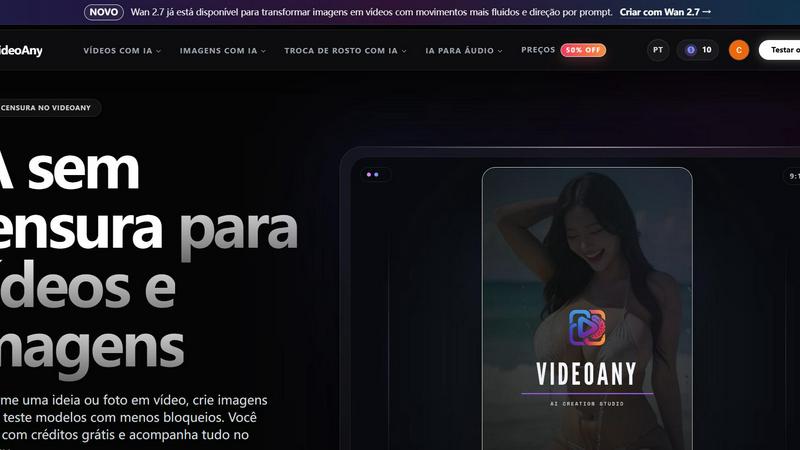
About VideoAny
VideoAny is a comprehensive AI creative platform, available in Brazilian Portuguese, designed to empower creators, marketers, and storytellers by providing a unified studio for generating videos, images, and audio from text prompts or visual references. The platform stands out for its uncensored approach to AI generation, allowing users to explore a wider range of creative ideas, including NSFW content, with fewer restrictions. At its core, VideoAny brings together multiple powerful AI models, such as the new Seedance 2.0 for animating photos with enhanced camera movement and character consistency, and Wan 2.7 for transforming images into fluid, prompt-driven videos. Users can leverage tools like text-to-video, image-to-video, video-to-video, face swap, lip sync, and creative effects within the video workspace. The image workspace supports prompt-based generation and editing, while audio tools complement the workflow by enabling voice, music, and sound effect creation. A key feature is the ability to compare available AI models, select formats and generation settings, and manage all results from a single online studio. With free starting credits and a clear credit cost system per model, VideoAny is designed for teams and individuals who value collaboration, synergy, and creative freedom. The platform’s global English version is also available, expanding its reach to an international audience seeking an integrated, unrestricted AI creation experience.
Features of VideoAny
Uncensored AI Video and Image Generation
VideoAny offers an uncensored AI environment for generating videos and images, allowing users to explore a broader spectrum of creative concepts, including NSFW content. This feature provides fewer restrictions and more flexibility, enabling creators to transform ideas or photos into videos and generate images without the typical content blocks found in other platforms. Each model has its own resources, credit costs, and conditions, which are transparently displayed before generation. This collaborative approach ensures that teams can experiment freely, test different models, and achieve the desired outcome without unnecessary limitations, fostering a synergy between creative vision and technical capability.
Multi-Model Studio with Comparison Tools
The platform integrates a wide array of leading AI models, including VideoAny V4, Seedance 2.0, Wan 2.7, Runway, Pika, Luma, Kling, Vidu, HeyGen, Synthesia, Kaiber, and Descript. Users can choose how to start a project, whether by describing a scene from scratch or uploading a photo to control character, framing, and style. A unique comparison feature allows creators to test the same idea with different models, evaluating movement fidelity, adherence to prompts, generation time, and credit consumption. This collaborative workflow helps teams select the best model for each project, ensuring optimal results and efficient resource use.
Integrated Audio and Voice Creation
VideoAny extends its creative capabilities beyond visuals by offering integrated audio tools for generating voice, music, and sound effects directly within the same production flow. Users can create the missing soundtrack, generate a voiceover, or add sound effects without leaving the platform. This seamless integration promotes a team-oriented workflow where video, image, and audio creation happen in synergy, reducing the need for external tools and streamlining the entire production process from initial test to final file.
Comprehensive History and Asset Management
All generated images, videos, and audio files are automatically associated with the user’s account and stored in a detailed history section. From this central hub, creators can open previous versions, review results, and download completed files once processing is finished. This feature supports collaborative projects by allowing team members to access shared assets, track iterations, and maintain organized workflows. The clear credit cost display before each generation also helps teams budget resources effectively, fostering a cooperative environment focused on efficient production.
Use Cases of VideoAny
Marketing and Social Media Content Creation
Marketing teams can use VideoAny to rapidly produce engaging video and image content for social media campaigns. By leveraging text-to-video and image-to-video tools, they can create promotional clips, product demonstrations, and animated ads without needing expensive production equipment. The uncensored capability allows for edgy, attention-grabbing content that stands out in crowded feeds. Teams can collaborate by testing different AI models, comparing results, and selecting the best format (e.g., 9:16 for vertical video) to maximize engagement. The integrated audio tools further enhance content by adding background music or voiceovers, creating a complete, professional package in one studio.
Adult and NSFW Content Production
Content creators specializing in adult or NSFW material can utilize VideoAny’s uncensored AI generation to produce videos and images from text or visual references. The platform’s flexibility allows creators to start with an image for precise control over character appearance, clothing, pose, and setting, or use text to explore entirely new scenes. Teams can collaborate by sharing prompts and reference images, testing different models for movement naturalness and fidelity, and managing all assets in the shared history. This use case empowers creators to explore a wider range of artistic expression while maintaining control over the final output.
Indie Filmmaking and Animation Prototyping
Independent filmmakers and animators can use VideoAny to quickly prototype scenes, animate storyboards, and visualize concepts before committing to full production. The video-to-video and image-to-video features, combined with models like Seedance 2.0 and Wan 2.7, allow for fluid camera movements and character consistency. Teams can collaborate by generating multiple variations of a scene, comparing how different models interpret motion, camera angles, and style. The ability to add audio, including voiceovers and sound effects, helps create rough cuts that convey the intended mood and pacing, streamlining the pre-production process.
Educational and Training Video Development
Educators and corporate trainers can leverage VideoAny to create engaging instructional videos and training materials. By using text-to-video and lip sync tools, they can generate animated explainers, virtual instructors, and scenario-based simulations. The platform’s multi-model approach allows teams to choose the most appropriate AI for different content types, such as realistic human avatars for soft skills training or animated visuals for technical concepts. The integrated audio features enable the addition of clear voiceovers and background music, while the history system facilitates version control and collaborative review, ensuring consistent, high-quality educational content.
Frequently Asked Questions
What is an uncensored AI, and how does VideoAny implement it?
An uncensored AI is a system that accepts a wider variety of ideas and applies fewer restrictions to content creation. In VideoAny, this concept is implemented across its video, image, and audio tools, allowing users to generate NSFW content and explore creative concepts with fewer blocks. The platform provides clear information about each model’s resources, credit costs, and conditions before generation. This transparent, collaborative approach ensures that teams can work together freely while understanding the capabilities and limitations of each tool, fostering a creative environment built on trust and synergy.
Can I test VideoAny’s uncensored AI for free?
Yes, VideoAny offers free starting credits for new accounts, allowing users to make their first attempts without financial commitment. Before generating, the platform displays the credit cost for the selected model, which can vary based on duration and settings. This system encourages collaborative experimentation, as teams can test different ideas and models together, compare results, and decide which approach works best for their project. The free credits provide a risk-free opportunity to explore the platform’s capabilities and understand how the credit system works.
How do I choose the best AI model for my project on VideoAny?
To choose the best model, VideoAny recommends running short tests with the same image and a similar prompt across different models. Evaluate each model based on fidelity to the reference, naturalness of movement, adherence to the prompt, generation time, and credit consumption. This collaborative testing process allows teams to compare results side-by-side and select the model that best meets their specific needs, whether it is for realistic video, fluid animation, or creative effects. The platform’s integrated comparison tools make this process efficient and data-driven.
Where are my generated images, videos, and audio files stored?
All creations associated with your account are automatically stored in the platform’s history section. From there, you can open previous versions, review results, and download completed files after processing finishes. This centralized storage supports collaborative workflows by allowing team members to access shared assets, track project iterations, and maintain organized records of all generated content. The history feature ensures that no work is lost and that teams can easily revisit and reuse past creations for future projects.
Similar to VideoAny
Typing Animation
Create typing animations with custom fonts, timing and sound. Export MP4, transparent WebM, HTML or PNG.
airapvideo
AI rap video generator that turns two portraits into a short vertical, lip-synced music video for TikTok, Reels, Shorts, celebrations, or fun.

GenX
All-in-one AI workspace to generate images, videos, and audio with multiple leading AI models.

YIX
AI image and video generation, photo editing, restoration and free prompt tools in one browser studio.

Nano AI
Create and edit AI images, generate videos, and compare models in one creative workbench.

Tip Toe AI
Upload a Dancer photo and a Partner photo and get your own AI Tip Toe barn-dance video. Free 5s preview, 12s HD from $4.90. No subscription.
BeatMotion
Turn a text prompt, your lyrics, or a photo into an original song with vocals plus a cinematic AI music video, ready to share in minutes.