
RoomCreator
RoomCreator lets you effortlessly transform photos into stunning AI-designed spaces, making home design accessible to everyone.
Visit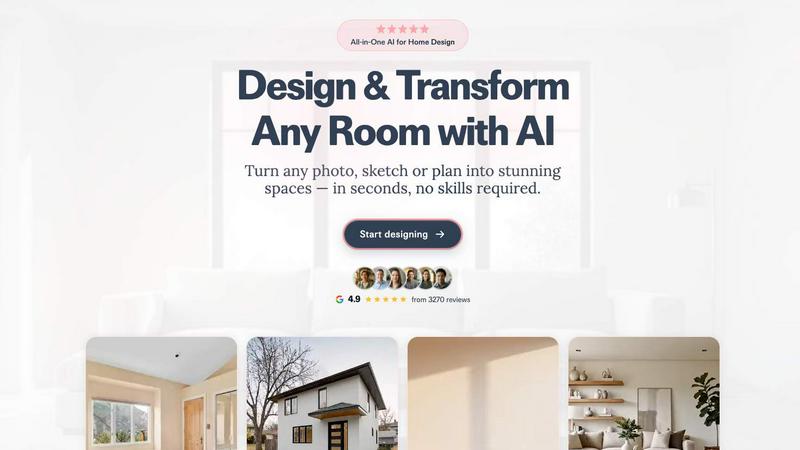
About RoomCreator
RoomCreator is an innovative AI-driven room design tool that is transforming the way homeowners and DIY enthusiasts visualize their spaces. Designed for ease of use, RoomCreator allows users to upload a photo of any room, such as a kitchen, bedroom, or living area, and receive realistic redesigns in just 10 seconds, eliminating the need for design skills. This powerful tool enables users to explore smart layout changes, experiment with new colors, and rearrange furniture instantly. Perfect for quick renovations, small spaces, or testing design ideas before making purchases, RoomCreator empowers individuals to make confident decisions about their home aesthetics. Whether you are a homeowner looking to refresh your living space, a real estate agent aiming to showcase properties more effectively, or an investor assessing renovation potential, RoomCreator offers a fast and free way to bring your design ideas to life.
Features of RoomCreator
Instant Room Redesign
With RoomCreator, you can upload a photo of your space and receive a professionally designed redesign in various styles within seconds. This feature provides realistic layouts, furniture placements, and color options tailored to your specific room, helping you make informed design choices.
Smart Layout Optimization
RoomCreator employs advanced AI algorithms to suggest smart layouts that enhance the flow and function of your space. By analyzing the dimensions and existing elements, it offers recommendations that maximize usability and aesthetics, making every inch count.
Realistic 3D Previews
Experience your redesigned space through hyper-realistic 3D previews that feature natural lighting and textures. This immersive visualization allows you to see how different design elements interact, ensuring you feel confident in your choices before implementation.
Customizable Design Styles
Choose from a diverse range of design styles, including modern, Scandinavian, and Bohemian, or create a custom look that reflects your personal taste. This flexibility makes it easy to tailor the design process to match your vision, ensuring your space truly feels like home.
Use Cases of RoomCreator
Homeowners
For homeowners, RoomCreator is an invaluable tool for visualizing potential renovations or redecorations. By experimenting with different styles, colors, and layouts, individuals can confidently decide how to enhance their living spaces without any guesswork.
Real Estate Agents
Real estate agents can leverage RoomCreator to create stunning visuals that highlight property listings. By transforming empty or outdated spaces into beautifully staged interiors, agents can attract more buyers and increase the appeal of their listings.
Individual Investors
Investors can use RoomCreator to assess the renovation potential of properties quickly. By generating realistic visuals for flips or rental properties, they can showcase future value without incurring the costs associated with traditional staging or rendering methods.
Designers and Architects
For designers and architects, RoomCreator serves as a collaborative tool to visualize concepts and share ideas with clients. The ability to present realistic renderings based on client preferences fosters better communication and helps clients make quicker decisions.
Frequently Asked Questions
How does RoomCreator work?
RoomCreator utilizes advanced AI technology to analyze your uploaded photos and generate realistic redesigns in seconds. By selecting styles and making adjustments, you can visualize your desired changes effortlessly.
Is there a cost to use RoomCreator?
RoomCreator offers a free trial with 10 credits, allowing users to explore its features without any upfront costs. Additional credits may be available for purchase, depending on your design needs.
Can I edit specific areas of my photo?
Yes, RoomCreator features an inpaint tool that allows you to brush over specific areas of your image to make targeted changes. This means you can adjust furniture, decor, or elements without regenerating the entire room.
What types of rooms can I redesign?
You can redesign a wide variety of spaces with RoomCreator, including living rooms, bedrooms, kitchens, bathrooms, and even outdoor areas. The platform is versatile and caters to numerous design needs and preferences.
Similar to RoomCreator

Suparelay
Call landlines and mobiles in 200+ countries from your browser. The person you call needs no app. Prepaid, from about 2 cents a minute.

Novastart
Apps and files on an infinite canvas where people and AI agents work together.

SightRadar
Face recognition API that is a drop-in replacement for AWS Rekognition. Index, search, compare and detect faces, billed per photo, no subscription.


gamespadtesterpro.com
Gamepad Tester Pro makes it easy to check whether your controller is working properly directly from your browser. Test compatible PS

tallycounterweb.com
Online tally counter for tracking attendance, workouts, inventory, sports scores, visitors, habits, and everyday counting tasks.

JsonTranslate
JsonTranslate translates JSON, Markdown, and TXT files while preserving keys and project structure for multilingual i18n workflows.