
JustPDF
JustPDF is a privacy-first, browser-based toolkit offering 17 free PDF tools for effortless editing, merging, and converting files securely.
Visit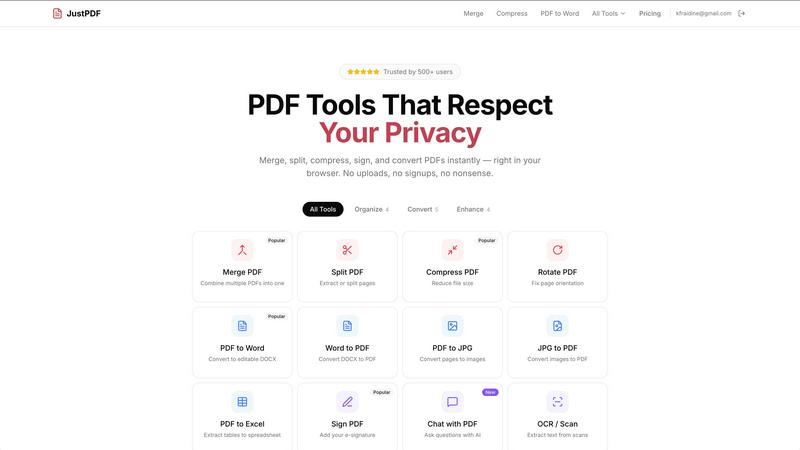
About JustPDF
JustPDF is a powerful online PDF tool that offers 17 professional-grade features designed to simplify your document management tasks, all while ensuring your privacy. Unlike other online tools like Smallpdf and iLovePDF, JustPDF operates entirely within your browser, utilizing JavaScript and WebAssembly to process files locally on your device. This means your documents never leave your browser, providing an unparalleled level of security and peace of mind. Ideal for anyone from students to business professionals, JustPDF aims to streamline your workflow with tools for merging, splitting, compressing, and converting PDFs into various formats. With a free tier allowing three operations per day and a pro version starting at just $4 a month for unlimited access, JustPDF is both accessible and affordable. Additionally, its FERPA compliance makes it a suitable choice for educational institutions, fostering collaboration and learning without compromising on privacy.
Features of JustPDF
Merge PDF
The Merge PDF feature allows users to combine multiple PDF documents into a single file effortlessly. This is particularly useful for organizing reports, presentations, or any collection of documents that need to be shared together. Simply drag and drop your files, and JustPDF will handle the rest, ensuring a seamless merging process without the need for any software installation.
Split PDF
With the Split PDF tool, users can extract specific pages or sections from a PDF file. This is ideal for situations where only certain information is needed from a larger document, helping to enhance focus and efficiency. Whether you need to send a single page to a colleague or create a concise report, this feature makes it quick and easy to isolate the content you require.
Compress PDF
The Compress PDF feature enables users to reduce the file size of their PDFs in seconds without sacrificing quality. This is particularly beneficial when sharing documents via email or uploading them to platforms with size limits. Just drag and drop your file, and enjoy fast, free compression that works offline, ensuring your documents remain accessible and manageable.
Chat with PDF (AI)
The innovative Chat with PDF feature allows users to interact with their documents through AI technology. You can ask questions about the content of your PDFs, making it easier to retrieve information or clarify details without manually searching through pages. This feature enhances productivity and makes it simpler to engage with complex documents, promoting a collaborative approach to information sharing.
Use Cases of JustPDF
Educational Use
Students and educators can benefit immensely from JustPDF's suite of tools. For instance, educators can merge various teaching materials into one comprehensive document, while students can split PDFs to focus on specific chapters or topics. The ability to convert PDFs to Word or Excel formats also aids in creating assignments and presentations.
Business Documentation
In a corporate environment, JustPDF is invaluable for managing reports, proposals, and contracts. Users can quickly compress large files for easier sharing, split lengthy PDFs to extract necessary sections, or merge multiple reports into a single file for presentations. The Sign PDF feature facilitates the signing of important documents, streamlining workflow.
Freelancing and Collaboration
Freelancers can use JustPDF to manage client documents effectively. Whether it's compressing a portfolio for easy submission or converting a client’s PDF into an editable Word document, JustPDF provides the tools to ensure efficient collaboration. The Chat with PDF feature allows freelancers to clarify project details without lengthy back-and-forth emails.
Personal Use
For personal projects, JustPDF offers a user-friendly interface to manage family photos in PDF format, convert images to PDFs for sharing, or even compress vacation itineraries for easy access on mobile devices. The ability to handle everything locally ensures privacy for sensitive personal documents.
Frequently Asked Questions
Is JustPDF free to use?
Yes, JustPDF offers a free tier that allows users to perform three operations per day without the need for an account. This makes it easy to try out the tools and determine if they meet your needs.
How does JustPDF ensure my files remain secure?
JustPDF processes all files locally in your browser without uploading them to any remote servers. This means that your documents never leave your device, providing a secure and private experience.
What types of files can I convert using JustPDF?
JustPDF supports a variety of file conversions, including PDF to Word, Word to PDF, PDF to JPG, JPG to PDF, PDF to Excel, and more. This flexibility allows users to work seamlessly across different document formats.
Can I access JustPDF offline?
Yes, JustPDF works completely in your browser and can function offline. This ensures that you can access and use your PDF tools even without an internet connection, enhancing convenience and efficiency.
Explore more in this category:
Similar to JustPDF

Suparelay
Call landlines and mobiles in 200+ countries from your browser. The person you call needs no app. Prepaid, from about 2 cents a minute.
Novastart
Apps and files on an infinite canvas where people and AI agents work together.
PromptMafia
Real AI prompts from founders, with the result
MyGenogramMaker
Draw genograms and family relationship diagrams in your browser with editable templates.
Toolvero
Free Online Tools Built With Privacy in Mind
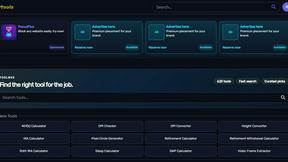
Kody Tools
Free collection of online developer utilities, code formatters, and digital converters designed to streamline your daily workflow.
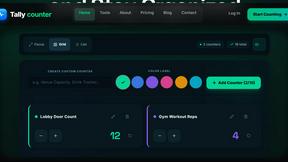
tallycounterweb.com
Online tally counter for tracking attendance, workouts, inventory, sports scores, visitors, habits, and everyday counting tasks.
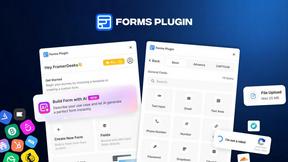
Forms Plugin
The #1 Native Form Builder Plugin for Framer - No Code, No Embeds, No External Platforms.