
Easymotion - AI Motion Graphic Generator
Easymotion lets your team turn static images, data, and map ideas into stunning motion graphics in under five minutes.
VisitPublished on:
June 15, 2026
Pricing:
About Easymotion - AI Motion Graphic Generator
Easymotion is an AI-powered motion graphics generator and map animation platform designed for content creators, video editors, business founders, marketers, and data storytellers who need to produce polished animated videos quickly and efficiently. The platform eliminates the need for complex timeline editing software like After Effects, allowing users to turn ideas, static visuals, and data files into professional motion graphics simply by chatting with AI. Whether you are creating SaaS product promos, animated flowcharts, dynamic data visualizations, UI explainers, interactive quizzes, or geographic storytelling visuals, Easymotion streamlines the entire production process. Users can start from a text prompt, upload images, spreadsheets, or PDFs, and instantly generate animation-ready scenes. After generation, the AI enables collaborative refinement through natural language commands to adjust colors, pacing, labels, layout, and visual style. The platform also includes a premium template library for proven motion graphics layouts that teams can customize for brand, campaign, or client content. With support for multiple export formats including MP4 and MOV with transparent backgrounds, and aspect ratios optimized for YouTube, TikTok, Instagram Reels, and social feeds, Easymotion empowers creators to produce high-quality video assets in under five minutes. It is built for teams who need a faster, more cooperative way to create reusable motion graphics and map animations directly in the browser, without requiring specialized design skills or expensive freelancers.
Features of Easymotion - AI Motion Graphic Generator
AI-Powered Motion Graphics Generation
Easymotion transforms your ideas into professional animations through simple chat commands. Describe what you want in plain English, such as "Design a social media promo video for my coffee shop," and the AI automatically generates keyframes, animation curves, and visual sequences. This feature eliminates the steep learning curve of traditional animation software, enabling teams to collaborate and iterate on motion graphics without technical barriers. You can start from scratch with a prompt or convert uploaded images, spreadsheets, and PDFs into fully animated scenes that are ready for refinement.
Map Animation Made Effortless
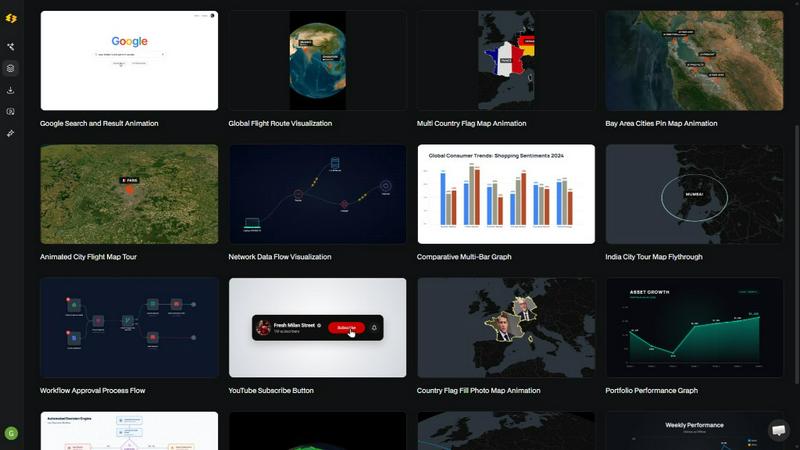
The platform specializes in creating stunning geographic animations, including flight routes, location pins, flag fill highlights, and global travel visualizations. Users can generate multi-stop travel route maps, globe fly-through sequences, and geographic storytelling videos in minutes. This feature is particularly valuable for travel content creators, logistics companies, and data storytellers who need to present location-based information dynamically. The AI handles all the complex mapping details, allowing teams to focus on the narrative and visual impact of their geographic animations.
Data to Animation Conversion
Easymotion allows users to upload CSV or XLSX files and instantly transform boring spreadsheets into beautiful animated data visualizations. Create animated bar charts, line graphs, and other data-driven graphics that stop the scroll on social media or enhance presentations. This feature enables data storytellers and marketing teams to present insights in a more engaging format, knowing that video posts with animated data visualizations generate up to five times more engagement than static images. The AI interprets your data and applies appropriate animation styles automatically.
Customizable Templates and Transparent Export
The platform provides a premium library of proven motion graphics templates for maps, charts, interface demos, and social media content. Teams can start from these layouts and customize every element including text, logos, colors, and assets to maintain brand consistency. Additionally, Easymotion supports transparent background export with alpha channel, allowing editors to drop videos directly into any editing software like Premiere Pro or Final Cut Pro. Export options include MP4 and MOV formats with aspect ratios for 16:9 landscape, 9:16 vertical, 1:1 square, and 4:5 feed-friendly formats.
Use Cases of Easymotion - AI Motion Graphic Generator
Social Media Content Creation for Creators and Marketers
YouTubers, TikTok creators, and social media marketers can rapidly produce engaging video content using Easymotion. Create animated travel reels, product promos, milestone celebration videos, and interactive UI explainers in under five minutes. The platform supports all major social media aspect ratios, so teams can repurpose a single animation across YouTube, Instagram, and TikTok without manual resizing. Creators report racking up more views with map animations and growing their channels faster by producing multiple videos per week instead of spending hours in After Effects.
Data Visualization for Business Presentations and Reports
Data analysts, consultants, and business leaders can turn static charts and spreadsheet data into compelling animated visualizations. Upload a CSV file of quarterly sales figures or market research data, and Easymotion generates an animated bar chart or line graph that clearly communicates trends and insights. This is ideal for internal presentations, client deliverables, and thought leadership content on LinkedIn. Teams can iterate on visual style collaboratively through chat commands, ensuring the final animation aligns with brand guidelines and messaging.
Geographic Storytelling for Travel and Logistics Content
Travel bloggers, tourism boards, and logistics companies can create professional map animations that showcase flight routes, delivery networks, or travel itineraries. Build a multi-stop travel route map animation step by step, add location pins with custom labels, and animate flag fill highlights to emphasize key regions. This use case is perfect for YouTube travel vlogs, corporate logistics presentations, and social media content that aims to visually engage audiences with geographic narratives. The AI handles complex map rendering so teams can focus on storytelling.
Marketing Campaign Videos for Startups and Agencies
Founders and marketing teams can ship video campaigns on the same day without waiting for designers or freelancers. Create SaaS product promos, animated flowcharts explaining workflows, and social media ads that maintain brand consistency. The template library provides starting points for common marketing formats, and the chat-based editing allows for quick adjustments based on stakeholder feedback. Startups are using Easymotion to grow their social presence without hiring expensive freelancers, while agencies can produce client deliverables faster and scale their video production capabilities.
Frequently Asked Questions
What is Easymotion and who is it for?
Easymotion is an AI-powered motion graphics generator that lets creators, editors, marketers, founders, and data storytellers create professional animated videos simply by chatting. It eliminates the need for complex software like After Effects and is designed for anyone who needs to produce polished motion graphics, map animations, data visualizations, and social media videos quickly. The platform is used by over 10,000 creators who value speed and collaboration in their video production workflow.
How does the AI motion graphics generation process work?
The process works in three simple steps. First, describe the animation you want in plain English or upload an image, spreadsheet, or PDF. Second, refine the result using chat commands to adjust colors, timing, map styles, labels, or visual assets. The AI handles all keyframes and animation curves automatically. Finally, export your completed video as MP4 or with a transparent background for use in any editing software. This collaborative workflow allows teams to iterate rapidly without technical barriers.
What types of videos can I create with Easymotion?
You can create a wide variety of motion graphics including map animations like flight routes and globe fly-throughs, data visualizations such as animated bar charts and line graphs, social media promos for platforms like TikTok and Instagram, UI explainers and workflow charts, product demos, and milestone celebration videos. The platform supports multiple aspect ratios including 16:9, 9:16, 1:1, and 4:5, making it versatile for any content distribution channel.
Can I customize the animations and export with transparent backgrounds?
Yes, you have full control over customization. You can edit text, logos, colors, pacing, labels, and layout through natural language chat commands. The platform also includes a premium template library for starting points. For export, Easymotion supports MP4 and MOV formats, including videos with transparent backgrounds (alpha channel) that can be dropped directly into editing software like Premiere Pro or Final Cut Pro for further compositing and refinement.
Similar to Easymotion - AI Motion Graphic Generator
Adobe Alternatives
Explore open-source creative software by workflow, platform and development stage, with comparisons and official project links.

BankBridge
Let your AI agent answer questions about your real bank data. Read-only access, $5/mo per connected bank, cancel any time.

LaunchIntel
Your AI agent picks relevant directories, submits your product in your browser and tracks every step. One-time purchase.

ToolVerified
Stop wasting time on broken AI demos. We test every app by hand, and honest community votes build our daily trending charts.
Typing Animation
Create typing animations with custom fonts, timing and sound. Export MP4, transparent WebM, HTML or PNG.

CloneWebsite
Clone any webpage pixel-perfect, export HTML/CSS/ZIP or React/Vue components.
ImageAgent
Create and edit AI images through conversation, using text or reference images and refining results in chat.

Easemic
Free open-source Android comic & manga cloud reader streaming encrypted libraries from S3, WebDAV & OPDS.