
ColorPaletteHub
Let us work together to explore ColorPaletteHub, the quiet encyclopedia and toolset where every color is studied and ready for your team.
Visit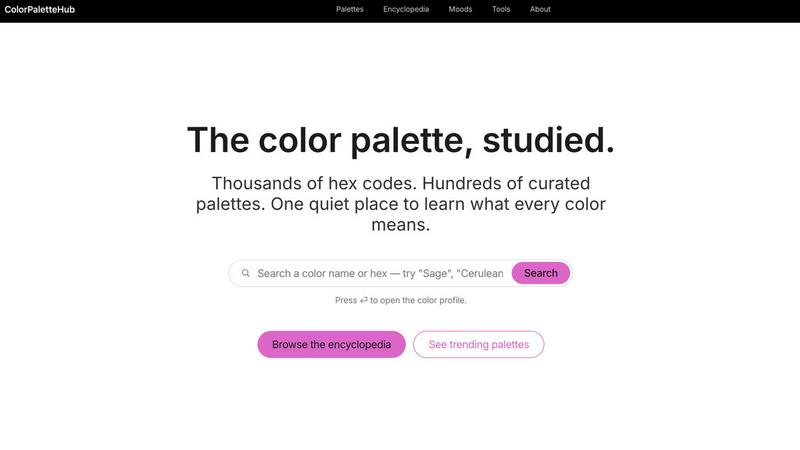
About ColorPaletteHub
ColorPaletteHub is a comprehensive color palette encyclopedia and design resource built for designers, developers, and brand builders who want to move beyond guesswork and into informed, intentional color selection. We have created a quiet, focused space where thousands of hex codes, hundreds of curated palettes, and deep color psychology research come together in one cohesive platform. Our mission is to turn what most tools treat as six characters of hex into a fully formed object of study, giving every color the profile and context it deserves. Whether you are searching for a specific named color like Cerulean Blue or Terracotta, exploring palettes organized by mood, or diving into our encyclopedia of 4,800+ named colors with full Hex, RGB, CMYK, and HSL values, ColorPaletteHub provides the depth and clarity your projects need. We also offer a suite of free tools including a color converter, contrast checker, color picker, image palette extractor, and gradient generator. Our platform is designed to help teams collaborate more effectively by using shared, research-backed color knowledge, ensuring that every palette you choose carries the right meaning, history, and emotional weight for your audience.
Features of ColorPaletteHub
Curated Color Encyclopedia
Our encyclopedia features over 4,800 named colors, each with a complete profile that includes Hex, RGB, CMYK, and HSL values, along with the psychological meaning and context behind the color. Every entry also shows which curated palettes the color belongs to, allowing you to see how a single hue functions within a larger system. This feature empowers designers and developers to make research-backed decisions rather than relying on instinct alone, fostering a team environment where everyone speaks the same color language.
Mood-Based Palette Discovery
We have organized our palette library around six distinct moods: Minimalist, Studio, Retro, Pastel, Earth Tones, and Monochrome. Each mood category contains carefully selected palettes that are designed to evoke specific emotional responses and suit particular project types. For example, Minimalist palettes are ideal for editorial and luxury brand work, while Studio palettes are built for art direction and motion graphics. This system helps teams quickly find the right starting point for any creative brief, saving time and ensuring alignment from the very beginning.
Comprehensive Gradient Library
Our gradient library offers six families of copy-ready CSS gradients, including Greens, Blues, Purples, Pinks, Black and Charcoal overlays, and Tone Mapping gradient maps. Each family contains multiple presets with specific color combinations, from sage and forest greens to navy and cobalt blues. The black and charcoal section is perfect for hero overlays, image scrims, and dark mode cards, while the tone mapping presets include teal and orange, sepia, faded film, and duotone recipes. All gradients are ready to copy and paste directly into your projects.
Free Design Tools Suite
We provide a complete set of free tools that support every stage of the color workflow. The color converter allows instant translation between Hex, RGB, CMYK, and HSL formats. The contrast checker ensures your designs meet accessibility standards. The color picker lets you sample colors from anywhere on your screen, and the image palette extractor automatically pulls dominant colors from any uploaded image. The gradient generator gives you full control to create custom gradients. These tools help teams work faster and more consistently, removing technical barriers to great design.
Use Cases of ColorPaletteHub
Brand Identity and System Design
Brand builders and identity designers use ColorPaletteHub to establish cohesive color systems that carry consistent meaning across all touchpoints. By exploring our mood-based palettes and encyclopedia entries, teams can select colors that align with brand values, target audience psychology, and industry expectations. For example, a wellness brand might choose soft pastels to convey calm and trust, while a tech startup might reach for studio blues to signal innovation and reliability. The platform ensures every team member understands the rationale behind each color choice.
Web and UI Development
Frontend developers and UI designers leverage our gradient library, contrast checker, and color converter to implement designs that are both beautiful and functional. The copy-ready CSS gradients save hours of manual coding, while the contrast checker helps teams meet WCAG accessibility requirements without guesswork. When working on dark mode implementations, developers can use our black and charcoal gradient presets to create seamless overlays and scrims. This collaborative approach means designers and developers share a single source of truth for all color decisions.
Marketing and Content Creation
Marketing teams and content creators use ColorPaletteHub to ensure visual consistency across campaigns, social media assets, and presentations. The image palette extractor is particularly valuable for pulling color schemes from brand photography or campaign imagery, allowing teams to build complementary palettes that reinforce the visual narrative. By understanding color psychology through our encyclopedia, marketers can make informed choices about which hues will resonate most with their target demographics, improving engagement and brand recall.
Educational and Research Projects
Students, educators, and researchers in design, psychology, and visual communication use ColorPaletteHub as a teaching and reference tool. The encyclopedia entries provide detailed context about color meaning, history, and practical application, making it an excellent resource for coursework and academic projects. Teams working on research papers or design theses can cite specific color profiles and palettes, ensuring their work is grounded in accurate, verifiable data. The platform supports collaborative learning by providing a shared vocabulary for discussing color.
Frequently Asked Questions
How do I search for a specific color or palette on ColorPaletteHub?
You can use the search bar at the top of the homepage to search by color name or hex code. Simply type your query and press the enter key to open the full color profile. You can also browse the encyclopedia alphabetically or explore trending palettes updated every Monday. The search function is designed to be fast and intuitive, helping you find exactly what you need without unnecessary clicks.
What color formats does ColorPaletteHub support?
Every color profile on ColorPaletteHub includes Hex, RGB, CMYK, and HSL values. Our color converter tool allows you to instantly translate between any of these formats, making it easy to work across different design and development environments. This comprehensive format support ensures that whether you are coding in CSS, designing in Photoshop, or printing in CMYK, you always have the exact values you need.
Are the free tools really free to use without any limitations?
Yes, all of our tools including the color converter, contrast checker, color picker, image palette extractor, and gradient generator are completely free to use with no limitations or hidden paywalls. You do not need to create an account or sign up for any service to access these tools. We believe that essential design resources should be available to everyone, and we are committed to keeping these tools free indefinitely.
How often is the palette library updated?
Our palette library is updated on a regular basis, with new trending palettes featured every Monday. The curated mood-based collections are reviewed and expanded periodically to reflect current design trends and community feedback. We also add new named colors to the encyclopedia as we research and verify additional entries. Our goal is to keep the library fresh and relevant while maintaining the high quality and research depth that our users depend on.
Similar to ColorPaletteHub

Toolvero
Free Online Tools Built With Privacy in Mind
GPT Image 2 API
Generate and edit production-ready images with GPT Image 2 API, clear text rendering, reference images, and developer-friendly API workflows.
AI STL Generator
The fastest AI STL generator to turn prompts and images into 3D printable STL files.
Ideogram Studio
Create readable text, logos, posters, ads, and ecommerce visuals with Ideogram 4 workflows, guided prompts, image references, and API tools.

Presentation Intelligence
AI-native presentation and visual content platform that turns prompts, documents, images, videos, and data into polished, shareable decks.
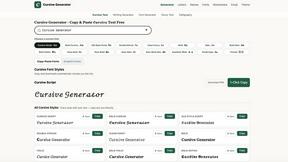
cursive text generator
Cursive Text Generator is a free browser-based tool that converts ordinary text into elegant cursive, script, and fancy Unicode styles. Users can inst
Clipy
Free, no-watermark screen recorder + instant share links. A Loom alternative: record, stop, share. No signup, no time cap, no app to watch.
Seedance 2.5 Free
Create polished AI videos from text or images with cinematic motion.