

Alternatives to QuickTextTools
QuickTextTools provides over 76 free online utilities to streamline text processing, boosting productivity for writers and creators effortlessly.
20 alternatives found


GigUp
GigUp helps freelancers discover relevant Upwork jobs through AI matching, automated monitoring, and instant alerts.

ZeraBooks
Turn PDF bank statements into finished, reconciled books. Accounting software for small businesses.


RenewRoster
Track every client's domain and SSL expiry in one list, with 60/30/14/3-day alerts, white-label client reminders and a monthly renewals report.

Safe Outreach
AI-powered platform that evaluates the safety of LinkedIn automation tools and helps reduce the risk of account restrictions.

Cardify
Markdown becomes share-ready knowledge cards: 30+ themes shown side by side, live preview, PNG/SVG/PDF batch export.

NestMaxx
Free online true-shape nesting software for laser, plasma and CNC router cutting. Pack parts tightly on sheets and export DXF or SVG layouts.

GoodOff
Upload lectures, notes, PDFs, or videos and get flashcards, quizzes, a study podcast, and a source-grounded tutor.

How Long How Many Tool
Timers and hourly checks to figure how out long until a certain time or how many days away.

AI Agent Task Manager
Clipy is a screen recorder for coding agents. Show a bug or UI change, explain it out loud, and share agent-readable context.

TinyFines
A habit tracker your friends can see. Skip a day and you owe a friend a tiny fine: half a pizza, a coffee, €2. Money never goes through the app.

Memorable Contact
AI-powered personal CRM that remembers where you met people and what you talked about. Save, scan, and recall contacts instantly.


Emailyy
Free email tools for signatures, subject lines, HTML previews, word counts, and email headers. Browser-based, simple to use, and no signup required.
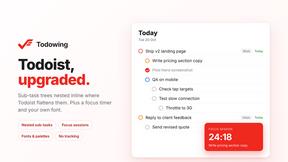
Todowing
Chrome extension that shows Todoist sub-tasks nested under their parents in Today, Upcoming, Filters, Labels, and boards.

Uniclip
Clip pages, take full-page screenshots and batch-capture list data to Notion, Feishu, Obsidian, Markdown, CSV or JSON.

TroveKey
Search tabs, Chrome bookmarks and history, run browser commands, and save webpages and social posts locally—no account.

About QuickTextTools Alternatives
QuickTextTools is a versatile online platform that falls under the category of productivity and management tools. With over 76 free utilities at its disposal, it is designed to enhance the workflow for writers, marketers, developers, students, SEO professionals, and content creators. The tools offered by QuickTextTools aim to streamline various tasks, from text formatting and SEO analysis to writing assistance and keyword management, all while prioritizing user privacy and ease of use. Users often seek alternatives to QuickTextTools for several reasons, including the need for specific features that may not be included in the toolkit, preferences for different user interfaces, or compatibility with certain platforms. Additionally, some may be looking for more advanced functionalities or integrations with other software. When evaluating potential alternatives, it’s essential to consider factors such as the range of tools offered, user-friendliness, pricing structures, and the overall effectiveness in boosting productivity. Ensuring that the alternative aligns with your unique workflow requirements will lead to a more satisfying user experience.
FAQs about QuickTextTools Alternatives
What is QuickTextTools?
QuickTextTools is a free online platform that provides over 76 utilities designed to assist writers, marketers, developers, students, and SEO professionals. The tools available focus on enhancing productivity and optimizing text through various functionalities, such as text formatting, SEO analysis, and writing assistance. Users can access these tools directly through their browsers, making it convenient and efficient.
Who is QuickTextTools for?
QuickTextTools is designed for a wide range of users, including writers, content creators, marketers, developers, and students. Its diverse set of utilities addresses the needs of anyone looking to improve their writing, optimize content for search engines, or streamline their workflow. Whether you are a professional or a student, QuickTextTools provides valuable resources to enhance productivity.
Is QuickTextTools free?
Yes, QuickTextTools is completely free to use, offering users access to a wide range of utilities without any associated costs. This makes it an attractive option for those seeking effective tools that enhance productivity without the burden of subscription fees or one-time payments. Users can take advantage of the full suite of features without any financial commitment.
What are the main features of QuickTextTools?
QuickTextTools boasts a comprehensive set of features designed to meet the needs of various users. Key functionalities include text formatting tools that help clean up and optimize written content, SEO analysis utilities for examining meta tags and keyword effectiveness, and writing assistants for improving overall text quality. The platform is user-friendly and focuses on providing fast, effective solutions to enhance productivity.