
TinyFast
TinyFast is your team's local Mac tool for fast, private file compression without uploads.
Visit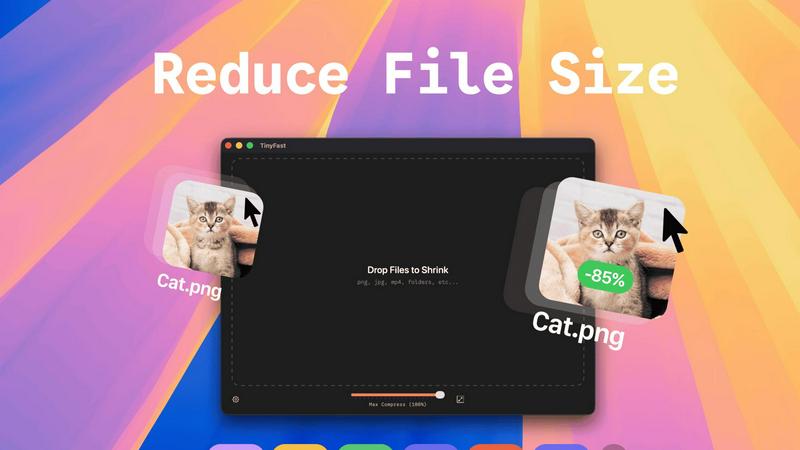
About TinyFast
TinyFast is a powerful and intuitive macOS application built for teams and individuals who prioritize speed, security, and seamless collaboration in their digital workflows. It serves as your dedicated, local file compression partner, enabling you to shrink images, videos, and documents directly on your Mac. By eliminating the need to upload sensitive files to external servers, TinyFast ensures your confidential assets and collaborative projects remain private and secure. It's designed for creators, developers, designers, and professionals who need to optimize files for sharing, storage, or web use without compromising on quality or waiting for slow online tools. The core value proposition is a synergy of unmatched privacy, blazing-fast local processing, and an incredibly simple drag-and-drop interface that integrates effortlessly into any team's workflow, making file optimization a quick and secure step rather than a bottleneck.
Features of TinyFast
100% Local & Private Processing
Your team's confidentiality is paramount. TinyFast operates entirely on your local machine, ensuring that files—whether they're unreleased designs, legal documents, or proprietary code—never leave your Mac. This local-first approach, built on a foundation of mutual trust and security, means no uploads to unknown cloud servers, eliminating data breach risks and perfectly aligning with strict privacy policies or NDAs for seamless and secure collaboration.
Blazing-Fast Drag & Drop Compression
Experience a frictionless workflow designed for team efficiency. Simply drag and drop any file or even entire folders directly into the TinyFast window. The application uses optimized native engines to process and shrink your files in seconds, not minutes. This instant, local compression saves your team hours every week by removing the tedious wait times associated with uploading to and downloading from online services.
Universal File Type Support
TinyFast is your team's universal compression toolkit, fostering cooperation across different project types. It supports a wide array of common file formats, including images (PNG, JPG, WEBP, SVG), videos (MP4, MOV), documents (PDF, DOCX), code files (JS, CSS, JSON), and audio (MP3). This versatility means everyone, from marketing to development, can use the same trusted tool, streamlining your team's asset optimization process.
Batch Processing & Resolution Control
Empower your team to handle large volumes of work with ease. TinyFast allows for batch compression of entire folders, delivering optimized outputs in one go—a perfect synergy for project handoffs or preparing multiple assets for publication. Additionally, for images and videos, you can collaboratively decide and set automatic resolution resizing, ensuring files are perfectly tailored for their intended use, from web pages to client presentations.
Use Cases of TinyFast
Preparing Design Assets for Developer Handoff
Design teams can efficiently compress and batch-export high-fidelity mockups, icons, and images directly on their Macs. By using TinyFast, they ensure all assets are optimized for web performance before handing them off to the development team, maintaining visual quality while enabling faster site load times and a smoother, more cooperative workflow between departments.
Securely Sharing Confidential Client Documents
Legal, financial, or consulting professionals often need to share large PDF reports or presentations containing sensitive data. TinyFast allows them to compress these documents locally to a manageable email size without ever risking client confidentiality by uploading files to a third-party server, fostering a relationship built on trust and security.
Optimizing Media for Web and Social Content
Content creators and marketing teams can quickly prepare dozens of images and videos for blogs, social media, or website updates. The batch processing feature saves immense time, and the local operation means unpublished campaign materials stay secure until the moment they are ready for public release, supporting a cohesive and efficient content pipeline.
Managing Application and Project File Sizes
Developers and project managers can reduce the size of project repositories by compressing documentation, code bundles (like minified JS/CSS), and screenshot libraries directly on their machines. This keeps shared drives and version control systems lean, facilitates quicker backups and transfers, and promotes a more organized and efficient collaborative coding environment.
Frequently Asked Questions
Is my data really kept private?
Absolutely. TinyFast is built on a principle of collaborative trust and security. All compression happens locally on your Mac using its own processing power. Your files are never uploaded to the internet, sent to our servers, or seen by anyone else. This local-only approach guarantees total privacy for your work and your team's confidential assets.
What file types does TinyFast support?
TinyFast supports a wide range of common file types to serve diverse team needs. This includes images (PNG, JPG, TIFF, HEIC, WEBP, GIF, BMP, SVG), videos (MP4, MOV, M4V), documents (PDF, DOCX), code files (JS, CSS, JSON), and audio (MP3). This universal support makes it a versatile tool for entire teams across different functions.
How does the free version work?
The free version of TinyFast allows you and your team to fully experience the application's core features, including local privacy and drag-and-drop simplicity. It permits compressing up to 5 files per day, which is ideal for testing its integration into your workflow or for occasional use. For unlimited daily compressions and full collaborative potential, a one-time or subscription plan is available.
Can I compress multiple files at once?
Yes, you can! TinyFast is designed for team efficiency and supports batch processing. You can drag and drop an entire folder containing multiple files into the app. It will compress all supported files within that folder in one go, saving your team significant time and streamlining the process of preparing large sets of assets for any project.
Pricing of TinyFast
TinyFast offers flexible plans to suit different team needs and usage patterns, all while providing the same core benefits of local, private, and fast compression.
Free Plan:
- Cost: $0, Forever.
- Includes: Compress up to 5 files per day with access to all features. Perfect for trying the tool or for very light, occasional use.
Lifetime Plan:
- Cost: One-time payment of €17.99.
- Includes: Unlimited local compressions, access to all features (including batch processing), lifetime updates, and support for future development. This is the ultimate value for long-term team use.
Monthly Subscription:
- Cost: €2.99 per month (includes a 3-day free trial).
- Includes: Unlimited local compressions, access to all features, and support for future development. Ideal for flexible, ongoing team needs.
Explore more in this category:
Similar to TinyFast

Toolvero
Free Online Tools Built With Privacy in Mind
Kody Tools
Free collection of online developer utilities, code formatters, and digital converters designed to streamline your daily workflow.
Sprite Sheet Maker
A free browser-based toolkit for creating, cutting, converting, and previewing sprite sheet animations.
tallycounterweb.com
Online tally counter for tracking attendance, workouts, inventory, sports scores, visitors, habits, and everyday counting tasks.
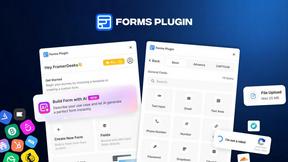
Forms Plugin
The #1 Native Form Builder Plugin for Framer - No Code, No Embeds, No External Platforms.

FaceCoda
Free AI attractiveness test and face analysis with private, on-device photo processing.

Meigen AI
Create and edit AI images and videos with leading models in one workspace.
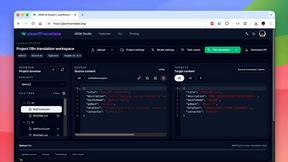
JsonTranslate
JsonTranslate translates JSON, Markdown, and TXT files while preserving keys and project structure for multilingual i18n workflows.