
retroshelf
Retroshelf helps retro handheld gamers automatically log sessions and discover trends together.
Visit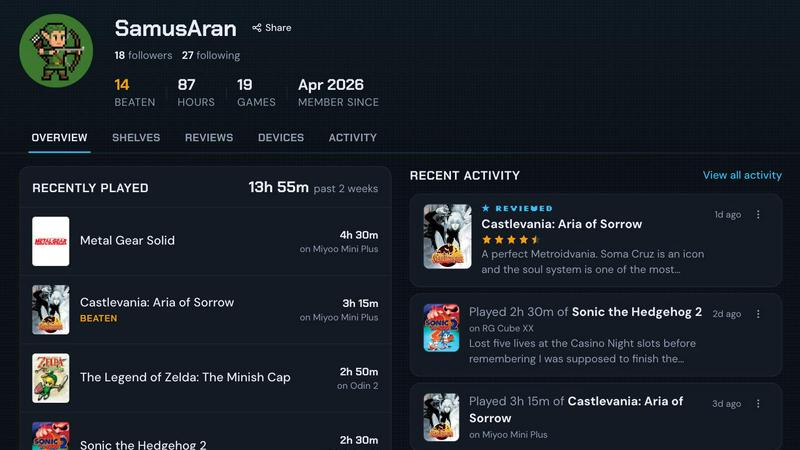
About retroshelf
retroshelf is an innovative play-tracking and discovery app specifically designed for retro handheld gaming enthusiasts. It provides users with a public shelf that showcases the games they are currently playing, have finished, are reviewing, and are replaying, all while maintaining device context. This means that instead of having to remember or keep track of notes across various platforms, spreadsheets, and even memory, users can easily access a comprehensive log of their gaming sessions. With retroshelf, every game you play is logged automatically through a tiny plugin that runs on your handheld device, capturing essential details such as the game title, playtime, and the specific handheld used. This creates a browsable history of gaming sessions, enabling players to reflect on their gaming journey and connect with others in the community. The core philosophy is that every game you play is worth remembering, and retroshelf makes that effortless. It turns scattered sessions across multiple handhelds into a cohesive timeline you can browse later: what you played, where you played it, what you finished, and the notes you left along the way. The platform also fosters a community where users can see what other players are picking up, finishing, and replaying, making game discovery a shared experience. Currently in closed beta, retroshelf is opening in small waves starting with retro handheld players who want to help shape the community from the beginning, with support for popular firmware like muOS and OnionOS.
Features of retroshelf
Automatic Session Logging
A tiny plugin runs directly on your handheld device and captures every gaming session as you play. It automatically logs the game title, the minutes you played, and the specific device you used. Your shelf updates while you are still on the cushion, eliminating the need for manual note-taking or spreadsheet tracking. This seamless integration ensures your gaming history is always current and complete.
Device Context for Every Game
Every game entry on your shelf is tied to the specific handheld device you played it on. This means star ratings come with the handheld they were played on, not just a number. You can filter shelves by Miyoo, Anbernic, Odin, and the rest of the gear you care about, providing a nuanced view of your gaming habits across different hardware platforms.
Public Shelf and Community Discovery
Your shelf is public, showcasing the games you are currently playing, have finished, are reviewing, and are replaying. This allows you to see what other players are picking up, finishing, and replaying in real time. You can browse popular games this week, see which games are catching on with handheld players, and discover new titles based on authentic community activity.
Browsable Timeline and History
retroshelf turns scattered sessions across handhelds into a timeline you can browse later. You can review what you played, where you played it, what you finished, and the notes you left along the way. This creates a comprehensive and browsable history of your gaming journey, making it easy to reflect on your experiences and share them with the community.
Use Cases of retroshelf
Keeping a Complete Gaming Log
For collectors and enthusiasts who own multiple retro handhelds, keeping track of what you played on each device can be a nightmare. retroshelf solves this by automatically logging every session from every device into one unified timeline. You no longer need to rely on memory, sticky notes, or separate spreadsheets to remember your play history. Your entire year of play is finally legible in one place.
Discovering New Games Through Real Shelves
Instead of relying on generic review sites or algorithm-driven recommendations, you can see which games are actually popular with handheld players right now. By browsing the shelves of other users, you can see what they are picking up, finishing, and replaying. This provides authentic, community-driven discovery that shows you not just the game, but the handheld it was played on and how long people are playing it.
Sharing Your Gaming Journey with the Community
Your public shelf becomes a living portfolio of your gaming life. You can share what you are currently playing, post reviews with device context, and show off your completed games. This fosters a collaborative community where players can connect over shared interests, compare playtimes, and get recommendations from people who use the same hardware they do.
Analyzing Your Own Gaming Habits
With a detailed timeline of every session, you can gain insights into your own gaming behavior. You can see which devices you use most, which genres you gravitate towards, and how much time you spend on each game. This data helps you understand your personal gaming journey and can even help you decide which new games or devices to explore next.
Frequently Asked Questions
What is required to use retroshelf?
To use retroshelf, you need a supported retro handheld device running muOS or OnionOS firmware. You will drop a tiny plugin onto your device's SD card, link your device to your retroshelf account, and then sessions will log automatically as you play. The platform is currently in closed beta, so you will need to join the waitlist to get access.
Is my gaming data private?
Your shelf is public by design, as the platform is built around community discovery and sharing. This allows other players to see what you are playing, finishing, and replaying. However, you have control over your profile and can manage the notes and reviews you leave on your games. The focus is on creating a transparent and collaborative community for retro handheld enthusiasts.
Which devices and firmware are supported?
retroshelf currently supports devices running muOS and OnionOS firmware. This covers a wide range of popular retro handhelds from brands like Miyoo, Anbernic, and others that use these custom firmware options. The team is likely to expand support to more firmware and devices as the platform grows, based on community feedback and demand.
How do I join the closed beta?
retroshelf is opening in small waves to retro handheld players who want to help shape the community from the beginning. You can join the beta by signing up on the retroshelf website. Once accepted, you will receive instructions on how to install the plugin on your device, link it to your account, and start automatically logging your gaming sessions.
Explore more in this category:
Similar to retroshelf

Wheel of Names Picker AI
Wheel of Names Spin Wheel Picker tool for classrooms or events

Snapkin
Snapkin is a calorie tracker you use by photographing your plate.

AI Face Swap Video
Swap any face into any video online with AI in minutes. Upload a clip and a photo, get natural lighting and expressions. Free credits on sign-up.
Name Wheel Pro
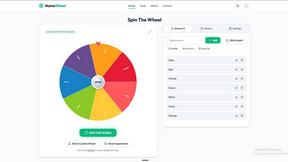
A lightweight, no-signup spin wheel toolkit: pick names, numbers, colors, or yes/no — perfect for classrooms, streams, and teams.

AIdorable
Adopt a virtual baby who grows, learns, and remembers you.
sorry text repeater
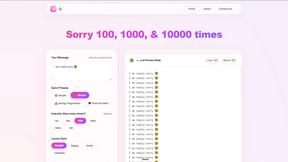
Instantly create and copy repeated apology messages for WhatsApp, Instagram & more — 100% free.
Hitou
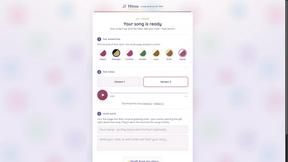
A custom song written and produced about someone you love - free preview in minutes, pay only if it lands.
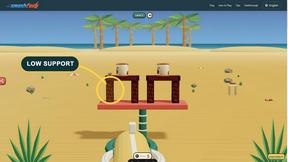
Play Smash Fest
Free browser physics destruction game with 100 handcrafted levels, real-time collisions, walkthroughs, and practical tips. No download required.