
Receipt Taxer
Receipt Taxer teams up with TurboTax to automatically scan and organize your receipts into deductible tax data you can export and file.
Visit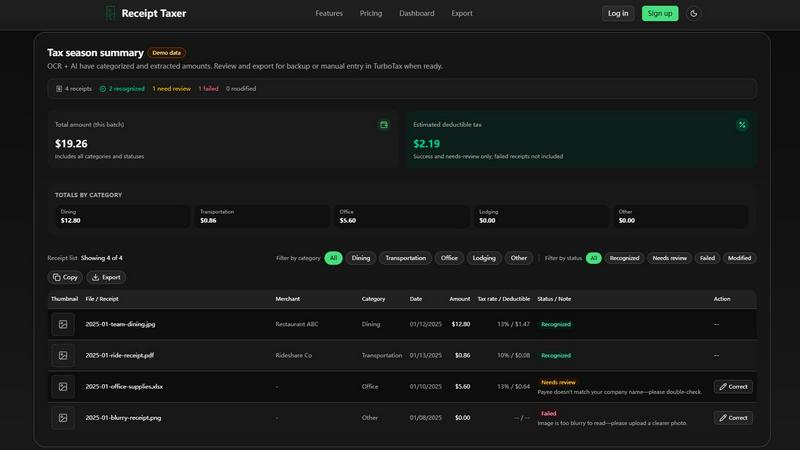
About Receipt Taxer
Receipt Taxer is a collaborative bookkeeping automation tool designed to transform the way freelancers, small business owners, and independent contractors manage their financial records. At its core, Receipt Taxer uses advanced AI-powered OCR (Optical Character Recognition) technology to instantly scan, read, and organize receipt data from uploaded images and documents. Instead of spending hours manually sorting through piles of paper receipts or digital files, users can simply drag and drop their receipts into the platform and let the AI extract critical details like merchant names, dates, amounts, tax rates, and deductible amounts. The platform then organizes this data into clean, exportable files in CSV, Excel, or PDF formats, making it ready for use in accounting software, business analytics, or tax filing tools like TurboTax. Receipt Taxer is built for teams and individuals who value efficiency and accuracy in their financial workflows. By automating the tedious process of data entry and categorization, the product helps users reduce errors, save time, and gain better visibility into their spending patterns. Whether you are preparing for tax season, managing expense reimbursements for your team, or simply keeping your personal finances in order, Receipt Taxer provides a streamlined, user-friendly solution that works seamlessly with your existing tools. The platform also offers a clear dashboard that shows total amounts, estimated deductible taxes, and breakdowns by category, giving users a real-time snapshot of their financial health. With a simple pricing model of $9.99 per period and support for up to 200 receipts, Receipt Taxer is an accessible and powerful ally for anyone looking to take control of their bookkeeping with minimal effort.
Features of Receipt Taxer
AI-Powered OCR Receipt Parsing
Receipt Taxer leverages cutting-edge AI and OCR technology to automatically read and extract data from your receipt images and documents. When you upload a receipt, the system identifies key fields such as the merchant name, transaction date, total amount, tax rate, and estimated deductible tax. This eliminates the need for manual data entry and reduces the risk of human error. The AI also categorizes each receipt into predefined categories like Dining, Transportation, Office, Lodging, and Other, making it easy to organize your expenses. For receipts that are unclear or require additional verification, the platform flags them with statuses like Needs Review or Failed, providing clear guidance on next steps. This feature is designed to work collaboratively with your team, allowing multiple users to upload and review receipts in a shared workspace.
Smart Categorization and Status Tracking
After parsing, Receipt Taxer automatically assigns each receipt to a relevant category and status. Categories include Dining, Transportation, Office, Lodging, and Other, helping you see where your money is going at a glance. Statuses such as Recognized, Needs Review, Modified, and Failed give you instant insight into the quality of the data extraction. For example, a receipt with a status of Needs Review might have a payee that does not match your company name, prompting you to double-check the information. A Failed status indicates the image is too blurry to read, encouraging you to upload a clearer photo. This collaborative feature ensures that your team can quickly identify and resolve any issues, keeping your bookkeeping accurate and up to date. The dashboard provides a summary of totals by category, as well as an overall total amount and estimated deductible tax, giving you a comprehensive view of your financial data.
Flexible Multi-Format Export
Receipt Taxer makes it easy to export your organized receipt data in the format that best suits your workflow. You can choose from CSV, Excel, or PDF files, each designed for specific purposes. CSV is recommended for use with business intelligence tools, analytics platforms, or when manually entering data into tax software like TurboTax. Excel is ideal for editing, creating detailed reports, or performing accounting tasks. PDF is perfect for archiving, sharing with team members, or printing physical copies. The export feature also allows you to select a specific date range, so you can export only the receipts that fall within a particular period. Additionally, you have the option to include or exclude a summary row, giving you control over whether the file contains totals or just individual records. This flexibility supports collaborative workflows where different team members may need different file formats for their specific tasks.
Real-Time Dashboard and Tax Summary
The Receipt Taxer dashboard provides an at-a-glance overview of your financial data, updated in real time as you upload and parse receipts. The tax season summary shows the total number of receipts processed, how many were successfully recognized, how many need review, how many failed, and how many were modified. It also displays the total amount for the batch and the estimated deductible tax, helping you prepare for tax filing with confidence. The totals by category section breaks down your spending into clear segments, so you can see exactly how much you spent on dining, transportation, office supplies, lodging, and other expenses. This collaborative dashboard is perfect for team discussions about budgeting, expense tracking, or tax preparation. It gives everyone on the team a shared view of the financial data, fostering transparency and cooperation in managing company or personal expenses.
Use Cases of Receipt Taxer
Streamlining Tax Preparation for Freelancers
Freelancers often struggle with keeping track of numerous receipts from various business expenses throughout the year. Receipt Taxer simplifies this process by allowing them to upload receipts as they accumulate, with the AI automatically extracting and categorizing the data. When tax season arrives, they can export a clean CSV file ready for manual entry into TurboTax or other tax software. The estimated deductible tax feature gives them a preview of potential savings, and the organized data reduces the stress and time associated with tax filing. This collaborative approach means freelancers can work with their accountants by sharing the exported files, ensuring everyone has accurate and up-to-date information.
Managing Team Expense Reimbursements
Small business owners and team leads can use Receipt Taxer to streamline the expense reimbursement process. Team members can upload their receipts for business meals, transportation, and office supplies directly into the platform. The AI automatically categorizes each expense and extracts the relevant amounts. The team lead can then review the receipts, check for any issues flagged as Needs Review, and approve or correct entries. Once approved, the data can be exported to Excel or CSV for integration with payroll or accounting software. This collaborative workflow eliminates the need for paper forms and manual data entry, speeding up reimbursements and reducing administrative overhead.
Personal Finance and Budget Tracking
Individuals who want to keep a closer eye on their spending can use Receipt Taxer as a personal finance tool. By regularly uploading receipts for dining, groceries, transportation, and other expenses, users can build a comprehensive digital record of their spending habits. The dashboard provides a clear breakdown of totals by category, helping users identify areas where they might be overspending. The export feature allows them to create PDF archives for monthly reviews or CSV files for use in budgeting spreadsheets. This use case is particularly valuable for couples or housemates who want to collaborate on tracking shared expenses, as the platform provides a single source of truth for all receipt data.
Auditing and Record Keeping for Accountants
Accountants and bookkeepers can leverage Receipt Taxer to efficiently manage receipt data for multiple clients. Instead of receiving piles of paper receipts, clients can upload their documents to the platform and share access with their accountant. The AI parses and categorizes the data, and the accountant can review the results, flagging any receipts that need clarification. The export feature allows the accountant to generate reports in their preferred format, whether that is CSV for data analysis, Excel for detailed review, or PDF for client records. This collaborative setup saves time, reduces errors, and ensures that all financial records are organized and accessible for audits or tax filings.
Frequently Asked Questions
What file types and sizes are supported for receipt uploads?
Receipt Taxer currently supports JPEG and PNG image formats for receipt uploads. Each file must be no larger than 10 MB to ensure optimal processing speed and accuracy. If you have receipts in other formats like PDF or Excel, you may need to convert them to an image format or take a screenshot. The platform is designed to handle clear, well-lit images for the best OCR results. If a receipt is too blurry or the image quality is poor, the system will mark it as Failed and prompt you to upload a clearer version.
How does Receipt Taxer handle receipts that are not fully recognized?
Receipts that are not fully recognized are given a status of Needs Review or Failed. A Needs Review status means the AI was able to extract some data but found an inconsistency, such as a payee name that does not match your company name. In this case, you can manually correct the information using the Correct button. A Failed status indicates the image was too blurry or unreadable, and you will need to upload a clearer photo. The platform provides clear feedback for each receipt, guiding you on the specific action needed to resolve the issue.
Can I export data for use with TurboTax or other tax software?
Yes, Receipt Taxer is designed to work seamlessly with TurboTax and other tax preparation tools. You can export your organized receipt data as a CSV file, which is the recommended format for manual entry into TurboTax when filing a Schedule C. The export feature allows you to select a specific date range, so you can export only the receipts relevant to your tax period. The CSV file includes all necessary fields like merchant, date, amount, category, and deductible tax, making it easy to transfer the data into your tax software.
What happens if I exceed the 200 receipt limit in my plan?
The Starter plan includes 200 receipts per billing period. If you exceed this limit, you will need to wait until the next period to upload additional receipts, or you may need to upgrade your plan if higher limits become available. The platform clearly tracks your usage on the dashboard, so you can monitor how many receipts you have processed. If you find yourself consistently exceeding the limit, we recommend reviewing your upload habits or contacting support for options to accommodate higher volume needs.
Pricing of Receipt Taxer
Receipt Taxer offers a simple and transparent pricing model with one plan: the Starter plan at $9.99 per period. Each period lasts for one month, for example from May 14 to June 14. This plan includes 200 receipt parses per period, which covers the core paid features such as AI-powered OCR parsing, smart categorization, multi-format export, and the real-time dashboard. There are no hidden fees, and you can cancel your subscription at any time. This straightforward pricing makes it easy for freelancers, small teams, and individuals to budget for their bookkeeping needs without worrying about complex tiered plans or surprise charges.
Similar to Receipt Taxer

Nevisible
Nevisible is an AI-sourced pipeline platform that makes suppliers readable to AI, uncovers AI-sourced buyers and tracks AI answers for manufacturers.

Fireply AI
AI reply agent for X (Twitter) that finds relevant conversations and posts replies in your own voice. 40 replies free.

GoodOff
Upload lectures, notes, PDFs, or videos and get flashcards, quizzes, a study podcast, and a source-grounded tutor.

PDFnoted
Review contracts against cited China / US / EU law, clean watermarks and hidden PDF data, and edit or annotate — all in one browser workspace.

Rhinobird
AI video ads, UGC-style videos, and product visuals for cross-border sellers and e-commerce brands.

Memorable Contact
AI-powered personal CRM that remembers where you met people and what you talked about. Save, scan, and recall contacts instantly.
DeskBot
DeskBot for Kalshi event contracts. $1 first month, then $19.99/mo. Trading can lose money. Not affiliated with Kalshi.