ProcessSpy
ProcessSpy is your team's advanced Mac process monitor, enabling collaborative system oversight with powerful filtering and insights.
Visit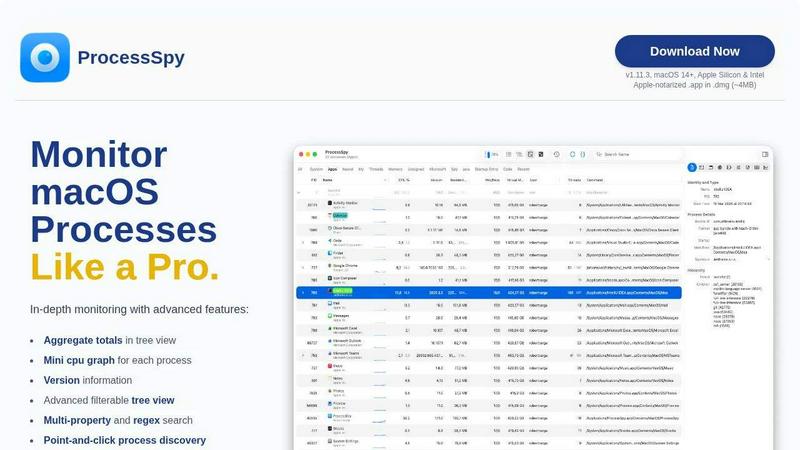
About ProcessSpy
ProcessSpy is a powerful, native macOS application designed for developers, system administrators, and power users who need to see beyond the surface of their system's activity. It serves as the definitive macOS alternative to Sysinternals Process Explorer, providing a level of process introspection that the built-in Activity Monitor simply cannot match. Born from a developer's own frustration with managing multiple Java applications, ProcessSpy illuminates the details that matter: full command-line paths, version information, environment variables, and intricate process hierarchies. Its core value proposition lies in fostering a collaborative relationship between you and your machine, enabling a deeper, more synergistic understanding of system behavior. By offering both a robust free version and an expanded paid license, ProcessSpy empowers individuals and teams to diagnose stubborn issues, optimize resource usage, and maintain system health with unparalleled clarity and control, all through a fast, native Mac-first interface.
Features of ProcessSpy
Advanced Hierarchical Process Tree
ProcessSpy visualizes your system's processes in a detailed, filterable tree view that clearly displays parent-child relationships. This collaborative view goes beyond a simple list by showing aggregate totals for CPU, memory, and thread usage across entire branches of processes. This allows teams to quickly identify which application or service tree is consuming resources, making resource management and troubleshooting a shared, transparent effort.
Multi-Property and Regex Search
Unify your team's diagnostic efforts with a powerful search system that supports regular expressions and searches across multiple process properties simultaneously. For instance, you can collaboratively hunt for processes containing "node" in the name and a specific port in the command line arguments. This precise filtering capability ensures your team can quickly isolate the exact process in question, streamlining collaborative debugging and system analysis.
JavaScript-Powered Custom Filters
ProcessSpy empowers advanced users and teams to build highly specific, dynamic filters using JavaScript. This feature allows for the creation of complex logical conditions that go beyond simple text matching, enabling a team to codify their unique monitoring rules. By scripting filters, teams can ensure consistent process monitoring standards and automatically highlight processes that match specific, nuanced criteria relevant to their projects.
Comprehensive Process Context & History
The tool provides an extensive context menu with actionable items for every process, open file, network connection, and dynamic library. For licensed users, this expands into a full historical record, where ProcessSpy remembers finished processes—including their arguments, environment variables, and resource history—and can export timeline data to CSV. This creates a shared knowledge base, allowing teams to review past system states and collaborate on post-mortem analyses long after a process has exited.
Use Cases of ProcessSpy
Collaborative Debugging of Stubborn Applications
When an application becomes unresponsive or a service won't terminate cleanly, teams can use ProcessSpy together to get the full picture. By viewing the complete process tree, identifying child processes, inspecting open files and network sockets, and using the force-quit functionality, team members can collaboratively diagnose the root cause and cleanly resolve issues that Activity Monitor leaves obscured.
Managing and Profiling Development Environments
Developers working with multiple runtime instances (like several Java, Python, or Node.js versions) can use ProcessSpy to bring clarity to their workspace. The tool distinguishes between identical process names by showing version info and full paths, allowing a team to verify which specific JDK or interpreter a process is using and ensure the correct environment variables are loaded, fostering a harmonious and correctly configured dev environment.
System Performance Analysis and Optimization
Teams tasked with maintaining system health can leverage ProcessSpy's aggregate resource totals and optional history recording (paid feature) to perform collaborative performance analysis. By monitoring CPU and memory trends over time and identifying resource-heavy process families, teams can work together to pinpoint optimization opportunities, validate the impact of deployments, and create a data-driven approach to capacity planning.
Security and Compliance Auditing
For teams concerned with security, ProcessSpy acts as a collaborative auditing tool. Licensed users can inspect process entitlements, signature information, and startup agents, allowing the team to verify software behavior and identify unauthorized or suspicious processes. The ability to review environment variables and command-line arguments for both running and historically remembered processes creates a valuable audit trail for compliance reviews.
Frequently Asked Questions
Is ProcessSpy safe to install on my Mac?
Yes, ProcessSpy is completely safe. It is an Apple-notarized application, meaning it has been scanned and approved by Apple for security. It is distributed as a signed .app file inside a .dmg disk image, providing a secure and verified installation method for both Intel and Apple Silicon Macs, so your team can deploy it with confidence.
What versions of macOS are supported?
ProcessSpy is designed for modern macOS systems, specifically supporting macOS 14 (Sonoma) and newer. It is optimized for the latest APIs and security features, ensuring the best possible performance and integration for teams working on current and future Apple operating systems.
What does the paid license include?
The paid license, available for a one-time fee, unlocks powerful collaborative features for your team. This includes viewing advanced process information (entitlements, Info.plist), environment variables, recording and exporting process history to CSV, and having the tool remember finished processes with all their details. The license covers one user across unlimited devices and includes lifetime updates.
How does ProcessSpy compare to the built-in Activity Monitor?
ProcessSpy is built for depth and teamwork where Activity Monitor offers a basic overview. Key differences include showing full command-line paths, version details, aggregate resource values in the tree view, multi-property regex search, and (with a license) advanced security audits and historical tracking. It's designed to answer the detailed questions that arise during collaborative development and system administration.
Similar to ProcessSpy

JevModel
Jev turns text or JSON into Choice, Score and Noul answers with probabilities.

SightRadar
Face recognition API that is a drop-in replacement for AWS Rekognition. Index, search, compare and detect faces, billed per photo, no subscription.

SnappyKit
40+ free image tools that run in your browser — convert, compress, resize and edit JPG, PNG, WebP, AVIF and HEIC files. No uploads, no sign-up.

JevCases
Explore Jev AI use cases, live demos and open-source projects that use typed decisions.

swipetolaunch
launch directory for sass/apps, swipe through new products and vote them