
PC Bottleneck Calculator
Team up with our PC Bottleneck Calculator to analyze your components and synergize your system for peak performance.
Visit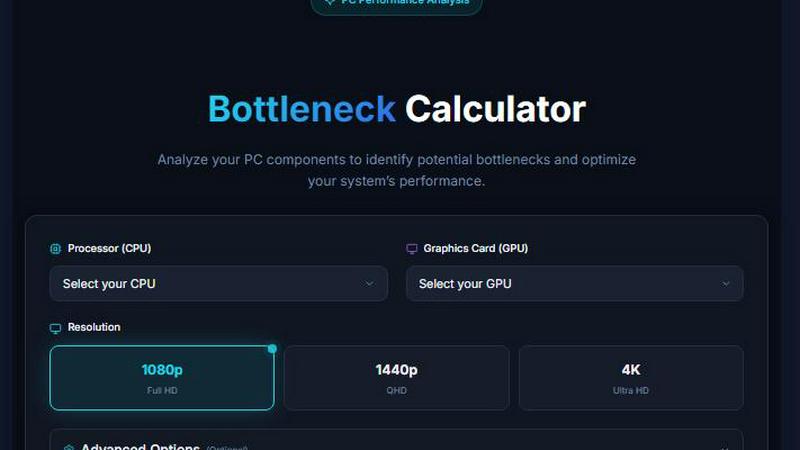
About PC Bottleneck Calculator
The PC Bottleneck Calculator is a specialized performance analysis tool designed to help you identify and resolve hardware limitations within your computer system. By working together with your existing components, this tool analyzes the synergy between your processor (CPU), graphics card (GPU), and system memory (RAM) to detect potential performance mismatches that could be holding your system back. Our team has developed this calculator to serve a wide range of users, from first-time PC builders assembling their first custom rig to experienced enthusiasts looking to optimize their high-end configurations. The core value proposition of this tool lies in its ability to provide clear, actionable insights into where your system may be underperforming due to component imbalances. Instead of guessing which part is causing slowdowns in your favorite games or demanding professional applications, you can rely on our algorithmic analysis to pinpoint exact bottlenecks. The calculator works by processing benchmark scores and performance metrics for each selected component, then comparing their relative capabilities to calculate a bottleneck percentage. This collaborative approach between you and our tool ensures that every upgrade decision you make is informed by data, not speculation. Whether you are planning a new build from scratch or looking to upgrade an existing system, the PC Bottleneck Calculator helps you achieve harmonious component pairing that maximizes your return on investment and delivers the performance you deserve.
Features of PC Bottleneck Calculator
Comprehensive Component Database
Our team has curated an extensive database of over 100 processors and graphics cards, each assigned accurate benchmark scores based on real-world performance testing. This includes the latest generation hardware such as the Intel Core i9-14900KS with a score of 65,000 and the NVIDIA RTX 5090 with a score of 40,000, ensuring that you can analyze even the most current components. The database is regularly updated to include new releases, allowing you to make informed decisions about both existing and upcoming hardware purchases. This collaborative resource ensures that every analysis reflects the true capabilities of your components.
Intelligent Bottleneck Detection Algorithm
The calculator employs a sophisticated algorithm that analyzes the performance scores of your selected CPU and GPU to determine the percentage of bottleneck in your system. By calculating the ratio between component capabilities, the tool identifies which part is limiting overall system performance and by how much. This synergy-focused approach helps you understand not just that a bottleneck exists, but the exact degree of imbalance, enabling you to make targeted upgrades rather than replacing entire systems. The algorithm accounts for various workload types and provides context-specific recommendations.
User-Friendly Selection Interface
We have designed the interface with simplicity and efficiency in mind, featuring organized dropdown menus that allow you to quickly select your CPU and GPU from an extensive list. The components are sorted by performance score, making it easy to compare options and understand relative capabilities at a glance. This collaborative design approach means you spend less time navigating and more time analyzing. The interface also includes clear visual indicators for selected components, reducing the chance of errors and ensuring accurate analysis results every time.
Real-Time Performance Analysis
As soon as you select your components, the PC Bottleneck Calculator processes the data and delivers immediate results showing the bottleneck percentage for your specific configuration. This real-time feedback loop allows you to experiment with different component combinations and instantly see how changes affect system balance. Whether you are comparing multiple GPU options for the same CPU or testing different processor pairings, the tool provides instant insights that facilitate better decision-making. This feature is particularly valuable when planning upgrades or evaluating potential new builds.
Use Cases of PC Bottleneck Calculator
Planning a New Custom PC Build
When you are assembling a new computer from scratch, achieving perfect component synergy is crucial for optimal performance. Our team recommends using the PC Bottleneck Calculator during the planning phase to test various CPU and GPU combinations before making any purchases. For example, if you are considering pairing an Intel Core i9-14900K with an NVIDIA RTX 4090, the calculator will show you whether these components work well together or if one significantly outperforms the other. This collaborative approach ensures that your budget is allocated effectively, preventing the common mistake of overspending on one component while underpowering another.
Upgrading an Existing System
If you already own a PC and are looking to improve its performance, the calculator helps you identify which component upgrade will deliver the most significant impact. Many users we work with assume that upgrading their graphics card alone will solve all performance issues, only to discover that their CPU is creating a bottleneck. By entering your current components into the tool, you can see exactly where the limitation lies and make targeted upgrades that maximize your return on investment. This prevents wasted spending on parts that would not improve overall system performance.
Comparing Hardware Options Before Purchase
Before committing to a specific processor or graphics card, you can use the calculator to compare multiple options and find the best match for your needs. Our team has seen users benefit greatly from testing different combinations, such as comparing an AMD Ryzen 7 7800X3D with an NVIDIA RTX 4080 SUPER versus an Intel Core i7-14700K with the same GPU. The tool provides clear bottleneck percentages for each configuration, enabling you to choose the setup that offers the best balance for your specific use case, whether that is gaming, content creation, or professional workloads.
Diagnosing Performance Issues in Existing Builds
If your current system is not performing as expected in games or applications, the PC Bottleneck Calculator can help diagnose whether hardware imbalance is the root cause. Instead of troubleshooting blindly or replacing parts based on guesswork, you can input your actual components and receive an objective analysis. This collaborative diagnostic process saves time and money by identifying whether the issue is truly a bottleneck or if other factors like driver problems, thermal throttling, or software configuration are responsible. The tool provides a solid foundation for further investigation and targeted solutions.
Frequently Asked Questions
What exactly is a PC bottleneck and how does the calculator detect it?
A PC bottleneck occurs when one component in your system limits the performance of another, preventing your computer from achieving its full potential. For example, a very powerful graphics card paired with an older, slower processor may result in the CPU being unable to feed data to the GPU fast enough, causing the graphics card to underperform. The PC Bottleneck Calculator detects these imbalances by comparing the benchmark performance scores of your selected CPU and GPU. It calculates the percentage difference between their capabilities, with a higher percentage indicating a more significant bottleneck. The algorithm considers the relative processing power of each component to determine which part is the limiting factor and by how much.
How accurate are the bottleneck percentages provided by the calculator?
The bottleneck percentages are based on standardized benchmark scores that represent the relative performance capabilities of each component under typical workloads. While these scores provide a reliable comparison point for understanding hardware balance, the actual performance in real-world scenarios can vary depending on factors such as the specific game or application being used, resolution settings, background processes, and system cooling. Our team recommends using the calculator as a planning and diagnostic tool rather than an absolute performance predictor. The percentages give you a clear indication of potential mismatches, but actual gaming or productivity performance may differ slightly based on your specific use case and system configuration.
Can I analyze laptop components with this calculator?
The PC Bottleneck Calculator is primarily designed for desktop components and uses standard desktop CPU and GPU benchmark scores for its calculations. While some laptop processors and graphics cards share similar names with their desktop counterparts, laptop versions often have different power limits, thermal constraints, and performance characteristics that affect their real-world capabilities. For the most accurate analysis, we recommend using the calculator for desktop builds. If you are working with a laptop, the tool can still provide a general indication of component balance, but you should consider that laptop hardware typically performs below the desktop scores listed in the database.
What bottleneck percentage is considered acceptable for a balanced system?
In general, a bottleneck percentage of 10% or less is considered well-balanced and indicates that your components are working together harmoniously with minimal performance loss. Percentages between 10% and 20% suggest a moderate imbalance where you might experience some performance limitations in certain scenarios, but the system will still perform well overall. Anything above 20% represents a significant bottleneck where the slower component is noticeably limiting system performance, and you would likely benefit from upgrading the underperforming part. However, the acceptable threshold can vary depending on your specific needs, as some users prioritize GPU performance for gaming while others need CPU power for productivity tasks.
Similar to PC Bottleneck Calculator

@fuck.it - email with attitude
Private email. Pure. Secure. Exclusive. No ads, no tracking, no data selling. GDPR compliant, EU-hosted.

Reword Image
Replace the text already inside a photo or screenshot and keep the original layout, colors and perspective. No design file needed.


VidhyaGen - Image Converter
All-in-one digital toolkit for effortless image conversion, compression, resizing, and everyday file utilities in a single place.

AFFLIGO
AFFLIGO makes everyday file tasks easier with free online tools to compress, convert, edit, and manage PDFs and images.

SmoothCut
Screen recorder for macOS and Windows with automatic zooms, a smoothed cursor and on-device captions. Pay once, runs on your computer.

Ecommerce Data API
Amazon research data APIs for developers, sellers and AI agents. Integrate product, keyword and market research through REST APIs and MCP.

Artcraft AI
AI image and video studio in your browser: generate and edit images, turn photos into videos, edit clips by sentence.