
Meme Picture
Meme Picture lets us team up with AI to turn selfies and pet photos into classic memes, free and ready to share in seconds.
Visit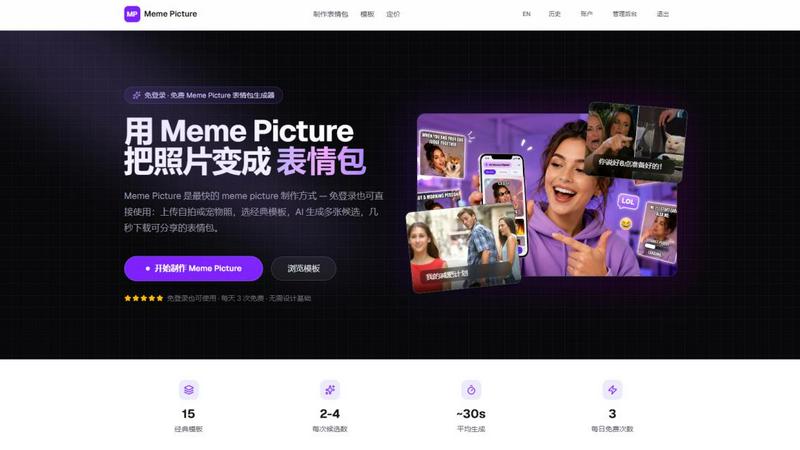
About Meme Picture
Meme Picture is a collaborative AI meme generator designed for creators, teams, and group chat enthusiasts who need share-ready jokes fast. This free tool allows anyone to upload a selfie, pet photo, or snapshot and instantly transform it into a classic meme format. With 15 hand-picked templates including Distracted Boyfriend, Surprised Pikachu, Doge, and more, Meme Picture brings your photos into iconic layouts that your friends and colleagues already recognize. The AI handles face placement and stylization automatically, returning 2 to 4 candidates per run so you can select the funniest result together with your team. Free users receive daily generations with watermarked output, making it easy to test the tool before committing. Signing in unlocks the ability to save your history, while upgrading to Pro provides higher limits, no watermark, HD export, and GIF meme creation. One-time permanent generation packs are also available for those who prefer a pay-as-you-go approach. Meme Picture prioritizes privacy by deleting original uploads immediately after generation, ensuring your photos remain yours. Outputs are PNG-ready for instant sharing on WhatsApp, Discord, Telegram, iMessage, and social media platforms. Whether you are a social media manager working with a content team, a group chat moderator looking to keep conversations lively, or an individual creator who wants to join the meme conversation without design skills, Meme Picture delivers a seamless, cooperative experience. The tool works across devices, from phone uploads to desktop drag-and-drop, and requires no login to start creating. By combining speed, simplicity, and a focus on team-friendly sharing, Meme Picture empowers everyone to participate in meme culture together.
Features of Meme Picture
Classic Meme Template Library
Meme Picture offers a collaborative library of 15 classic meme templates that your team can use to create instant inside jokes. From Distracted Boyfriend and Woman Yelling at Cat to Surprised Pikachu, Doge, and Grumpy Cat, each template preserves the iconic layout your friends and coworkers already recognize. You simply upload a photo, select a template, and the AI places your subject into the format with perfect alignment. This feature ensures that everyone on your team can contribute to meme creation without needing design experience, fostering a cooperative environment where humor flows freely.
AI Stylization Options
The AI stylization feature allows your team to customize the visual vibe of each meme picture to match the mood of your conversation. Choose from Cartoon, Pixel Art, Hand-drawn, or Realistic styles to transform your photo into a format that complements the template. This cooperative tool eliminates the need for Photoshop or design skills, enabling every team member to produce visually cohesive memes that resonate with your audience. Whether you want a playful cartoon look for a lighthearted group chat or a realistic style for a more serious reaction, Meme Picture delivers multiple candidates per run so you can pick the best result together.
Privacy-First Upload and Deletion
Meme Picture is built with a privacy-first approach that supports team trust and cooperation. Your original photo is deleted immediately after generation, meaning no one on your team has to worry about personal images being stored or misused. Signed-in users only keep the finished meme picture images, and the platform explicitly states that it does not train on or sell your photos. This feature empowers teams to share candid selfies, pet photos, and snapshots without hesitation, fostering a safe and collaborative environment where creativity can thrive without privacy concerns.
Multi-Platform Share-Ready Outputs
Every meme picture generated by Meme Picture is optimized for instant sharing across your team's favorite platforms. Outputs are PNG-ready for WhatsApp, Discord, Telegram, iMessage, and social media channels, ensuring that your collaborative creations reach your audience in seconds. The tool also supports HD export for Pro users, making it suitable for professional content teams who need high-quality assets. By streamlining the export process, Meme Picture eliminates friction and allows your group to focus on what matters most: creating and sharing laughter together.
Use Cases of Meme Picture
Team Building and Internal Communication
Meme Picture is an excellent tool for fostering team bonding and lightening the mood in workplace communication. Team members can upload a colleague's funny expression from a team photo, select a classic template like Distracted Boyfriend or Surprised Pikachu, and generate a meme that everyone in the Slack channel will appreciate. This cooperative activity encourages participation from all levels of the organization, from interns to executives, and helps break down formal barriers. With 3 free generations per day, teams can create a steady stream of inside jokes that strengthen relationships and make remote collaboration more enjoyable.
Social Media Content Creation for Brands
Social media managers and content teams can use Meme Picture to quickly produce engaging, on-brand meme content for their audiences. By uploading product shots, team photos, or customer-submitted images, teams can create relatable memes that align with current trends and platform-specific humor. The AI stylization options allow brands to maintain visual consistency across campaigns, whether they choose a cartoon style for a playful brand voice or a realistic style for authenticity. With Pro features like HD export and no watermark, professional teams can generate high-quality assets that are ready for publication across Instagram, Twitter, TikTok, and Facebook.
Group Chat Moderation and Engagement
Group chat moderators on platforms like Discord, WhatsApp, and Telegram can use Meme Picture to keep conversations lively and engaging. When a conversation starts to slow down, a moderator can quickly upload a relevant photo, select a reaction template like Drake Hotline Bling or Hide the Pain Harold, and generate a meme that sparks new discussion. This cooperative approach to moderation helps maintain community energy without requiring extensive content creation skills. The 2 to 4 candidates per run allow moderators to choose the funniest option, ensuring that the meme resonates with the group's specific humor.
Personal Meme Creation for Friends and Family
Individuals who want to create personalized memes for friends and family will find Meme Picture incredibly intuitive and fun. Whether it is turning a pet photo into a Doge meme for the family group chat or using a selfie to create a Change My Mind meme for a friendly debate, the tool makes it easy to participate in meme culture without technical barriers. The privacy-first approach ensures that personal photos are deleted after generation, giving users peace of mind when sharing candid snapshots. With 3 free generations per day, users can keep the jokes flowing without any financial commitment.
Frequently Asked Questions
Do I need to create an account to use Meme Picture?
No, you do not need to create an account or log in to use Meme Picture. The tool is designed to be accessible to everyone, allowing you to upload a photo, select a template, and generate a meme in seconds without any sign-up process. Free users get 3 generations per day with watermarked output. If you want to save your history, upgrade to Pro, or purchase one-time generation packs, you can sign in at any time.
What happens to my uploaded photos after generation?
Meme Picture prioritizes your privacy by deleting your original uploaded photo immediately after generation. The platform does not train on or sell your photos. Signed-in users only retain the finished meme picture images in their history. This privacy-first approach ensures that your personal selfies, pet photos, and snapshots are not stored or misused, making the tool safe for sharing candid content.
How many meme candidates do I get per generation?
Each generation run returns 2 to 4 meme candidates for you to choose from. This feature allows you to pick the funniest or most appropriate result for your specific use case. Whether you are creating a meme for a team Slack channel or a family group chat, having multiple options ensures that you can select the one that best captures the intended humor and context.
What file formats and sizes are supported for uploads?
Meme Picture supports JPEG, PNG, and WebP file formats for uploads, with a maximum file size of 4MB. Large photos are automatically compressed to meet this limit, so you do not need to worry about resizing images manually. The tool works seamlessly on both mobile devices and desktop computers, allowing you to upload from your phone or drag and drop files on your computer.
Pricing of Meme Picture
Meme Picture offers a flexible pricing structure to accommodate different user needs. Free users receive 3 generations per day with watermarked output, no login required. Signing in unlocks the ability to save your generation history. For users who need more, the Pro plan provides higher generation limits, no watermark, HD export, and the ability to create GIF memes. Additionally, one-time permanent generation packs are available for purchase, allowing users to buy extra generations without committing to a subscription. This tiered approach ensures that casual users, power creators, and professional teams can all find a plan that suits their collaborative meme-making needs.
Explore more in this category:
Similar to Meme Picture
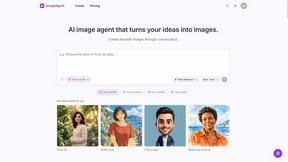
ImageAgent
Create and edit AI images through conversation, using text or reference images and refining results in chat.
GenX
All-in-one AI workspace to generate images, videos, and audio with multiple leading AI models.
AiAgeFilter
Free AI age filter: upload an adult portrait, add 10-40 years, meet your older self. No app needed.
AppIconGenerator
Generate iOS and Android app icons from any image and export all platform sizes for free.
PhotoGenerAI
Browser-based AI photo generation and editing for portraits, product images, background edits and outfit changes.
YIX
AI image and video generation, photo editing, restoration and free prompt tools in one browser studio.
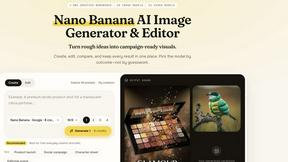
Nano AI
Create and edit AI images, generate videos, and compare models in one creative workbench.