
MeetingMind
MeetingMind automatically records and summarizes your Zoom meetings, ensuring you never miss important details again.
Visit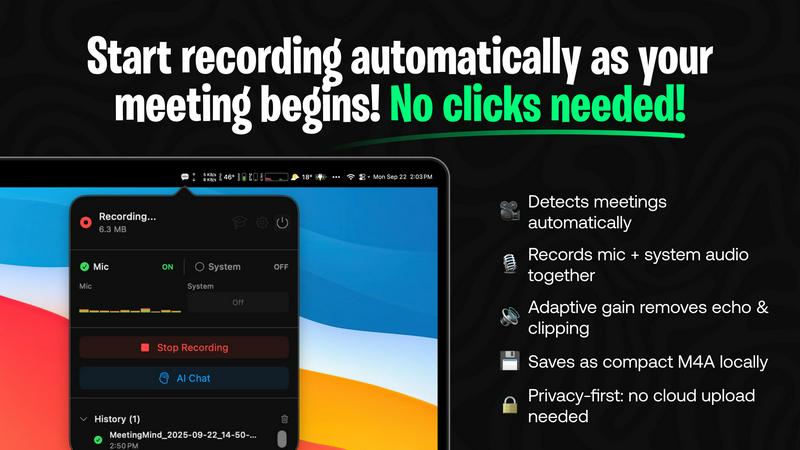
About MeetingMind
MeetingMind is your intelligent meeting assistant, designed to enhance collaboration and ensure that every team member remains engaged and informed during important discussions. It revolutionizes the process of capturing, understanding, and acting on meeting content by automatically recording and transcribing Zoom meetings in real-time. Built specifically for macOS, MeetingMind effortlessly integrates into your workflow, residing in your menu bar until called upon. The core value proposition lies in creating synergy through clarity; by relieving you of the note-taking burden, MeetingMind allows participants to focus fully on the conversation. Ideal for project managers, remote teams, consultants, and anyone who values productivity without sacrificing privacy, MeetingMind operates with a privacy-first approach, processing all data locally on your Apple Silicon Mac. This ensures that sensitive conversations remain secure on your device, only shared with cloud services at your discretion. Join the ranks of professionals who never miss critical meeting details again.
Features of MeetingMind
Automatic Detection
MeetingMind automatically detects when Zoom meetings start, eliminating the need for any manual clicks. This seamless integration ensures that you can focus on your discussions without worrying about whether the recording is active, allowing for a distraction-free environment.
Comprehensive Recording
The application captures both microphone and system audio with adaptive gain, ensuring that every voice is heard clearly. This comprehensive recording capability means no important details are lost, creating an accurate account of your meeting for future reference.
AI Assistant
Choose your AI assistant depending on your needs: use local processing with Ollama for swift insights or connect to OpenRouter for advanced cloud-based summaries. This flexibility empowers you to receive tailored support based on your preferences and requirements.
Markdown Export
After each meeting, receive beautifully formatted markdown files containing AI-generated summaries and transcripts. This feature not only organizes the meeting notes but also makes it easy to share important points with your team, ensuring that everyone stays informed.
Use Cases of MeetingMind
Project Management
For project managers, MeetingMind is an indispensable tool that helps ensure that all team members are aligned on project goals and action items. Its automatic recording and transcription capabilities allow managers to focus on leading discussions instead of taking notes.
Remote Teams
In today's digital workplace, remote teams often struggle to maintain engagement during virtual meetings. MeetingMind helps bridge this gap by providing accurate transcripts and summaries, allowing team members to revisit discussions and stay connected, regardless of their location.
Consultant Meetings
Consultants can leverage MeetingMind to capture crucial insights during client meetings. By automatically recording conversations, consultants can focus on understanding their clients' needs without the distraction of note-taking, ultimately leading to more effective consultations.
Training Sessions
MeetingMind is also ideal for training sessions, where capturing detailed information is critical. With its ability to record and transcribe, participants can revisit the material later, ensuring that no important training detail is overlooked.
Frequently Asked Questions
How does MeetingMind ensure privacy?
MeetingMind prioritizes user privacy by processing all data locally on your Mac. This means that your meeting recordings never leave your device unless you consciously choose to upload them to a cloud service.
Can I use MeetingMind with other video conferencing tools?
Currently, MeetingMind is designed specifically for Zoom meetings, ensuring optimal performance and integration. Future updates may expand its compatibility with other platforms.
Is there a limit on the free version?
Yes, the free version allows for 60 minutes of recording per day, making it perfect for short meetings and daily standups. You can upgrade to unlock unlimited recording capabilities.
How do I download MeetingMind?
You can download MeetingMind from the Mac App Store, where you can also find additional information about pricing and features. Secure purchase options with Family Sharing support are available through Apple.
Explore more in this category:
Similar to MeetingMind

@fuck.it - email with attitude
Private email. Pure. Secure. Exclusive. No ads, no tracking, no data selling. GDPR compliant, EU-hosted.

AFFLIGO
AFFLIGO makes everyday file tasks easier with free online tools to compress, convert, edit, and manage PDFs and images.
mcpfolio
Discover MCP servers, compare tools, and follow setup guides to connect AI assistants to your apps and workflows
Riff
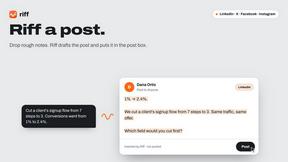
Riff writes replies, DMs and posts with Gemini Nano inside Chrome. Runs on your computer, no account or API key, and never posts for you.

SmoothCut
Screen recorder for macOS and Windows with automatic zooms, a smoothed cursor and on-device captions. Pay once, runs on your computer.

Suparelay
Call landlines and mobiles in 200+ countries from your browser. The person you call needs no app. Prepaid, from about 2 cents a minute.