
Flowton
Let’s work together to turn your goals into leveled-up reality by tracking and improving your Up time versus Down time ratio with Flowton.
VisitPublished on:
June 28, 2026
Pricing:
About Flowton
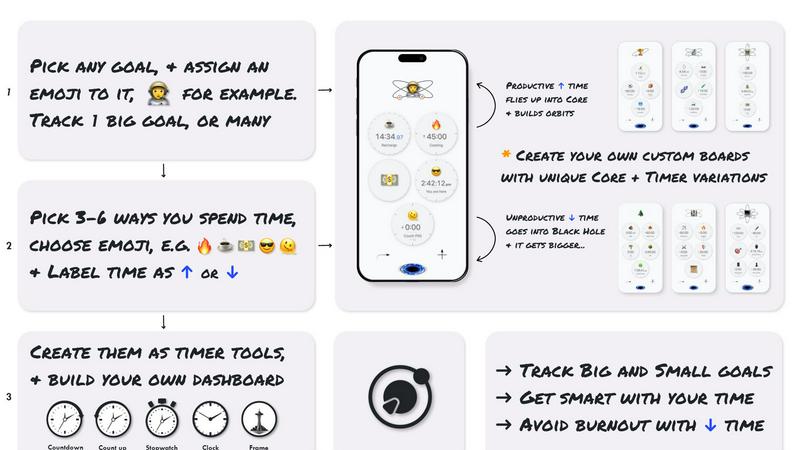
Flowton is a collaborative time management tool designed to help you and your team rethink your entire day through the lens of productive versus unproductive time. It is built on the simple but powerful idea that what truly moves the needle is doing more of one thing and less of another. Whether you are a student trying to study more, a developer focused on deep work, or a creator building a skill, Flowton transforms your daily activities into a measurable, gamified experience. The app introduces the concept of a "flowton" — a hypothetical productivity particle that only exists when you track it. By using countdown and count-up timers, you deposit time into your Core (productive time) or discard it into the Black Hole (unproductive time). This synergy between tracking and visualization allows you to monitor your Up time versus Down time ratio, identify where your time truly goes, and collaborate with your own goals to improve. Flowton is for anyone living in a hyper-connected, distracted world who understands that individual, focused, and prolonged productivity is the key to achieving goals. With full offline functionality and a sci-fi aesthetic, it makes time tracking feel like a cooperative adventure with your future self.
Features of Flowton
Bankable Timers with Flowton Capture
Flowton uses advanced timers that you can set as "bankable" to capture productive flowtons or "non-bankable" to track unproductive activities. When a timer finishes, the flowtons are deposited into your Core, representing time spent on meaningful goals. This feature allows you to gradually increase your productive time while decreasing unproductive time, creating a cooperative feedback loop between your actions and your objectives.
Core and Orbit Visualization
Each Core represents a goal or objective you set for yourself. As you bank productive time, flowtons generate orbits around the Core, visually representing your productive day. This gamified system makes your progress tangible and motivating. You can track multiple Cores across single or multiple boards, allowing you to manage different projects or life areas in a collaborative, synergistic way.
Daily Core Deposit and History Bank
At the end of each day, you perform a Core Deposit by forwarding time, which dislodges the orbiting flowtons and stores them into your history bank. This feature lets you review your long-term progress, view detailed statistics, and identify areas for improvement. It creates a cooperative partnership with your past self, ensuring every day contributes to your larger goals.
Multiple Boards and Streak Maintenance
Flowton allows you to create boards with a multitude of Cores, helping you find the perfect daily setup to achieve your goals. You can maintain a streak to stay on track, and bank Cores daily or over longer periods. With Flowton Prime, you can customize themes and view more historic day cells, fostering a team-oriented approach to personal productivity where you are the captain of your own time.
Use Cases of Flowton
Student Study Time Optimization
A student preparing for exams can use Flowton to track study sessions as bankable time and gaming or social media as non-bankable time. By visualizing the ratio of Up time to Down time, the student can adjust their schedule to increase productive hours. The streak feature helps maintain daily study habits, and the Core Deposit at the end of each day provides a clear record of progress, fostering a cooperative relationship between effort and results.
Developer Deep Work Sessions
Developers often struggle with context switching and distractions. Flowton allows them to set timers for coding, debugging, or learning new technologies as bankable activities, while tracking meetings or email as non-bankable. The orbit visualization shows how much focused time has been accumulated, and the history bank reveals patterns over weeks. This synergy between tracking and reflection helps developers optimize their workdays for maximum output.
Freelancer Project Management
Freelancers juggling multiple clients can create separate Cores for each project. By using bankable timers for billable work and non-bankable timers for administrative tasks, they can accurately measure time spent on revenue-generating activities. The multiple boards feature allows them to organize projects by priority, and the daily Core Deposit ensures every client gets the attention they need. This collaborative approach to time management improves profitability and work-life balance.
Skill Builder and Hobbyist Progress
Someone learning a new language or musical instrument can use Flowton to track practice sessions. By setting practice as bankable and leisure as non-bankable, they can see their progress over weeks and months. The gamified flowton system makes practice feel rewarding, and the streak feature encourages consistency. This use case turns a solitary pursuit into a cooperative journey with the app, helping the user stay motivated and see tangible results.
Frequently Asked Questions
What is a flowton?
A flowton is a hypothetical "productivity particle" that exists all around you. It acts as a unit of time that you "bank" using Flowton's time tracking technology. The number of flowtons you capture is in direct relation to how much you have accomplished in a day. Maximizing this process is the key objective of the app, turning abstract time into a tangible, measurable resource.
How is time tracked in Flowton?
Time is tracked using timers with a "bankability" feature. When you use timers with bankability enabled, flowtons are captured when the timer finishes and deposited into your Core as productive time. For activities that don't contribute to your goal, you set timers as non-bankable. Gradually increasing bankable time while decreasing non-bankable time is how you achieve your goals. Timers also include "reverse time" and "fast-finish" mechanics to help you on your quest.
What are Cores and how do I use them?
Each Core represents a goal or objective you set for yourself. You define which activities (timers) contribute to this goal and which do not. When you bank time, flowtons go into the Core and generate orbits, visually representing your productive day. You can track multiple Cores across a single board or multiple boards. At the end of the day, you perform a Core Deposit to store your progress into your history bank for long-term tracking.
Who is Flowton for?
Flowton is for anyone living in an increasingly distracted and hyper-connected world who understands that individual, focused, and prolonged productivity is the only way to accomplish goals. It is ideal for students, practitioners, skill builders, creators, developers, and all those working towards advancing themselves wherever a time investment is required. The app embodies the German concept of "sitzfleisch" — the ability to persist and focus over long periods.
Pricing of Flowton
Flowton is available as a free download on iOS. The app includes full offline functionality and core features at no cost. For users who want enhanced capabilities, there is a premium upgrade called Flowton Prime. Prime allows you to create and theme multiple boards, and view more historic day cells for deeper analysis of your productivity patterns. Specific pricing for Prime is available within the app. An Android version is currently in development and will launch later this year.
Similar to Flowton

LightScroll
Native iOS and macOS app for healthier screen time

Bloom
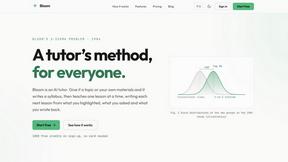
An adaptive AI tutor that turns topics or your materials into courses, lessons, and answers tailored to how you learn.

Drafto
Browser tools for Indian SMBs and CAs: GST, Tally, bank statement conversion and Meesho label crop. Free daily limit.
Agent Pets
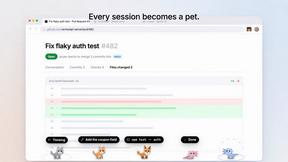
Your Claude Code & Codex sessions as pets in Chrome. Approve, deny and reply to your coding agents from any tab.
Pixdok
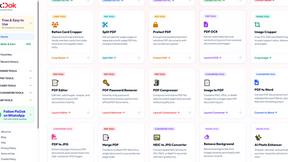
PixDok is your all-in-one free online toolkit for PDF editing, image conversion, background removal, passport photos, and QR codes.
Lemongraph
Seriously proactive personal productivity app
PracticeNetworking
Master networking with interactive, hands-on practice directly in your browser. Solve real terminal challenges, debug routes, and build core IT skills