
DocuExtractor
DocuExtractor is your team's AI partner that effortlessly converts receipts and invoices into clean, structured data.
Visit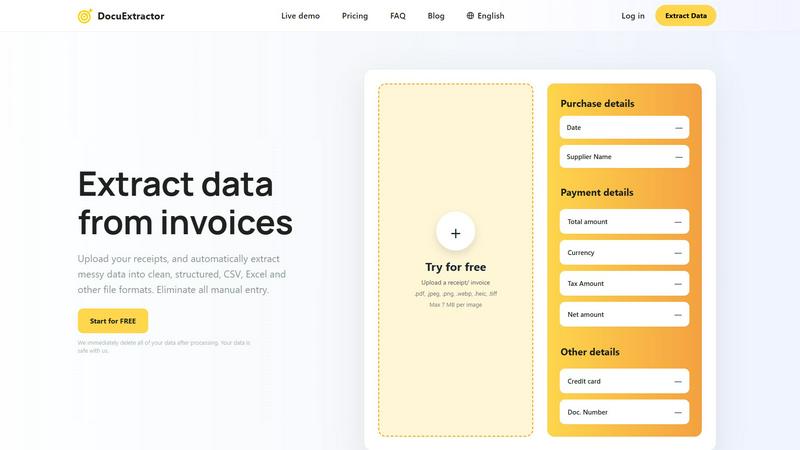
About DocuExtractor
DocuExtractor is a powerful, AI-driven document converter built to revolutionize how accounting teams and financial professionals handle data. It transforms the tedious, error-prone task of manual data entry into a seamless, automated workflow. By simply uploading messy documents like receipts, invoices, and bank statements, the software leverages advanced Optical Character Recognition (OCR) combined with deep learning and large language models (AI) to extract key information with a remarkable 99.6% accuracy rate. The extracted data is then output into clean, structured formats like CSV and Excel, ready for immediate import into accounting software. Designed with a collaborative team environment in mind, its user-friendly interface and batch processing capabilities allow entire departments to work in synergy, boosting collective productivity. DocuExtractor prioritizes data security, immediately deleting all documents after processing, and scales to meet the needs of individual bookkeepers and large enterprises alike, handling over 500,000 documents monthly. It's more than a tool; it's a partnership in efficiency, empowering teams to achieve more together by eliminating manual bottlenecks and ensuring data integrity.
Features of DocuExtractor
Advanced AI-Powered Extraction
At the core of DocuExtractor is a sophisticated blend of OCR, Deep Learning (DL), and Large Language Models (LLMs). This multi-layered AI technology doesn't just read text; it understands the context of financial documents. It automatically identifies and extracts key fields such as date, supplier name, total amount, tax, and document numbers from a wide variety of file formats including PDF, JPG, PNG, and TIFF, ensuring high accuracy and reducing the need for manual verification.
Batch Processing & Team-Friendly Workspace
DocuExtractor is built for team synergy and high-volume processing. The platform allows users to drag and drop hundreds of documents at once for simultaneous extraction. The centralized work area provides a collaborative hub where team members can manage extraction tasks, view processing history, and monitor credits, enabling seamless cooperation and streamlined workflow management across the entire accounting department.
Multi-Format Export & Preset Templates
To fit seamlessly into your existing workflow, DocuExtractor offers flexible output options. Teams can choose to export their meticulously extracted data directly into CSV or Excel formats, structured and ready for their specific accounting software. The platform also offers convenient presets for common documents like receipts and invoices, allowing for quick, standardized extraction without needing to configure fields each time.
Enterprise-Grade Security & Global Support
Trust and reliability are paramount. DocuExtractor is built with enterprise-ready security, guaranteeing that all uploaded documents are permanently deleted immediately after processing. It supports global operations with automatic language detection for documents in over 45 languages. Combined with expert customer support and specialized algorithms tuned for different document types, it provides a reliable, scalable foundation for businesses of all sizes.
Use Cases of DocuExtractor
Streamlining Accounts Payable
AP teams can collaboratively process stacks of supplier invoices and receipts in minutes instead of hours. By uploading batches of documents, the team automatically extracts vendor details, invoice numbers, dates, and amounts. The resulting clean CSV file can be directly validated and imported into the accounting system, accelerating the payment cycle and improving vendor relationships through timely processing.
Automating Expense Report Reconciliation
Instead of manually deciphering employee-submitted receipt photos, finance teams can use DocuExtractor to automate the entire process. Employees or managers upload receipts, and the software extracts merchant names, dates, and totals. This data populates expense reports automatically, allowing managers and accountants to quickly verify and approve claims, fostering a smoother, more cooperative expense management process.
Accelerating Month-End & Audit Close
During critical closing periods, bookkeepers and accountants are inundated with bank statements and transaction records. DocuExtractor helps the entire finance team work in unison to quickly convert PDF bank statements into structured Excel data. This eliminates manual entry errors, speeds up reconciliation, and provides a clear, auditable trail of extracted data, making the month-end close a coordinated and efficient effort.
Centralizing Document Data for Firms
Accounting firms managing multiple clients benefit from a unified data extraction process. Client documents of varying types and qualities can be uploaded to a single, secure platform. The firm's team can efficiently extract uniform data sets from all clients, ensuring consistency in their bookkeeping services, improving client reporting accuracy, and scaling their service offerings through powerful technological synergy.
Frequently Asked Questions
How accurate is DocuExtractor's data extraction?
DocuExtractor achieves a market-leading accuracy rate of 99.6% for financial documents. This high precision is the result of combining specialized Optical Character Recognition (OCR) with advanced Deep Learning and Large Language Model (AI) technologies. These systems are specifically trained on financial documents like invoices and receipts to correctly identify and contextualize key data points, minimizing the need for manual corrections.
Is my document data safe and secure with DocuExtractor?
Absolutely. Your data security is our top priority. We employ enterprise-grade security measures, and our most important promise is that we immediately and permanently delete all of your uploaded documents and extracted data from our servers as soon as the processing is complete and you have downloaded your results. Your information is never stored long-term or used for any other purpose.
What file formats does DocuExtractor support?
DocuExtractor supports a wide range of common document formats to fit your team's needs. You can upload PDF files, as well as image formats including JPG, JPEG, PNG, WebP, HEIC, and TIFF. Each file can be up to 7 MB in size. The extracted data can then be downloaded in structured CSV or Excel (XLSX) formats for easy integration into your accounting software.
Can DocuExtractor process documents in different languages?
Yes, it can. DocuExtractor is designed for global teams and supports over 45 languages with automatic language detection. Whether your invoices are in English, Spanish, French, German, or many other languages, the AI will accurately detect the language and extract the relevant information, making it an ideal tool for international businesses and accounting firms with diverse clients.
Explore more in this category:
Similar to DocuExtractor

@fuck.it - email with attitude
Private email. Pure. Secure. Exclusive. No ads, no tracking, no data selling. GDPR compliant, EU-hosted.
RunMyWealth
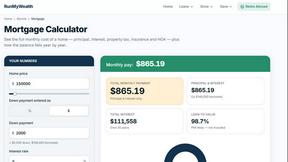
Free, private financial calculators for mortgage, FIRE, and debt. 100% free, runs locally in your browser, no signup required.

AFFLIGO
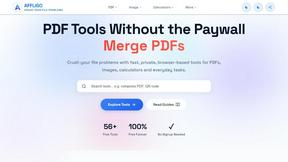
AFFLIGO makes everyday file tasks easier with free online tools to compress, convert, edit, and manage PDFs and images.

SmoothCut
Screen recorder for macOS and Windows with automatic zooms, a smoothed cursor and on-device captions. Pay once, runs on your computer.


Suparelay
Call landlines and mobiles in 200+ countries from your browser. The person you call needs no app. Prepaid, from about 2 cents a minute.
Novastart
Apps and files on an infinite canvas where people and AI agents work together.