
ComicsMaker
ComicsMaker helps teams turn scene prompts into structured comic panels with dialogue and layout, streamlining storyboard creation from idea to.
VisitPublished on:
July 7, 2026
Pricing:
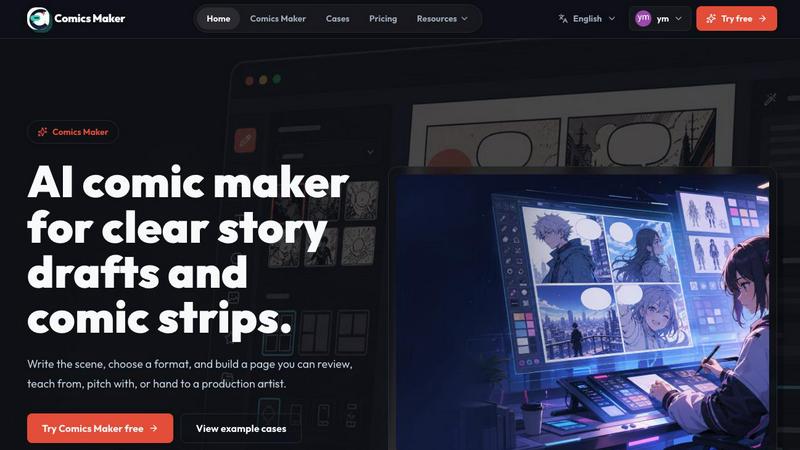
About ComicsMaker
ComicsMaker is a collaborative AI comic maker and comic strip generator designed to help creators, educators, marketers, and teams transform ideas into visual stories with unprecedented speed and clarity. Instead of starting from a blank canvas, teams begin with a single scene description and work together to plan beats, generate panels, add dialogue, and arrange pages directly in their browser. The platform serves as a structured workspace where raw concepts evolve into polished comic drafts, manga-style panels, storyboards, and social-ready comic pages. Users maintain clear control over layout, tone, reading flow, and style direction throughout the creative process. ComicsMaker bridges the gap between initial inspiration and production-ready visual narratives, making it an essential tool for anyone who needs to communicate through sequential art. Whether you are drafting AI comic strips, building explainer comics for classroom settings, developing product storyboards for marketing campaigns, or creating character-driven manga panels, this tool provides the structure and flexibility teams need to move from idea to draft without friction. The platform emphasizes cooperation between team members, allowing writers, artists, and project managers to contribute their expertise at each stage of development. By keeping panel count, pacing, shot type, and reading order visible before investing time in polish, ComicsMaker ensures every team member stays aligned on the visual direction and narrative goals from the very first draft.
Features of ComicsMaker
Scene-Based Planning Studio
The planning studio allows teams to start with a single scene description and collaboratively shape it into structured comic panels. Users name the character, setting, visible action, and change, then select from layout options including single panel, 3-panel strip, 2x2 page, and vertical flow. The interface keeps captions and dialogue close to the panel plan, ensuring every team member understands the narrative structure before generation begins. This collaborative approach to planning reduces rework and keeps projects moving forward with clear direction.
AI-Powered Panel Generation
ComicsMaker transforms plain language scene descriptions into generated comic panels that maintain consistent visual direction. Teams can lock style notes, character details, and reference language so every panel belongs to the same world. The generator works with multiple moods, from dramatic to lighthearted, and supports various comic traditions including shonen manga and Western comic styles. This feature enables rapid prototyping of visual ideas without requiring artistic skills from every team member.
Layout and Pacing Controls
The studio provides simple controls for panel count, pacing, shot type, and reading order that remain visible throughout the editing process. Teams can experiment with different page formats and adjust the visual flow before committing to final generation. The layout system supports single panel statements, 3-panel strips for sequential storytelling, 2x2 pages for complex scenes, and vertical flow for mobile-friendly comic strips. These controls ensure the visual structure serves the narrative purpose.
Project Export and Collaboration Tools
ComicsMaker enables teams to export drafts that artists, teammates, or stakeholders can understand and build upon. The platform generates JSON project data containing prompts, notes, and panel structures that can be handed off for longer production passes. This feature supports cooperative workflows where different team members contribute to planning, writing, generating, and polishing the final comic page. The export functionality ensures no creative work is lost between project phases.
Use Cases of ComicsMaker
Marketing Campaign Storyboarding
Marketing teams can rapidly prototype product reveal comics and campaign concepts using ComicsMaker. By starting with a single scene describing the product moment, teams generate multiple panel layouts that communicate key selling points through visual storytelling. The collaborative workspace allows copywriters, designers, and brand managers to align on visual direction before committing to expensive production. Campaign concepts become reviewable comic pages that stakeholders can evaluate for clarity and emotional impact.
Classroom Visual Learning Materials
Educators use ComicsMaker to create explainer comics that make complex subjects accessible to students. By describing a concept as a scene with characters, setting, and change, teachers generate structured comic panels that illustrate scientific processes, historical events, or literary themes. The tool supports different reading orders and panel counts, allowing educators to match the visual complexity to student comprehension levels. Classroom visuals become collaborative projects where students can participate in planning and dialogue writing.
Creative Team Brainstorming Sessions
Creative teams use ComicsMaker as a collaborative brainstorming tool during early project development. Writers describe scenes in plain language, then work with artists and directors to shape beats into panels before generating images. The platform keeps everyone focused on the narrative structure rather than getting lost in visual polish too early. Teams can rapidly iterate on story ideas, testing different panel arrangements and pacing to find the most effective visual sequence for their project.
Social Media Content Production
Content creators and social media managers use ComicsMaker to produce consistent comic strips for platforms like Instagram, Twitter, and Facebook. The vertical flow layout option optimizes panels for mobile viewing, while style locks ensure brand consistency across multiple posts. Teams plan a series of scenes, generate panels, add dialogue, and export ready-to-post comic pages that maintain visual continuity. The collaborative workflow allows writers, designers, and social strategists to contribute their expertise to each post.
Frequently Asked Questions
How does the scene-based planning process work?
Teams start by describing a single scene in plain language, including the character name, setting, visible action, and the change that occurs. From this description, users select a layout format such as single panel, 3-panel strip, or 2x2 page. The system then helps plan the beats across the selected number of panels, keeping captions and dialogue close to the panel plan. This structured approach ensures every team member understands the narrative arc before generating any images.
Can multiple team members work on the same comic project?
Yes, ComicsMaker is built for cooperative workflows where writers, artists, and project managers contribute at different stages. The planning phase allows writers to describe scenes and plan beats, while artists can add style notes and visual direction. The project export feature generates JSON data containing prompts, notes, and panel structures that can be shared among team members for review and further development. This collaborative approach keeps everyone aligned on the visual and narrative goals.
What export formats are available for completed comic drafts?
ComicsMaker provides project export capabilities that include JSON data containing all prompts, notes, and panel structures. These exports can be handed off to artists or teammates for longer production passes. The platform also generates reviewable comic pages that stakeholders can evaluate for story clarity, panel order, dialogue space, and visual direction. This ensures teams can check creative decisions before investing in final production.
Is there a free plan available for testing the platform?
Yes, ComicsMaker offers a free plan that includes 10 starter credits for testing image generation. This allows teams to explore the planning studio, generate sample panels, and evaluate the workflow before committing to a paid subscription. The free plan follows the same editor and project export workflow as paid plans, so teams can fully assess how the tool fits their creative processes.
Similar to ComicsMaker

Reword Image
Replace the text already inside a photo or screenshot and keep the original layout, colors and perspective. No design file needed.

VidhyaGen - Image Converter
All-in-one digital toolkit for effortless image conversion, compression, resizing, and everyday file utilities in a single place.

Leadeon
AI growth tool for X and LinkedIn: write posts in your voice, schedule at your best times, find leads on X and see what works.
AFFLIGO
AFFLIGO makes everyday file tasks easier with free online tools to compress, convert, edit, and manage PDFs and images.

Artcraft AI
AI image and video studio in your browser: generate and edit images, turn photos into videos, edit clips by sentence.
ViewMax Studio
AI video generator that turns one prompt into shorts, UGC-style ads and faceless videos, with script, voiceover and captions.
ToonBee AI
ToonBee AI turns a script or a one-line idea into a narrated cartoon video, keeping the same character in every scene. 10+ styles, 16:9 or 9:16.

ImageGenerator
Create and edit AI images online with multiple models, text-to-image, image-to-image, background removal, and upscaling.