
Caesura
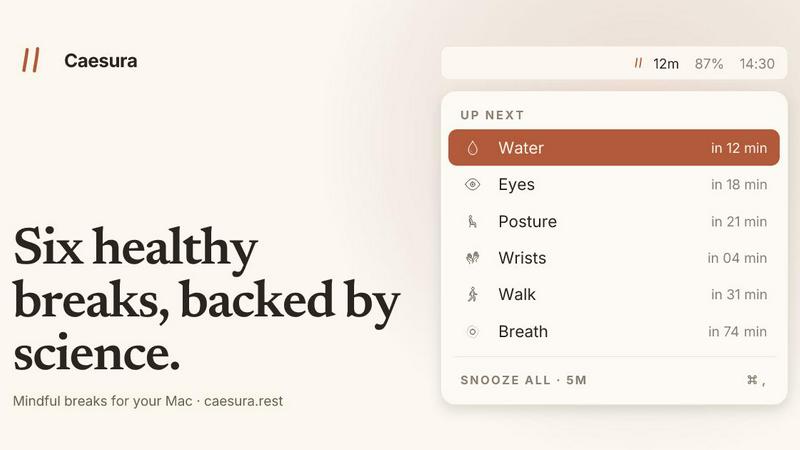
Caesura works with your flow, pausing science-backed reminders for water, walking, and more when you are busy on Mac.
VisitPublished on:
June 22, 2026
Pricing:
About Caesura
Caesura is a thoughtfully designed macOS menu bar application that serves as your quiet, collaborative partner in maintaining healthy habits throughout the workday. Unlike aggressive reminder apps that disrupt your flow with jarring notifications, Caesura works with you, not against you, by intelligently coalescing multiple healthy break reminders into a single, unified prompt. The app focuses on six science-backed habits: drinking water, walking, stretching your wrists, resting your eyes, checking your posture, and breathing. Each of these reminders runs on its own schedule, with intervals derived from actual research studies rather than arbitrary round numbers. Caesura lives discreetly in your menu bar, out of your way, and automatically pauses itself when you are on calls, screen sharing, in fullscreen mode, or during calendar events. It is designed for anyone who spends significant time at a computer, including remote workers, developers, designers, writers, and knowledge workers who want to take better care of their physical health without sacrificing productivity. The app respects your flow by merging nearby reminders into a single break, ensuring you are never interrupted twice in a row. With a one-time purchase model, no account creation, no telemetry, and no subscription, Caesura offers a privacy-focused, permanent solution for building sustainable healthy habits at your desk.
Features of Caesura
Science-Backed Interval Reminders
Each of the six healthy break reminders in Caesura operates on an interval derived directly from peer-reviewed research, not from arbitrary round numbers. Water reminders appear every 45 minutes based on hydration studies, walking prompts every 60 minutes, wrist stretches every 30 minutes, eye breaks every 20 minutes, posture shifts every 30 minutes, and breathing exercises every 90 minutes. You can turn any reminder off individually or retune the intervals to match your personal workflow, giving you full control while ensuring the science remains your foundation.
Intelligent Coalescing and Auto-Pausing
Caesura features a unique coalescing system that merges multiple reminders arriving within one minute of each other into a single break prompt, so you never face back-to-back interruptions. The app also intelligently pauses all timers when it detects you are on a video call, screen sharing, in a fullscreen app, during a calendar event, or playing a game. When the activity ends, Caesura picks up exactly where it left off, meaning if you had 12 minutes remaining until your water reminder, you still have 12 minutes after the call ends.
Flexible Prompt Styles for Every Preference
You can customize how each break appears on your screen with three distinct prompt styles, selectable per break. The Overlay style takes over your entire screen until you acknowledge it, ideal for breaks you might otherwise ignore like drinking water. The Banner style slides in gently from under the menu bar and auto-dismisses after 30 seconds, perfect for breathing reminders. The Notification style delivers a standard macOS notification for the lightest possible touch, suitable for posture shifts you can handle silently.
Detailed Visual Guides for Specific Breaks
Caesura goes beyond simple reminders by providing interactive visual guides for certain breaks. The breathing guide features a soft expanding orb and a progress bar that paces your inhale, hold, and exhale through three cycles. The eye break includes a small pill that follows your cursor with a 20-second countdown ring, helping you look away from the screen for the full recommended duration. The wrist break displays four illustrated stretches on the overlay, each lasting ten seconds, making it easy to follow along without needing to remember the exercises.
Use Cases of Caesura
Remote Workers Maintaining Health During Back-to-Back Meetings
For remote workers who spend hours in video calls, Caesura automatically pauses all timers during meetings and resumes exactly where it left off afterward. When two breaks, such as water and posture, come due within a minute of each other, they merge into a single coalesced break, allowing you to drink water and adjust your posture in one seamless pause. This keeps you healthy without disrupting your professional flow or causing you to miss important discussion points.
Developers and Designers Protecting Wrists and Eyes During Deep Work
Developers and designers engaged in long coding sessions or design sprints benefit from Caesura's 30-minute wrist stretch and 20-minute eye break reminders. The overlay style ensures you cannot ignore these critical breaks, while the cursor countdown for eye breaks helps you look at a distance for the full 20 seconds. The app pauses during fullscreen mode, so your focus flow in tools like Xcode, Figma, or VS Code remains uninterrupted until you choose to take a break.
Writers and Content Creators Building Sustainable Desk Habits
Writers who often lose track of time while drafting articles or editing content can rely on Caesura's 45-minute water reminder and 60-minute walking prompt to prevent dehydration and prolonged sitting. The breathing guide helps reset mental focus every 90 minutes, while the banner style for posture reminders provides a gentle nudge without breaking creative momentum. The app's quiet menu bar presence means it never distracts from the writing process.
Students and Researchers Managing Long Study Sessions
Students preparing for exams or researchers analyzing data can use Caesura to maintain physical health during extended study periods. The science-backed intervals ensure they hydrate, move, and rest their eyes at optimal times, while the coalescing feature prevents multiple interruptions. The notification style for less critical breaks like breathing allows them to stay in the zone, and the auto-pause during screen sharing or fullscreen presentations ensures study groups and lectures proceed without interruption.
Frequently Asked Questions
How does Caesura know when I am on a call or busy?
Caesura monitors your camera usage, screen sharing activity, calendar events, fullscreen app status, and Do Not Disturb mode. When any of these are active, all timers freeze and resume exactly where they left off once the activity ends. If you had 12 minutes remaining until your water reminder, you still have 12 minutes after the call finishes. The app also pauses during games and when FaceTime is in the foreground.
Can I customize which breaks I receive and how they appear?
Yes, absolutely. You can turn off any of the six break types individually, adjust the interval for each break, and choose a different prompt style for each break. For example, you might set water to use the full overlay style because you tend to ignore smaller prompts, while posture uses a silent notification. You can also change how each break shows up at any time.
Is Caesura a subscription or a one-time purchase?
Caesura is a one-time purchase for $15. There is no subscription, no account creation required, and no credit card needed for the 14-day free trial. After the trial, you buy it once and own it forever. The app also collects no telemetry or personal data, ensuring your privacy is fully protected.
Does Caesura work with macOS Focus modes and Do Not Disturb?
Yes, Caesura respects your macOS Focus modes and Do Not Disturb settings. When Do Not Disturb is active, the app pauses all timers. When you exit Do Not Disturb, the timers resume exactly where they left off. This ensures that your focused work periods remain uninterrupted while still providing timely reminders when you are available.
Pricing of Caesura
Caesura is available as a one-time purchase for $15. This single payment gives you permanent access to all features, including all six science-backed reminders, coalescing breaks, auto-pausing during calls, and all three prompt styles. You can try the app free for 14 days with no credit card required and no account creation. There are no subscriptions, no recurring fees, and no in-app purchases. The app requires macOS 14 or later.
Similar to Caesura

@fuck.it - email with attitude
Private email. Pure. Secure. Exclusive. No ads, no tracking, no data selling. GDPR compliant, EU-hosted.
Wheel of Names Picker AI
Wheel of Names Spin Wheel Picker tool for classrooms or events


AFFLIGO
AFFLIGO makes everyday file tasks easier with free online tools to compress, convert, edit, and manage PDFs and images.

SmoothCut
Screen recorder for macOS and Windows with automatic zooms, a smoothed cursor and on-device captions. Pay once, runs on your computer.

Suparelay
Call landlines and mobiles in 200+ countries from your browser. The person you call needs no app. Prepaid, from about 2 cents a minute.
Novastart
Apps and files on an infinite canvas where people and AI agents work together.
Snapkin
Snapkin is a calorie tracker you use by photographing your plate.