
AnyToURL
Effortlessly turn any file into a secure shareable URL in seconds with our fast and user-friendly platform.
Visit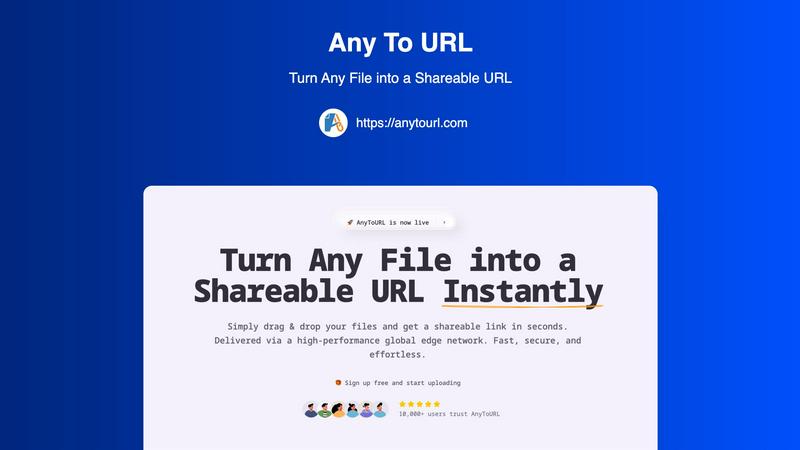
About AnyToURL
AnyToURL is an innovative file sharing tool designed to simplify the way individuals and teams share files over the internet. It empowers users to transform their files into instant, shareable links with remarkable ease and speed. Whether you are a designer needing to share mockups, a marketer distributing essential campaign assets, or a product manager collaborating with a geographically dispersed team, AnyToURL caters to all these needs and more. The platform offers an intuitive drag-and-drop interface that allows users to upload various file types, such as images, videos, PDFs, and code snippets, and receive a direct URL in seconds. With a robust global edge CDN, AnyToURL ensures fast and secure delivery of files, regardless of the recipient's location. Security is a top priority, featuring options like password protection and smart file previews, making it an ideal choice for users who require an efficient and secure file sharing experience. Join our growing community and discover how AnyToURL can revolutionize your file sharing process.
Features of AnyToURL
Drag & Drop Upload
With AnyToURL, uploading files has never been easier. The drag-and-drop functionality allows users to simply drag their files onto the page, eliminating complicated steps and making the process intuitive and user-friendly. This feature is designed for efficiency, enabling users to upload images, documents, and more in just a few moments.
Instant Shareable Links
Once your file is uploaded, AnyToURL generates a short, shareable URL instantly. This means you can copy the link with a single click and share it across various platforms, including email, chat applications, or social media. This feature streamlines the sharing process, making it hassle-free and quick.
Smart File Preview
AnyToURL enhances the user experience by offering smart file previews. Recipients can view images, PDFs, and documents directly in their browser without the need for downloads. This feature not only saves time but also ensures that your audience can access the content seamlessly, allowing for better engagement and collaboration.
Global Edge CDN
The platform operates through a high-performance global edge network powered by Cloudflare, ensuring that files are delivered quickly and reliably worldwide. This feature guarantees that users, regardless of their location, experience lightning-fast access to shared files, enhancing productivity and collaboration across teams.
Use Cases of AnyToURL
UX Designers
UX designers can utilize AnyToURL to effortlessly share design mockups, wireframes, and prototypes with clients. The ability to provide instant feedback through browser previews enables a more collaborative and efficient design iteration process, helping teams to achieve results faster.
Marketing Teams
Marketing teams can benefit greatly from AnyToURL by distributing campaign assets, branding materials, and media files to team members. With smart file previews, colleagues can review images and PDFs without downloading, streamlining communication and enhancing project workflows.
Product Managers
Product managers can leverage AnyToURL to share product specifications, documentation, and resources with distributed teams. The platform's global access ensures that all team members can retrieve necessary files quickly, facilitating smooth project management and timely decision-making.
Educators and Trainers
Educators and trainers can use AnyToURL to share instructional materials, presentations, and resources with students or participants. The ease of access and secure sharing options, including password protection, allow for effective dissemination of educational content while maintaining control over sensitive information.
Frequently Asked Questions
How do I upload files to AnyToURL?
Uploading files is simple. You can drag and drop files directly onto the page or click to browse your device. Supported file types include images, PDFs, and documents.
Is there a limit to the file size I can upload?
For free users, the maximum file size is set at 50MB. However, files uploaded under the free tier will expire after 24 hours, so it's advisable to upgrade for permanent storage if needed.
Can I protect my files with a password?
Yes, AnyToURL offers the option to add password protection for sensitive files. Only users with the correct password can access the protected links, ensuring your files remain secure.
What types of files can I share using AnyToURL?
AnyToURL supports a wide range of file types, including images, videos, PDFs, documents, and code snippets. This versatility makes it an excellent choice for various professional and personal use cases.
Explore more in this category:
Similar to AnyToURL

@fuck.it - email with attitude
Private email. Pure. Secure. Exclusive. No ads, no tracking, no data selling. GDPR compliant, EU-hosted.
AFFLIGO
AFFLIGO makes everyday file tasks easier with free online tools to compress, convert, edit, and manage PDFs and images.

SmoothCut
Screen recorder for macOS and Windows with automatic zooms, a smoothed cursor and on-device captions. Pay once, runs on your computer.

Suparelay
Call landlines and mobiles in 200+ countries from your browser. The person you call needs no app. Prepaid, from about 2 cents a minute.
Novastart
Apps and files on an infinite canvas where people and AI agents work together.

PromptMafia
Real AI prompts from founders, with the result

MyGenogramMaker
Draw genograms and family relationship diagrams in your browser with editable templates.