VideoDubber Video Translator vs YouTube to Transcript
Side-by-side comparison to help you choose the right product.

VideoDubber Video Translator
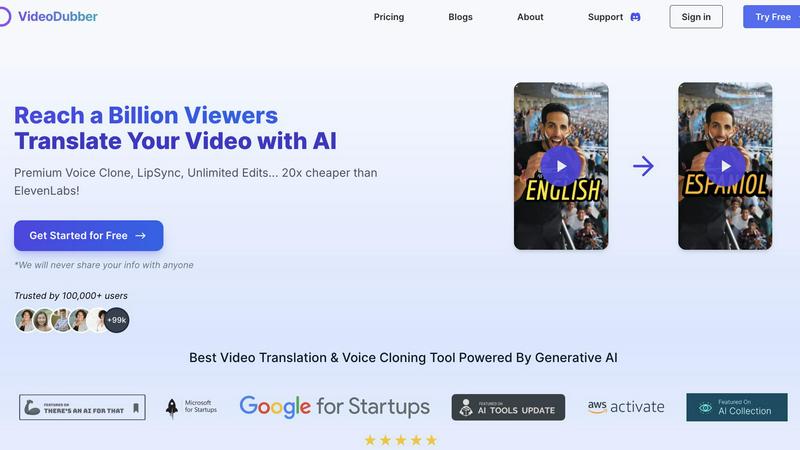
VideoDubber effortlessly translates and dubs your videos into 150+ languages, helping you reach a global audience.
Last updated: March 1, 2026

YouTube to Transcript
Easily extract accurate transcripts from any YouTube video for free, with no account needed and instant results.
Last updated: March 3, 2026
Visual Comparison
VideoDubber Video Translator
YouTube to Transcript

Feature Comparison
VideoDubber Video Translator
Superior Voice Cloning and Dubbing
VideoDubber employs advanced voice cloning technology to deliver natural and engaging voice-overs that resonate with viewers. This feature ensures that the emotional tone and authenticity of the original speaker are preserved, creating a more relatable experience for audiences across different languages.
Simple Yet Powerful 1-click UI
The platform boasts an intuitive interface that allows users to translate an entire video with a single click. For those seeking more control, advanced options are available for editing subtitles and timestamps, making transcription, translation, and dubbing a seamless experience that saves both time and effort.
Unlimited Free Editing and Voice-overs
Unlike many competitors, VideoDubber believes in providing users with the freedom to edit their translated videos without extra costs. Users can make unlimited changes to voice-overs, timestamps, and text, fostering an environment of creativity and collaboration without financial constraints.
DeepSeek, Gemini & GPT-5 Integration
With the integration of state-of-the-art AI models, VideoDubber offers unparalleled translation accuracy and quality. Users can choose between DeepSeek, Gemini, or OpenAI's GPT-5, ensuring that every sentence is accurately transcribed and translated with minimal edits, enhancing the overall quality of video content.
YouTube to Transcript
Completely Free
YouTube to Transcript offers its services entirely free of charge. There are no hidden fees, premium tiers, or subscription costs. Users can access the full range of features without financial commitments, making it an ideal choice for budget-conscious individuals and organizations.
Multi-language Support
This tool excels in providing transcription and translation capabilities in over 125 languages. Users can easily switch to their preferred language, allowing them to access content in a format that is accessible and comprehensible, regardless of the original video's language.
Instant Results
The process to generate transcripts is remarkably swift. After pasting the YouTube video URL and clicking the generate button, users receive their transcripts almost instantly. This efficiency is crucial for those who need to work under tight deadlines or who require immediate access to video content in text form.
Unlimited Usage
There are no restrictions on the number of transcripts users can generate. Whether it is a short video or a lengthy presentation, users can transcribe as many videos as they wish without encountering any limits. This feature is particularly beneficial for researchers and professionals who frequently need to reference multiple video sources.
Use Cases
VideoDubber Video Translator
Marketing Campaigns
Businesses can utilize VideoDubber to translate promotional videos into multiple languages, effectively reaching diverse audiences and maximizing engagement. This capability is essential for global marketing strategies aiming to connect with international customers.
Educational Content Creation
Educators and content creators can use VideoDubber to translate and dub instructional videos, making learning materials accessible to non-native speakers. This feature promotes inclusivity and ensures that valuable educational content reaches a broader audience.
Social Media Engagement
Social media influencers can leverage VideoDubber to create multilingual content that appeals to their followers around the world. By translating and dubbing videos, influencers can enhance viewer engagement and build a more diverse community online.
Corporate Training and Development
Organizations can use VideoDubber to translate training videos for employees in different regions, ensuring consistent learning experiences. This capability is crucial for companies with a global workforce, fostering effective communication and teamwork.
YouTube to Transcript
Content Creation
Content creators can leverage YouTube to Transcript to quickly generate scripts from their video content. This allows them to create blog posts, articles, or social media content based on their video themes without spending hours on transcription.
Academic Research
Students and researchers utilize this tool to transcribe educational videos or lectures from YouTube. This facilitates easier note-taking and helps in studying, as they can review the text while watching the videos.
Accessibility
Individuals with hearing impairments can benefit from the transcripts generated by this tool, improving their access to video content. By providing text versions of spoken content, YouTube to Transcript fosters inclusivity and ensures that everyone can engage with multimedia resources.
Language Learning
Language learners can use transcripts to enhance their education by reading along with videos in their target language. This dual exposure to spoken and written forms helps reinforce vocabulary and comprehension skills.
Overview
About VideoDubber Video Translator
VideoDubber Video Translator is an innovative, AI-driven platform that revolutionizes how video content is created and shared across language barriers. Designed for content creators, businesses, and teams, it enables users to effortlessly translate and dub their videos into over 150 languages. The software takes the complexities of transcription, translation, voice-over generation, and lip-syncing and turns them into a streamlined, collaborative process. By leveraging advanced AI models such as GPT-5, Gemini, and DeepSeek, VideoDubber ensures high-quality translations while preserving the original speaker's tone through cutting-edge voice cloning technology. Its core value proposition lies in the combination of professional-grade output and user-centric flexibility, allowing users to make unlimited free edits, promoting a cooperative environment that fosters creative refinement. Whether you're an individual YouTuber or part of a large marketing team, VideoDubber makes it easy to reach global audiences and enhance viewer engagement.
About YouTube to Transcript
YouTube to Transcript is a user-friendly, web-based tool designed for anyone needing quick and accurate transcripts from YouTube videos. By simply pasting the URL of any video, users can generate high-quality text transcripts in seconds, making it an invaluable resource for content creators, students, researchers, and professionals. This innovative service eliminates the need for lengthy manual transcription, empowering users to focus on their work rather than the tedious task of converting video content into text. Its main value proposition lies in its accessibility and efficiency; it is completely free and requires no registration, allowing users to generate transcripts instantly without any barriers. With support for over 125 languages, YouTube to Transcript caters to a global audience, ensuring that everyone can benefit from this powerful tool.
Frequently Asked Questions
VideoDubber Video Translator FAQ
How does VideoDubber ensure translation accuracy?
VideoDubber utilizes advanced AI models like DeepSeek, Gemini, and GPT-5, which are designed to provide contextual understanding and high accuracy in translations, minimizing the need for extensive edits.
Can I edit my translated video after downloading it?
Yes, VideoDubber allows for unlimited free edits even after downloading your video. You can adjust text, voice-overs, and timestamps as many times as needed without any additional cost.
What types of videos can I translate with VideoDubber?
You can translate a wide variety of videos, including marketing content, educational materials, training videos, and social media posts. The platform supports various formats, making it versatile for different needs.
Is there a limit to the number of languages I can select?
No, VideoDubber allows you to choose multiple target languages for your video translation in one go. You can select as many languages as you need without having to upload the video multiple times.
YouTube to Transcript FAQ
Is YouTube to Transcript free to use?
Yes, YouTube to Transcript is completely free to use with no hidden costs or subscription fees. Users can generate transcripts without any financial commitment.
How do I get a transcript of a YouTube video?
To obtain a transcript, simply copy the URL of the desired YouTube video and paste it into the designated input field on the YouTube to Transcript website. Then, click the generate button to receive your transcript.
How long does it take to generate the transcript?
The generation of transcripts is instant. Users can expect to receive their transcripts within seconds after submitting the video URL, making the process highly efficient.
Can I download the transcript?
Yes, users can easily download the generated transcript as a TXT file. This feature allows for convenient storage and sharing of the content outside of the platform.
Alternatives
VideoDubber Video Translator Alternatives
VideoDubber Video Translator is a cutting-edge, AI-driven platform that specializes in translating and dubbing videos into over 150 languages, catering to creators, businesses, and teams aiming to connect with a global audience. As a member of the AI Assistants category, it offers a unique blend of advanced technology and user-centric features designed to streamline the complexities of multilingual video production. Users often seek alternatives to VideoDubber for various reasons, such as pricing, feature sets, and specific platform compatibility. When exploring alternatives, it's essential to consider factors like translation accuracy, voice quality, ease of use, and support for collaboration. Ultimately, the ideal alternative should align with your content creation needs while maintaining high-quality output and flexibility.
YouTube to Transcript Alternatives
YouTube to Transcript is a unique web-based utility that falls under the Education & Learning and Productivity & Management categories. It empowers users, including content creators, students, and researchers, to extract high-quality transcripts and subtitles from YouTube videos effortlessly. By simply pasting a video URL, users can access valuable text content for various purposes, such as note-taking, content repurposing, or enhancing search engine optimization. Users often seek alternatives to YouTube to Transcript for several reasons. These may include the need for different features, compatibility with various platforms, or even preferences for specific pricing structures. When considering an alternative, it’s essential to evaluate factors such as ease of use, translation capabilities, and the availability of additional functionalities that can enhance the overall user experience.