DocuExtractor vs Dokta
Side-by-side comparison to help you choose the right product.

DocuExtractor
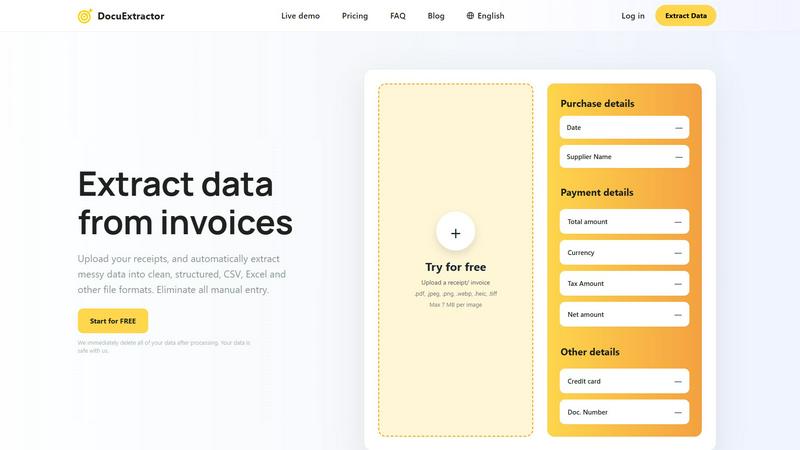
DocuExtractor is your team's AI partner that effortlessly converts receipts and invoices into clean, structured data.
Last updated: February 28, 2026

Dokta is your collaborative partner that automates document management so your team can focus on what matters most.
Last updated: April 4, 2026
Visual Comparison
DocuExtractor
Dokta

Feature Comparison
DocuExtractor
Advanced AI-Powered Extraction
At the core of DocuExtractor is a sophisticated blend of OCR, Deep Learning (DL), and Large Language Models (LLMs). This multi-layered AI technology doesn't just read text; it understands the context of financial documents. It automatically identifies and extracts key fields such as date, supplier name, total amount, tax, and document numbers from a wide variety of file formats including PDF, JPG, PNG, and TIFF, ensuring high accuracy and reducing the need for manual verification.
Batch Processing & Team-Friendly Workspace
DocuExtractor is built for team synergy and high-volume processing. The platform allows users to drag and drop hundreds of documents at once for simultaneous extraction. The centralized work area provides a collaborative hub where team members can manage extraction tasks, view processing history, and monitor credits, enabling seamless cooperation and streamlined workflow management across the entire accounting department.
Multi-Format Export & Preset Templates
To fit seamlessly into your existing workflow, DocuExtractor offers flexible output options. Teams can choose to export their meticulously extracted data directly into CSV or Excel formats, structured and ready for their specific accounting software. The platform also offers convenient presets for common documents like receipts and invoices, allowing for quick, standardized extraction without needing to configure fields each time.
Enterprise-Grade Security & Global Support
Trust and reliability are paramount. DocuExtractor is built with enterprise-ready security, guaranteeing that all uploaded documents are permanently deleted immediately after processing. It supports global operations with automatic language detection for documents in over 45 languages. Combined with expert customer support and specialized algorithms tuned for different document types, it provides a reliable, scalable foundation for businesses of all sizes.
Dokta
Instant AI-Powered Document Analysis
Dokta acts as your first line of defense against manual data entry. Its collaborative AI, powered by Claude from Anthropic, works with you to read, classify, and extract critical information from any uploaded document—be it a photo, scan, or PDF—in less than 60 seconds. It identifies the document type, amounts, due dates, and client or supplier details, presenting the extracted data for your quick validation. This feature creates a seamless teamwork dynamic where the AI handles the heavy lifting, and you remain in control with a simple click.
Automated Invoicing & Quote Lifecycle
This feature streamlines your entire sales and billing cycle through intelligent automation and cooperation. You can create professional invoices and quotes in just a few clicks. For freelancers with day-rate contracts, Dokta enables automatic monthly invoicing. Furthermore, you can send quotes with an online acceptance link, allowing for smooth collaboration with clients, and convert an accepted quote into an invoice with a single click, ensuring a fluid and error-free handoff between proposal and payment request.
Real-Time Cash Flow & Anomaly Detection
Dokta provides a unified, real-time financial dashboard that gives you and your business a clear, collaborative view of your health. See invoiced revenue, collected cash, unpaid amounts, and VAT liabilities at a glance with intuitive 12-month graphs. More importantly, Dokta's AI works protectively for you by detecting potential anomalies like changed IBAN details, duplicate invoices, inconsistent VAT, or missing numbering, safeguarding your documents and finances proactively.
Intelligent Client & Supplier Management
Transform your documents into a dynamic, intelligent network. Dokta automatically builds and enriches your contact database by extracting information from every processed document. It can auto-enrich entities with SIRET details in France, apply payment behavior scoring, and maintain a complete history per client or supplier. This creates a powerful knowledge base that helps you make informed, collaborative decisions about your business relationships and financial planning.
Use Cases
DocuExtractor
Streamlining Accounts Payable
AP teams can collaboratively process stacks of supplier invoices and receipts in minutes instead of hours. By uploading batches of documents, the team automatically extracts vendor details, invoice numbers, dates, and amounts. The resulting clean CSV file can be directly validated and imported into the accounting system, accelerating the payment cycle and improving vendor relationships through timely processing.
Automating Expense Report Reconciliation
Instead of manually deciphering employee-submitted receipt photos, finance teams can use DocuExtractor to automate the entire process. Employees or managers upload receipts, and the software extracts merchant names, dates, and totals. This data populates expense reports automatically, allowing managers and accountants to quickly verify and approve claims, fostering a smoother, more cooperative expense management process.
Accelerating Month-End & Audit Close
During critical closing periods, bookkeepers and accountants are inundated with bank statements and transaction records. DocuExtractor helps the entire finance team work in unison to quickly convert PDF bank statements into structured Excel data. This eliminates manual entry errors, speeds up reconciliation, and provides a clear, auditable trail of extracted data, making the month-end close a coordinated and efficient effort.
Centralizing Document Data for Firms
Accounting firms managing multiple clients benefit from a unified data extraction process. Client documents of varying types and qualities can be uploaded to a single, secure platform. The firm's team can efficiently extract uniform data sets from all clients, ensuring consistency in their bookkeeping services, improving client reporting accuracy, and scaling their service offerings through powerful technological synergy.
Dokta
The Freelance Developer or IT Consultant
For freelancers working on Time & Materials contracts, Dokta becomes an indispensable collaborative partner. It automates the entire invoicing process based on your contracts, generating monthly invoices automatically so you can focus on coding. The platform tracks payments and sends automated, professional reminders for late invoices, ensuring a steady cash flow without awkward conversations, allowing you to collaborate more effectively on projects instead of admin.
The Creative Freelancer or Project-Based Worker
Graphic designers, writers, and other creatives benefit from Dokta's seamless quote-to-cash workflow. You can create a proposal, send it for online client acceptance, and with their collaboration confirmed, convert it to an invoice instantly. This manages the entire project lifecycle from the first quote to the final payment in one cooperative platform, keeping projects organized and financially on track without switching between disjointed tools.
The Auto-Entrepreneur or Micro-Entrepreneur
Solo entrepreneurs needing simplicity and compliance find a perfect ally in Dokta. It ensures invoices are compliant, tracks all incoming payments, and can even send alerts for upcoming URSSAF contribution deadlines in France. This collaborative approach takes the headache out of administrative and tax obligations, providing a straightforward, "no-fuss" system that works reliably in the background of a one-person business.
The Growing Small Business or Startup
For small teams and SMBs, Dokta centralizes document intelligence, fostering internal synergy. It eliminates document silos by providing a single source of truth for all invoices, contracts, and client data. The real-time cash flow dashboard allows the team to make collaborative financial decisions, while automated tasks and reminders ensure nothing falls through the cracks as the business scales, keeping everyone aligned and efficient.
Overview
About DocuExtractor
DocuExtractor is a powerful, AI-driven document converter built to revolutionize how accounting teams and financial professionals handle data. It transforms the tedious, error-prone task of manual data entry into a seamless, automated workflow. By simply uploading messy documents like receipts, invoices, and bank statements, the software leverages advanced Optical Character Recognition (OCR) combined with deep learning and large language models (AI) to extract key information with a remarkable 99.6% accuracy rate. The extracted data is then output into clean, structured formats like CSV and Excel, ready for immediate import into accounting software. Designed with a collaborative team environment in mind, its user-friendly interface and batch processing capabilities allow entire departments to work in synergy, boosting collective productivity. DocuExtractor prioritizes data security, immediately deleting all documents after processing, and scales to meet the needs of individual bookkeepers and large enterprises alike, handling over 500,000 documents monthly. It's more than a tool; it's a partnership in efficiency, empowering teams to achieve more together by eliminating manual bottlenecks and ensuring data integrity.
About Dokta
Dokta is your collaborative AI partner, designed to transform document chaos into streamlined business synergy. It's an intelligent document management platform built for the modern solo professional and small team, including freelancers, consultants, auto-entrepreneurs, and SMBs. By placing AI at the heart of your administrative workflow, Dokta fosters a cooperative relationship between you and your technology, freeing you to focus on your core work. Simply drop any document—like an invoice, quote, or contract—and Dokta's powerful AI engine works alongside you, reading, classifying, and extracting key data in under 60 seconds. It then manages the entire document lifecycle collaboratively: creating professional invoices and quotes, tracking payments, automating polite reminders for unpaid invoices, managing contracts and deadlines, and even generating actionable tasks automatically. This synergy eliminates lost files, missed deadlines, and tedious admin nights. Dokta proactively builds your client database from your documents, provides real-time cash flow visibility, and exports clean data for your accountant, ensuring everyone in your business ecosystem is aligned. Hosted securely in Europe on AWS and fully GDPR compliant, Dokta is the trusted, cooperative foundation for your business's document intelligence.
Frequently Asked Questions
DocuExtractor FAQ
How accurate is DocuExtractor's data extraction?
DocuExtractor achieves a market-leading accuracy rate of 99.6% for financial documents. This high precision is the result of combining specialized Optical Character Recognition (OCR) with advanced Deep Learning and Large Language Model (AI) technologies. These systems are specifically trained on financial documents like invoices and receipts to correctly identify and contextualize key data points, minimizing the need for manual corrections.
Is my document data safe and secure with DocuExtractor?
Absolutely. Your data security is our top priority. We employ enterprise-grade security measures, and our most important promise is that we immediately and permanently delete all of your uploaded documents and extracted data from our servers as soon as the processing is complete and you have downloaded your results. Your information is never stored long-term or used for any other purpose.
What file formats does DocuExtractor support?
DocuExtractor supports a wide range of common document formats to fit your team's needs. You can upload PDF files, as well as image formats including JPG, JPEG, PNG, WebP, HEIC, and TIFF. Each file can be up to 7 MB in size. The extracted data can then be downloaded in structured CSV or Excel (XLSX) formats for easy integration into your accounting software.
Can DocuExtractor process documents in different languages?
Yes, it can. DocuExtractor is designed for global teams and supports over 45 languages with automatic language detection. Whether your invoices are in English, Spanish, French, German, or many other languages, the AI will accurately detect the language and extract the relevant information, making it an ideal tool for international businesses and accounting firms with diverse clients.
Dokta FAQ
How does Dokta's AI analysis work?
When you upload a document (photo, scan, or PDF), Dokta's AI engine, powered by Claude from Anthropic, goes to work collaboratively. It performs OCR (Optical Character Recognition) to read the text and then uses advanced AI models to classify the document type (e.g., invoice, quote) and extract key structured data like amounts, dates, client names, and tax numbers. This entire cooperative process is completed in under 60 seconds, after which you simply review and validate the results.
Is my data secure with Dokta?
Absolutely. Data security and privacy are foundational to our collaborative partnership with you. Dokta is 100% compliant with the GDPR (General Data Protection Regulation). All data is hosted securely on Amazon Web Services (AWS) servers located in Paris, Europe. Furthermore, we use AES-256 encryption to protect your information, ensuring your business documents and client data are handled with the highest standards of security and care.
What happens if I exceed my monthly document limit?
On the free Discovery plan, you receive 15 documents per month. If you reach this limit, you will be prompted to upgrade to a paid plan to continue processing documents. The paid Starter, Freelance, and Pro plans offer higher monthly document allowances (50, 100, and more respectively) to match your business volume, ensuring our collaboration scales with your needs.
Can I try Dokta before committing to a paid plan?
Yes, we encourage you to experience the collaborative benefits of Dokta firsthand. We offer a free Discovery tier that includes 15 documents per month at no cost and does not require a credit card to start. Additionally, our paid plans come with a 14-day free trial period, allowing you and your team to fully explore the features and workflow synergy before any financial commitment.
Alternatives
DocuExtractor Alternatives
DocuExtractor is a specialized productivity tool for financial professionals, designed to automate the conversion of receipts and invoices into structured data. It belongs to the document management and data extraction category, helping teams eliminate tedious manual entry. Users often explore alternatives to find a solution that aligns perfectly with their collaborative workflow, budget, or specific platform requirements. Some may need different integration capabilities, while others prioritize a particular pricing model or a unique set of automation features for their team's synergy. When evaluating other options, it's wise for a team to consider the accuracy of data extraction, supported file formats, and ease of use to ensure seamless adoption. Prioritizing tools that enhance group efficiency and offer reliable batch processing can lead to a more cohesive and productive financial management process.
Dokta Alternatives
Dokta is an AI-powered document management platform designed to automate the document lifecycle for small businesses, freelancers, and solo entrepreneurs. It belongs to the business productivity and financial management software category, helping teams streamline invoicing, contracts, and administrative tasks through intelligent automation. Users often explore alternatives to find a solution that aligns perfectly with their collaborative workflow, budget, or specific feature requirements. This could be due to needing different integration capabilities, a pricing structure that scales with a larger team, or specialized tools for particular industries. The search for the right tool is a natural part of building an efficient, synergistic operational system. When evaluating options, it's wise for a team to consider core needs like AI automation depth, real-time collaboration features, security standards, and how well a platform integrates with existing tools. The goal is to find a partner that enhances team synergy, reduces administrative friction, and grows seamlessly with your collective ambitions.