
Cosy
Cosy automates Slack member onboarding and introductions, fostering engagement while saving you valuable time.
VisitPublished on:
November 13, 2025
Pricing:
About Cosy
Cosy is a pioneering tool designed exclusively for Slack, tailored to meet the needs of community managers who aspire to create vibrant and engaging digital spaces. By automating time-consuming community management tasks, Cosy empowers you to focus on the core elements of community building: nurturing relationships, fostering inclusivity, and enhancing member engagement. Whether you are managing a small team or a large-scale community, Cosy offers essential features that streamline the onboarding process, facilitate member interactions, and highlight the most engaging content. Its user-friendly interface and seamless integration with Slack ensure that community leaders can manage their spaces efficiently while saving precious time and effort. Ideal for community managers, social leaders, and organizations dedicated to cultivating thriving communities, Cosy transforms Slack into a more welcoming and collaborative environment. Experience the ease of community management with Cosy, and watch your Slack workspace thrive as members connect and engage effortlessly.
Features of Cosy
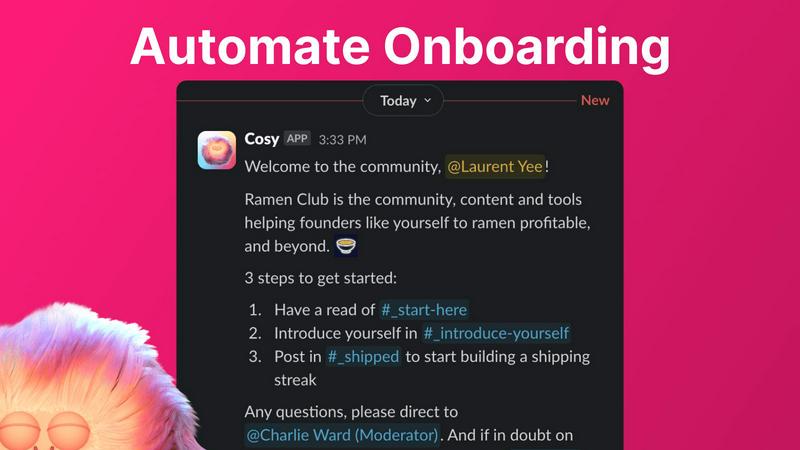
Automate Onboarding
Cosy allows you to create and automate up to 10 distinct onboarding welcome DM sequences for new members. This feature ensures that every new member is greeted with personalized messages, enhancing their initial experience and allowing you to focus on deeper community engagement.
Connect Your Members
With Cosy, you can automatically introduce community members to each other via DMs, fostering connections and engagement. This feature allows you to customize the frequency and content of introductions, making it easier for members to meet and interact with one another regularly.
Member Directory
Cosy provides a searchable member directory within Slack, enabling members to easily find and connect with one another. This feature allows you to customize the fields in profiles, ensuring that members can showcase their skills and interests, facilitating meaningful connections.
Content Highlights
Easily surface the top 10 most engaging posts in your community with Cosy's content highlights feature. This allows you to quickly identify popular discussions and ensure that valuable content is not missed, enhancing overall community engagement and interaction.
Use Cases of Cosy
Streamlined Onboarding
Community managers can use Cosy to automate the onboarding process for new members, ensuring that they feel welcomed and informed from the moment they join. This saves time and ensures consistency in communication, allowing managers to focus on community growth.
Enhanced Member Engagement
By facilitating regular introductions between members, Cosy creates opportunities for networking and deeper engagement. This feature is particularly useful in large communities where members may not easily connect without assistance.
Efficient Member Discovery
Utilizing the member directory, community members can quickly find others with similar interests or expertise, fostering collaboration and knowledge sharing. This feature enhances the sense of belonging and community within the Slack workspace.
Content Management and Promotion
With the content highlights feature, community managers can easily track the most engaging posts and discussions. This enables them to promote valuable content, ensuring that members remain informed and engaged with the community's activities.
Frequently Asked Questions
How does Cosy automate onboarding?
Cosy automates the onboarding process by sending personalized welcome DMs to new members as soon as they join. You can customize these messages and set time delays for when they are sent, ensuring a tailored experience for each newcomer.
Can I customize the member introductions?
Yes, you can customize the frequency and content of member introductions through Cosy. This allows you to control how often members are introduced to one another, enhancing networking opportunities based on your community's needs.
Is there a limit to the number of members I can onboard?
Cosy allows you to onboard up to 250 members for free. For larger communities, there is a 30-day trial available that supports unlimited members, giving you ample opportunity to explore its capabilities.
How do members access the directory?
Members can access the directory by using the Cosy app within Slack or by typing the /member-directory command in any public channel. This makes it easy for them to find and connect with others without disrupting their workflow.
Explore more in this category:
Similar to Cosy


Toolvero
Free Online Tools Built With Privacy in Mind
Kody Tools
Free collection of online developer utilities, code formatters, and digital converters designed to streamline your daily workflow.
tallycounterweb.com
Online tally counter for tracking attendance, workouts, inventory, sports scores, visitors, habits, and everyday counting tasks.
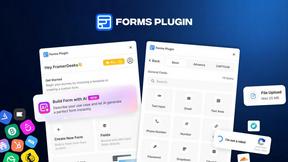
Forms Plugin
The #1 Native Form Builder Plugin for Framer - No Code, No Embeds, No External Platforms.
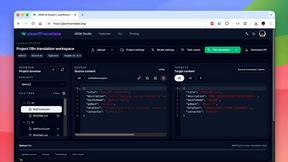
JsonTranslate
JsonTranslate translates JSON, Markdown, and TXT files while preserving keys and project structure for multilingual i18n workflows.

Motion Control AI
Create reference-driven character videos by transferring motion, timing, gestures, and camera rhythm from a video to an image.