Cosy vs Playwriter
Side-by-side comparison to help you choose the right product.

Cosy automates Slack member onboarding and introductions, fostering engagement while saving you valuable time.
Last updated: February 28, 2026

Playwriter
Playwriter empowers your team to control Chrome seamlessly with AI, leveraging your existing sessions for enhanced collaboration and efficiency.
Last updated: March 18, 2026
Visual Comparison
Cosy
Playwriter

Feature Comparison
Cosy
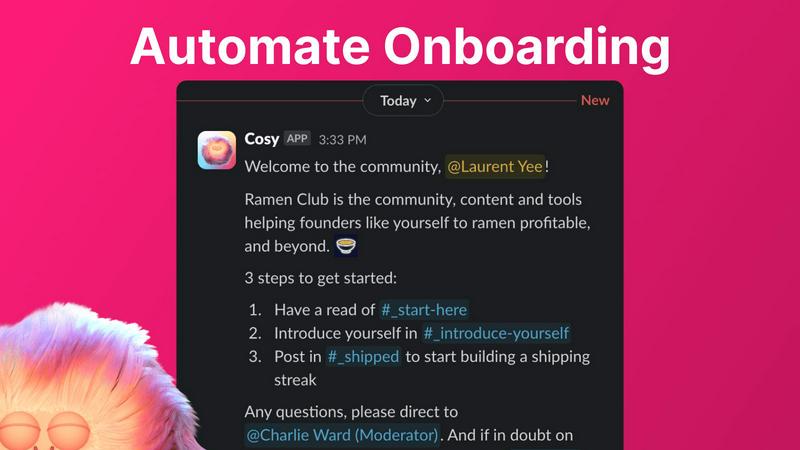
Automate Onboarding
Cosy allows you to create and automate up to 10 distinct onboarding welcome DM sequences for new members. This feature ensures that every new member is greeted with personalized messages, enhancing their initial experience and allowing you to focus on deeper community engagement.
Connect Your Members
With Cosy, you can automatically introduce community members to each other via DMs, fostering connections and engagement. This feature allows you to customize the frequency and content of introductions, making it easier for members to meet and interact with one another regularly.
Member Directory
Cosy provides a searchable member directory within Slack, enabling members to easily find and connect with one another. This feature allows you to customize the fields in profiles, ensuring that members can showcase their skills and interests, facilitating meaningful connections.
Content Highlights
Easily surface the top 10 most engaging posts in your community with Cosy's content highlights feature. This allows you to quickly identify popular discussions and ensure that valuable content is not missed, enhancing overall community engagement and interaction.
Playwriter
Real Browser Session Access
Playwriter allows AI agents to access your existing Chrome session, including all extensions, logins, and cookies. This eliminates the issues of bot detection and memory overhead associated with headless browsers, making your automation efforts more effective and efficient.
Comprehensive Automation API
With Playwriter, you gain access to the full Playwright API through a single execute tool. This means that agents can run any Playwright code without the need for wrappers or multiple tool definitions, streamlining your automation workflow.
Collaboration in Real Time
The unique collaboration feature of Playwriter allows you to see everything the agent does in real time. When challenges arise, such as captchas or consent walls, you can intervene directly, ensuring seamless cooperation and effective problem-solving.
Debugging and Live Editing
Playwriter includes a powerful debugger with breakpoints and live code editing capabilities. This feature enables developers to test and adjust their automation scripts on the fly, optimizing performance and enhancing the overall user experience.
Use Cases
Cosy
Streamlined Onboarding
Community managers can use Cosy to automate the onboarding process for new members, ensuring that they feel welcomed and informed from the moment they join. This saves time and ensures consistency in communication, allowing managers to focus on community growth.
Enhanced Member Engagement
By facilitating regular introductions between members, Cosy creates opportunities for networking and deeper engagement. This feature is particularly useful in large communities where members may not easily connect without assistance.
Efficient Member Discovery
Utilizing the member directory, community members can quickly find others with similar interests or expertise, fostering collaboration and knowledge sharing. This feature enhances the sense of belonging and community within the Slack workspace.
Content Management and Promotion
With the content highlights feature, community managers can easily track the most engaging posts and discussions. This enables them to promote valuable content, ensuring that members remain informed and engaged with the community's activities.
Playwriter
Web Testing
Playwriter is ideal for web developers and testers who need to automate the testing of web applications. By leveraging the full browser session, they can ensure that tests are run in a realistic environment, leading to more accurate results.
Data Scraping
Data analysts can utilize Playwriter to automate data collection from websites. With access to real browser sessions, they can navigate websites that require logins and avoid common scraping pitfalls like bot detection.
User Experience Research
Researchers can use Playwriter to simulate user interactions on their websites. By collaborating in real time with AI agents, they can gather insights into user behavior and identify areas for improvement.
Content Management
Content managers can automate repetitive tasks, such as posting updates or managing content on various platforms. With Playwriter, they can ensure that automation is done in an authenticated session, preserving the integrity of content management processes.
Overview
About Cosy
Cosy is a pioneering tool designed exclusively for Slack, tailored to meet the needs of community managers who aspire to create vibrant and engaging digital spaces. By automating time-consuming community management tasks, Cosy empowers you to focus on the core elements of community building: nurturing relationships, fostering inclusivity, and enhancing member engagement. Whether you are managing a small team or a large-scale community, Cosy offers essential features that streamline the onboarding process, facilitate member interactions, and highlight the most engaging content. Its user-friendly interface and seamless integration with Slack ensure that community leaders can manage their spaces efficiently while saving precious time and effort. Ideal for community managers, social leaders, and organizations dedicated to cultivating thriving communities, Cosy transforms Slack into a more welcoming and collaborative environment. Experience the ease of community management with Cosy, and watch your Slack workspace thrive as members connect and engage effortlessly.
About Playwriter
Playwriter is a groundbreaking tool that empowers AI agents to operate within your actual browser environment. Unlike traditional solutions that rely on fresh browser instances or limited toolsets, Playwriter connects directly to your existing Chrome session, complete with your logins, cookies, and extensions. This innovative Chrome extension and CLI allow agents to execute Playwright scripts seamlessly, enabling real-time collaboration between human users and AI. It is particularly valuable for developers, testers, and anyone who requires automated web interactions without the hassle of bot detection or session restrictions. By providing a robust API and eliminating unnecessary memory overhead, Playwriter enhances productivity and fosters synergy between human oversight and automated processes.
Frequently Asked Questions
Cosy FAQ
How does Cosy automate onboarding?
Cosy automates the onboarding process by sending personalized welcome DMs to new members as soon as they join. You can customize these messages and set time delays for when they are sent, ensuring a tailored experience for each newcomer.
Can I customize the member introductions?
Yes, you can customize the frequency and content of member introductions through Cosy. This allows you to control how often members are introduced to one another, enhancing networking opportunities based on your community's needs.
Is there a limit to the number of members I can onboard?
Cosy allows you to onboard up to 250 members for free. For larger communities, there is a 30-day trial available that supports unlimited members, giving you ample opportunity to explore its capabilities.
How do members access the directory?
Members can access the directory by using the Cosy app within Slack or by typing the /member-directory command in any public channel. This makes it easy for them to find and connect with others without disrupting their workflow.
Playwriter FAQ
How does Playwriter enhance browser automation?
Playwriter enhances browser automation by allowing agents to operate within your actual Chrome session. This includes access to all your logged-in accounts and extensions, which reduces bot detection and improves automation reliability.
Is Playwriter suitable for team collaboration?
Yes, Playwriter is designed for real-time collaboration. You can see what the agent is doing as it works, allowing you to intervene when necessary, such as solving captchas or addressing any issues that arise during automation.
What platforms does Playwriter support?
Playwriter supports various MCP clients, including Cursor, Claude, VS Code, and more. This versatility allows users to integrate Playwriter into their existing workflows with ease.
Is Playwriter open source?
Yes, Playwriter is open source and is licensed under the MIT license. This allows developers to contribute to its development and customize it according to their needs.
Alternatives
Cosy Alternatives
Cosy is a powerful tool specifically designed to enhance Slack communities through automated onboarding and member introductions. It falls into the productivity and management category, offering features that enable community managers to create engaging and connected environments. Users often seek alternatives to Cosy for various reasons, such as budget constraints, specific feature requirements, or compatibility with other platforms. When selecting an alternative, it's crucial to evaluate the ease of use, integration capabilities, and overall value provided by the tool to ensure it aligns with your community's unique needs.
Playwriter Alternatives
Playwriter is an innovative tool that allows users to control Chrome through AI via command line interface (CLI) or multi-channel protocol (MCP). It falls under the automation category, providing a seamless experience by granting AI agents access to the user's actual browser session, complete with existing logins and extensions. This capability sets Playwriter apart from other solutions that often struggle with web browsing due to restrictions in access or functionality. Users often seek alternatives to Playwriter for various reasons, including pricing considerations, specific feature requirements, or compatibility with different platforms. When evaluating alternatives, it is essential to look for features that enhance usability, such as automation capabilities, ease of integration, performance efficiency, and the level of support offered. Ensuring that the alternative aligns with team collaboration and project goals is crucial for achieving optimal results.