Tool.Video vs Veo 4 AI
Side-by-side comparison to help you choose the right product.

Tool.Video
Tool.Video empowers your team to create stunning videos, music, and images effortlessly with our all-in-one AI toolkit.
Last updated: March 1, 2026

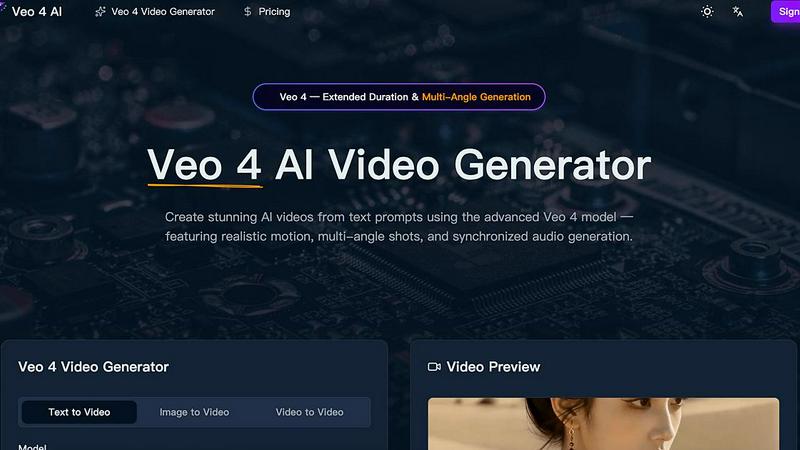
Veo 4 AI transforms text prompts into stunning, multi-angle videos with realistic motion and synchronized audio, enhancing your creative projects.
Last updated: March 26, 2026
Visual Comparison
Tool.Video

Veo 4 AI
Feature Comparison
Tool.Video
Sora 2 Video Generation
Sora 2 is an advanced text-to-video AI model that allows users to create stunning and realistic videos directly from text prompts. Its ability to produce natural motion and captivating visuals makes it an invaluable asset for any content creator seeking to bring their ideas to life.
Nano Banana Pro
This feature provides high-quality AI image generation through both text-to-image and image-to-image modes. Users can generate visually striking images in mere seconds, enabling them to create unique and engaging content that captures their audience's attention effectively.
AI Music Generation with Suno 5
Suno 5 is a professional-grade AI music generation tool that allows users to compose songs complete with lyrics, melodies, and full arrangements in any desired genre. This feature adds a rich audio dimension to videos, enhancing overall engagement and appeal.
Video Thumbnail Generator
The video thumbnail generator automates the process of creating compelling thumbnails designed to boost engagement and click-through rates. By extracting and generating images from videos at any timestamp, it ensures that content stands out in crowded feeds.
Veo 4 AI
Text to Video Generation
Veo 4 AI enables users to convert natural language descriptions into high-fidelity videos. This advanced feature ensures that videos maintain realistic lighting, physics, and human motion, bringing text prompts to life with remarkable detail.
Multi-Angle Camera Generation
With this innovative feature, users can generate the same scene from multiple camera angles simultaneously, including front, side, overhead, and behind views. This provides a comprehensive visual experience and enhances creative storytelling.
Synchronized Audio and Voice Generation
Veo 4 produces synchronized dialogue, sound effects, and ambient audio that match the video perfectly. This feature includes multilingual lip-sync capabilities, allowing creators to reach broader audiences through diverse language options.
Extended Video Duration
This feature allows users to generate longer video clips while maintaining consistent quality throughout. It enables filmmakers and marketers to create more extensive narratives and engage their audience over a more extended period.
Use Cases
Tool.Video
Collaborative Video Production
Tool.Video is perfect for teams working together on video projects. By allowing multiple users to contribute ideas, generate assets, and edit content within a single platform, it streamlines the collaborative process and enhances creativity.
Marketing Campaigns
Marketers can leverage Tool.Video to create captivating advertisements and promotional videos quickly. The integration of AI tools for video, image, and music generation allows for the rapid production of high-quality marketing materials that resonate with target audiences.
Educational Content Creation
Educators and instructional designers can utilize Tool.Video to develop engaging video lessons and tutorials. With the ability to generate visuals and audio to complement educational content, the platform promotes a more interactive and effective learning experience.
Social Media Content Strategy
Social media managers can take advantage of Tool.Video's capabilities to create eye-catching videos, images, and music tracks tailored to their brand's voice. This comprehensive toolkit supports the rapid production of diverse content types, making it easier to maintain a consistent posting schedule.
Veo 4 AI
Social Media Content Creation
Content creators can leverage Veo 4 AI to generate captivating videos for platforms like Instagram, TikTok, and YouTube. The ability to create stunning visuals quickly helps maintain an active online presence.
Marketing Campaigns
Businesses can utilize Veo 4 to create visually appealing promotional videos that communicate their brand message effectively. The platform's advanced capabilities ensure that marketing materials stand out in a crowded digital space.
Educational Videos
Educators and trainers can use Veo 4 to develop engaging instructional videos that enhance learning experiences. The combination of visuals and synchronized audio makes complex topics more accessible and interesting.
Entertainment and Film Production
Filmmakers can harness Veo 4's cinematic features to create high-quality video content for short films, trailers, or even full-length productions. The platform's capabilities facilitate the exploration of new storytelling techniques and visual styles.
Overview
About Tool.Video
Tool.Video is a groundbreaking collaborative platform designed to unify the often fragmented process of AI content creation. Targeting creators, marketers, and developers alike, it offers an all-in-one solution that integrates a powerful suite of industry-leading AI models and essential video utilities. With features like Sora 2 for text-to-video generation, Nano Banana Pro for image creation, and Suno 5 for music composition, Tool.Video empowers users to efficiently navigate the entire creative workflow—from initial concept development to final output. The platform's main value proposition lies in its ability to eliminate the need for multiple disparate services, fostering a cooperative environment where video, image, and audio generation are seamlessly intertwined. Whether you are storyboarding an idea, generating realistic videos, scoring with custom soundtracks, or designing eye-catching thumbnails, Tool.Video provides all the necessary tools within a cohesive framework, enabling both teams and individuals to produce professional-quality, AI-driven content with remarkable efficiency.
About Veo 4 AI
Veo 4 AI is a revolutionary video generation platform harnessing the power of artificial intelligence to transform simple text prompts into high-quality, professional videos. Designed for content creators, marketers, and businesses of all sizes, Veo 4 offers an intuitive interface that allows users to generate engaging video content quickly and efficiently. The platform boasts advanced features such as realistic motion, seamless transitions, and cinematic visual effects, ensuring that every video produced is visually stunning. With Veo 4, users can create videos suited for various applications, including social media posts, marketing campaigns, and creative projects, all without needing extensive video editing expertise. By simplifying the video creation process, Veo 4 empowers users to focus on their creative vision while the AI handles the technical complexities.
Frequently Asked Questions
Tool.Video FAQ
What types of content can be created with Tool.Video?
Tool.Video allows users to create a wide variety of content, including videos, images, music tracks, and thumbnails, all within a single unified platform. This versatility supports diverse creative projects.
Is Tool.Video suitable for beginners?
Yes, Tool.Video is designed to be user-friendly, making it accessible for beginners while also being powerful enough for experienced creators. Its intuitive interface simplifies the process of content creation.
Can I collaborate with my team on projects?
Absolutely! Tool.Video promotes collaboration by allowing multiple users to work on projects simultaneously. This feature enhances teamwork and fosters a creative environment.
Are there any limitations to the AI tools provided?
While Tool.Video offers a robust suite of AI tools, the effectiveness of the generated content can vary based on the complexity of the prompts and the quality of the input provided by users. Experimentation may be required to achieve desired results.
Veo 4 AI FAQ
What types of videos can I create with Veo 4 AI?
Veo 4 AI allows users to create a variety of video formats, including promotional videos, educational content, social media clips, and cinematic productions, all from text or image inputs.
Is there a learning curve associated with using Veo 4 AI?
No, Veo 4 is designed with an intuitive interface that simplifies the video creation process. Users do not need extensive video editing skills to produce high-quality videos.
Can I customize the output of the videos generated by Veo 4 AI?
Yes, Veo 4 offers extensive customization options, including multi-angle shots, audio synchronization, and the ability to specify cinematography details, allowing for tailored video outputs.
How does Veo 4 AI handle audio generation?
Veo 4 generates dialogue, ambient sound, and sound effects that are synchronized with the visual output. This ensures a seamless viewing experience, with lip-sync capabilities for multiple languages.
Alternatives
Tool.Video Alternatives
Tool.Video is a comprehensive, all-in-one platform that falls under the category of AI content creation, specifically tailored for video, music, and image generation. This innovative toolkit unites various advanced AI models and essential utilities, enabling teams to collaborate effectively in a seamless environment. Users often seek alternatives to Tool.Video due to factors such as pricing, specific feature requirements, or the need for compatibility with different platforms. When searching for an alternative, it is crucial to evaluate the features that align with your creative workflow, the cost-effectiveness of the solution, and the overall user experience. Look for platforms that offer a cohesive toolkit, facilitating collaboration among team members while ensuring access to high-quality AI models for video, audio, and image generation.
Veo 4 AI Alternatives
Veo 4 AI is an innovative video generation platform that utilizes advanced artificial intelligence to convert text prompts into high-quality videos. This platform belongs to the video category and is designed to cater to content creators, marketers, and businesses looking to enhance their visual storytelling capabilities. Users often seek alternatives due to various factors, including pricing, feature sets, and specific platform requirements that may better align with their needs. When searching for alternatives to Veo 4 AI, it’s essential to consider several key aspects. Look for options that offer similar quality in video production, user-friendly interfaces, and features that support your specific content goals. Additionally, evaluate the pricing models and ensure they fit your budget while providing the necessary functionality for your projects.