RocketShare vs TinyFast
Side-by-side comparison to help you choose the right product.

RocketShare
RocketShare enables private file sharing with zero-knowledge encryption, ensuring your data remains confidential and.
Last updated: March 4, 2026

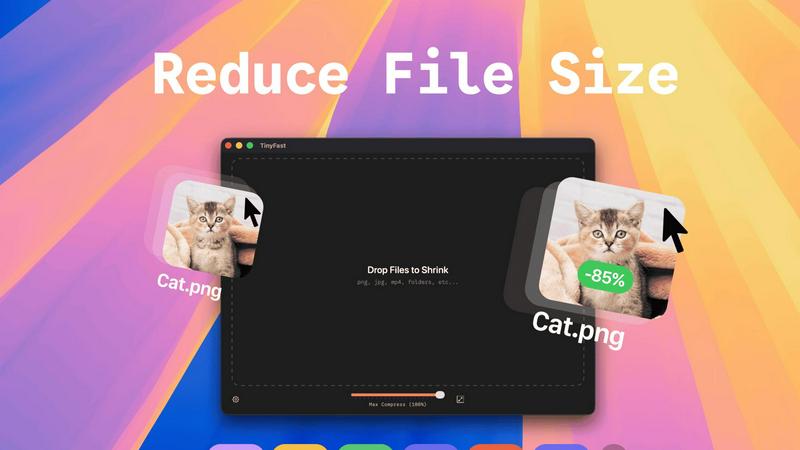
TinyFast is your team's local Mac tool for fast, private file compression without uploads.
Last updated: February 28, 2026
Visual Comparison
RocketShare

TinyFast
Feature Comparison
RocketShare
Zero-Knowledge Encryption
RocketShare employs zero-knowledge encryption, meaning files are encrypted on your device before they are uploaded. This guarantees that no unauthorized party, including RocketShare, can access your files, ensuring maximum privacy.
Flexible Sharing Options
With both cloud-based and local peer-to-peer sharing options, RocketShare allows users to choose how they wish to send their files. This flexibility makes it easy to collaborate with others regardless of their location or technical setup.
Secure EU Data Storage
All files shared through RocketShare are stored securely within the EU, adhering to stringent data protection regulations. This geographical consideration ensures compliance with GDPR, providing users with peace of mind regarding their data security.
User-Friendly Interface
RocketShare features an intuitive interface that simplifies the file-sharing process. Users can easily drag and drop files to upload or click to browse, making it accessible for both tech-savvy individuals and those less familiar with digital tools.
TinyFast
100% Local & Private Processing
Your team's confidentiality is paramount. TinyFast operates entirely on your local machine, ensuring that files—whether they're unreleased designs, legal documents, or proprietary code—never leave your Mac. This local-first approach, built on a foundation of mutual trust and security, means no uploads to unknown cloud servers, eliminating data breach risks and perfectly aligning with strict privacy policies or NDAs for seamless and secure collaboration.
Blazing-Fast Drag & Drop Compression
Experience a frictionless workflow designed for team efficiency. Simply drag and drop any file or even entire folders directly into the TinyFast window. The application uses optimized native engines to process and shrink your files in seconds, not minutes. This instant, local compression saves your team hours every week by removing the tedious wait times associated with uploading to and downloading from online services.
Universal File Type Support
TinyFast is your team's universal compression toolkit, fostering cooperation across different project types. It supports a wide array of common file formats, including images (PNG, JPG, WEBP, SVG), videos (MP4, MOV), documents (PDF, DOCX), code files (JS, CSS, JSON), and audio (MP3). This versatility means everyone, from marketing to development, can use the same trusted tool, streamlining your team's asset optimization process.
Batch Processing & Resolution Control
Empower your team to handle large volumes of work with ease. TinyFast allows for batch compression of entire folders, delivering optimized outputs in one go—a perfect synergy for project handoffs or preparing multiple assets for publication. Additionally, for images and videos, you can collaboratively decide and set automatic resolution resizing, ensuring files are perfectly tailored for their intended use, from web pages to client presentations.
Use Cases
RocketShare
Legal Document Sharing
Lawyers can utilize RocketShare to send sensitive legal documents to clients and colleagues with confidence. The zero-knowledge encryption ensures that private information remains secure throughout the sharing process.
Creative Collaboration
Photographers and videographers can deliver large client galleries or project files without worrying about data breaches. RocketShare allows creative professionals to share their work securely, maintaining the integrity of their intellectual property.
Healthcare Data Transfer
Healthcare professionals can share patient records and sensitive information securely with colleagues, ensuring compliance with healthcare regulations while facilitating collaboration on patient care.
Marketing Agency Projects
Marketing agencies can collaborate on confidential campaigns by sharing files securely among team members and clients. RocketShare provides a safe environment for exchanging creative assets and strategic documents.
TinyFast
Preparing Design Assets for Developer Handoff
Design teams can efficiently compress and batch-export high-fidelity mockups, icons, and images directly on their Macs. By using TinyFast, they ensure all assets are optimized for web performance before handing them off to the development team, maintaining visual quality while enabling faster site load times and a smoother, more cooperative workflow between departments.
Securely Sharing Confidential Client Documents
Legal, financial, or consulting professionals often need to share large PDF reports or presentations containing sensitive data. TinyFast allows them to compress these documents locally to a manageable email size without ever risking client confidentiality by uploading files to a third-party server, fostering a relationship built on trust and security.
Optimizing Media for Web and Social Content
Content creators and marketing teams can quickly prepare dozens of images and videos for blogs, social media, or website updates. The batch processing feature saves immense time, and the local operation means unpublished campaign materials stay secure until the moment they are ready for public release, supporting a cohesive and efficient content pipeline.
Managing Application and Project File Sizes
Developers and project managers can reduce the size of project repositories by compressing documentation, code bundles (like minified JS/CSS), and screenshot libraries directly on their machines. This keeps shared drives and version control systems lean, facilitates quicker backups and transfers, and promotes a more organized and efficient collaborative coding environment.
Overview
About RocketShare
RocketShare is a secure file-sharing platform that prioritizes your privacy above all else. Designed for both individuals and businesses, it enables users to send files of any size while ensuring that the content remains completely inaccessible to anyone, including RocketShare itself. This is achieved through a zero-knowledge encryption model, which means that your files are encrypted on your own device before they ever reach the internet. The encryption key, often embedded in the share link, ensures that only you can decrypt the files. RocketShare offers enterprise-grade security in an easy-to-use, self-serve package. Whether you are a lawyer sharing sensitive case documents, a photographer delivering client galleries, or a team working on confidential projects, RocketShare is built to protect your intellectual property and private data. With options for both cloud-based and local peer-to-peer sharing, and all data stored securely in the EU, RocketShare is the ideal solution for anyone who values simplicity without sacrificing top-tier security.
About TinyFast
TinyFast is a powerful and intuitive macOS application built for teams and individuals who prioritize speed, security, and seamless collaboration in their digital workflows. It serves as your dedicated, local file compression partner, enabling you to shrink images, videos, and documents directly on your Mac. By eliminating the need to upload sensitive files to external servers, TinyFast ensures your confidential assets and collaborative projects remain private and secure. It's designed for creators, developers, designers, and professionals who need to optimize files for sharing, storage, or web use without compromising on quality or waiting for slow online tools. The core value proposition is a synergy of unmatched privacy, blazing-fast local processing, and an incredibly simple drag-and-drop interface that integrates effortlessly into any team's workflow, making file optimization a quick and secure step rather than a bottleneck.
Frequently Asked Questions
RocketShare FAQ
How does RocketShare ensure my files are secure?
RocketShare uses zero-knowledge encryption, meaning your files are encrypted on your device before they are uploaded, ensuring that no one else can access them.
Can I share large files with RocketShare?
Yes, RocketShare allows users to send files of any size, making it easy to share large documents, videos, and other media without limitations.
Where is my data stored when using RocketShare?
All data shared through RocketShare is stored securely in the EU, complying with GDPR regulations to ensure your information is protected.
Do I need a credit card to use RocketShare?
No, there is no credit card required to start using RocketShare, making it accessible for individuals and businesses looking to secure their file-sharing process.
TinyFast FAQ
Is my data really kept private?
Absolutely. TinyFast is built on a principle of collaborative trust and security. All compression happens locally on your Mac using its own processing power. Your files are never uploaded to the internet, sent to our servers, or seen by anyone else. This local-only approach guarantees total privacy for your work and your team's confidential assets.
What file types does TinyFast support?
TinyFast supports a wide range of common file types to serve diverse team needs. This includes images (PNG, JPG, TIFF, HEIC, WEBP, GIF, BMP, SVG), videos (MP4, MOV, M4V), documents (PDF, DOCX), code files (JS, CSS, JSON), and audio (MP3). This universal support makes it a versatile tool for entire teams across different functions.
How does the free version work?
The free version of TinyFast allows you and your team to fully experience the application's core features, including local privacy and drag-and-drop simplicity. It permits compressing up to 5 files per day, which is ideal for testing its integration into your workflow or for occasional use. For unlimited daily compressions and full collaborative potential, a one-time or subscription plan is available.
Can I compress multiple files at once?
Yes, you can! TinyFast is designed for team efficiency and supports batch processing. You can drag and drop an entire folder containing multiple files into the app. It will compress all supported files within that folder in one go, saving your team significant time and streamlining the process of preparing large sets of assets for any project.
Alternatives
RocketShare Alternatives
RocketShare is a secure file-sharing platform that prioritizes user privacy through its robust encryption model. It allows individuals and businesses to share files of any size with the assurance that only the sender and recipient can access the content, making it an ideal solution for sensitive data transmission. Users often seek alternatives to RocketShare for various reasons, such as pricing structures, feature sets, or specific platform compatibility needs. When exploring alternatives, it's important to consider factors like security measures, user experience, and integration capabilities with existing workflows to ensure a seamless transition and continued protection of sensitive information.
TinyFast Alternatives
TinyFast is a powerful macOS application in the tech tools category, designed for local, private compression of images, videos, and PDFs. It stands out by keeping all your files securely on your device, eliminating the need for potentially risky cloud uploads. Users often explore other options for various reasons. Some may need a solution for a different operating system like Windows, while others might seek a different pricing model or require a specific feature that aligns with their unique workflow. It's a natural part of finding the perfect tool for your team's collaborative needs. When evaluating other tools, consider your group's core priorities. Key factors often include the platform compatibility, the balance of compression speed and quality, the overall cost for your team, and, crucially, the privacy policy regarding where your files are processed. Finding a tool that fosters synergy in your workflow is essential.