Changeflow vs TinyFast
Side-by-side comparison to help you choose the right product.

Changeflow
Changeflow uses AI to track and summarize the competitor changes that matter to your team.
Last updated: March 4, 2026

TinyFast is your team's local Mac tool for fast, private file compression without uploads.
Last updated: February 28, 2026
Visual Comparison
Changeflow

TinyFast
Feature Comparison
Changeflow
AI-Powered Change Intelligence
Our core AI doesn't just detect that a page changed; it reads and comprehends the content to determine relevance. By understanding the context of your specific monitoring goals, it filters out irrelevant updates and false positives. This ensures your team receives clear, concise summaries of only the changes that impact your work, eliminating noise and saving valuable time that can be better spent on collaborative analysis and decision-making.
Natural Language Setup & Smart Link Following
Setting up monitoring is a collaborative breeze. Simply describe what you want to track in plain English—no technical skills or RSS feed configuration required. Furthermore, Changeflow can intelligently follow links from a designated page, read the target content, and determine if new links or pages are relevant to your needs. This turns a single source page into a dynamic, self-updating feed of intelligence, allowing your team to discover and track new information sources automatically.
Enterprise-Grade Team Workspaces
Changeflow is built for team synergy. Shared workspaces centralize all your monitored pages, updates, and insights in one place, ensuring every team member is on the same page. Features like centralized user administration, role-based access, and collaborative feeds streamline workflows. This fosters a cooperative environment where intelligence is easily shared, discussed, and acted upon, enhancing collective productivity.
Site Version Control & Forensic Analysis
Go beyond notifications with our interactive Site Version Control. Every change is captured in a timestamped archive, allowing your team to navigate through a page's history like a time machine. The forensic change viewer highlights exactly what was added, removed, or modified. This provides a single source of truth for audits, compliance verification, and deep-dive analysis, enabling teams to collaborate on understanding the full story behind any update.
TinyFast
100% Local & Private Processing
Your team's confidentiality is paramount. TinyFast operates entirely on your local machine, ensuring that files—whether they're unreleased designs, legal documents, or proprietary code—never leave your Mac. This local-first approach, built on a foundation of mutual trust and security, means no uploads to unknown cloud servers, eliminating data breach risks and perfectly aligning with strict privacy policies or NDAs for seamless and secure collaboration.
Blazing-Fast Drag & Drop Compression
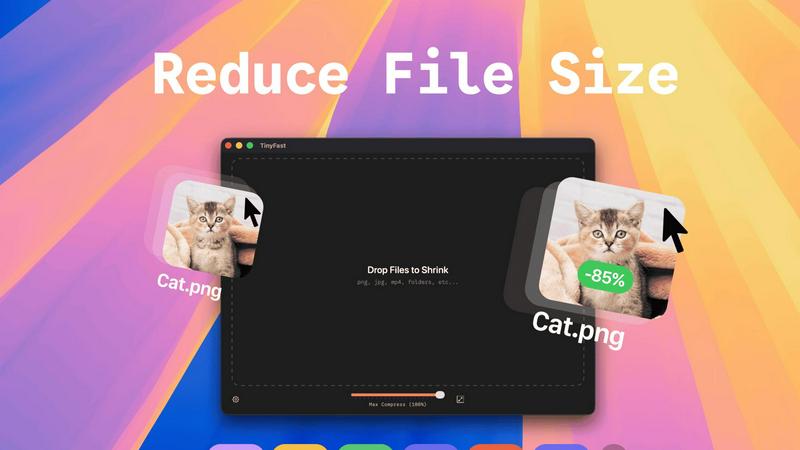
Experience a frictionless workflow designed for team efficiency. Simply drag and drop any file or even entire folders directly into the TinyFast window. The application uses optimized native engines to process and shrink your files in seconds, not minutes. This instant, local compression saves your team hours every week by removing the tedious wait times associated with uploading to and downloading from online services.
Universal File Type Support
TinyFast is your team's universal compression toolkit, fostering cooperation across different project types. It supports a wide array of common file formats, including images (PNG, JPG, WEBP, SVG), videos (MP4, MOV), documents (PDF, DOCX), code files (JS, CSS, JSON), and audio (MP3). This versatility means everyone, from marketing to development, can use the same trusted tool, streamlining your team's asset optimization process.
Batch Processing & Resolution Control
Empower your team to handle large volumes of work with ease. TinyFast allows for batch compression of entire folders, delivering optimized outputs in one go—a perfect synergy for project handoffs or preparing multiple assets for publication. Additionally, for images and videos, you can collaboratively decide and set automatic resolution resizing, ensuring files are perfectly tailored for their intended use, from web pages to client presentations.
Use Cases
Changeflow
Competitive & Pricing Intelligence
Teams can work together to monitor competitor websites, product catalogs, and pricing pages. Changeflow's AI identifies and summarizes critical changes like price adjustments, new product launches, or promotional campaigns. This shared intelligence allows sales, marketing, and strategy teams to collaboratively develop timely and informed responses, maintaining a competitive edge in fast-moving markets.
Legal & Regulatory Compliance Monitoring
Legal librarians and compliance officers at top firms use Changeflow to collaboratively track court dockets, regulatory bodies (like the SEC or FDA), and legal publications. The platform ensures no critical filing, guidance update, or case citation is missed. Teams can efficiently distribute this intelligence, ensuring collective adherence to regulations and enabling proactive legal strategy.
News & Brand Mention Tracking
Marketing and PR teams can synergize their efforts by monitoring for brand mentions, industry news, and media coverage across thousands of sources. Changeflow filters out irrelevant noise and delivers summarized updates on relevant articles or posts. This allows the team to quickly rally around opportunities for engagement or manage public relations matters cohesively and swiftly.
Market & Supply Chain Intelligence
Teams responsible for market research or supply chain management can track vendor sites, commodity prices, and industry reports. By getting AI-summarized updates on tariffs, material availability, or market movements, procurement, logistics, and planning teams can collaborate effectively to mitigate risks, seize opportunities, and ensure operational continuity.
TinyFast
Preparing Design Assets for Developer Handoff
Design teams can efficiently compress and batch-export high-fidelity mockups, icons, and images directly on their Macs. By using TinyFast, they ensure all assets are optimized for web performance before handing them off to the development team, maintaining visual quality while enabling faster site load times and a smoother, more cooperative workflow between departments.
Securely Sharing Confidential Client Documents
Legal, financial, or consulting professionals often need to share large PDF reports or presentations containing sensitive data. TinyFast allows them to compress these documents locally to a manageable email size without ever risking client confidentiality by uploading files to a third-party server, fostering a relationship built on trust and security.
Optimizing Media for Web and Social Content
Content creators and marketing teams can quickly prepare dozens of images and videos for blogs, social media, or website updates. The batch processing feature saves immense time, and the local operation means unpublished campaign materials stay secure until the moment they are ready for public release, supporting a cohesive and efficient content pipeline.
Managing Application and Project File Sizes
Developers and project managers can reduce the size of project repositories by compressing documentation, code bundles (like minified JS/CSS), and screenshot libraries directly on their machines. This keeps shared drives and version control systems lean, facilitates quicker backups and transfers, and promotes a more organized and efficient collaborative coding environment.
Pricing Comparison
Changeflow
Changeflow offers simple, team-oriented pricing with all plans including core features and support. Annual billing provides savings. The Plus plan at $19/month is ideal for getting started, offering monitoring for 20 pages, basic support, and 10 saved versions. The Business plan at $149/month is designed for teams, scaling to 500 pages, and includes expert support, 20 saved versions, premium page unblocking, and data import tools. A 30-day free trial is available for both plans.
TinyFast
TinyFast offers flexible plans to suit different team needs and usage patterns, all while providing the same core benefits of local, private, and fast compression.
Free Plan:
- Cost: $0, Forever.
- Includes: Compress up to 5 files per day with access to all features. Perfect for trying the tool or for very light, occasional use.
Lifetime Plan:
- Cost: One-time payment of €17.99.
- Includes: Unlimited local compressions, access to all features (including batch processing), lifetime updates, and support for future development. This is the ultimate value for long-term team use.
Monthly Subscription:
- Cost: €2.99 per month (includes a 3-day free trial).
- Includes: Unlimited local compressions, access to all features, and support for future development. Ideal for flexible, ongoing team needs.
Overview
About Changeflow
Changeflow is a sophisticated web monitoring platform designed for teams that need to move in sync with the digital world. It goes beyond simple change detection by employing advanced AI to understand context, filter out noise, and deliver only the meaningful updates that matter to your specific goals. The platform transforms any webpage into an intelligent feed of actionable insights, saving teams from the tedious and error-prone process of manual checking. With a focus on seamless collaboration, Changeflow offers shared workspaces, robust API access, and enterprise-grade reliability, ensuring your entire team stays aligned and informed. Trusted by Fortune 500 and Am Law 200 firms, it is built for business users across functions like competitive intelligence, legal research, compliance, and market analysis. By handling complex technical challenges like login walls and JavaScript-heavy sites with a 99.9% success rate, Changeflow empowers teams to work smarter together, turning web monitoring from a chore into a strategic advantage.
About TinyFast
TinyFast is a powerful and intuitive macOS application built for teams and individuals who prioritize speed, security, and seamless collaboration in their digital workflows. It serves as your dedicated, local file compression partner, enabling you to shrink images, videos, and documents directly on your Mac. By eliminating the need to upload sensitive files to external servers, TinyFast ensures your confidential assets and collaborative projects remain private and secure. It's designed for creators, developers, designers, and professionals who need to optimize files for sharing, storage, or web use without compromising on quality or waiting for slow online tools. The core value proposition is a synergy of unmatched privacy, blazing-fast local processing, and an incredibly simple drag-and-drop interface that integrates effortlessly into any team's workflow, making file optimization a quick and secure step rather than a bottleneck.
Frequently Asked Questions
Changeflow FAQ
How does Changeflow handle websites with logins or complex JavaScript?
Changeflow employs sophisticated anti-blocking technology developed over a decade of monitoring challenging sites. Our platform can navigate login walls, execute JavaScript, and interact with dynamic content just like a human browser would. This results in a 99.9% success rate on pages that often stump other monitoring tools, ensuring reliable access to the critical information your team depends on.
Can I monitor hundreds or thousands of pages?
Absolutely. Changeflow is built for scale, trusted by large enterprises to monitor vast numbers of web resources. Our Business plan supports monitoring 500 pages, and we offer solutions for even larger volumes. You can quickly add multiple pages using our AI chatbot or import lists via CSV/Excel, making it easy for your entire team to manage a comprehensive monitoring portfolio together.
How are notifications delivered to my team?
Changeflow provides flexible, collaborative notification options. Updates appear in your team's centralized dashboard feed. You can also configure email alerts to multiple addresses. For integration into existing team workflows, our API and Zapier connections allow you to send concise, AI-generated summaries to channels like Slack, Microsoft Teams, or your internal systems, keeping everyone synchronized.
What kind of support can my team expect?
We prioritize partnership with our customers. All plans include email and chat support. The Plus and Business plans feature onboarding calls and fast troubleshooting to ensure your team gets started smoothly. For business teams, we provide expert support to help you maximize the platform's value for your collaborative intelligence-gathering processes.
TinyFast FAQ
Is my data really kept private?
Absolutely. TinyFast is built on a principle of collaborative trust and security. All compression happens locally on your Mac using its own processing power. Your files are never uploaded to the internet, sent to our servers, or seen by anyone else. This local-only approach guarantees total privacy for your work and your team's confidential assets.
What file types does TinyFast support?
TinyFast supports a wide range of common file types to serve diverse team needs. This includes images (PNG, JPG, TIFF, HEIC, WEBP, GIF, BMP, SVG), videos (MP4, MOV, M4V), documents (PDF, DOCX), code files (JS, CSS, JSON), and audio (MP3). This universal support makes it a versatile tool for entire teams across different functions.
How does the free version work?
The free version of TinyFast allows you and your team to fully experience the application's core features, including local privacy and drag-and-drop simplicity. It permits compressing up to 5 files per day, which is ideal for testing its integration into your workflow or for occasional use. For unlimited daily compressions and full collaborative potential, a one-time or subscription plan is available.
Can I compress multiple files at once?
Yes, you can! TinyFast is designed for team efficiency and supports batch processing. You can drag and drop an entire folder containing multiple files into the app. It will compress all supported files within that folder in one go, saving your team significant time and streamlining the process of preparing large sets of assets for any project.
Alternatives
Changeflow Alternatives
Changeflow is an AI-driven market and competitor insights platform in the productivity and management category. It specializes in intelligently monitoring web pages for meaningful changes, going beyond simple alerts to provide contextual summaries of what actually matters. Users often explore alternatives for various reasons, such as budget constraints, specific feature requirements, or integration needs with their existing tech stack. It's a common step in finding the perfect tool to empower your team's workflow. When evaluating options, consider the tool's ability to handle complex pages, the intelligence behind its change detection, and how well it facilitates team collaboration. The right solution should seamlessly integrate into your team's processes, turning data into actionable insights for everyone.
TinyFast Alternatives
TinyFast is a powerful macOS application in the tech tools category, designed for local, private compression of images, videos, and PDFs. It stands out by keeping all your files securely on your device, eliminating the need for potentially risky cloud uploads. Users often explore other options for various reasons. Some may need a solution for a different operating system like Windows, while others might seek a different pricing model or require a specific feature that aligns with their unique workflow. It's a natural part of finding the perfect tool for your team's collaborative needs. When evaluating other tools, consider your group's core priorities. Key factors often include the platform compatibility, the balance of compression speed and quality, the overall cost for your team, and, crucially, the privacy policy regarding where your files are processed. Finding a tool that fosters synergy in your workflow is essential.