swiftRMS vs Tickari
Side-by-side comparison to help you choose the right product.

swiftRMS
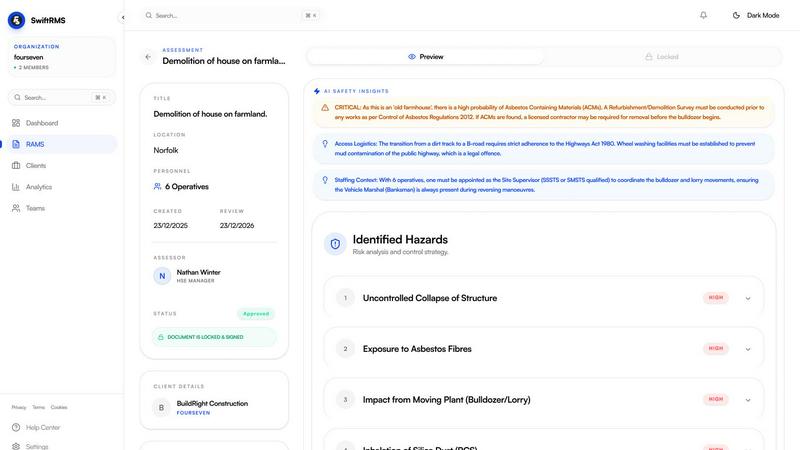
SwiftRMS helps your team create compliant UK risk assessments together in minutes.
Last updated: February 28, 2026

The no-nonsense task manager that actually helps you get things done. No clutter. No complexity. Just you and your tasks.
Visual Comparison
swiftRMS
Tickari

Overview
About swiftRMS
swiftRMS is an AI-powered platform designed to revolutionise how UK-based teams create Risk Assessment and Method Statement (RAMS) documents. It transforms a process that traditionally takes hours of manual writing and research into a task that can be completed in under five minutes. By simply describing a task in plain English or uploading a video outline, users instantly receive a comprehensive, professionally structured RAMS. This includes detailed risk assessments with control measures, full method statements, required PPE, and emergency procedures. Crucially, every document is automatically aligned with and cites relevant UK health and safety, security, and facilities management legislation, such as CDM 2015 and HASAWA 1974. Built for seamless team synergy, swiftRMS invites collaboration with features for team sign-off, full version control, and an audit log. It is the essential tool for construction managers, security contractors, facilities management teams, and health & safety officers who value accuracy, compliance, and reclaiming valuable time.
About Tickari
Tickari is a deliberately minimal, no-nonsense task manager designed for people who are tired of overcomplicated productivity tools and just want to get things done. Instead of overwhelming you with features like complex boards, AI-generated suggestions, or endless customization, Tickari focuses on a simple, frictionless workflow: write a task, tick it off, and move on.
The product embraces a “less but better” philosophy—eliminating clutter, reducing cognitive overhead, and removing the need for onboarding tutorials or setup processes. There are no distractions, no unnecessary decisions, and no feature bloat—just a clean interface that works instantly the moment you open it. This makes it particularly effective for users who feel stuck organizing tasks instead of actually completing them.