StatPecker vs X11.social
Side-by-side comparison to help you choose the right product.

StatPecker
StatPecker delivers rapid AI-driven insights and stunning visuals from your data for impactful storytelling and.
Last updated: March 1, 2026

X11.social
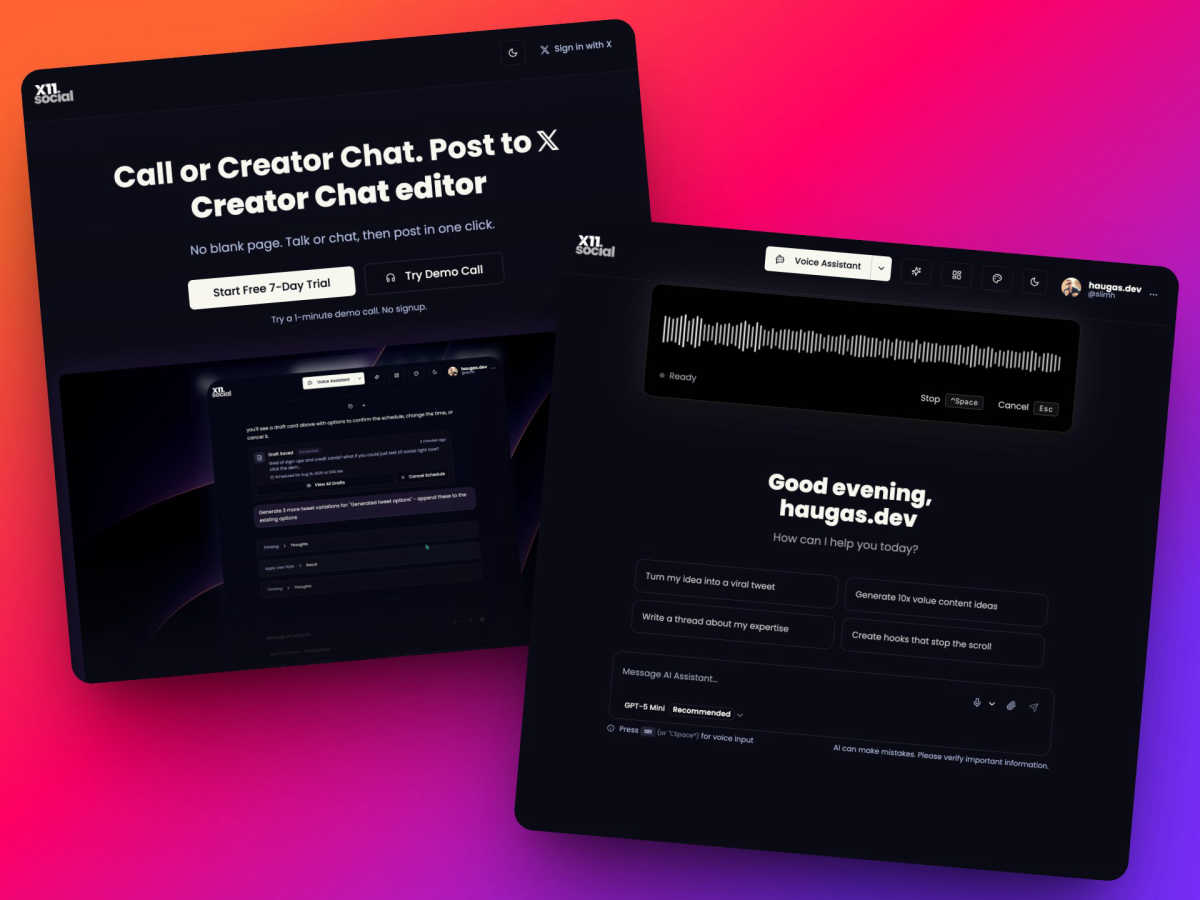
X11.social lets your team create and schedule viral X posts just by talking.
Last updated: March 1, 2026
Visual Comparison
StatPecker

X11.social
Feature Comparison
StatPecker
Ask Your Query
StatPecker allows users to obtain instant insights from validated sources using AI, eliminating the need for complex tools. Users can simply type in their questions and receive quick, credible answers, streamlining the data analysis process.
Publish & Embed
This feature enables users to make their visuals interactive and easily integrate them into blogs, articles, and websites. By enhancing the user experience, StatPecker ensures that the infographics created are not only informative but also engaging for the audience.
Upload & Analyze CSVs
Users can effortlessly upload CSV files of up to 50 MB and explore their data without the hassle of traditional spreadsheets. This feature prioritizes privacy by running analyses on the user's device, ensuring that sensitive information remains secure.
Download & Use Anywhere
StatPecker allows users to export their infographics as images, making it easy to incorporate them into reports, presentations, and other materials. This flexibility means that users can share their insights in a variety of formats without any additional hassle.
X11.social
Context-Aware Voice & Chat Assistant
This intelligent assistant is your ultimate collaborative tool, understanding the context of whatever you're viewing online. While watching a YouTube video or reading an article, activate it with a quick keystroke. You can then have a natural conversation, asking it to summarize content, extract key points, and directly transform those insights into threaded posts or tweets. This seamless integration means you can capture and develop ideas in real-time without ever switching tabs or copying and pasting, creating a fluid workflow between consumption and creation.
Call-to-Tweet Hands-Free Creation
Designed for ultimate convenience and teamwork with your schedule, this feature lets you partner with your AI assistant through a simple phone call. Dial a local number while driving, cooking, or walking, and just start talking. Your assistant listens, comprehends your ideas, and collaborates with you to craft polished posts ready for your approval by the time you park or finish your task. It’s a powerful synergy that turns otherwise lost time into a productive content brainstorming and creation session.
Smart Auto-Scheduling & Reminders
X11.social proactively collaborates with you to build consistent posting habits. The AI doesn’t just wait for your input; it can schedule daily check-in calls to help you brain dump ideas, ensuring you never hit a creative block. It also auto-schedules your polished content for optimal engagement times, and if you forget to create content, it can nudge you with reminders. This feature acts like a reliable team member dedicated to keeping your content pipeline active and strategic.
Virality Analytics & Smart Actions
Work together with AI analytics to improve your content's performance before you even publish. The virality analytics feature previews potential post performance, offering collaborative feedback on why a post might flop and suggesting fixes. Coupled with Smart Actions—contextual buttons that appear for one-click posting, scheduling, tone adjustment, or media attachment—this creates a dynamic editing suite. You and the AI refine each post in a cooperative process, ensuring every piece of content is optimized for maximum impact.
Use Cases
StatPecker
Data Visualization for Marketing
Marketers can utilize StatPecker to create eye-catching infographics that summarize campaign performance, customer demographics, and market trends. This visual storytelling approach enhances presentations and makes data more relatable for stakeholders.
Educational Insights
Educators can leverage StatPecker to visualize complex data, such as student performance metrics or curriculum effectiveness. By presenting these insights in engaging formats, they can better communicate findings to students, parents, and administrators.
Business Analytics
Business analysts can use StatPecker to quickly derive insights from sales data, financial reports, and operational metrics. The ability to visualize this data helps teams identify trends and make informed decisions based on real-time information.
Team Collaboration
StatPecker fosters collaboration among teams by allowing multiple users to work on data analysis together. Teams can share insights, create visuals, and collaborate on presentations, ensuring everyone is on the same page and contributing to the overall success.
X11.social
For the Busy Founder or Entrepreneur
Founders are constantly generating ideas but have little time to articulate them online. X11.social acts as a collaborative co-pilot. During a commute or between meetings, they can call in, verbally strategize about industry insights or company updates, and have a week's worth of professional, engaging content crafted and scheduled. This synergy protects their valuable time while amplifying their thought leadership.
For Content Creators & Influencers
Consistency is key for growth, but creator burnout is real. X11.social partners with creators to ease the burden. While watching a trending video for research, they can use the Chrome extension to instantly deconstruct it into a viral thread. The platform helps batch-create content during dedicated voice sessions and manages the entire publishing calendar, allowing the creator to focus on being on camera and engaging with their community.
For Marketing & Social Media Teams
Teams can use X11.social as a unified ideation and production tool. A manager can quickly call in to dictate campaign talking points, which are then refined into a cohesive content series by the AI. Team members can use the shared platform to generate variations, schedule posts across the week, and use virality analytics to collaboratively decide on the best-performing drafts, streamlining the entire content workflow.
For Individuals Building a Personal Brand
Professionals looking to grow their network often struggle with what to post. X11.social collaborates as a personal content coach. By simply talking through their daily learnings or reactions to industry news, users can consistently produce polished, valuable posts. The auto-scheduling feature ensures they maintain a steady presence, building their reputation reliably and authentically with minimal daily effort.
Overview
About StatPecker
StatPecker is an innovative AI-powered tool that transforms the way individuals and organizations visualize data. Designed for a diverse audience including content creators, analysts, marketers, and educators, StatPecker makes data storytelling accessible to everyone. The platform excels in converting raw data into visually appealing infographics within seconds, enabling users to communicate insights clearly and effectively. With its user-friendly interface, StatPecker allows users to analyze CSV files effortlessly, derive significant insights, and create engaging visuals that captivate audiences. By eliminating the need for manual reporting and expensive design services, StatPecker empowers users to focus on core messages while the robust AI handles the technical aspects of design and data visualization. As a collaborative platform, it fosters teamwork and creativity, ensuring that insights can be shared, published, or presented seamlessly.
About X11.social
X11.social is your collaborative partner in content creation, designed to ensure your best ideas never go to waste. It’s an innovative platform built for busy creators, entrepreneurs, and teams who want to maintain a vibrant and engaging presence on X (formerly Twitter) without being chained to a keyboard. The core philosophy is synergy between your spontaneous creativity and AI-powered execution. You simply talk through your ideas via a phone call or a conversational chat interface, and X11.social works with you to polish those raw thoughts into high-quality posts that sound authentically like you. It transforms idle moments—like your commute, walk, or coffee break—into productive content sessions. Beyond creation, the platform acts as a strategic partner with auto-scheduling to maintain consistency and virality analytics to refine your strategy. By handling the heavy lifting of writing, formatting, and scheduling, X11.social empowers you and your team to focus on what you do best: generating brilliant ideas and connecting with your audience.
Frequently Asked Questions
StatPecker FAQ
What types of files can I upload to StatPecker?
StatPecker allows users to upload CSV files of up to 50 MB. This feature enables users to analyze their data without the need for additional software or complex tools.
Is my data safe when using StatPecker?
Yes, StatPecker prioritizes user privacy by conducting all data analyses on your device. Your data remains secure and is not shared with external servers during the analysis process.
Can I integrate StatPecker visuals into my website?
Absolutely! StatPecker provides options to publish and embed your created infographics into blogs, articles, and websites, enhancing your content with engaging visuals.
What support options are available if I encounter issues?
StatPecker offers support through its website, where users can access help resources and contact the support team for assistance with any issues they may face while using the platform.
X11.social FAQ
How does X11.social ensure the posts sound like me?
X11.social is designed as a collaborative editor, not a replacement. The AI is trained to listen to your natural speech patterns, vocabulary, and style during your calls and chats. It then polishes your raw ideas by fixing typos and improving structure while meticulously preserving your unique voice and tone. You have final approval on every post, ensuring the output is a true partnership and reflects your authentic self.
Can I really create content without any typing?
Absolutely. The core synergy of X11.social is built around voice-first collaboration. You can use the "Call-to-Tweet" feature by dialing a phone number and simply speaking your mind. Alternatively, the voice assistant (activated with Alt+Space) allows you to dictate and command anywhere online. The AI collaborates by transcribing, refining, and preparing your content for publishing, requiring no typing from you.
What is the Chrome extension and how does it work?
The free Chrome extension is a collaborative tool that brings X11.social's power to any webpage. It adds an AI assistant that understands the context of the page you're on (like a YouTube video or article). With one keystroke, you can activate a chat or voice conversation to summarize the content, debate points, and directly instruct it to create a thread or post about it, turning any online inspiration into content instantly.
Is there a free trial available?
Yes, X11.social encourages you to experience the collaborative workflow risk-free. Every paid plan includes a full 7-day free trial with no credit card required upfront. You can also try a quick 5-minute demo call immediately to see the platform in action without any signup, allowing you to test the synergy between your ideas and the AI's execution.
Alternatives
StatPecker Alternatives
StatPecker is a cutting-edge AI-powered tool that specializes in data visualization, transforming raw data into visually appealing infographics in a matter of seconds. This platform is designed for a diverse range of users, from content creators to educators, making data storytelling accessible and engaging. As businesses and individuals seek efficient ways to present their data, many users find themselves exploring alternatives that may better fit their unique needs or budget constraints. When searching for alternatives to StatPecker, users often consider factors such as pricing, specific features, and compatibility with their existing platforms. It's essential to evaluate what functionalities are most important, whether it's ease of use, collaborative capabilities, or advanced analytical tools. A suitable alternative should align with the user's objectives and enhance their data visualization experience without sacrificing quality or efficiency.
X11.social Alternatives
X11.social is a voice-first social media management tool designed to help creators and marketers transform spoken ideas into polished posts. It operates within the social media scheduling and content creation category, focusing on turning quick voice notes into scheduled content with built-in analytics. Users often explore alternatives to find a solution that aligns perfectly with their team's workflow and budget. Common reasons include seeking different pricing structures, specific integrations with other platforms, or a feature set tailored to collaborative content approval processes. It's a natural part of finding the right tool for your collective goals. When evaluating other options, consider how a platform supports your team's synergy. Look for core functionalities like seamless scheduling, collaborative editing features, and insightful analytics. The ideal alternative should enhance your team's cooperation, making the content creation process more unified and efficient without sacrificing the unique voice of your brand.