Gleem.AI Studio vs Seedream 5.0
Side-by-side comparison to help you choose the right product.

Gleem.AI Studio
Gleem.AI Studio is your all-in-one workspace for effortlessly generating and editing stunning visuals in one seamless.
Last updated: February 28, 2026

Seedream 5.0
Seedream 5.0 effortlessly turns your text into stunning visuals in seconds, empowering your creativity with AI.
Last updated: February 28, 2026
Visual Comparison
Gleem.AI Studio

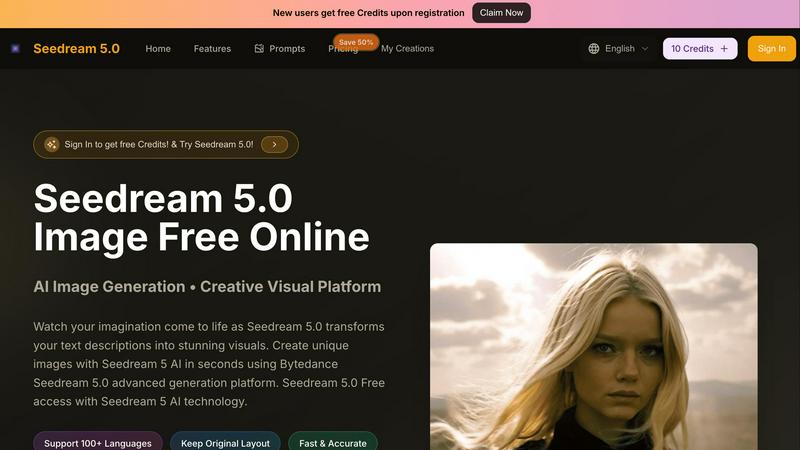
Seedream 5.0
Feature Comparison
Gleem.AI Studio
Text-to-Image Generator
The Text-to-Image Generator allows users to transform their ideas into beautiful visuals effortlessly. By simply entering descriptive text, users can select their desired size and let the built-in Prompt Enhance feature refine their input for optimal results, ensuring a high-quality output every time.
AI Image Editing
Gleem.AI Studio’s AI Image Editing feature offers a comprehensive suite of editing tools that enable users to modify images directly within the platform. Whether adding or removing objects, adjusting poses, or applying filters, this intuitive editor makes it easy to enhance images without needing extensive editing skills.
AI Avatars
With the AI Avatars feature, users can generate and personalize their own avatars, placing them in any scene or adjusting their poses without the need for a photoshoot. This functionality is perfect for marketers and creators looking to maintain a consistent brand image while adding a personal touch to their visuals.
Project Management
Gleem.AI Studio keeps users organized with dedicated spaces for each project. Each idea can be developed in its own environment, complete with saved prompts, edits, and version histories. This ensures that everything is easily accessible, facilitating seamless collaboration and iteration.
Seedream 5.0
AI Image Generation
Seedream 5.0 utilizes advanced AI technology to create stunning visuals from simple text descriptions. Users can generate high-quality images instantly, making it easy to bring their ideas to life without any prior design experience.
Multilingual Support
With support for over 100 languages, Seedream 5.0 breaks down language barriers, allowing users from diverse backgrounds to create visuals in their preferred language. This feature enhances accessibility and encourages global collaboration.
Customization Options
The platform offers extensive customization features, letting users choose aspect ratios and upload images for editing. This flexibility ensures that the visuals generated can meet specific requirements and personal preferences, enhancing the overall user experience.
No Watermark and Privacy
Seedream 5.0 allows users to create visuals without watermarks, ensuring that the generated images are suitable for professional use. Additionally, users can choose to keep their creations private, providing peace of mind regarding their intellectual property.
Use Cases
Gleem.AI Studio
Marketing Campaigns
Marketers can utilize Gleem.AI Studio to create eye-catching visuals for their campaigns quickly. From social media graphics to promotional materials, the platform allows for rapid content generation and editing, ensuring that marketing assets are always fresh and engaging.
Social Media Content Creation
Content creators can leverage the platform to produce stunning visuals for their social media channels. With the ability to generate and edit images in one place, creators can maintain a consistent aesthetic while rapidly producing content tailored to their audience.
Product Image Generation
E-commerce businesses can benefit from Gleem.AI Studio by generating high-quality product images that showcase their offerings. The platform enables easy adjustments to visuals, ensuring that product images meet branding standards and appeal to potential customers.
Creative Experimentation
Gleem.AI Studio is perfect for creative teams looking to experiment with different visual styles and concepts. The ease of generating variations and editing images allows for a dynamic creative process, where ideas can be tested and refined quickly.
Seedream 5.0
Content Creation
Content creators can utilize Seedream 5.0 to generate eye-catching images for blogs, social media posts, and marketing materials. The platform's ability to create visuals quickly helps streamline the content creation process.
Educational Resources
Educators can leverage Seedream 5.0 to develop engaging visual aids for teaching materials. By transforming complex concepts into easy-to-understand images, the platform enhances learning experiences for students.
Graphic Design Projects
Professional designers can use Seedream 5.0 to brainstorm ideas and create initial drafts for graphic design projects. The AI-generated visuals can serve as a foundation for further refinement and development.
Personal Projects
Individuals looking to create personalized gifts, invitations, or artwork can use Seedream 5.0 to generate unique visuals tailored to their specific needs. This feature fosters creativity and allows users to express themselves in various ways.
Overview
About Gleem.AI Studio
Gleem.AI Studio is an innovative AI image workspace tailored for creators who seek a seamless experience in generating and editing visuals. Designed specifically for marketers, small teams, and content creators, it eliminates the hassle of managing multiple tools by offering a unified platform where every step of the creative process is streamlined. Users can easily generate stunning images from text prompts, edit them using intuitive AI tools, and even create personalized avatars—all within a single environment. This workflow-centric design allows for rapid iteration and simplifies the creative journey, enabling users to focus on their artistic vision without getting bogged down by technical complexities. Gleem.AI Studio is ideal for anyone looking to produce consistent, high-quality visuals quickly and intuitively, making it a must-have for modern content creation.
About Seedream 5.0
Seedream 5.0 is an innovative AI-powered platform that transforms the way users create visuals from text descriptions. It is designed for a diverse audience, including casual users and professional creatives, offering a seamless experience for anyone looking to generate stunning images in seconds. By leveraging the advanced Bytedance Seedream 5 technology, Seedream 5.0 produces high-quality visuals while supporting over 100 languages, making it accessible to a global community. The platform features an intuitive interface that allows users to upload images, select various aspect ratios, and customize their creations effortlessly. With Seedream 5.0, users can easily turn their imagination into captivating visuals without needing any artistic skills or extensive design knowledge. Experience the future of creative design with fast, free, and unlimited image generation, empowering users to explore their creativity like never before.
Frequently Asked Questions
Gleem.AI Studio FAQ
What is Gleem.AI Studio?
Gleem.AI Studio is a unified AI image workspace that allows users to generate, edit, and remix images in a streamlined environment, enabling faster and more intuitive creative workflows.
Who can benefit from using Gleem.AI Studio?
Marketers, content creators, and small teams looking for a simple yet powerful tool for generating and editing visuals can significantly benefit from using Gleem.AI Studio.
How does the Text-to-Image Generator work?
Users input descriptive text into the Text-to-Image Generator, select their desired image size, and the system uses AI to create stunning visuals, with enhancements available to refine the output further.
Is there a collaborative feature in Gleem.AI Studio?
Yes, Gleem.AI Studio includes project management tools that allow teams to work collaboratively, with dedicated spaces for projects, version histories, and easy access to all relevant prompts and edits.
Seedream 5.0 FAQ
How does Seedream 5.0 work?
Seedream 5.0 uses advanced AI algorithms to convert text descriptions into images. Users simply input their ideas, and the platform generates visuals based on the provided details.
Can I edit the images generated by Seedream 5.0?
Yes, Seedream 5.0 offers image editing capabilities, allowing users to upload existing photos or images and refine them using the platform's tools.
Is Seedream 5.0 free to use?
Seedream 5.0 provides free access for users, enabling them to explore its features without any financial commitment. However, certain premium features may be available for a fee.
What file formats are supported for uploads?
Seedream 5.0 supports various image formats, including JPG, PNG, and WEBP, making it easy for users to upload their visuals for editing and enhancement.
Alternatives
Gleem.AI Studio Alternatives
Gleem.AI Studio is a comprehensive AI image workspace designed for creators who prioritize efficiency and creativity in their visual projects. This platform caters to marketers, small teams, and content creators, offering a seamless experience that combines image generation and editing within a single environment. By streamlining the creative process, Gleem.AI Studio eliminates the need for complex setups and multiple tools, allowing users to focus on what truly matters: crafting compelling visuals. Users often seek alternatives to Gleem.AI Studio for various reasons, including pricing concerns, specific feature requirements, or compatibility with existing workflows. When exploring alternatives, it’s essential to consider factors such as ease of use, integration capabilities, and the breadth of tools offered. Additionally, look for platforms that maintain a collaborative spirit, fostering teamwork and creativity in a way that aligns with your project goals and team dynamics.
Seedream 5.0 Alternatives
Seedream 5.0 is a transformative platform designed to convert text descriptions into striking visuals instantly. As a leading AI image editor in the design tools category, it caters to both everyday users and professional creatives, making the art of visual creation accessible to all. Users often seek alternatives to Seedream 5.0 for various reasons, including features, pricing, and platform compatibility. Some may require specific functionality or integration with other tools, while others may be exploring cost-effective solutions that still deliver high-quality outputs. When looking for alternatives to Seedream 5.0, consider factors such as user interface simplicity, available features, and the quality of image resolution. It’s essential to evaluate whether the alternative meets your creative needs while providing an intuitive experience. Additionally, support for multiple languages and platforms can be crucial for a diverse user base, ensuring that everyone can tap into their creative potential with ease.