Seedream 5.0 vs vaethat
Side-by-side comparison to help you choose the right product.

Seedream 5.0
Seedream 5.0 instantly transforms text prompts into stunning 4K images, making creativity effortless and fast.
Last updated: February 28, 2026

vaethat
Vaethat is your specialized AI partner that upscales and perfects architectural renders with ease.
Last updated: February 28, 2026
Visual Comparison
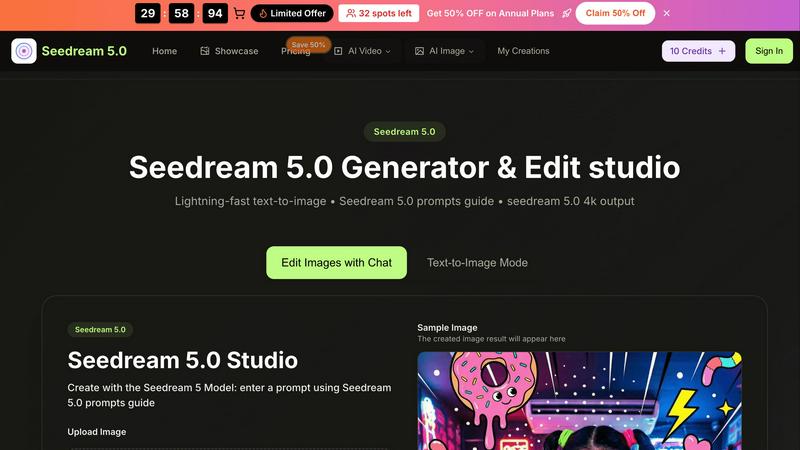
Seedream 5.0
vaethat

Feature Comparison
Seedream 5.0
Lightning-Fast Text-to-Image Generation
Seedream 5.0 offers instant AI generation that transforms text prompts into images in as little as 2 to 5 seconds. This rapid output enables users to brainstorm and visualize ideas quickly, enhancing creativity and productivity.
Intuitive Image Editing with Natural Language
The platform allows users to edit images using natural language commands. This feature simplifies the editing process, making it accessible for users of all skill levels, from beginners to seasoned professionals.
High-Resolution Outputs
Users can generate images in native 2K resolution, with the option for one-click 4K upscaling. This capability ensures that the visuals produced are of professional quality, suitable for various applications, including print and digital media.
Multi-Image Fusion and Style Transfer
Seedream 5.0 excels in multi-image fusion and style transfer, allowing users to create complex visuals by blending multiple images or applying different artistic styles. This enhances creativity by offering diverse aesthetic options.
vaethat
Specialized Archviz AI Engine
Unlike generic AI models, vaethat's technology is trained exclusively on architectural visualization. This deep, collaborative understanding of materials, lighting, geometry, and spatial composition allows it to enhance renders with a level of precision and appropriateness that general AI cannot match, ensuring every improvement feels natural and intentional to the scene.
Multi-Image Project Workspace
Designed for real-world studio workflow, this feature lets your team drag and drop entire folders of renders. You can save sessions, manage projects collaboratively, and process multiple images at once. This streamlines the enhancement of full project sets, guaranteeing a harmonious and consistent look across all visuals for client decks and portfolios.
One-Click Enhancement Presets
Vaethat eliminates the guesswork and iterative tweaking often associated with AI tools. Through a cooperative design process, we've distilled complex enhancements into simple, selectable presets. Your team can upload a render, choose a preset, and get exceptional results instantly—no prompts, sliders, or wasted credits on experimentation.
Design-Intent Preservation
This is the cornerstone of vaethat's collaborative approach. The AI is meticulously calibrated to enhance technical quality—sharpening details, balancing light, and cleaning noise—without altering the fundamental composition, mood, or artistic choices you've made. It works to elevate your work, not reinterpret it, ensuring the final image remains unmistakably yours.
Use Cases
Seedream 5.0
Marketing Campaigns
Marketers can utilize Seedream 5.0 to create eye-catching visuals for promotional materials. The ability to generate high-quality images quickly allows for more dynamic and engaging campaigns that stand out in a crowded marketplace.
Content Creation for Social Media
Content creators can harness the power of Seedream 5.0 to produce unique images tailored to their brand's aesthetic. From Instagram posts to blog graphics, the tool provides a quick way to generate engaging visuals that resonate with audiences.
Storytelling and Character Development
Writers and illustrators can use Seedream 5.0 to develop consistent and lifelike characters across their projects. This feature is particularly useful for graphic novels and digital storytelling, where visual continuity is key to audience engagement.
Educational Materials
Educators can create customized images for presentations, worksheets, and online courses. With Seedream 5.0, they can easily generate visuals that enhance learning experiences and make complex concepts more accessible to students.
vaethat
Finalizing Client Presentation Decks
Before a crucial client review, your team can batch-process all project renders through vaethat to ensure a unified, professional, and ultra-polished presentation. The enhanced clarity and realism help clients better understand materials and spatial relationships, leading to more confident feedback and approvals.
Enhancing Portfolio and Marketing Materials
Visual artists and studios use vaethat to give their portfolio pieces an extra edge. By upscaling resolution and refining fine details like textures and vegetation, your best work becomes even more immersive and impactful, showcasing your skills in the best possible light to attract new clients and collaborators.
Streamlining Fast-Turnaround Projects
On projects with tight deadlines, vaethat acts as a force multiplier. Instead of spending hours on manual post-production tweaks for noise reduction or sharpening, artists can achieve superior results in seconds, allowing the team to maintain high quality without compromising on speed or burning out.
Improving Consistency Across Render Farms
When different machines or settings produce renders with slight variations in noise or sharpness, vaethat can process them all to a consistent, high standard. This collaborative tool ensures that every image in a sequence or set meets the same quality benchmark, presenting a cohesive visual narrative.
Overview
About Seedream 5.0
Seedream 5.0 is an innovative AI image generator and editing studio developed by ByteDance, designed to meet the creative needs of a broad audience. Whether you are a professional artist, a content creator, a marketer, or simply a hobbyist, Seedream 5.0 provides the tools you need to create visually stunning images in a matter of seconds. The platform excels in transforming text prompts into beautiful, high-resolution visuals, typically within just 2 to 5 seconds. Its primary value proposition lies in its lightning-fast text-to-image capabilities, which allow users to produce 4K images with intuitive editing features. The built-in Seedream 5.0 prompts guide enhances the user experience by offering suggestions for crafting effective prompts, ensuring that users can achieve their creative visions effortlessly. By combining advanced AI technology with a user-friendly design, Seedream 5.0 stands out as an essential tool for anyone looking to elevate their visual content while saving time and effort.
About vaethat
Vaethat is a specialized AI partner built to elevate the final stage of architectural visualization. It's more than just an upscaler; it's a dedicated enhancement tool that understands the unique language of archviz. Created through a collaborative effort with visualization professionals, vaethat is designed to work alongside 3D artists, architects, and studios as a seamless extension of their post-production workflow. Its core mission is to unlock the full potential of your 3D renders by intelligently improving clarity, sharpness, and realism, all while faithfully preserving your original design intent. By focusing exclusively on architectural imagery, vaethat delivers superior, consistent results where general-purpose AI tools often fall short, saving teams valuable time and resources. It transforms good renders into exceptional, presentation-ready images that clearly communicate your vision to clients and stakeholders, fostering a smoother path from concept to approval.
Frequently Asked Questions
Seedream 5.0 FAQ
What formats does Seedream 5.0 support for image uploads?
Seedream 5.0 supports various image formats, including JPG, PNG, and WEBP, with a maximum file size of 10MB. This flexibility allows users to work with different types of images seamlessly.
How does the Seedream 5.0 prompts guide work?
The prompts guide provides users with helpful suggestions for crafting effective text prompts. By recommending details related to colors, lighting, and art styles, it enhances the quality of the generated images.
Can I use Seedream 5.0 for free?
Yes, Seedream 5.0 offers a free trial option, allowing users to explore its features and capabilities before committing to a subscription. This makes it accessible for those who wish to test the platform.
Is there a limit to the number of images I can generate?
While specific limits may vary based on the chosen plan, Seedream 5.0 generally allows for a generous number of image generations. Users can create a multitude of visuals to support their projects and creative endeavors.
vaethat FAQ
What makes vaethat different from other AI enhancers?
Vaethat is built through direct collaboration with archviz professionals and trained exclusively on architectural imagery. This specialization means it understands context—like how to properly enhance brickwork, glass, or foliage without creating artifacts. It requires no prompts or complex adjustments, offering reliable, design-faithful results instantly, unlike general AI tools that often misinterpret scenes.
Can I use vaethat with my current render engine (V-Ray, Lumion, etc.)?
Absolutely. Vaethat is designed to be your collaborative post-production partner, working seamlessly alongside any major render software like V-Ray, Corona, Lumion, Enscape, Twinmotion, and more. You simply export your final render as a standard image file (JPG, PNG, etc.) and upload it to the vaethat platform for enhancement.
How does the credit system work?
Credits are consumed per image processed, with the cost depending on the output resolution. This straightforward system allows your team to plan and manage resources effectively. You can upgrade, downgrade, or cancel your subscription plan at any time, and some plans may include rollover credits for unused months, promoting flexible and cooperative resource management.
Does vaethat use my uploaded images to train its AI?
No. We believe in a partnership built on trust. Your architectural renders and data are never used to train our AI models. Your intellectual property remains entirely yours, and we are committed to providing a secure platform where you can enhance your work with complete confidence.
Alternatives
Seedream 5.0 Alternatives
Seedream 5.0 is an advanced AI image generator and editing studio that falls within the design tools category. Developed by ByteDance, it allows users to create high-quality 4K visuals from text prompts in just a matter of seconds. Despite its impressive capabilities, users often seek alternatives due to various reasons, such as pricing, specific feature needs, or compatibility with their preferred platforms. As the landscape of AI image generation continually evolves, it's essential for users to explore alternatives that align more closely with their unique requirements and working styles. When selecting an alternative to Seedream 5.0, users should consider several factors. These include the speed of image generation, the quality of output, and any additional features that may enhance their creative process. It's also important to evaluate user experience and the level of support provided by the tool, ensuring it meets individual or team collaboration needs effectively. By taking these aspects into account, users can find a solution that complements their artistic vision and workflow seamlessly.
vaethat Alternatives
Vaethat is an AI-powered tool in the design software category, specifically built for architectural visualization professionals. It focuses on upscaling and enhancing 3D renders to improve clarity, detail, and realism for final presentations. Architects and visualization specialists often explore different tools to find the best fit for their team's workflow and project demands. Common reasons include finding a solution that aligns with specific budget considerations, offers a particular feature set, or integrates seamlessly with their existing software ecosystem. When evaluating options for your collaborative projects, consider factors like the quality of AI enhancement, how well the tool preserves original design intent, and the simplicity of the team's workflow. The goal is to find a supportive tool that amplifies your collective output without disrupting your creative synergy.