
Seedream 4.0 vs Shrinkpad
Side-by-side comparison to help you choose the right product.

Seedream 4.0
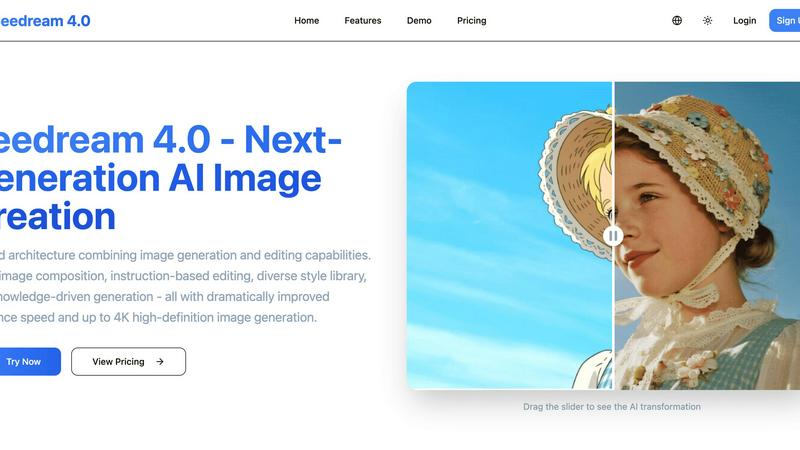
Seedream 4.0 empowers your team to create and edit stunning AI images together with precision and speed.
Last updated: March 1, 2026

Shrinkpad
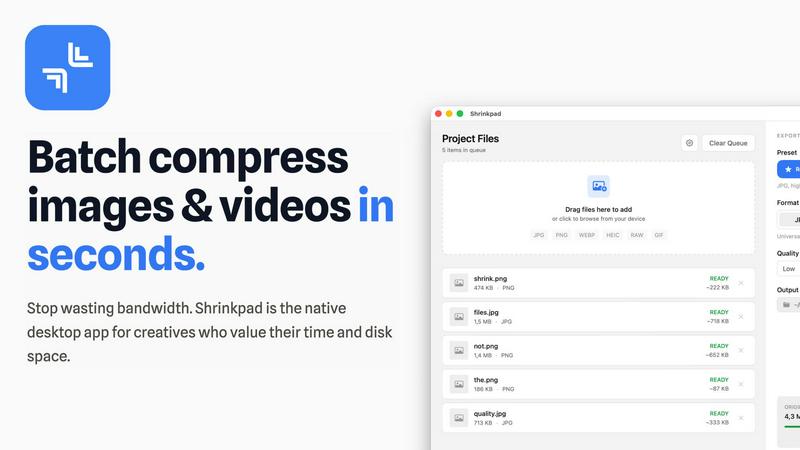
Shrinkpad effortlessly batch compresses images and videos on Mac, optimizing your assets for faster performance and.
Last updated: February 28, 2026
Visual Comparison
Seedream 4.0
Shrinkpad
Feature Comparison
Seedream 4.0
Unified Generation & Editing Architecture
This foundational feature eliminates the need to switch between disparate tools, creating a harmonious workflow for teams. The architecture allows for a fluid transition from generating a brand-new image to making precise edits, all within the same interface. This synergy saves valuable time and reduces friction, enabling creative collaborators to iterate and refine concepts together in real-time, maintaining a consistent vision from the first sketch to the final polished asset.
Multi-Image Composition
Unlock powerful collaborative storytelling by inputting multiple reference images to guide a single, cohesive output. This feature is perfect for teams assembling mood boards, merging brand elements, or creating complex scenes that draw from various visual sources. It allows a group to pool their visual inspirations and achieve a unified composition with a simple sentence, streamlining the process of building rich, layered visuals that satisfy diverse creative inputs.
Instruction-Based Editing
Foster clear and effective team communication with true "what you say is what you get" functionality. Instead of navigating complex software menus, team members can describe desired changes in plain language. This makes giving feedback and executing revisions intuitive, ensuring that designers, marketers, and clients are perfectly aligned. It democratizes the editing process, allowing anyone on the team to contribute precise creative direction.
Knowledge-Driven Generation & Diverse Styles
This dual-capability feature supports a wide range of collaborative projects. The knowledge-driven engine ensures teams can create accurate educational diagrams, technical illustrations, and professional charts with confidence. Simultaneously, the extensive style library—from watercolor to cyberpunk—provides a shared visual vocabulary. Teams can easily experiment and agree on a stylistic direction, ensuring brand consistency and creative exploration are both fully supported.
Shrinkpad
Automatic Compression Optimization
Shrinkpad takes the guesswork out of media compression by automatically analyzing the visual complexity of your files. This feature applies the perfect compression ratio without introducing artifacts, ensuring high-quality results every time.
Unlimited Batching
With Shrinkpad, users can process thousands of assets without the risk of crashes. Unlike typical web-based tools, this application effortlessly handles massive queues, allowing for efficient batch processing of images and videos in a single operation.
One-Drop Import
Gone are the days of dragging files one by one. Shrinkpad’s One-Drop Import feature allows users to simply drag an entire folder onto the app, instantly detecting and adding all supported images and videos to the batch list for quick compression.
Privacy-Focused Processing
Shrinkpad processes all files locally on your Mac, ensuring that your sensitive assets never leave your device. This privacy-first approach guarantees that no uploads to the cloud take place, giving you peace of mind while optimizing your media files.
Use Cases
Seedream 4.0
Marketing & Brand Asset Creation
Marketing teams can collaborate swiftly to produce a cohesive suite of branded visuals. From social media graphics and ad banners to website imagery, teams can use multi-image composition to blend product photos with brand elements and apply consistent stylistic edits across entire campaigns using instruction-based prompts, ensuring speed and brand alignment.
Design Agency & Creative Workflows
Design agencies can leverage Seedream 4.0 to rapidly prototype concepts for client presentations. The unified platform allows designers, art directors, and clients to iterate on visuals in a conversational manner, making revisions based on simple instructions. This streamlines feedback loops and enables the collaborative creation of unique, high-fidelity mockups and final assets.
Educational Content Development
Educators and content developers can work together to create accurate, engaging learning materials. Using knowledge-driven generation, teams can produce clear scientific diagrams, historical illustrations, and informative charts. The tool allows for easy refinement based on educational standards, making complex subjects visually accessible through collaborative effort.
Personal Projects & Collaborative Hobbies
Creative groups, such as online communities or friends working on a shared project like a game or story, can use Seedream 4.0 to build their visual worlds together. They can collectively guide image generation with multiple references, stylize character art, and edit scenes through simple descriptive feedback, making the creative process a truly shared and synergistic experience.
Shrinkpad
Optimizing Photography Workflows
Photographers can benefit immensely from Shrinkpad by efficiently compressing large sets of images without sacrificing quality. This allows for faster sharing and storage, making it easier to manage extensive portfolios.
Streamlining Design Projects
Designers using software like Figma or Photoshop can save hours by exporting assets in bulk at higher resolutions and letting Shrinkpad handle the optimization and renaming automatically, thus enhancing productivity.
Enhancing Video Editing Processes
Content creators working with video files can utilize Shrinkpad to compress large video assets quickly. This ensures that videos load faster on websites and platforms, improving user experience without losing visual fidelity.
Managing Web Assets Efficiently
Web developers and digital marketers can leverage Shrinkpad to compress images and videos for websites, significantly reducing load times. This not only enhances the performance of the site but also contributes to better SEO outcomes.
Overview
About Seedream 4.0
Seedream 4.0 represents a powerful leap forward in collaborative visual creation, uniting teams and individuals under a single, intuitive platform. It's more than just an AI image generator; it's a comprehensive ecosystem built on a unified architecture that seamlessly blends generation and editing. This synergy empowers everyone, from marketing teams and design agencies to educators and content creators, to work together more efficiently. By breaking down the barriers between idea and execution, Seedream 4.0 fosters a cooperative environment where stunning visuals are born from simple instructions and shared creative vision. Its core value lies in transforming complex workflows into a streamlined, conversational process, enabling teams to produce high-quality, up to 4K images with dramatically improved speed. Whether you're composing assets from multiple references or refining a single concept, Seedream 4.0 is the partner that amplifies your collective creativity, ensuring every member can contribute to and elevate the final masterpiece.
About Shrinkpad
Shrinkpad is a cutting-edge batch compression tool tailored for Mac users who require efficient management of their media files. This powerful application allows users to swiftly compress images and videos, making it the perfect solution for photographers, designers, content creators, and anyone regularly handling large media files. By enabling the compression of hundreds of files or entire folders in mere seconds, Shrinkpad drastically reduces storage space while maintaining the visual quality of your media. With a strong emphasis on privacy, all processing takes place locally on your Mac, ensuring that your files remain secure and untouched by cloud services. Supporting over 50 formats out of the box, Shrinkpad provides seamless compatibility, allowing users to compress various types of media without hassle. Featuring customizable settings and a user-friendly interface, Shrinkpad stands out as the ultimate tool for optimizing your assets without compromising quality or privacy.
Frequently Asked Questions
Seedream 4.0 FAQ
Can I try Seedream 4.0 for free?
Yes, you can experience Seedream 4.0's capabilities by visiting the platform's demo area. The interactive demo allows you to test core features like instruction-based editing without an account. For full access to generation credits, style libraries, and high-resolution exports, you can explore the various subscription plans designed for different levels of collaborative need.
How does Seedream 4.0 work?
Seedream 4.0 operates on a sophisticated unified AI architecture. You provide a text instruction or upload reference images. The platform's AI understands your request, leverages its knowledge base and style models, and processes the information to generate or edit an image. This collaborative process between your input and the AI's capabilities happens with improved inference speed, delivering high-definition results up to 4K resolution.
What makes Seedream 4.0 different from other AI image tools?
Seedream 4.0 stands out through its deeply integrated, unified approach that combines generation and editing into one cooperative workflow. Features like multi-image composition and true instruction-based editing are designed for team-oriented creation, reducing tool-switching and miscommunication. Its focus on both creative styles and knowledge-driven accuracy makes it a versatile partner for a wider range of professional and collaborative projects.
Can I use the images I generate commercially?
Yes, images generated by Seedream 4.0 are provided for your use, including commercial applications such as marketing materials, website content, and product designs. It is always recommended to review the specific Terms of Service for detailed licensing information to ensure your usage complies with the platform's policies, especially for sensitive or high-stakes commercial projects.
Shrinkpad FAQ
Can I use Shrinkpad for free?
Yes, Shrinkpad offers a Free Starter plan that includes essential tools for casual use, allowing you to compress a limited number of files per batch.
What file formats does Shrinkpad support?
Shrinkpad supports over 50 file formats, including popular image formats like JPG, PNG, and WEBP, as well as video formats such as MP4 and MOV.
Does Shrinkpad support video compression?
Absolutely! Shrinkpad is designed to handle both image and video compression, allowing users to process mixed media batches effortlessly.
How many files can I process at once?
With the Personal and Team plans, users can process unlimited files per batch, enabling efficient handling of even the largest media collections without any restrictions.
Alternatives
Seedream 4.0 Alternatives
Seedream 4.0 is a powerful AI image generator and editor that empowers teams to create and modify stunning visuals with precision. It falls within the image and photo software category, combining advanced generation with intuitive editing tools in a single platform. This makes it a valuable asset for collaborative projects where visual content is key. Teams often explore alternatives to find a solution that aligns perfectly with their unique workflow and goals. Common reasons include budget considerations, the need for specific features not covered, or platform compatibility requirements. The search for the right tool is a natural step in optimizing a team's creative synergy. When evaluating other options, it's wise for a team to consider several core factors. Look at the balance of generation power and editing flexibility, the tool's ability to support collaborative projects, and the overall value it brings to your shared creative process. The goal is to find a partner that enhances your team's collective ability to produce compelling visual work.
Shrinkpad Alternatives
Shrinkpad is a powerful batch compression tool designed specifically for Mac users who require efficient management of their media files. This innovative application allows users to quickly compress images and videos, making it an essential asset for photographers, designers, and content creators who frequently work with large media files. By reducing storage space while maintaining visual quality, Shrinkpad helps streamline workflows and enhances productivity. Users often seek alternatives to Shrinkpad for various reasons, including pricing, specific feature sets, compatibility with different operating systems, or personal preferences regarding user interface. When searching for an alternative, it’s crucial to consider factors such as batch processing capabilities, local versus cloud-based processing options, format compatibility, and the ability to customize settings to meet specific needs. Finding a solution that aligns with your workflow can help you maintain efficiency while managing media files effectively.