QuoteCraft AI vs TinyFast
Side-by-side comparison to help you choose the right product.

QuoteCraft AI
QuoteCraft AI crafts winning proposals for freelancers in seconds, ensuring clarity and competitive pricing.
Last updated: March 4, 2026

TinyFast is your team's local Mac tool for fast, private file compression without uploads.
Last updated: February 28, 2026
Visual Comparison
QuoteCraft AI

TinyFast
Feature Comparison
QuoteCraft AI
Voice-to-Proposal Generation
Describe your project conversationally out loud, and watch as QuoteCraft AI instantly transcribes your thoughts into a structured proposal draft. This feature is perfect for capturing ideas on the go, allowing you to walk out of a client meeting, record a quick summary, and have a professional proposal framework ready before you've even left. It turns spontaneous discussion into actionable project outlines, ensuring no detail is lost and dramatically speeding up your initial workflow.
Context Engine & Import Learning
The platform becomes a true collaborative partner by learning from you. You can import your past winning proposals, and the AI analyzes your unique pricing models, writing style, and standard deliverables. The Context Engine uses this knowledge to ensure every new proposal it generates already sounds like it was crafted by you, maintaining your brand voice and business logic for a consistent, professional client experience.
Interactive & Customizable Client Proposals
Foster a cooperative proposal process with your clients by sending interactive documents. Clients can toggle specific line items or services on or off directly within the proposal, and the total cost updates in real-time. This collaborative flexibility reduces back-and-forth emails, minimizes rejections due to pricing, and involves the client in co-creating a scope that works for both parties, leading to higher acceptance rates.
Integrated E-Signatures & Smart Tracking
Close deals seamlessly with legally binding digital signatures recorded with IP addresses and timestamps for security. Work in tandem with the platform's tracking tools: receive notifications the moment a client views your proposal and use Smart Follow-Ups to automate gentle reminders. This suite of features manages the post-send process for you, ensuring nothing falls through the cracks and you can focus on the work itself.
TinyFast
100% Local & Private Processing
Your team's confidentiality is paramount. TinyFast operates entirely on your local machine, ensuring that files—whether they're unreleased designs, legal documents, or proprietary code—never leave your Mac. This local-first approach, built on a foundation of mutual trust and security, means no uploads to unknown cloud servers, eliminating data breach risks and perfectly aligning with strict privacy policies or NDAs for seamless and secure collaboration.
Blazing-Fast Drag & Drop Compression
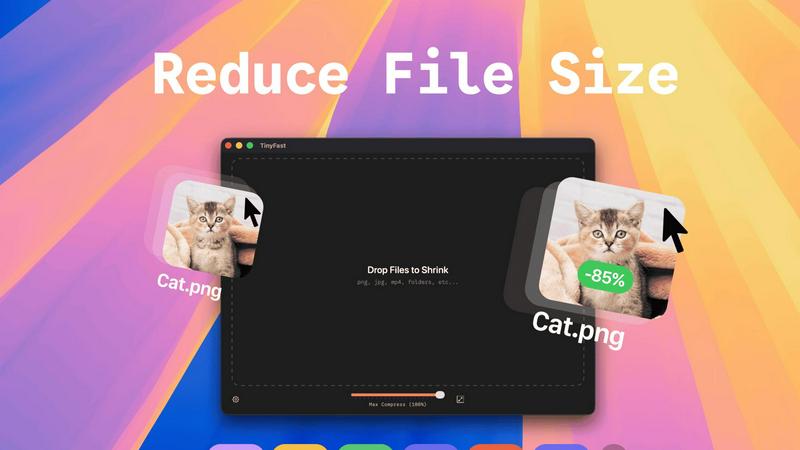
Experience a frictionless workflow designed for team efficiency. Simply drag and drop any file or even entire folders directly into the TinyFast window. The application uses optimized native engines to process and shrink your files in seconds, not minutes. This instant, local compression saves your team hours every week by removing the tedious wait times associated with uploading to and downloading from online services.
Universal File Type Support
TinyFast is your team's universal compression toolkit, fostering cooperation across different project types. It supports a wide array of common file formats, including images (PNG, JPG, WEBP, SVG), videos (MP4, MOV), documents (PDF, DOCX), code files (JS, CSS, JSON), and audio (MP3). This versatility means everyone, from marketing to development, can use the same trusted tool, streamlining your team's asset optimization process.
Batch Processing & Resolution Control
Empower your team to handle large volumes of work with ease. TinyFast allows for batch compression of entire folders, delivering optimized outputs in one go—a perfect synergy for project handoffs or preparing multiple assets for publication. Additionally, for images and videos, you can collaboratively decide and set automatic resolution resizing, ensuring files are perfectly tailored for their intended use, from web pages to client presentations.
Use Cases
QuoteCraft AI
For Web Designers & Developers
Quickly translate client discovery calls into detailed technical proposals. After discussing a website's needed features, use Voice-to-Proposal to outline the scope. The AI generates a comprehensive document including development phases, technology stack, timelines, and a clear breakdown of costs for design, development, and testing, presenting a professional image that builds client trust.
For Marketing Agencies & Creative Studios
Streamline proposal creation for campaign-based projects like social media management or branding overhauls. Import past successful campaign proposals to teach the AI your agency's service packages and pricing tiers. Then, generate new proposals that accurately reflect your team's approach, complete with interactive line items for clients to select specific ad spend or content volumes.
For Independent Consultants & Freelancers
Overcome the pricing uncertainty that many solo professionals face. Describe your consulting engagement, and let the AI suggest a structured pricing model based on project value or hourly rates, incorporating lessons from your past accepted deals. This provides a confident starting point, allowing you to present well-justified fees that reflect your expertise.
For Teams Managing Multiple Client Pipelines
Maintain consistency and oversight when several team members are creating proposals. Use the shared dashboard to track all sent proposals, see which clients have viewed them, and manage e-signatures. The Context Engine ensures every team member's proposals align with the company's standard language and pricing, presenting a unified front to all clients.
TinyFast
Preparing Design Assets for Developer Handoff
Design teams can efficiently compress and batch-export high-fidelity mockups, icons, and images directly on their Macs. By using TinyFast, they ensure all assets are optimized for web performance before handing them off to the development team, maintaining visual quality while enabling faster site load times and a smoother, more cooperative workflow between departments.
Securely Sharing Confidential Client Documents
Legal, financial, or consulting professionals often need to share large PDF reports or presentations containing sensitive data. TinyFast allows them to compress these documents locally to a manageable email size without ever risking client confidentiality by uploading files to a third-party server, fostering a relationship built on trust and security.
Optimizing Media for Web and Social Content
Content creators and marketing teams can quickly prepare dozens of images and videos for blogs, social media, or website updates. The batch processing feature saves immense time, and the local operation means unpublished campaign materials stay secure until the moment they are ready for public release, supporting a cohesive and efficient content pipeline.
Managing Application and Project File Sizes
Developers and project managers can reduce the size of project repositories by compressing documentation, code bundles (like minified JS/CSS), and screenshot libraries directly on their machines. This keeps shared drives and version control systems lean, facilitates quicker backups and transfers, and promotes a more organized and efficient collaborative coding environment.
Pricing Comparison
QuoteCraft AI
During the ongoing beta phase, full access to QuoteCraft AI is completely free, with no credit card required to join. This includes 10 proposals per month, all core AI generation features, the Context Engine, professional email sending, secure client links, e-signatures, voice input, and interactive proposals. This allows you and our early community to collaborate on building the tool. Future pricing plans, which will be introduced after beta, are projected to include a Solo plan at $9/month, a Growth plan at $19/month, and an Agency plan at $39/month, with increasing proposal limits and additional premium features. By joining the beta now, you can lock in your free access.
TinyFast
TinyFast offers flexible plans to suit different team needs and usage patterns, all while providing the same core benefits of local, private, and fast compression.
Free Plan:
- Cost: $0, Forever.
- Includes: Compress up to 5 files per day with access to all features. Perfect for trying the tool or for very light, occasional use.
Lifetime Plan:
- Cost: One-time payment of €17.99.
- Includes: Unlimited local compressions, access to all features (including batch processing), lifetime updates, and support for future development. This is the ultimate value for long-term team use.
Monthly Subscription:
- Cost: €2.99 per month (includes a 3-day free trial).
- Includes: Unlimited local compressions, access to all features, and support for future development. Ideal for flexible, ongoing team needs.
Overview
About QuoteCraft AI
QuoteCraft AI is a collaborative platform built to empower freelancers and creative teams by transforming how they create and manage proposals. It acts as your intelligent proposal partner, designed to eliminate the friction and guesswork that often costs valuable deals. By leveraging advanced AI, the tool works alongside you to generate comprehensive, professional proposals in seconds, not hours. It’s specifically crafted for web designers, marketing agencies, creative studios, and consulting firms who face the common challenges of defining clear project scopes and setting confident, competitive prices. The core value proposition is a powerful synergy between user input and AI intelligence: you bring your project vision and expertise, and QuoteCraft AI handles the structuring, writing, and formatting, learning from your feedback to become a more effective teammate over time. This partnership allows you to present clients with polished, detailed proposals faster, turning administrative work into a strategic advantage for winning more business. Best of all, this collaborative tool is currently free during its beta phase, inviting early adopters to join in shaping its future.
About TinyFast
TinyFast is a powerful and intuitive macOS application built for teams and individuals who prioritize speed, security, and seamless collaboration in their digital workflows. It serves as your dedicated, local file compression partner, enabling you to shrink images, videos, and documents directly on your Mac. By eliminating the need to upload sensitive files to external servers, TinyFast ensures your confidential assets and collaborative projects remain private and secure. It's designed for creators, developers, designers, and professionals who need to optimize files for sharing, storage, or web use without compromising on quality or waiting for slow online tools. The core value proposition is a synergy of unmatched privacy, blazing-fast local processing, and an incredibly simple drag-and-drop interface that integrates effortlessly into any team's workflow, making file optimization a quick and secure step rather than a bottleneck.
Frequently Asked Questions
QuoteCraft AI FAQ
How does the AI generate proposals?
The AI analyzes your project description, selected services, and chosen client profile. It cross-references this information with its training on effective business proposals and, if available, your own imported proposal history. It then structures a complete document with logical sections like project scope, detailed line items, deliverables, a clear timeline, and professional pricing, all tailored to the specific project context.
Will my proposals look generic?
No, they won't. This is where our collaborative Context Engine shines. By importing your past proposals, the AI learns your specific writing style, common phrases, pricing structures, and typical deliverables. It applies this learned "voice" to every new proposal it generates, ensuring the output feels personal and authentically yours, not a generic template.
Can I edit proposals after generation?
Absolutely. The AI-generated proposal is a collaborative starting point designed to save you time. You have full control to edit, customize, and refine every section before sending it to your client. Think of the AI as your first draft partner, handling the heavy lifting so you can focus on perfecting the details and adding your personal touch.
Is my data and client information secure?
Yes, security is a top priority. We use industry-standard encryption to protect your data both in transit and at rest. Client proposals are sent via secure, unique links. Furthermore, the integrated e-signature feature includes legal protections like IP address and timestamp recording to validate the signing process for both parties.
TinyFast FAQ
Is my data really kept private?
Absolutely. TinyFast is built on a principle of collaborative trust and security. All compression happens locally on your Mac using its own processing power. Your files are never uploaded to the internet, sent to our servers, or seen by anyone else. This local-only approach guarantees total privacy for your work and your team's confidential assets.
What file types does TinyFast support?
TinyFast supports a wide range of common file types to serve diverse team needs. This includes images (PNG, JPG, TIFF, HEIC, WEBP, GIF, BMP, SVG), videos (MP4, MOV, M4V), documents (PDF, DOCX), code files (JS, CSS, JSON), and audio (MP3). This universal support makes it a versatile tool for entire teams across different functions.
How does the free version work?
The free version of TinyFast allows you and your team to fully experience the application's core features, including local privacy and drag-and-drop simplicity. It permits compressing up to 5 files per day, which is ideal for testing its integration into your workflow or for occasional use. For unlimited daily compressions and full collaborative potential, a one-time or subscription plan is available.
Can I compress multiple files at once?
Yes, you can! TinyFast is designed for team efficiency and supports batch processing. You can drag and drop an entire folder containing multiple files into the app. It will compress all supported files within that folder in one go, saving your team significant time and streamlining the process of preparing large sets of assets for any project.
Alternatives
QuoteCraft AI Alternatives
QuoteCraft AI is a specialized productivity tool that helps freelancers and small teams generate professional project proposals with speed and precision. It falls into the business and productivity software category, focusing on streamlining a critical part of the client acquisition workflow. By automating scope definition and pricing, it allows creative professionals to focus more on their core work and less on administrative tasks. Users often explore other options for various reasons. As needs evolve, some may seek different feature sets, specific integrations with other platforms, or pricing models that align with a growing business. Others might look for tools that cater to a different company size or offer more extensive customization beyond the proposal stage. When evaluating other solutions, it's wise to consider your team's collaborative workflow. Look for tools that enhance synergy, clearly define project parameters to avoid scope creep, and support your pricing strategy. The goal is to find a platform that acts as a true partner in your business development, ensuring every proposal you send is both competitive and comprehensively clear.
TinyFast Alternatives
TinyFast is a powerful macOS application in the tech tools category, designed for local, private compression of images, videos, and PDFs. It stands out by keeping all your files securely on your device, eliminating the need for potentially risky cloud uploads. Users often explore other options for various reasons. Some may need a solution for a different operating system like Windows, while others might seek a different pricing model or require a specific feature that aligns with their unique workflow. It's a natural part of finding the perfect tool for your team's collaborative needs. When evaluating other tools, consider your group's core priorities. Key factors often include the platform compatibility, the balance of compression speed and quality, the overall cost for your team, and, crucially, the privacy policy regarding where your files are processed. Finding a tool that fosters synergy in your workflow is essential.