PhotoWeather vs ZeroEdit
Side-by-side comparison to help you choose the right product.

PhotoWeather
PhotoWeather alerts outdoor photographers to perfect conditions, ensuring you never miss the ideal moment to capture.
Last updated: February 28, 2026

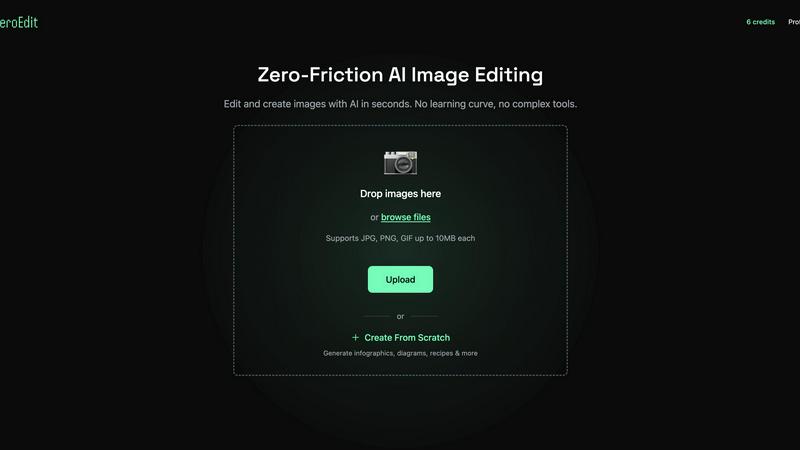
ZeroEdit is your collaborative AI image editor that transforms photos instantly using simple text prompts.
Last updated: February 28, 2026
Visual Comparison
PhotoWeather

ZeroEdit
Feature Comparison
PhotoWeather
Ready-Made Templates
PhotoWeather offers a selection of ready-made templates specifically crafted for photographers. These templates include conditions ideal for capturing fog and mist, golden and blue hours, aurora visibility, storm intensity, and coastal drama. This feature simplifies the setup process, allowing photographers to quickly choose conditions they want to monitor without needing to create rules from scratch.
Powerful Rule Builder
The powerful rule builder in PhotoWeather allows users to define their ideal shooting conditions with over 80 parameters. Photographers can combine various factors such as clouds, visibility, wind, humidity, and astronomical events using AND/OR/NOT logic. For instance, you can set alerts for "Golden hour + 20-60% clouds + wind less than 7 m/s," ensuring that you are alerted to the precise conditions you are interested in.
Smart Notifications
PhotoWeather provides smart notifications that keep you informed about the best photographic opportunities. You can receive daily digests, reminders before conditions begin, and alerts when forecasts change. Additionally, calendar synchronization ensures that all opportunities are integrated into your calendar, making it easier to plan your shoots without missing any critical moments.
Trusted Forecast Sources
The app sources its forecasts from reputable meteorological services like ECMWF, DWD, NOAA, MET Norway, and Météo-France. This ensures that users receive accurate and reliable weather information, allowing them to make informed decisions about when and where to shoot. With real-time updates and alerts sent within a minute, you can be confident that you will never miss an important photo opportunity.
ZeroEdit
Natural Language Editing
This foundational feature allows your entire team to collaborate using simple English prompts. Instead of navigating complex toolbars, team members can articulate the desired edit—like "add dramatic sunset lighting" or "remove the background and place on a beach"—and the AI executes it precisely. This creates a unified, intuitive language for creative collaboration, ensuring everyone from marketers to managers can contribute directly to the visual process without specialized training.
AI-Powered Complex Transforms
ZeroEdit moves beyond basic filters to understand and execute sophisticated creative requests collaboratively. Whether it's generating cinematic movie posters, applying specific artistic styles (like GTA aesthetics), creating product ad mockups, or performing sky replacement, the AI acts as a shared creative partner. This allows teams to rapidly prototype ideas, test different visual concepts, and achieve complex artistic visions together that would normally require multiple specialists or extensive manual labor.
Multi-Image Editing & Combination
Built for team projects and campaigns, this feature enables users to work with multiple images simultaneously. You can combine elements from different photos, create cohesive collages, or apply consistent edits across a batch of images based on a single descriptive prompt. This is essential for teams creating a series of social media posts, product galleries, or marketing materials that require a uniform look and feel, ensuring brand consistency through collaborative efficiency.
Rapid Object & Background Manipulation
The platform excels at precise, context-aware edits like removing unwanted objects, people, or backgrounds, and intelligently adding new elements. This capability streamlines collaborative revision rounds; for instance, a product team can quickly remove a distracting element from a shoot or a content team can seamlessly swap backgrounds to match a campaign theme, all through simple descriptive collaboration, drastically reducing feedback loops and production time.
Use Cases
PhotoWeather
Landscape Photography
Landscape photographers can utilize PhotoWeather to set conditions for capturing stunning natural scenes. By monitoring specific weather patterns such as fog, cloud drama, and golden hours, they can ensure they are ready to capture landscapes under the most favorable conditions.
Astro Photography
For astro photographers, PhotoWeather simplifies the process of planning night shoots. By tracking astronomical events, moon phases, and cloud coverage, users can anticipate ideal nights for capturing the Milky Way or other celestial phenomena, eliminating guesswork.
Wildlife Photography
Wildlife photographers can set alerts based on specific weather conditions that affect animal behavior, such as humidity and temperature changes. This allows them to plan their shoots around the best times for animal activity, enhancing their chances of capturing stunning wildlife images.
Event Photography
Event photographers can leverage PhotoWeather to ensure they are prepared for outdoor events. By setting rules related to weather conditions, they can receive alerts that help them decide whether to proceed with outdoor shoots or find alternative indoor venues based on forecast changes.
ZeroEdit
E-commerce Team Product Staging
E-commerce teams can collaborate to produce professional product imagery at scale. A member can upload a simple photo and prompt the AI to "place this vase on a marble countertop with soft studio lighting." This allows the entire team—from product managers to social media coordinators—to quickly generate and approve consistent, high-quality visuals for websites and marketplaces without relying on lengthy photo shoots or external editors, speeding up time-to-market.
Content Creator & Social Media Team
Content creators and their collaborators can maintain a strong, consistent visual brand across platforms. A team can effortlessly generate engaging YouTube thumbnails, apply trending visual styles to Instagram posts, or transform casual photos into cinematic pieces for TikTok using descriptive prompts. This collaborative tool ensures all visual content aligns with the brand's identity, enabling the team to produce more engaging content faster and in unison.
Marketing & Advertising Campaigns
Marketing teams can rapidly ideate, create, and A/B test campaign visuals in a collaborative environment. By describing different concepts—"make a vibrant, energetic ad for the summer sale" versus "a sophisticated, minimalist version"—the team can generate multiple visual variants in minutes. This synergy allows for quick iteration based on collective feedback, enabling data-driven design decisions and significantly accelerating campaign launch cycles.
Photography Workflow Enhancement
Photographers collaborating with clients or assistants can streamline their post-production workflow. They can use ZeroEdit to quickly perform time-consuming edits like enhancing lighting ("add dramatic golden hour glow"), rescuing photos by removing photobombers, or applying artistic effects. This facilitates a more cooperative review process with clients, allowing for quick previews and adjustments based on descriptive feedback, ultimately delivering final products faster.
Overview
About PhotoWeather
PhotoWeather is a revolutionary tool designed specifically for outdoor photographers who seek to capture the perfect shot at the right moment. Instead of relying on traditional weather apps that require constant checking, PhotoWeather monitors forecasts around the clock and sends alerts tailored to your specific photography goals. Whether you're aiming to catch the mystical beauty of sunrise fog, the intensity of a storm, or the enchanting glow of golden-hour light, PhotoWeather ensures you won’t miss these fleeting opportunities. With a user-friendly interface available on both iOS and Android, you can add your favorite locations, set custom rules or use pre-made templates, and receive notifications with confidence scores. This synergy between technology and photography allows users to focus on their craft, knowing that they will be alerted when conditions align perfectly for their next masterpiece.
About ZeroEdit
ZeroEdit is a collaborative, AI-powered image editing platform that redefines visual creation by making professional-grade editing accessible to everyone through the power of natural language. It transforms individual effort into a seamless, synergistic process where ideas become stunning visuals in seconds. By simply describing edits in plain English, teams and creators can bypass the complex interfaces and steep learning curves of traditional software. This tool is built for a diverse, cooperative ecosystem, including e-commerce teams streamlining product imagery, content creators and marketing departments producing rapid campaign assets, and photographers enhancing their workflow. ZeroEdit's core value proposition lies in its ability to democratize high-quality visual editing, fostering a cooperative environment where technical skill is no longer a barrier to creative execution. It empowers groups to work together more efficiently, aligning on a vision and seeing it materialize instantly, thus accelerating project timelines and enhancing collective creative output.
Frequently Asked Questions
PhotoWeather FAQ
How do I get started with PhotoWeather?
Getting started is simple. Download the PhotoWeather app, create your account, and begin by adding your favorite shooting locations. You can then set your desired conditions using templates or the powerful rule builder to receive alerts tailored to your photography needs.
How accurate are the forecasts provided by PhotoWeather?
PhotoWeather sources its forecasts from trusted meteorological services such as NOAA and ECMWF, ensuring high accuracy. Users can expect reliable weather predictions that will help them plan their photography shoots effectively.
Can I create my own rules for weather alerts?
Yes, PhotoWeather allows users to create their own custom rules based on over 80 parameters. This flexibility lets you tailor alerts to your specific photographic goals, ensuring you receive notifications only when the conditions you care about are met.
Do you support calendar synchronization?
Absolutely! PhotoWeather offers calendar synchronization that allows you to integrate photographic opportunities directly into your calendar. This feature helps you stay organized and ensures that you never miss a chance to capture the perfect shot.
ZeroEdit FAQ
How does the natural language editing work?
ZeroEdit uses advanced AI and natural language processing models trained on vast datasets of images and descriptive text. When you type a prompt, the AI interprets your request, understands the context and objects in your image, and applies the corresponding visual transformations. It's designed to comprehend creative intent, making collaborative editing as simple as having a conversation about the desired outcome with your team.
Is there a free way to try ZeroEdit?
Yes, ZeroEdit offers a completely free tier to experience its collaborative power. You can sign up and perform your first edit without any credit card required. This allows entire teams to test the platform's core functionality, understand how natural language prompts can streamline their workflow, and see the quality of the results before committing to a paid plan.
What kind of image quality does ZeroEdit produce?
ZeroEdit delivers high-quality outputs suitable for professional use. Paid plans offer "Pro" quality at 2K resolution, ensuring images are crisp and detailed for web, social media, and even print materials. The standard quality (1K) available on lower tiers is still highly effective for digital platforms, allowing teams to choose the right balance of quality and volume for their collaborative projects.
Can I use ZeroEdit for commercial projects?
Absolutely. ZeroEdit is designed to support commercial use for individuals, freelancers, and teams. Whether you're creating product images for an online store, marketing assets for a client campaign, or visual content for a monetized social channel, you have full rights to use the images you create on the platform. It's built to be a reliable, collaborative partner in professional creative workflows.
Alternatives
PhotoWeather Alternatives
PhotoWeather is an innovative tool designed for photographers that provides real-time alerts about optimal photography conditions, such as golden hour, fog, and dramatic cloud formations. By monitoring weather forecasts 24/7, it enables users to focus on capturing the perfect shot without the need for constant manual checks. Users often seek alternatives to PhotoWeather for a variety of reasons, including pricing, specific feature sets, or compatibility with different platforms. When searching for an alternative, it's important to consider aspects like ease of use, customization options, and the variety of weather parameters that can be tracked to ensure the tool meets your photography needs effectively.
ZeroEdit Alternatives
ZeroEdit is a powerful AI image editor within the design and photography category, enabling users to transform photos using simple text prompts. It's designed for teams and individuals who value speed and simplicity in creating professional visuals. Users often explore alternatives for various reasons, such as aligning with specific budget constraints, requiring niche features beyond core AI editing, or needing compatibility with different operating systems and existing team workflows. The search for the right tool is a common step in optimizing a collaborative creative process. When evaluating other options, consider how well they integrate with your team's current software, the learning curve for new members, and the balance between automated AI capabilities and the level of manual control offered. The goal is to find a solution that enhances your team's synergy, allowing everyone to contribute effectively to visual projects.