BlitzCut vs Nano Photo
Side-by-side comparison to help you choose the right product.

BlitzCut
Blitzcut is your AI editing partner that removes silence and adds captions so you can post videos faster together.
Last updated: February 28, 2026

Unlock your creativity with NanoPhoto.AI, the effortless way to edit photos and videos using cutting-edge AI technology.
Last updated: March 1, 2026
Visual Comparison
BlitzCut

Nano Photo
Feature Comparison
BlitzCut
Automatic Silence Removal
BlitzCut's AI instantly detects and removes all pauses and dead air from your talking-head videos. This on-device processing means no waiting for uploads; the AI cleans up your audio in seconds, cutting out typically 30-60% of silence. This feature alone saves creators 15-20 minutes of manual cutting per video, dramatically accelerating the editing workflow and improving viewer retention by delivering a tighter, more engaging pace directly from your phone.
AI-Powered Styled Captions
The editor automatically generates accurate captions with over 95% recognition accuracy and applies viral, stylish formatting to them. This eliminates the separate, lengthy process of manually transcribing, correcting, and styling subtitles, which can take another 15-20 minutes. By automating caption creation, BlitzCut ensures your content is accessible, engaging, and platform-optimized with just one tap, fostering better synergy between your message and your audience.
Text-Based Video Editing
BlitzCut allows you to edit your video by simply editing its transcript. You can delete sentences or phrases directly from the text, and the corresponding video sections are removed automatically. This intuitive, collaborative approach between your script and the visual timeline makes refining content incredibly fast and straightforward, perfect for trimming mistakes or tightening narratives without ever needing to manually splice a video clip.
Mobile-First, One-Tap Export Workflow
Built exclusively for the Apple ecosystem (iPhone, iPad, Mac), BlitzCut offers a streamlined, three-step process. After importing your clip, one tap triggers both silence removal and caption styling. Within minutes, you can export in full HDR quality and share directly to social platforms like TikTok, Instagram, or YouTube. This seamless, integrated workflow embodies the team-oriented goal of minimizing friction and maximizing efficiency for creators on the go.
Nano Photo
AI-Powered Video Creation
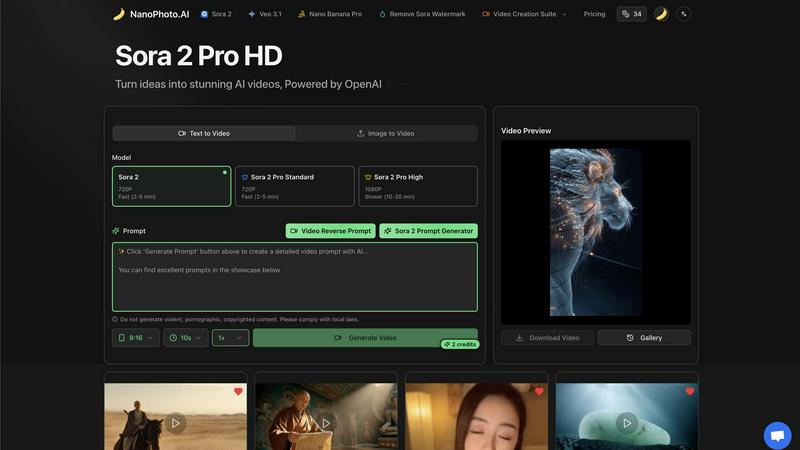
Nano Photo harnesses the power of AI to facilitate the seamless creation of videos from text prompts or images. Users can quickly generate high-quality videos that capture their vision, enabling them to bring ideas to life in a matter of minutes.
Image to Video Transformation
One of the standout features of Nano Photo is its ability to transform static images into dynamic videos. This innovative functionality allows users to add motion to their visuals, creating engaging content that captivates audiences.
Multiple Video Quality Options
Users have the flexibility to choose from various video quality options, including 720P and 1080P. This versatility caters to different project requirements, ensuring that users can create content that meets their specific needs, whether for social media or professional presentations.
Sora 2 Prompt Generator
The Sora 2 Prompt Generator simplifies the creative process by assisting users in generating effective prompts for video creation. This feature is particularly beneficial for those who may struggle with ideation, empowering them to produce compelling content effortlessly.
Use Cases
BlitzCut
Daily Social Media Content Creators
For influencers, educators, and entrepreneurs committed to daily posting on TikTok, Reels, or Shorts, BlitzCut is indispensable. It turns the unsustainable burden of hour-long edits into a manageable 2-minute task. This synergy between creator and tool makes consistent, high-quality output possible, allowing them to maintain audience engagement and growth without being bogged down by complex editing software.
Podcasters and Interviewers Repurposing Content
Creators who record long-form conversations can use BlitzCut to quickly extract compelling highlights for social promotion. The automatic silence removal tightens the pacing, while AI captions make the snippets accessible and shareable. This collaborative repurposing workflow efficiently extends the reach of their primary content, working in tandem with their overall content strategy.
Small Business Marketing Teams
Small business owners and solo marketers can produce professional-looking promotional videos without a dedicated video editor. BlitzCut's simple, fast process allows them to create testimonials, product explainers, and announcement clips quickly. This empowers the entire team to collaborate on content creation, ensuring a steady stream of authentic marketing material that resonates with their community.
Beginner Video Editors
Individuals new to video editing who are intimidated by professional desktop software find a perfect partner in BlitzCut. Its intuitive, mobile-first design and automated features lower the barrier to entry. Beginners can achieve polished results quickly, building confidence and skill through a cooperative process where the AI handles technical complexities, letting them focus on storytelling.
Nano Photo
Marketing Campaigns
Marketers can leverage Nano Photo to create eye-catching promotional videos and images that resonate with their target audience. The platform's AI capabilities help streamline the production process, allowing for rapid content delivery that keeps pace with market demands.
Social Media Content
For social media managers and influencers, Nano Photo offers a convenient way to generate engaging multimedia content. Users can quickly create videos and images tailored for platforms like Instagram, TikTok, and Facebook, enhancing their online presence with minimal effort.
Educational Materials
Educators can utilize Nano Photo to develop visually appealing educational content. By transforming complex concepts into compelling visuals, teachers can enhance the learning experience for students, making subjects more relatable and easier to understand.
Artistic Projects
Artists and creatives can explore their imagination through Nano Photo's powerful tools. By using the platform to generate unique visuals, they can push the boundaries of traditional art forms and create innovative pieces that reflect their artistic vision.
Overview
About BlitzCut
BlitzCut is a revolutionary AI-powered video editor built from the ground up for the modern content creator. It's designed to transform the tedious, time-consuming process of video editing into a swift and seamless experience, empowering creators to focus on what they do best: creating. At its core, BlitzCut is the fastest AI video editor for social media content, specifically engineered for TikTok, Instagram Reels, and YouTube Shorts. It serves a vital mission: to make professional video editing accessible to every creator by automating the most tedious tasks. The app champions a mobile-first philosophy, recognizing that the future of content creation is on iPhone, iPad, and Mac. BlitzCut operates on the principle that AI should be a collaborative partner, handling the repetitive work like silence removal and captioning, freeing up human creativity rather than replacing it. Its ultimate value proposition is enabling a sustainable daily posting schedule by reducing total editing time to just two minutes per video, turning raw clips into polished, post-ready content in a fraction of the time traditional editing requires.
About Nano Photo
NanoPhoto.AI is a revolutionary AI-powered creative platform tailored for individuals and businesses aiming to enhance their content creation capabilities. From marketers to filmmakers, artists, and everyday creative enthusiasts, Nano Photo provides a comprehensive solution for generating stunning video and image content. With the integration of advanced AI models like OpenAI's Sora 2 and Google's Veo 3.1, users can effortlessly convert their ideas into high-quality visuals. The platform stands out for its user-friendly interface, allowing users to create compelling multimedia content without requiring extensive technical expertise. By streamlining the creative process, Nano Photo democratizes access to sophisticated media creation, empowering users to explore their creativity efficiently. With a commitment to saving time and enhancing creative expression, Nano Photo proves to be an indispensable resource for anyone looking to produce engaging visual content.
Frequently Asked Questions
BlitzCut FAQ
Is BlitzCut really free to use?
Yes, BlitzCut is free to download and use. The app operates on a transparent model where you can access its core AI editing features, including silence removal and caption generation, without needing to create an account or enter a credit card. This aligns with our mission to make professional editing truly accessible through a cooperative and open approach.
How does BlitzCut compare to editors like CapCut or InShot?
While CapCut and InShot are full-featured traditional editors, BlitzCut is a specialized AI tool focused on unparalleled speed for a specific workflow: polishing talking-head videos for social media. We collaborate with creators to solve the slowest parts of editing (silence and captions) automatically. Think of BlitzCut as your fast, AI-powered teammate for quick turnarounds, while other apps are broader toolkits.
Does BlitzCut work offline?
The core silence removal feature uses on-device AI processing, meaning it works completely offline without needing to upload your video. This collaborative design between your device's power and our software ensures speed and privacy. Some features, like initial caption generation, may require an internet connection.
What video formats and lengths does BlitzCut support?
BlitzCut is designed to be a flexible partner in your workflow. You can import raw clips of any standard length and format directly from your iPhone, iPad, or Mac camera roll. The AI tools are built to handle typical social media video projects, efficiently processing them to get you from import to export in just a couple of minutes.
Nano Photo FAQ
What types of content can I create with Nano Photo?
Nano Photo allows users to create both videos and images, offering versatile tools for diverse content creation needs. Whether you need promotional videos, social media posts, or artistic visuals, the platform supports a wide range of creative projects.
Do I need technical skills to use Nano Photo?
Not at all! Nano Photo is designed to be user-friendly, making it accessible for individuals without technical expertise. The intuitive interface and AI-driven features streamline the creative process, allowing anyone to produce high-quality content.
Can I customize the video quality when creating content?
Yes, Nano Photo offers multiple video quality options, including 720P and 1080P. This flexibility enables users to select the best quality for their specific needs, whether for online sharing or professional presentations.
Is there a special offer for new users?
Yes, Nano Photo currently has an annual payment special offer, making it easier for new users to access the platform at half-price. This initiative aims to encourage creativity without financial barriers, allowing more individuals to explore their creative potential.
Alternatives
BlitzCut Alternatives
BlitzCut is an AI-powered video editor designed for content creators who need to produce social media videos quickly. It belongs to the category of automated, mobile-first editing tools that prioritize speed and simplicity, using artificial intelligence to handle time-consuming tasks like cutting silences and adding captions. Users often explore alternatives for various reasons. Some may be looking for different pricing models or subscription tiers, while others might need specific advanced features, integrations, or support for different operating systems beyond the Apple ecosystem. It's a natural part of finding the right tool that aligns with both a creator's workflow and budget. When evaluating other options, it's wise to consider a few key factors. Look at the core automation capabilities, especially for silence removal and transcription accuracy. The overall speed of the workflow from import to export is crucial for daily posting. Finally, assess the platform compatibility and whether the tool's design philosophy supports your creative process by handling the tedious work, allowing you to focus on the content itself.
Nano Photo Alternatives
Nano Photo is an innovative AI-powered creative platform that specializes in photo and video editing. It caters to a wide range of users, including marketers, filmmakers, and artists, providing an all-in-one solution for generating high-quality visual content. Users often seek alternatives to Nano Photo for various reasons, such as pricing differences, specific feature requirements, or the need for compatibility with different platforms. When choosing an alternative, it's essential to consider factors like ease of use, the range of features offered, and how well it aligns with your creative goals. Additionally, look for platforms that provide robust support and resources to enhance your creative process, ensuring that you can produce engaging multimedia content efficiently and effectively.