
Nano AI vs Shrinkpad
Side-by-side comparison to help you choose the right product.

Nano AI
Nano AI is your all-in-one creative platform for fast image generation, editing, and seamless team collaboration.
Last updated: February 28, 2026

Shrinkpad
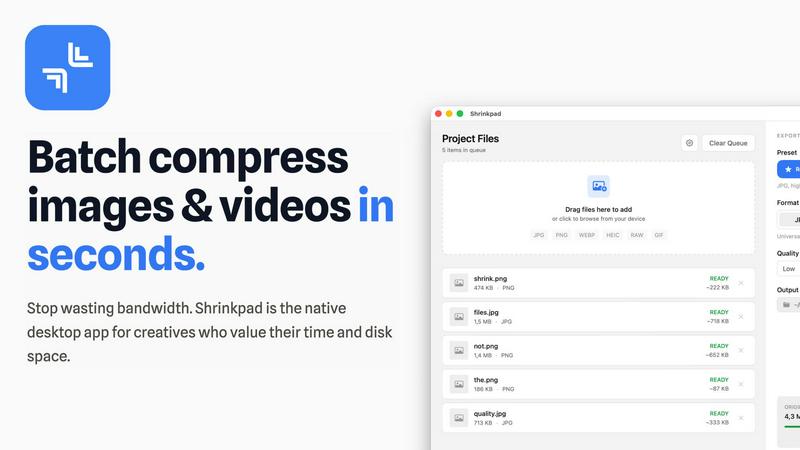
Shrinkpad effortlessly batch compresses images and videos on Mac, optimizing your assets for faster performance and.
Last updated: February 28, 2026
Visual Comparison
Nano AI

Shrinkpad
Feature Comparison
Nano AI
Flash-Speed AI Generation
Powered by the Nano Banana model, Nano AI delivers stunning text-to-image and image-to-image results in under ten seconds. This rapid inference speed is transformative for team workflows, allowing for instant visualization of concepts during collaborative sessions. You can describe a scene, apply a style from a reference image, and see a high-quality visual appear almost immediately, keeping the entire team engaged and moving forward without disruptive waiting periods.
Magic Edit: Inpainting & Outpainting
Fix, modify, or expand your images directly within the platform using simple natural language commands. This powerful feature allows any team member to highlight an area of an image and type an instruction—like "change the shirt to blue" or "extend the background with a forest"—to seamlessly alter the content. It enables rapid revisions and creative explorations without requiring complex manual edits or switching to another software, perfect for collaborative polishing.
Deep Style Tuning & Control
Move beyond generic filters. Nano AI, in partnership with the Nano Banana style model, provides granular control over the artistic output. By describing the desired lighting, texture, and composition in your prompt, you can achieve highly specific visual styles. This allows teams to maintain consistent artistic direction across multiple assets, whether you're applying Renaissance lighting to a product shot or a vaporwave aesthetic to a campaign visual, all through prompt-only instructions.
Unified Creative Workspace
Nano AI consolidates the entire creative pipeline into a single, streamlined environment. Teams can generate images, resize or convert files, apply artistic effects like photo-to-sketch, and utilize utility tools like background removal without ever leaving the platform. This integrated approach ensures that all experiments, drafts, and final assets are centralized, reducing context-switching and making it effortless to share and review work internally.
Shrinkpad
Automatic Compression Optimization
Shrinkpad takes the guesswork out of media compression by automatically analyzing the visual complexity of your files. This feature applies the perfect compression ratio without introducing artifacts, ensuring high-quality results every time.
Unlimited Batching
With Shrinkpad, users can process thousands of assets without the risk of crashes. Unlike typical web-based tools, this application effortlessly handles massive queues, allowing for efficient batch processing of images and videos in a single operation.
One-Drop Import
Gone are the days of dragging files one by one. Shrinkpad’s One-Drop Import feature allows users to simply drag an entire folder onto the app, instantly detecting and adding all supported images and videos to the batch list for quick compression.
Privacy-Focused Processing
Shrinkpad processes all files locally on your Mac, ensuring that your sensitive assets never leave your device. This privacy-first approach guarantees that no uploads to the cloud take place, giving you peace of mind while optimizing your media files.
Use Cases
Nano AI
Rapid Campaign Mockups for Marketing Teams
Marketing teams can use Nano AI to swiftly generate and iterate on visual concepts for new campaigns. By quickly turning copy ideas into compelling images and adjusting styles to match brand guidelines, the entire team can review and provide feedback on tangible mockups in minutes, dramatically speeding up the approval process and enabling faster go-to-market strategies.
Collaborative Design Sprints
During design sprints, creative teams can leverage Nano AI's speed to brainstorm and visualize a wide array of ideas. The ability to generate, edit, and share variations in real-time fosters a dynamic and productive collaborative environment. Team members can build upon each other's prompts and edits, converging on the strongest visual direction without technical bottlenecks.
Streamlined Asset Production for Social Media
Content creators and social media managers can produce a high volume of tailored visuals efficiently. From generating unique hero images for posts to quickly resizing and reformatting content for different platforms (1:1, 9:16, 16:9) using built-in tools, Nano AI helps small teams maintain a consistent and engaging social media presence without a heavy production burden.
Effortless Product Visualization
E-commerce and product teams can create lifestyle and contextual images for products without expensive photoshoots. Using image-to-image, they can place product photos into new environments or styles. The Magic Edit feature allows for quick alterations, like changing a product color based on feedback, enabling agile responses to market trends and team input.
Shrinkpad
Optimizing Photography Workflows
Photographers can benefit immensely from Shrinkpad by efficiently compressing large sets of images without sacrificing quality. This allows for faster sharing and storage, making it easier to manage extensive portfolios.
Streamlining Design Projects
Designers using software like Figma or Photoshop can save hours by exporting assets in bulk at higher resolutions and letting Shrinkpad handle the optimization and renaming automatically, thus enhancing productivity.
Enhancing Video Editing Processes
Content creators working with video files can utilize Shrinkpad to compress large video assets quickly. This ensures that videos load faster on websites and platforms, improving user experience without losing visual fidelity.
Managing Web Assets Efficiently
Web developers and digital marketers can leverage Shrinkpad to compress images and videos for websites, significantly reducing load times. This not only enhances the performance of the site but also contributes to better SEO outcomes.
Overview
About Nano AI
Nano AI is the all-in-one creative platform built for modern teams who value speed, synergy, and seamless collaboration. It's where your collective creative vision comes to life, uniting powerful AI generation with practical editing tools in one intuitive workspace. Designed for creative teams, marketers, and designers, Nano AI eliminates the friction of juggling multiple applications. At its core is the advanced Nano Banana model, delivering flash-speed text-to-image and image-to-image transformations in under ten seconds. This unprecedented efficiency means your team can iterate on concepts in real-time, keeping the creative momentum flowing during brainstorming sessions and client reviews. From initial mockup to final asset, Nano AI supports the entire workflow with features like background removal, inpainting, outpainting, and granular style control. Shared galleries and upcoming features like 4K neural upscaling are designed to streamline team collaboration and accelerate production. By bringing every step of the creative process into one cohesive space, Nano AI empowers teams to explore, refine, and ship high-quality visuals together, faster than ever before.
About Shrinkpad
Shrinkpad is a cutting-edge batch compression tool tailored for Mac users who require efficient management of their media files. This powerful application allows users to swiftly compress images and videos, making it the perfect solution for photographers, designers, content creators, and anyone regularly handling large media files. By enabling the compression of hundreds of files or entire folders in mere seconds, Shrinkpad drastically reduces storage space while maintaining the visual quality of your media. With a strong emphasis on privacy, all processing takes place locally on your Mac, ensuring that your files remain secure and untouched by cloud services. Supporting over 50 formats out of the box, Shrinkpad provides seamless compatibility, allowing users to compress various types of media without hassle. Featuring customizable settings and a user-friendly interface, Shrinkpad stands out as the ultimate tool for optimizing your assets without compromising quality or privacy.
Frequently Asked Questions
Nano AI FAQ
What is the Nano Banana model?
The Nano Banana model is the advanced AI engine at the heart of Nano AI's generation capabilities. It is specifically designed for flash-speed inference, delivering image results in under ten seconds. More importantly, it excels at understanding layered instructions and nuanced stylistic cues from natural language prompts, allowing users to achieve their desired output without complex prompt engineering.
Who is Nano AI designed for?
Nano AI is built for collaborative creative professionals. It is an ideal tool for in-house marketing teams, design agencies, content creation squads, and any group that needs to produce high-quality visual content quickly and iteratively. Its unified workspace is particularly valuable for teams looking to streamline their workflow and reduce dependency on multiple disparate software tools.
Can I use the generated images for commercial projects?
Yes, commercial usage rights are granted for images generated by users on the Pro and Studio subscription plans. This allows teams and businesses to confidently use the visuals created within Nano AI in client work, advertising, product packaging, and other commercial applications, providing clear legal security for professional use.
What are the upcoming features in Nano AI?
Nano AI has a roadmap focused on enhancing team collaboration and asset quality. The most anticipated upcoming feature is 4K Neural Upscaling, which will intelligently add fine, believable details to upscale images for print or high-resolution displays. Furthermore, dedicated Prompt Labs, Shared Galleries, and enhanced Editors are coming to further centralize project management and team review processes within the platform.
Shrinkpad FAQ
Can I use Shrinkpad for free?
Yes, Shrinkpad offers a Free Starter plan that includes essential tools for casual use, allowing you to compress a limited number of files per batch.
What file formats does Shrinkpad support?
Shrinkpad supports over 50 file formats, including popular image formats like JPG, PNG, and WEBP, as well as video formats such as MP4 and MOV.
Does Shrinkpad support video compression?
Absolutely! Shrinkpad is designed to handle both image and video compression, allowing users to process mixed media batches effortlessly.
How many files can I process at once?
With the Personal and Team plans, users can process unlimited files per batch, enabling efficient handling of even the largest media collections without any restrictions.
Alternatives
Nano AI Alternatives
Nano AI is a comprehensive creative platform in the image generation and editing category. It empowers teams to rapidly produce and refine visual content through AI, focusing on speed and collaborative features to streamline project workflows. Users often explore alternatives for various reasons. A team's specific needs around budget, required feature sets like video generation or 3D modeling, and integration with existing tools can all lead to a search for other solutions. The ideal platform varies based on a project's unique demands and the team's collaborative rhythm. When evaluating other platforms, consider how they support your team's synergy. Look for tools that balance powerful AI capabilities with intuitive sharing and feedback loops. The goal is to find a solution that enhances your collective creative process, ensuring everyone can contribute effectively from concept to final asset.
Shrinkpad Alternatives
Shrinkpad is a powerful batch compression tool designed specifically for Mac users who require efficient management of their media files. This innovative application allows users to quickly compress images and videos, making it an essential asset for photographers, designers, and content creators who frequently work with large media files. By reducing storage space while maintaining visual quality, Shrinkpad helps streamline workflows and enhances productivity. Users often seek alternatives to Shrinkpad for various reasons, including pricing, specific feature sets, compatibility with different operating systems, or personal preferences regarding user interface. When searching for an alternative, it’s crucial to consider factors such as batch processing capabilities, local versus cloud-based processing options, format compatibility, and the ability to customize settings to meet specific needs. Finding a solution that aligns with your workflow can help you maintain efficiency while managing media files effectively.