HeyVid vs MeetingMind
Side-by-side comparison to help you choose the right product.

HeyVid is your all-in-one AI solution for effortlessly creating stunning videos and images, streamlining your creative workflow.
Last updated: April 4, 2026

MeetingMind
MeetingMind automatically records and summarizes your Zoom meetings, ensuring you never miss important details again.
Last updated: March 1, 2026
Visual Comparison
HeyVid

MeetingMind
Feature Comparison
HeyVid
Text to Video
This feature allows users to convert written content into engaging videos seamlessly. Simply input your text, and HeyVid utilizes advanced AI models to create a visually appealing narrative, complete with animations and graphics that enhance the message.
Image to Video
Transform static images into dynamic videos with ease. This feature enables users to take their existing visuals and animate them, creating captivating video content that can be used for presentations, social media, and more.
AI Image to Image Refiner & Stylizer
Enhance your images with this powerful tool that refines and stylizes visuals based on user preferences. Whether you want to adjust the color palette or apply artistic effects, this feature ensures your images stand out.
One-Click AI Video Maker
Creating videos has never been easier. With just one click, users can generate a complete video based on predefined templates and AI suggestions. This feature streamlines the content creation process, making it accessible for everyone.
MeetingMind
Automatic Detection
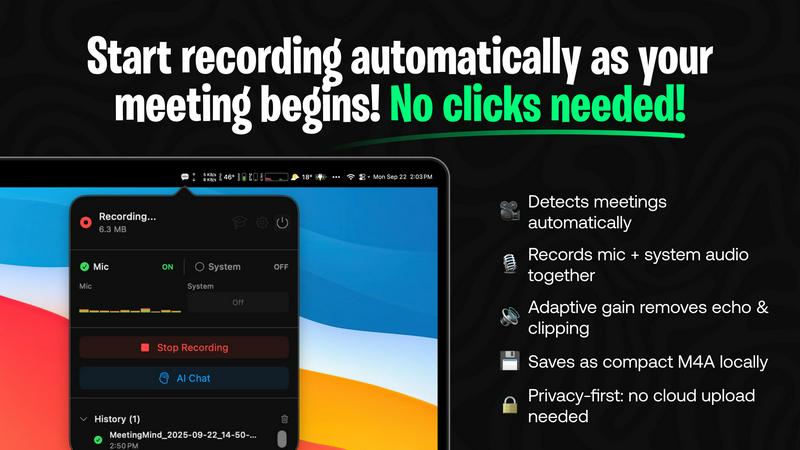
MeetingMind automatically detects when Zoom meetings start, eliminating the need for any manual clicks. This seamless integration ensures that you can focus on your discussions without worrying about whether the recording is active, allowing for a distraction-free environment.
Comprehensive Recording
The application captures both microphone and system audio with adaptive gain, ensuring that every voice is heard clearly. This comprehensive recording capability means no important details are lost, creating an accurate account of your meeting for future reference.
AI Assistant
Choose your AI assistant depending on your needs: use local processing with Ollama for swift insights or connect to OpenRouter for advanced cloud-based summaries. This flexibility empowers you to receive tailored support based on your preferences and requirements.
Markdown Export
After each meeting, receive beautifully formatted markdown files containing AI-generated summaries and transcripts. This feature not only organizes the meeting notes but also makes it easy to share important points with your team, ensuring that everyone stays informed.
Use Cases
HeyVid
Marketing Campaigns
HeyVid is ideal for marketers looking to produce eye-catching promotional videos and images. With its advanced tools, marketers can create engaging ad content that captures attention and drives conversions across multiple platforms.
Educational Content
Educators can leverage HeyVid to create informative and visually appealing course materials. From instructional videos to engaging presentations, the platform allows for the seamless integration of text and visuals, enhancing the learning experience.
Social Media Content
HeyVid is perfect for social media managers and influencers aiming to elevate their online presence. The ability to generate short-form videos and stunning thumbnails quickly helps users maintain a consistent and professional look across their social profiles.
Corporate Communications
Businesses can use HeyVid to create corporate videos that effectively communicate updates, presentations, and training materials. This ensures that internal communications are engaging and professional, fostering a better understanding among team members.
MeetingMind
Project Management
For project managers, MeetingMind is an indispensable tool that helps ensure that all team members are aligned on project goals and action items. Its automatic recording and transcription capabilities allow managers to focus on leading discussions instead of taking notes.
Remote Teams
In today's digital workplace, remote teams often struggle to maintain engagement during virtual meetings. MeetingMind helps bridge this gap by providing accurate transcripts and summaries, allowing team members to revisit discussions and stay connected, regardless of their location.
Consultant Meetings
Consultants can leverage MeetingMind to capture crucial insights during client meetings. By automatically recording conversations, consultants can focus on understanding their clients' needs without the distraction of note-taking, ultimately leading to more effective consultations.
Training Sessions
MeetingMind is also ideal for training sessions, where capturing detailed information is critical. With its ability to record and transcribe, participants can revisit the material later, ensuring that no important training detail is overlooked.
Overview
About HeyVid
HeyVid is an innovative AI-powered platform designed to simplify the video and image creation process for users of all skill levels. Whether you are a content creator, marketer, educator, or entrepreneur, HeyVid offers an all-in-one solution to generate high-quality videos and images quickly and effortlessly. Its user-friendly interface allows anyone to transform their ideas into stunning visual content without the need for extensive editing skills. With features such as text-to-video and image-to-image generation, HeyVid empowers users to create professional-grade content that captivates audiences. The platform leverages top AI models like Veo 3.1 and Sora 2, ensuring that users can produce visually striking content for various applications, from marketing campaigns to educational materials. HeyVid is your go-to creative studio for turning concepts into compelling visuals that resonate with viewers, helping you elevate your storytelling and brand identity.
About MeetingMind
MeetingMind is your intelligent meeting assistant, designed to enhance collaboration and ensure that every team member remains engaged and informed during important discussions. It revolutionizes the process of capturing, understanding, and acting on meeting content by automatically recording and transcribing Zoom meetings in real-time. Built specifically for macOS, MeetingMind effortlessly integrates into your workflow, residing in your menu bar until called upon. The core value proposition lies in creating synergy through clarity; by relieving you of the note-taking burden, MeetingMind allows participants to focus fully on the conversation. Ideal for project managers, remote teams, consultants, and anyone who values productivity without sacrificing privacy, MeetingMind operates with a privacy-first approach, processing all data locally on your Apple Silicon Mac. This ensures that sensitive conversations remain secure on your device, only shared with cloud services at your discretion. Join the ranks of professionals who never miss critical meeting details again.
Frequently Asked Questions
HeyVid FAQ
How does HeyVid generate videos and images?
HeyVid utilizes advanced AI algorithms and models to create videos and images based on user input. Users can choose from various AI models and simply provide text or images to generate their desired content.
Is HeyVid suitable for beginners?
Absolutely! HeyVid is designed to be user-friendly, making it accessible for individuals with no prior editing experience. The intuitive controls and templates allow anyone to create professional-quality content effortlessly.
What types of content can I create with HeyVid?
HeyVid enables users to create a wide range of content, including marketing videos, educational materials, social media posts, corporate presentations, and more. The diverse features cater to various creative needs.
Are there any limitations on the content I can generate?
Users can create a multitude of content types, but specific limitations may apply based on the chosen AI model and resource credits. However, the platform provides ample flexibility to meet diverse creative requirements.
MeetingMind FAQ
How does MeetingMind ensure privacy?
MeetingMind prioritizes user privacy by processing all data locally on your Mac. This means that your meeting recordings never leave your device unless you consciously choose to upload them to a cloud service.
Can I use MeetingMind with other video conferencing tools?
Currently, MeetingMind is designed specifically for Zoom meetings, ensuring optimal performance and integration. Future updates may expand its compatibility with other platforms.
Is there a limit on the free version?
Yes, the free version allows for 60 minutes of recording per day, making it perfect for short meetings and daily standups. You can upgrade to unlock unlimited recording capabilities.
How do I download MeetingMind?
You can download MeetingMind from the Mac App Store, where you can also find additional information about pricing and features. Secure purchase options with Family Sharing support are available through Apple.
Alternatives
HeyVid Alternatives
HeyVid is an all-in-one AI video and image generator that empowers users to create high-quality visual content quickly and easily. As a tool in the productivity and management category, it caters to a diverse range of professionals seeking to enhance their creative capabilities without the need for extensive technical skills. However, users often look for alternatives to HeyVid for various reasons, including pricing concerns, feature sets that may not fully align with their specific needs, or compatibility with different platforms. When seeking an alternative, it is essential to consider elements such as ease of use, the quality of output, integration capabilities with existing tools, and the overall value offered. This collaborative approach will help ensure you find a solution that meets your team's requirements effectively.
MeetingMind Alternatives
MeetingMind is an innovative meeting assistant that automatically records and summarizes your team’s Zoom meetings into private notes, promoting seamless collaboration and engagement. As a productivity and management tool, it caters primarily to project managers, remote teams, and consultants who want to enhance their meeting experiences. Users often seek alternatives due to various factors, including pricing structures, feature sets, platform compatibility, or specific functionality that may better meet their unique needs. When exploring alternatives, consider essential aspects such as ease of integration with existing tools, the flexibility of features to suit your workflow, and the importance of maintaining data privacy. Look for solutions that prioritize user engagement while effectively managing the burden of note-taking, ensuring your team can focus on meaningful discussions without distractions.