
LuxSign vs MeetingMind
Side-by-side comparison to help you choose the right product.

LuxSign simplifies document signing with secure, legally compliant electronic signatures, all hosted in Luxembourg.
Last updated: February 28, 2026

MeetingMind
MeetingMind automatically records and summarizes your Zoom meetings, ensuring you never miss important details again.
Last updated: March 1, 2026
Visual Comparison
LuxSign

MeetingMind
Feature Comparison
LuxSign
Multiple Signature Methods
LuxSign offers various signature methods to accommodate the preferences of all users. You can draw your signature using a mouse, type your name, or even upload an image of your signature. This flexibility makes it easy to customize the signing experience, including the option to add custom initials for quick document signing.
Advanced Security
Security is paramount with LuxSign. The platform utilizes industry-standard encryption to protect your documents during upload, storage, and transmission. In addition, all documents are stored on secure servers in Luxembourg, complying with EU data protection regulations and ensuring your data remains safe from unauthorized access.
Collaboration Workspaces
LuxSign provides collaboration workspaces that allow teams to work together seamlessly. You can create shared spaces for organizing documents, managing member access, and collaborating on signing workflows. This feature enhances team cooperation and ensures everyone is on the same page throughout the signing process.
Complete Audit Trail
With LuxSign, every action taken on a document is logged with detailed timestamps, IP addresses, and signer information. This comprehensive audit trail is essential for compliance and verification, giving you peace of mind that every transaction is transparent and accountable.
MeetingMind
Automatic Detection
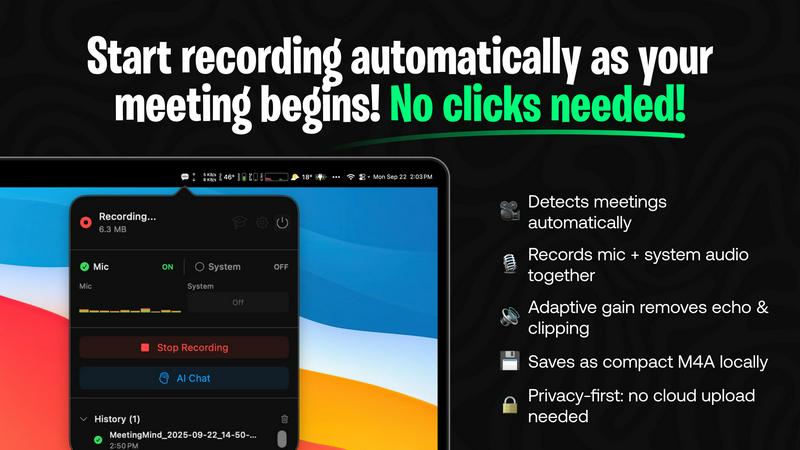
MeetingMind automatically detects when Zoom meetings start, eliminating the need for any manual clicks. This seamless integration ensures that you can focus on your discussions without worrying about whether the recording is active, allowing for a distraction-free environment.
Comprehensive Recording
The application captures both microphone and system audio with adaptive gain, ensuring that every voice is heard clearly. This comprehensive recording capability means no important details are lost, creating an accurate account of your meeting for future reference.
AI Assistant
Choose your AI assistant depending on your needs: use local processing with Ollama for swift insights or connect to OpenRouter for advanced cloud-based summaries. This flexibility empowers you to receive tailored support based on your preferences and requirements.
Markdown Export
After each meeting, receive beautifully formatted markdown files containing AI-generated summaries and transcripts. This feature not only organizes the meeting notes but also makes it easy to share important points with your team, ensuring that everyone stays informed.
Use Cases
LuxSign
Contract Management
Businesses can streamline their contract management process using LuxSign. By enabling multiple signers and flexible signing workflows, teams can quickly get contracts signed and returned, reducing delays and improving efficiency in business operations.
Human Resources Onboarding
HR departments can utilize LuxSign for onboarding new employees by securely sending offer letters, contracts, and policy documents for signature. This approach simplifies the onboarding process, allowing HR teams to focus on more strategic tasks rather than paperwork.
Real Estate Transactions
Real estate professionals can benefit from LuxSign by facilitating the signing of purchase agreements, lease contracts, and disclosure forms. The platform’s ease of use and compliance with legal standards streamline transactions, enhancing the overall customer experience.
Financial Services Documentation
Financial service providers can use LuxSign to manage client agreements, loan documents, and investment contracts securely. By ensuring that all documents are encrypted and stored in compliance with regulations, these businesses can maintain trust and reliability with their clients.
MeetingMind
Project Management
For project managers, MeetingMind is an indispensable tool that helps ensure that all team members are aligned on project goals and action items. Its automatic recording and transcription capabilities allow managers to focus on leading discussions instead of taking notes.
Remote Teams
In today's digital workplace, remote teams often struggle to maintain engagement during virtual meetings. MeetingMind helps bridge this gap by providing accurate transcripts and summaries, allowing team members to revisit discussions and stay connected, regardless of their location.
Consultant Meetings
Consultants can leverage MeetingMind to capture crucial insights during client meetings. By automatically recording conversations, consultants can focus on understanding their clients' needs without the distraction of note-taking, ultimately leading to more effective consultations.
Training Sessions
MeetingMind is also ideal for training sessions, where capturing detailed information is critical. With its ability to record and transcribe, participants can revisit the material later, ensuring that no important training detail is overlooked.
Overview
About LuxSign
LuxSign is a cutting-edge electronic signature platform designed to meet the stringent compliance needs of businesses in the digital age. Based in Luxembourg, this secure, cloud-based solution ensures that all documents are end-to-end encrypted and stored exclusively within the country, guaranteeing full adherence to GDPR regulations. With support for eIDAS SES standards, LuxSign provides legally valid signatures for contracts throughout the European Union, making it an ideal choice for companies operating across borders. The platform caters to a wide range of users, from independent professionals to large enterprises, by offering features that enhance productivity and collaboration. Key value propositions include fast setup, user-friendly drag-and-drop functionality for signature placement, and automated notifications, which streamline the signing process. LuxSign empowers businesses to manage their documents digitally and securely, ultimately saving time and resources while ensuring compliance with legal standards.
About MeetingMind
MeetingMind is your intelligent meeting assistant, designed to enhance collaboration and ensure that every team member remains engaged and informed during important discussions. It revolutionizes the process of capturing, understanding, and acting on meeting content by automatically recording and transcribing Zoom meetings in real-time. Built specifically for macOS, MeetingMind effortlessly integrates into your workflow, residing in your menu bar until called upon. The core value proposition lies in creating synergy through clarity; by relieving you of the note-taking burden, MeetingMind allows participants to focus fully on the conversation. Ideal for project managers, remote teams, consultants, and anyone who values productivity without sacrificing privacy, MeetingMind operates with a privacy-first approach, processing all data locally on your Apple Silicon Mac. This ensures that sensitive conversations remain secure on your device, only shared with cloud services at your discretion. Join the ranks of professionals who never miss critical meeting details again.
Frequently Asked Questions
LuxSign FAQ
How does LuxSign ensure document security?
LuxSign ensures document security through end-to-end encryption, which protects your files during upload, storage, and transmission. All documents are hosted on secure servers in Luxembourg, complying with GDPR and local data protection laws.
Is LuxSign compliant with EU regulations?
Yes, LuxSign is fully compliant with eIDAS SES standards, making it legally valid for business transactions across all EU member states. This compliance provides businesses with confidence in the legality of their digital signatures.
Can I customize my signature?
Absolutely! LuxSign allows you to customize your signature by drawing it, typing your name, or uploading an image. Additionally, you can add custom initials for a quicker signing process.
What support options are available for LuxSign users?
LuxSign offers various support options, including email support for users across all plans. Premium users can also access priority support to resolve any issues more swiftly, ensuring a smooth user experience.
MeetingMind FAQ
How does MeetingMind ensure privacy?
MeetingMind prioritizes user privacy by processing all data locally on your Mac. This means that your meeting recordings never leave your device unless you consciously choose to upload them to a cloud service.
Can I use MeetingMind with other video conferencing tools?
Currently, MeetingMind is designed specifically for Zoom meetings, ensuring optimal performance and integration. Future updates may expand its compatibility with other platforms.
Is there a limit on the free version?
Yes, the free version allows for 60 minutes of recording per day, making it perfect for short meetings and daily standups. You can upgrade to unlock unlimited recording capabilities.
How do I download MeetingMind?
You can download MeetingMind from the Mac App Store, where you can also find additional information about pricing and features. Secure purchase options with Family Sharing support are available through Apple.
Alternatives
LuxSign Alternatives
LuxSign is a secure electronic signature platform from Luxembourg, designed to meet the needs of businesses that prioritize compliance and data protection. It falls within the productivity and management category, focusing on streamlining the signing process while ensuring legal validity across the European Union, thanks to its adherence to eIDAS SES standards. Users often seek alternatives to LuxSign for various reasons, including pricing structures, specific feature sets, or compatibility with existing workflows and platforms. When choosing an alternative, it's essential to consider factors such as compliance with local regulations, security measures, ease of use, and the availability of advanced features that can enhance collaboration and efficiency within teams.
MeetingMind Alternatives
MeetingMind is an innovative meeting assistant that automatically records and summarizes your team’s Zoom meetings into private notes, promoting seamless collaboration and engagement. As a productivity and management tool, it caters primarily to project managers, remote teams, and consultants who want to enhance their meeting experiences. Users often seek alternatives due to various factors, including pricing structures, feature sets, platform compatibility, or specific functionality that may better meet their unique needs. When exploring alternatives, consider essential aspects such as ease of integration with existing tools, the flexibility of features to suit your workflow, and the importance of maintaining data privacy. Look for solutions that prioritize user engagement while effectively managing the burden of note-taking, ensuring your team can focus on meaningful discussions without distractions.