FLUX.2 [max] Image Generator vs Picture to Drawing
Side-by-side comparison to help you choose the right product.
![FLUX.2 [max] Image Generator logo](https://unitelist.com/images/flux2max-app-icon.jpg)
FLUX.2 [max] Image Generator
FLUX.2 [max] is your collaborative AI image generator, delivering production-ready visuals with prompt galleries and seamless editing workflows.
Last updated: March 26, 2026

Picture to Drawing
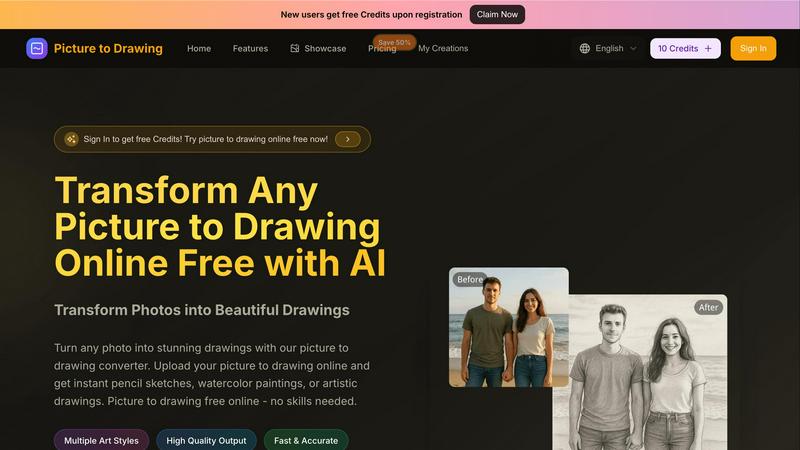
Easily convert your photos into beautiful drawings online for free with our AI-powered picture to drawing tool.
Last updated: March 1, 2026
Visual Comparison
FLUX.2 [max] Image Generator
![FLUX.2 [max] Image Generator screenshot](https://unitelist.com/images/flux2max-app-screenshot.jpg)
Picture to Drawing
Feature Comparison
FLUX.2 [max] Image Generator
Searchable Prompt Gallery & Category Hubs
This feature provides a vast, organized library of successful image prompts across categories like PORTRAIT, PRODUCT, CONCEPT, and SCENERY. It acts as a collaborative reference hub, allowing teams to find inspiration, understand effective prompt patterns, and jumpstart projects with proven starting points. This shared resource ensures everyone is aligned on style and quality, turning visual research into actionable creative briefs instantly.
Iterative Editing & Advanced Workflows
FLUX.2 [max] excels in non-destructive, iterative editing, allowing creators to refine lighting, adjust composition, or clean up details while maintaining image stability. This is complemented by specialized workflows for spatial reasoning (controlling perspective and camera angles), precise retexturing of objects, and exceptional text rendering in any style. This suite of tools enables a team to polish an image to professional standards through a cooperative, step-by-step refinement process.
Multi-Model Generator with Flexible Controls
The live generator supports a wide array of AI models, including FLUX.2 [max], Gemini 2.5 Flash, and others, giving teams the flexibility to choose the best tool for a specific task. Coupled with customizable canvas sizes (Square, Wide, Portrait, etc.), this feature allows for the creation of assets tailored to any platform or format, from social media graphics to cinematic wide shots, fostering adaptability in collaborative projects.
Character Consistency Engine
A standout feature for narrative and branding work, this engine allows teams to create and edit characters with unmatched consistency across different images, scenes, and styles. It preserves facial features, proportions, and visual identity, making it possible to develop a character sheet or maintain a brand mascot's look throughout an entire campaign, ensuring cohesive storytelling and brand recognition.
Picture to Drawing
Multiple Art Styles
Picture to Drawing offers a diverse range of artistic styles, allowing users to choose from options such as pencil sketches, watercolor paintings, charcoal drawings, and more. This variety ensures that each user can find a style that aligns with their creative vision, making it an ideal tool for anyone looking to express their individuality through art.
High Quality Output
The tool guarantees high-quality output, ensuring that every drawing created from a photo retains intricate details and vibrant colors. Users can expect professional-grade artwork that is ready for download and sharing, making it perfect for both personal keepsakes and professional use.
Fast & Accurate Conversion
With advanced AI technology, Picture to Drawing converts photos into drawings quickly and accurately. Users no longer need to wait for long processing times; with just a few clicks, they can see their images transformed into stunning artworks almost instantly, enhancing their creative workflow.
Free Credits for New Users
To welcome new users, Picture to Drawing offers free credits upon registration. This initiative allows individuals to explore the tool's features and capabilities without any initial investment, encouraging more users to try their hands at transforming their photos into art.
Use Cases
FLUX.2 [max] Image Generator
Product Marketing & Photography
Teams can generate highest-quality, marketplace-ready product photos that look polished and professional. By using reference photos and iterative editing, they can create consistent, stylized shots for e-commerce, advertisements, and packaging, significantly speeding up the asset production cycle while maintaining a high bar for visual quality.
Concept Art & Filmmaking
Ideal for pre-production, this use case involves creating cinematic texture and richly stylized frames for storyboards, environment concepts, and character design. The spatial reasoning and dramatic lighting capabilities help directors and concept artists visualize complex scenes and establish a unified visual language early in the collaborative filmmaking process.
Branding & Logo Design
Teams can take an existing logo as a reference and generate stunning, brand-consistent design variations. This is perfect for exploring thematic styles, creating branded content, or developing visual identities across different media, allowing for creative experimentation that stays true to the core brand elements.
Commercial & Lifestyle Imagery
From cinematic food shots and fashion editorials to workspace moods and lifestyle scenes, FLUX.2 [max] enables the rapid creation of on-brand commercial imagery. The prompt gallery provides immediate direction for style and composition, helping marketing and content teams produce engaging visual content for campaigns, websites, and social media efficiently.
Picture to Drawing
Personalized Gifts
Picture to Drawing is perfect for creating personalized gifts. Users can convert cherished family photos or special moments into artistic drawings that make heartfelt presents for birthdays, anniversaries, or holidays, ensuring a unique and memorable gift.
Enhancing Portfolios
For photographers and artists, this tool serves as a fantastic way to enhance portfolios. By transforming standard photographs into artistic representations, professionals can showcase their creative versatility and attract potential clients with visually striking pieces.
Educational Projects
Students can utilize Picture to Drawing for various educational projects. Whether it is for art class assignments, presentations, or creative storytelling, the ability to convert images into drawings can significantly enhance the overall appeal and engagement of their work.
Social Media Content
Social media enthusiasts can take advantage of Picture to Drawing to create eye-catching posts. By transforming their photos into unique artworks, users can stand out in crowded feeds and capture the attention of their followers with visually appealing content.
Overview
About FLUX.2 [max] Image Generator
FLUX.2 [max] Image Generator is a comprehensive AI-powered creative suite designed to transform visual research into production-ready imagery. It moves beyond simple text-to-image generation by integrating a searchable prompt gallery, specialized category hubs, and a live generator into a single, cohesive workflow. This synergy is built for professional creators, marketers, and designers who demand not just high-quality outputs but also efficiency and precision in their process. The platform's core value proposition lies in its ability to provide clear creative direction through real-world examples and then offer the advanced tools needed to execute and refine those ideas. With support for multiple AI models, including its flagship FLUX.2 [max], and a focus on professional workflows like iterative editing, character consistency, and advanced text rendering, it serves as an indispensable partner for teams working on product photography, concept art, branding, and cinematic production. It’s about reducing guesswork and wasted iterations, enabling a collaborative flow from inspiration to final asset.
About Picture to Drawing
Picture to Drawing is a revolutionary AI-powered online tool that allows users to transform their photos into exquisite artistic drawings in mere seconds. This tool caters to a broad spectrum of individuals, including artists seeking inspiration, photographers aiming to enhance their portfolios, students exploring creative avenues, and anyone who wants to infuse a unique artistic touch into their images. The primary value proposition of Picture to Drawing lies in its user-friendly interface and the efficiency of the conversion process. Users can simply upload their photos, select from an array of artistic styles, and receive high-quality drawings almost instantly. Whether you want to convert a beloved family portrait, a breathtaking landscape, or creative still-life images into beautiful artworks, Picture to Drawing provides a seamless and enjoyable experience. With features that include multiple art styles and high-quality output, this tool empowers users to unleash their creativity effortlessly, without requiring any prior artistic skills or extensive software knowledge.
Frequently Asked Questions
FLUX.2 [max] Image Generator FAQ
What makes FLUX.2 [max] different from other AI image generators?
FLUX.2 [max] distinguishes itself by being a complete workflow platform, not just a generator. It combines a searchable prompt gallery and category hubs for inspiration with advanced, production-ready editing tools like iterative refinement, character consistency, and spatial reasoning. This integrated approach is designed to reduce wasted iterations and provide clear paths from research to final, polished assets.
How does the Character Consistency feature work?
The Character Consistency engine uses advanced AI to lock in the visual identity of a character—including facial features, proportions, and style—across multiple generated images. You start with a reference image of your character, and the model will maintain those core attributes even when changing the scene, outfit, or action, which is essential for storytelling and branding projects.
Can I use FLUX.2 [max] for creating images with text?
Yes, advanced text rendering is a key strength. FLUX.2 [max] excels at integrating text into images, adapting seamlessly to various styles like modern typography, classic lettering, handwritten scripts, or dynamic 3D effects. This makes it highly effective for creating posters, branded graphics, logos, and any imagery where legible, stylized text is required.
What is the best way to start using the platform for a new project?
The platform is designed for a prompt-first workflow. The most effective path is to begin in the Prompt Gallery or relevant Category Hub (e.g., PRODUCT, CONCEPT) to find inspiration and see examples of successful prompts. This research-led approach provides a strong creative direction, which you can then bring to life and refine using the live Generator and its iterative editing tools.
Picture to Drawing FAQ
How does Picture to Drawing work?
Picture to Drawing uses advanced AI algorithms to analyze your uploaded photo and apply artistic styles to create a drawing. Simply upload your image, choose a style, and the tool will do the rest in seconds.
What formats does the tool support for uploads?
The tool supports several image formats including JPG, PNG, WEBP, and HEIC. This flexibility allows users to easily upload their photos without worrying about compatibility issues.
Is there a cost associated with using Picture to Drawing?
While new users receive free credits upon registration, additional credits may be required for further usage after the initial offer. This model allows users to explore the tool before committing to any purchases.
Can I save and download my drawings after conversion?
Yes, once your photo is converted into a drawing, you can easily preview the artwork and download it in high quality. This feature ensures you can share or print your creations as desired.
Alternatives
FLUX.2 [max] Image Generator Alternatives
FLUX.2 [max] Image Generator is a powerful AI tool in the design and image generation category. It goes beyond simple creation by offering a collaborative hub with a prompt gallery and professional editing workflows, helping teams turn visual research into final assets. Teams often explore alternatives for various reasons. This could be due to budget considerations, the need for different feature sets, or specific platform integrations that better suit their existing collaborative environment. Finding the right tool fit is crucial for seamless project synergy. When evaluating other options, consider how well they support team-based creation. Look for tools that facilitate shared inspiration, maintain consistency across assets, and offer production-ready editing capabilities. The goal is to find a platform that enhances your team's collective workflow, not just individual output.
Picture to Drawing Alternatives
Picture to Drawing is an innovative AI-driven online tool that enables users to effortlessly transform photos into beautiful drawings. As a design tool, it caters to a wide range of users, including artists, photographers, and casual creators seeking to enhance their images without the need for extensive artistic skills or software expertise. Users often seek alternatives to Picture to Drawing for various reasons, including pricing, additional features, or compatibility with specific platforms. When considering an alternative, it's essential to evaluate the quality of output, user experience, and the variety of artistic styles offered. These factors can significantly influence the overall satisfaction and effectiveness of the tool in meeting creative needs.