Fill PDF from Excel vs TinyFast
Side-by-side comparison to help you choose the right product.

Fill PDF from Excel
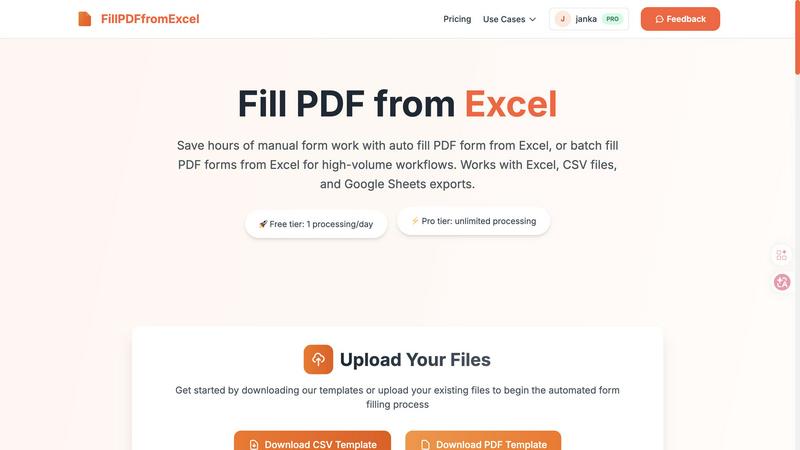
Fill PDF from Excel automates your team's high-volume form workflows, saving hours of manual data entry.
Last updated: March 19, 2026

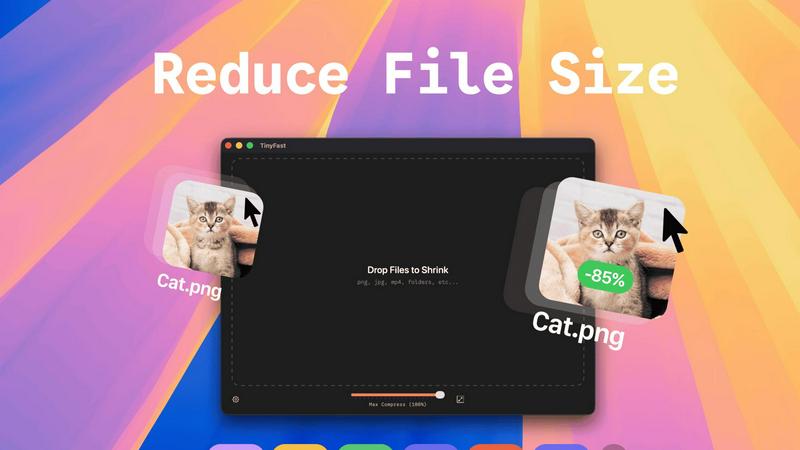
TinyFast is your team's local Mac tool for fast, private file compression without uploads.
Last updated: February 28, 2026
Visual Comparison
Fill PDF from Excel
TinyFast
Feature Comparison
Fill PDF from Excel
Intelligent Field Mapping
Our platform features smart, automatic field detection that intuitively matches the column headers in your Excel or CSV file to the corresponding fillable fields in your PDF form template. This intelligent mapping drastically reduces setup time, allowing your team to move from upload to results faster. You can easily review and adjust these mappings to ensure perfect alignment, creating a reliable template that your entire department can use repeatedly for consistent, error-free outputs.
High-Volume Batch Processing
Engineered for team efficiency, this feature allows you to process hundreds or even thousands of PDF forms in a single, streamlined operation. Simply upload one PDF template and one data file with multiple rows; the system will generate a unique, filled PDF for each row of data. This batch-fill capability is perfect for collaborative projects like sending out mass client agreements, employee onboarding packets, or student enrollment forms, turning days of work into a task that takes minutes.
Multi-Source Data Compatibility
To support diverse team workflows and tools, Fill PDF from Excel works seamlessly with data from Excel (.xlsx, .xls), CSV files, and exports from Google Sheets. This flexibility means that whether your sales team uses Google Sheets, your admin staff uses Excel, or you receive data as a CSV from another system, everyone can contribute to and benefit from the same automated PDF filling process without time-consuming file conversions.
Template-Based Reusability
Configure your field mappings once and save the setup for future use. This creates a powerful, reusable workflow that any team member can execute. When a new batch of data arrives, simply upload the new spreadsheet to the saved template flow and generate the filled PDFs instantly. This promotes consistency across all documents and empowers every team member to execute complex form filling without specialized training, fostering a truly cooperative and efficient work environment.
TinyFast
100% Local & Private Processing
Your team's confidentiality is paramount. TinyFast operates entirely on your local machine, ensuring that files—whether they're unreleased designs, legal documents, or proprietary code—never leave your Mac. This local-first approach, built on a foundation of mutual trust and security, means no uploads to unknown cloud servers, eliminating data breach risks and perfectly aligning with strict privacy policies or NDAs for seamless and secure collaboration.
Blazing-Fast Drag & Drop Compression
Experience a frictionless workflow designed for team efficiency. Simply drag and drop any file or even entire folders directly into the TinyFast window. The application uses optimized native engines to process and shrink your files in seconds, not minutes. This instant, local compression saves your team hours every week by removing the tedious wait times associated with uploading to and downloading from online services.
Universal File Type Support
TinyFast is your team's universal compression toolkit, fostering cooperation across different project types. It supports a wide array of common file formats, including images (PNG, JPG, WEBP, SVG), videos (MP4, MOV), documents (PDF, DOCX), code files (JS, CSS, JSON), and audio (MP3). This versatility means everyone, from marketing to development, can use the same trusted tool, streamlining your team's asset optimization process.
Batch Processing & Resolution Control
Empower your team to handle large volumes of work with ease. TinyFast allows for batch compression of entire folders, delivering optimized outputs in one go—a perfect synergy for project handoffs or preparing multiple assets for publication. Additionally, for images and videos, you can collaboratively decide and set automatic resolution resizing, ensuring files are perfectly tailored for their intended use, from web pages to client presentations.
Use Cases
Fill PDF from Excel
HR & Employee Onboarding
HR teams can collaboratively streamline the onboarding process by batch-generating employment contracts, tax forms (like W-4s), and benefit enrollment documents for new hires. Using a single master spreadsheet with all new employee data, the entire packet of personalized forms can be created automatically, ensuring accuracy and saving the HR department dozens of manual hours, allowing them to provide a better welcome experience.
Financial & Tax Document Preparation
Accounting and finance departments can use this tool to efficiently populate client tax returns, invoice templates, or financial reporting forms from centralized data. This ensures data integrity, reduces the risk of transposition errors common in manual entry, and allows the team to handle a higher volume of client work during peak seasons like tax time, all while maintaining a strict standard of accuracy.
Educational Administration
School and university administrative teams can automate the creation of student enrollment forms, permission slips, and report cards. By pulling data from student information systems into a spreadsheet, they can generate personalized documents for an entire class or grade level in one go, freeing up administrative staff to focus on direct student and parent support instead of paperwork.
Legal and Real Estate Document Assembly
Law firms and real estate agencies can quickly assemble high volumes of standardized legal documents, such as rental agreements, client engagement letters, or property disclosure forms. By automating the population of client names, addresses, and specific terms from a case or transaction spreadsheet, legal assistants and agents can ensure precision and dramatically accelerate document turnaround times.
TinyFast
Preparing Design Assets for Developer Handoff
Design teams can efficiently compress and batch-export high-fidelity mockups, icons, and images directly on their Macs. By using TinyFast, they ensure all assets are optimized for web performance before handing them off to the development team, maintaining visual quality while enabling faster site load times and a smoother, more cooperative workflow between departments.
Securely Sharing Confidential Client Documents
Legal, financial, or consulting professionals often need to share large PDF reports or presentations containing sensitive data. TinyFast allows them to compress these documents locally to a manageable email size without ever risking client confidentiality by uploading files to a third-party server, fostering a relationship built on trust and security.
Optimizing Media for Web and Social Content
Content creators and marketing teams can quickly prepare dozens of images and videos for blogs, social media, or website updates. The batch processing feature saves immense time, and the local operation means unpublished campaign materials stay secure until the moment they are ready for public release, supporting a cohesive and efficient content pipeline.
Managing Application and Project File Sizes
Developers and project managers can reduce the size of project repositories by compressing documentation, code bundles (like minified JS/CSS), and screenshot libraries directly on their machines. This keeps shared drives and version control systems lean, facilitates quicker backups and transfers, and promotes a more organized and efficient collaborative coding environment.
Overview
About Fill PDF from Excel
Fill PDF from Excel is a collaborative automation platform designed to transform how teams handle document workflows. It seamlessly bridges the gap between your data and your forms, enabling you to auto-fill and batch-fill PDF forms directly from data stored in Excel, CSV files, or Google Sheets. This tool is built for professionals and teams across HR, finance, legal, education, and business services who are burdened by repetitive, high-volume form processing. The core value proposition is synergy: by automating the tedious task of manual data entry, teams can reclaim countless hours, significantly reduce human error, and redirect their collective energy toward more strategic, high-value work. Instead of one person painstakingly copying data, the entire team benefits from a configured, repeatable process that delivers consistent, reliable results. It fosters a cooperative environment where technology handles the repetition, allowing human talent to focus on analysis, client service, and innovation. Whether you're processing 10 forms or 10,000, Fill PDF from Excel provides a unified solution that scales with your team's needs, promoting efficiency and accuracy through smart automation.
About TinyFast
TinyFast is a powerful and intuitive macOS application built for teams and individuals who prioritize speed, security, and seamless collaboration in their digital workflows. It serves as your dedicated, local file compression partner, enabling you to shrink images, videos, and documents directly on your Mac. By eliminating the need to upload sensitive files to external servers, TinyFast ensures your confidential assets and collaborative projects remain private and secure. It's designed for creators, developers, designers, and professionals who need to optimize files for sharing, storage, or web use without compromising on quality or waiting for slow online tools. The core value proposition is a synergy of unmatched privacy, blazing-fast local processing, and an incredibly simple drag-and-drop interface that integrates effortlessly into any team's workflow, making file optimization a quick and secure step rather than a bottleneck.
Frequently Asked Questions
Fill PDF from Excel FAQ
What file formats are supported for the PDF and data files?
We support fillable PDF forms as templates. For your data source, we accept Excel files (.xlsx and .xls), CSV files, and exports from Google Sheets. It is crucial that your PDF has properly defined, fillable form fields for our intelligent mapping system to detect and populate them correctly from your spreadsheet columns.
Do you store the files we upload for processing?
As a core feature focused on your security and privacy, we do not permanently store your uploaded PDF or data files. Uploaded files are processed in memory to generate your filled PDF results and are not retained on our servers after the processing session is complete, giving your team peace of mind when handling sensitive information.
How does the field mapping work?
When you upload your PDF form and data file, our system automatically scans the PDF for fillable fields and attempts to match them with column headers from your spreadsheet. You will be presented with a mapping screen to review these connections. Here, your team can manually link any unmatched fields or correct any suggestions, ensuring the automation aligns perfectly with your specific document structure.
Can I generate multiple PDFs from one data file?
Absolutely. This is the core of our batch processing capability. Each row in your Excel or CSV data file represents one unique set of information. When you run the process, the system will create a separate, individually filled PDF document for every row in your spreadsheet, making it ideal for teams that need to produce large volumes of personalized forms efficiently.
TinyFast FAQ
Is my data really kept private?
Absolutely. TinyFast is built on a principle of collaborative trust and security. All compression happens locally on your Mac using its own processing power. Your files are never uploaded to the internet, sent to our servers, or seen by anyone else. This local-only approach guarantees total privacy for your work and your team's confidential assets.
What file types does TinyFast support?
TinyFast supports a wide range of common file types to serve diverse team needs. This includes images (PNG, JPG, TIFF, HEIC, WEBP, GIF, BMP, SVG), videos (MP4, MOV, M4V), documents (PDF, DOCX), code files (JS, CSS, JSON), and audio (MP3). This universal support makes it a versatile tool for entire teams across different functions.
How does the free version work?
The free version of TinyFast allows you and your team to fully experience the application's core features, including local privacy and drag-and-drop simplicity. It permits compressing up to 5 files per day, which is ideal for testing its integration into your workflow or for occasional use. For unlimited daily compressions and full collaborative potential, a one-time or subscription plan is available.
Can I compress multiple files at once?
Yes, you can! TinyFast is designed for team efficiency and supports batch processing. You can drag and drop an entire folder containing multiple files into the app. It will compress all supported files within that folder in one go, saving your team significant time and streamlining the process of preparing large sets of assets for any project.
Alternatives
Fill PDF from Excel Alternatives
Fill PDF from Excel is a productivity and management tool designed to streamline document workflows. It automates the process of populating PDF forms with data from spreadsheets, saving teams significant time and reducing manual entry errors. This collaborative approach allows groups to handle high-volume tasks with greater synergy and efficiency. Users often explore alternatives for various reasons, such as budget constraints, specific feature requirements, or compatibility with different operating systems and platforms. A team's unique workflow, the scale of their operations, and their need for integration with other software can all drive the search for a different solution. When evaluating other options, it's crucial to consider the tool's ease of use, the security of your data, and how well it supports team collaboration. Look for solutions that offer reliable mapping capabilities, batch processing for efficiency, and seamless integration with your existing data sources to maintain a smooth and cooperative workflow.
TinyFast Alternatives
TinyFast is a powerful macOS application in the tech tools category, designed for local, private compression of images, videos, and PDFs. It stands out by keeping all your files securely on your device, eliminating the need for potentially risky cloud uploads. Users often explore other options for various reasons. Some may need a solution for a different operating system like Windows, while others might seek a different pricing model or require a specific feature that aligns with their unique workflow. It's a natural part of finding the perfect tool for your team's collaborative needs. When evaluating other tools, consider your group's core priorities. Key factors often include the platform compatibility, the balance of compression speed and quality, the overall cost for your team, and, crucially, the privacy policy regarding where your files are processed. Finding a tool that fosters synergy in your workflow is essential.