Dokie AI vs Picture to Drawing
Side-by-side comparison to help you choose the right product.

Dokie AI
Dokie AI empowers teams to effortlessly create stunning professional presentations in minutes using advanced AI technology.
Last updated: March 19, 2026

Picture to Drawing
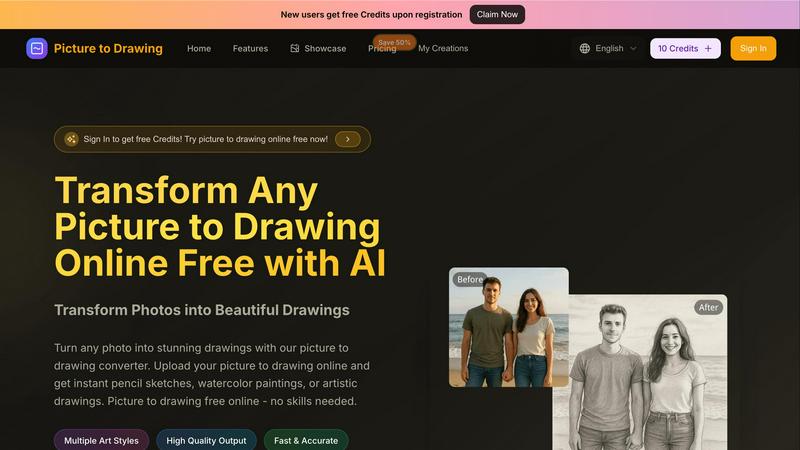
Easily convert your photos into beautiful drawings online for free with our AI-powered picture to drawing tool.
Last updated: March 1, 2026
Visual Comparison
Dokie AI

Picture to Drawing
Feature Comparison
Dokie AI
AI Generate PPT
The AI Generate PPT feature allows users to describe their topic in plain text and receive a complete slide deck in return. This tool takes care of professional layouts, impactful charts, and engaging content, ensuring that users can focus on their message rather than the design process.
AI Beautify PPT
With the AI Beautify PPT feature, users can upload existing presentations and watch as Dokie AI enhances their design. This feature fixes layouts and applies professional styling while preserving the original content, turning ordinary slides into visually appealing presentations.
Speech Notes Generation
Dokie AI's Speech Notes Generation feature automatically creates detailed speaker notes and talking points for each slide. This functionality helps users deliver their presentations with confidence, providing them with key insights and prompts to engage their audience effectively.
Multi-format Conversion
Dokie AI supports a variety of file conversions, including PDF to PPT, Word to PPT, and HTML to PPT. This multi-format conversion capability allows users to transform various document types into presentations seamlessly, ensuring a smooth workflow and versatility in content creation.
Picture to Drawing
Multiple Art Styles
Picture to Drawing offers a diverse range of artistic styles, allowing users to choose from options such as pencil sketches, watercolor paintings, charcoal drawings, and more. This variety ensures that each user can find a style that aligns with their creative vision, making it an ideal tool for anyone looking to express their individuality through art.
High Quality Output
The tool guarantees high-quality output, ensuring that every drawing created from a photo retains intricate details and vibrant colors. Users can expect professional-grade artwork that is ready for download and sharing, making it perfect for both personal keepsakes and professional use.
Fast & Accurate Conversion
With advanced AI technology, Picture to Drawing converts photos into drawings quickly and accurately. Users no longer need to wait for long processing times; with just a few clicks, they can see their images transformed into stunning artworks almost instantly, enhancing their creative workflow.
Free Credits for New Users
To welcome new users, Picture to Drawing offers free credits upon registration. This initiative allows individuals to explore the tool's features and capabilities without any initial investment, encouraging more users to try their hands at transforming their photos into art.
Use Cases
Dokie AI
Business Presentations
Business professionals can utilize Dokie AI to create impactful presentations for meetings, pitches, and conferences. The tool's ability to generate visually appealing slides quickly and efficiently enables teams to focus on strategy and delivery.
Educational Lectures
Educators can leverage Dokie AI to develop engaging lecture slides that enhance student learning. By automating the design process, teachers can dedicate more time to content creation and interaction with students.
Marketing Campaigns
Marketers can use Dokie AI to craft persuasive presentations for product launches or marketing strategies. The AI-generated presentations help convey complex ideas clearly and attractively, ensuring maximum impact.
Startup Pitches
Startup founders can benefit from Dokie AI when preparing pitch decks for investors. With the ability to create professional, polished presentations quickly, entrepreneurs can present their ideas effectively and make a strong impression.
Picture to Drawing
Personalized Gifts
Picture to Drawing is perfect for creating personalized gifts. Users can convert cherished family photos or special moments into artistic drawings that make heartfelt presents for birthdays, anniversaries, or holidays, ensuring a unique and memorable gift.
Enhancing Portfolios
For photographers and artists, this tool serves as a fantastic way to enhance portfolios. By transforming standard photographs into artistic representations, professionals can showcase their creative versatility and attract potential clients with visually striking pieces.
Educational Projects
Students can utilize Picture to Drawing for various educational projects. Whether it is for art class assignments, presentations, or creative storytelling, the ability to convert images into drawings can significantly enhance the overall appeal and engagement of their work.
Social Media Content
Social media enthusiasts can take advantage of Picture to Drawing to create eye-catching posts. By transforming their photos into unique artworks, users can stand out in crowded feeds and capture the attention of their followers with visually appealing content.
Overview
About Dokie AI
Dokie AI is a cutting-edge AI presentation maker designed to help business professionals, educators, marketers, and startup founders create visually stunning presentations without requiring any design skills. This innovative tool leverages the power of Claude Opus 4.6 to automate the entire presentation creation process, managing everything from content structure to layout selection, typography, and visual design. Dokie AI offers multiple modes to cater to various needs, including generating presentations from scratch, enhancing existing slides, adding speaker notes, and converting documents into PowerPoint presentations. With Dokie AI, users can produce polished, professional results in a fraction of the time it would take using traditional methods, making it an invaluable asset for anyone looking to effectively communicate their ideas.
About Picture to Drawing
Picture to Drawing is a revolutionary AI-powered online tool that allows users to transform their photos into exquisite artistic drawings in mere seconds. This tool caters to a broad spectrum of individuals, including artists seeking inspiration, photographers aiming to enhance their portfolios, students exploring creative avenues, and anyone who wants to infuse a unique artistic touch into their images. The primary value proposition of Picture to Drawing lies in its user-friendly interface and the efficiency of the conversion process. Users can simply upload their photos, select from an array of artistic styles, and receive high-quality drawings almost instantly. Whether you want to convert a beloved family portrait, a breathtaking landscape, or creative still-life images into beautiful artworks, Picture to Drawing provides a seamless and enjoyable experience. With features that include multiple art styles and high-quality output, this tool empowers users to unleash their creativity effortlessly, without requiring any prior artistic skills or extensive software knowledge.
Frequently Asked Questions
Dokie AI FAQ
How does Dokie AI generate presentations?
Dokie AI generates presentations by analyzing user-provided text descriptions and automatically creating a complete slide deck. It utilizes advanced AI technology to determine the best layouts, typography, and visual elements based on the input.
Can I enhance my existing presentations with Dokie AI?
Yes, Dokie AI offers a Beautify feature that allows users to upload existing presentations. The AI will enhance the design, fix layouts, and apply professional styling to improve the overall look and feel of your slides.
What types of documents can be converted into presentations?
Dokie AI supports various document conversions, including PDF to PPT, Word to PPT, HTML to PPT, and even YouTube videos to presentations. This versatility makes it easy to repurpose content for different formats.
Is there a free trial available for Dokie AI?
While specific details about a free trial are not mentioned, Dokie AI operates on a pay-as-you-go basis, allowing users to explore its features without a long-term commitment. Users can choose from various pricing plans based on their needs.
Picture to Drawing FAQ
How does Picture to Drawing work?
Picture to Drawing uses advanced AI algorithms to analyze your uploaded photo and apply artistic styles to create a drawing. Simply upload your image, choose a style, and the tool will do the rest in seconds.
What formats does the tool support for uploads?
The tool supports several image formats including JPG, PNG, WEBP, and HEIC. This flexibility allows users to easily upload their photos without worrying about compatibility issues.
Is there a cost associated with using Picture to Drawing?
While new users receive free credits upon registration, additional credits may be required for further usage after the initial offer. This model allows users to explore the tool before committing to any purchases.
Can I save and download my drawings after conversion?
Yes, once your photo is converted into a drawing, you can easily preview the artwork and download it in high quality. This feature ensures you can share or print your creations as desired.
Alternatives
Dokie AI Alternatives
Dokie AI is a leading AI presentation maker that empowers users to create professional-quality slides in just minutes. It belongs to the design tools category, specifically tailored for business professionals, educators, marketers, and startup founders who seek to produce polished presentations without requiring extensive design skills. Users often explore alternatives to Dokie AI for various reasons, such as pricing considerations, feature sets that better align with their specific needs, or compatibility with their preferred platforms. When searching for an alternative, it's essential to evaluate factors like ease of use, the range of features offered, pricing models, and the level of support provided. Other considerations include the flexibility of design options and the ability to enhance existing presentations, which can significantly impact user experience and satisfaction.
Picture to Drawing Alternatives
Picture to Drawing is an innovative AI-driven online tool that enables users to effortlessly transform photos into beautiful drawings. As a design tool, it caters to a wide range of users, including artists, photographers, and casual creators seeking to enhance their images without the need for extensive artistic skills or software expertise. Users often seek alternatives to Picture to Drawing for various reasons, including pricing, additional features, or compatibility with specific platforms. When considering an alternative, it's essential to evaluate the quality of output, user experience, and the variety of artistic styles offered. These factors can significantly influence the overall satisfaction and effectiveness of the tool in meeting creative needs.