
conceptviz vs Seedance 2.0
Side-by-side comparison to help you choose the right product.

conceptviz
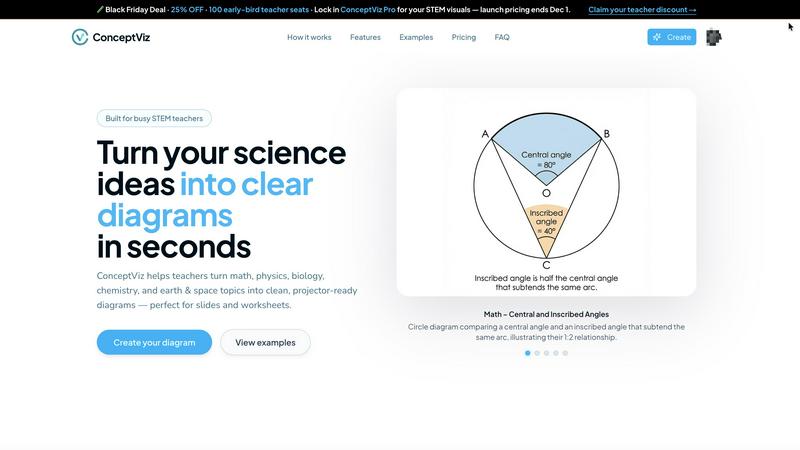
ConceptViz simplifies complex science and math concepts into clear, customizable diagrams for educators and researchers.
Last updated: February 28, 2026

Seedance 2.0
Seedance 2.0 lets your team instantly create cinematic AI videos together from text or images.
Last updated: February 28, 2026
Visual Comparison
conceptviz
Seedance 2.0

Feature Comparison
conceptviz
User-Friendly Interface
ConceptViz features an intuitive, easy-to-navigate interface that allows users of all skill levels to create stunning diagrams quickly. With no design or drawing skills required, it's accessible for K-12 educators and university researchers alike.
Tailored Subject & Grade Presets
The platform offers quick presets for various subjects such as physics, biology, chemistry, earth & space, and math. These presets are designed to match U.S. grade bands, ensuring that educators can find the right resources for elementary, middle, and high school students.
High-Quality, Projector-Ready Diagrams
All diagrams created with ConceptViz are sharp and clear, making them perfect for classroom presentation. Designed with thick, legible lines and minimal visual noise, these visuals ensure that every student can see and understand the information being presented.
Efficient Diagram Generation
Users can transform their explanations into visuals in just three simple steps. By signing in, describing the desired diagram, and generating it instantly, educators can save significant preparation time and enhance their lesson plans.
Seedance 2.0
Multi-Mode Creative Workflow
Seedance 2.0 supports a collaborative creative process through multiple generation modes. Teams can choose between Text-to-Video for describing scenes in natural language, Image-to-Video for animating uploaded photos or artwork, and integrated Audio Generation. This flexibility allows different team members—from copywriters to graphic designers—to contribute their expertise within a single, unified platform, ensuring all creative assets work in harmony from the start.
Advanced Cinematic Motion Control
The platform provides teams with professional-grade cinematic tools, enabling precise control over camera movements like dolly shots, crane movements, and smooth zooms. This physics-aware motion synthesis allows creative teams to direct scenes with the precision of a film crew, collaborating to achieve specific visual storytelling effects without any physical equipment, ensuring everyone's creative direction is realized in the final video.
Integrated Audio & Lip-Sync Generation
Seedance 2.0 fosters a cohesive audiovisual experience by generating synchronized audio, sound effects, background music, and multilingual voice synthesis with accurate lip-sync in a single pass. This eliminates the need for separate audio post-production work, allowing sound designers and visual creators to collaborate simultaneously and produce perfectly aligned content efficiently, strengthening the final product's impact.
Team-Oriented Asset Management
With features like 'My Creations' and a shared gallery, Seedance 2.0 is built for team collaboration. Teams can store, organize, and review generated videos together, drawing inspiration from a communal gallery of AI-generated content. This shared repository encourages feedback, iteration, and collective inspiration, making the creative process a truly synergistic effort where every team member can contribute and build upon each other's work.
Use Cases
conceptviz
Enhancing Lesson Plans
Educators can use ConceptViz to create visuals that enrich their lesson plans, making complex scientific concepts more accessible and engaging for students. This helps foster a deeper understanding of the subjects being taught.
Supporting Collaborative Learning
ConceptViz promotes teamwork and collaboration in the classroom by allowing students to create their own diagrams. This encourages peer discussions and group projects, enhancing the overall learning experience.
Facilitating Research Presentations
University researchers can utilize ConceptViz to generate high-quality diagrams for research presentations. This ensures that their findings are communicated clearly and effectively, helping to engage their audience.
Streamlining Homework Assignments
Teachers can create custom diagrams for homework assignments, allowing students to visualize concepts learned in class. This not only reinforces learning but also provides students with a valuable resource as they study.
Seedance 2.0
Collaborative Marketing Campaigns
Marketing teams can work together to rapidly produce high-quality video ads, social media clips, and product demonstrations. Copywriters can draft prompts, designers can supply brand imagery, and managers can review iterations—all within one platform—to quickly launch cohesive campaigns that capture audience attention and align with brand vision through shared effort.
Unified Content Creation for Social Media
Content teams and influencers can synergize their efforts to maintain a consistent posting schedule. By collaborating on prompt ideas and visual styles, they can generate a steady stream of engaging, platform-specific videos for TikTok, Instagram, and YouTube, ensuring their content strategy is executed smoothly and creatively as a united front.
Streamlined Pre-Visualization for Film & Storyboarding
Film and animation studios can use Seedance 2.0 as a collaborative storyboarding and pre-visualization tool. Directors, writers, and concept artists can quickly generate video mock-ups of scenes, experimenting with angles and motion together before committing to expensive production shoots, fostering a more aligned and efficient pre-production phase.
Dynamic Educational and Training Material
Educational institutions and corporate training departments can collaborate to create engaging learning modules. Instructors, instructional designers, and media specialists can co-create explanatory videos, simulations, and animated lectures, making complex topics accessible and enhancing the learning experience through combined expertise.
Overview
About conceptviz
ConceptViz is an innovative and powerful tool crafted specifically for STEM educators, students, and researchers who need high-quality, classroom-ready diagrams effortlessly. This platform empowers users to create clear, accurate visuals for lesson plans, lab activities, and assessments within seconds. By streamlining the diagram creation process, ConceptViz allows educators to dedicate their time and energy to teaching rather than spending hours searching for or crafting visuals. Its user-friendly interface requires no prior design or drawing experience, making it accessible for all users, from K-12 teachers to university researchers. ConceptViz not only enhances lesson delivery but also nurtures a collaborative learning environment where complex scientific concepts can be transformed into simple, engaging visuals. Whether you need a physics ray diagram or a biology cross-section, ConceptViz provides the essential tools to visualize scientific concepts effectively and efficiently, fostering a deeper understanding of STEM subjects.
About Seedance 2.0
Seedance 2.0 is a collaborative AI video generation platform designed to bring teams together to create stunning cinematic content. It transforms simple text prompts and images into high-quality, professional-grade videos, empowering creators, marketers, developers, and entire creative departments to work in synergy. By leveraging advanced AI models like Seedance 2, the platform eliminates traditional barriers like the need for cameras, crews, and complex editing software, allowing teams to focus on their shared vision. The core value proposition lies in its ability to drastically reduce production time and costs while unlocking unprecedented creative scalability. Whether you're a solo creator or part of a larger marketing team, Seedance 2.0 provides a unified space where ideas can be rapidly prototyped and brought to life with complete control over style, motion, and audio, fostering a seamless cooperative workflow from concept to final output.
Frequently Asked Questions
conceptviz FAQ
What subjects does ConceptViz cover?
ConceptViz caters to a variety of subjects including physics, biology, chemistry, earth & space, and math, making it suitable for a wide range of educational needs.
Is there any design experience required to use ConceptViz?
No, ConceptViz is designed for users of all skill levels. Its user-friendly interface allows anyone to create professional-quality diagrams without any prior design or drawing experience.
Can I use ConceptViz for both classroom and research purposes?
Absolutely! ConceptViz is versatile enough to be used in K-12 classrooms as well as in university research settings, making it a valuable tool for all educators and researchers.
How do I generate a diagram using ConceptViz?
Generating a diagram is easy. Simply sign in, choose your subject and level, describe the diagram you need in plain English, and ConceptViz will create a ready-to-use visual that you can download and insert into your materials.
Seedance 2.0 FAQ
What is the difference between Seedance 2.0 and other AI video tools?
Seedance 2.0 distinguishes itself through its focus on collaborative creation and its integration of multiple advanced AI models, including its proprietary Seedance 2 model. It offers a unique combination of high-fidelity cinematic motion control, joint audio-video generation with lip-sync, and a team-oriented platform design that simplifies workflow synergy, unlike tools built primarily for individual users.
Can I use videos generated with Seedance 2.0 for commercial purposes?
Yes, according to the provided content, all videos generated on the Seedance 2.0 platform can be used for commercial purposes. This allows teams and businesses to confidently create content for marketing, client work, and product promotions without licensing concerns, fostering a cooperative environment for professional projects.
How does the collaborative aspect of Seedance 2.0 work?
While specific dashboard features aren't detailed, the platform is designed for team synergy through shared asset management ('My Creations'), a public inspiration gallery, and multi-modal workflows. This setup allows different team members to contribute text, images, and creative direction, then manage and iterate on the generated videos together in a unified workspace.
Do I need technical skills or a credit card to start using Seedance 2.0?
No, Seedance 2.0 is designed to be user-friendly and accessible for teams of all skill levels. You can start creating immediately with no setup required. The platform offers free credits to new users, and you can begin generating videos without providing a credit card, making it easy for a whole team to explore and collaborate risk-free.
Alternatives
conceptviz Alternatives
ConceptViz is an innovative tool designed to transform complex science and math concepts into clear, customizable diagrams, specifically for STEM educators, students, and researchers. As a content creation and data visualization tool, it streamlines the process of diagram generation, allowing users to create high-quality, classroom-ready visuals quickly and efficiently. Users often seek alternatives to ConceptViz due to various reasons, including pricing, specific feature requirements, or compatibility with different platforms. When searching for an alternative, it's important to consider factors such as the ease of use, the range of subjects and grade levels supported, and whether the diagrams created are suitable for classroom presentations. Ultimately, finding a tool that aligns with your educational needs and enhances collaboration within the learning environment is essential.
Seedance 2.0 Alternatives
Seedance 2.0 is a powerful AI video generation platform that transforms text and images into cinematic videos, placing it at the forefront of the content creation category. It empowers teams to produce professional-grade visuals collaboratively, streamlining workflows that traditionally require extensive resources. Users often explore other options to find a solution that aligns perfectly with their project's unique requirements, budget considerations, or specific feature needs. The ideal platform for one team's collaborative dynamic might differ for another, making it valuable to understand the broader landscape. When evaluating different tools, it's wise for a team to consider factors like the quality and style of video output, the level of creative control offered, ease of integration into existing workflows, and the overall value for the investment. Finding a platform that enhances your team's synergy is key to unlocking collective creative potential.