Clinic Comply vs TinyFast
Side-by-side comparison to help you choose the right product.

Clinic Comply
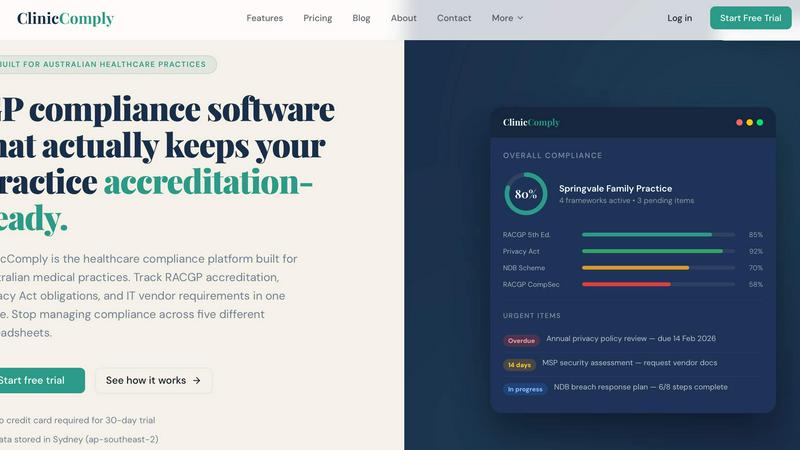
Clinic Comply simplifies compliance for Australian healthcare practices, unifying accreditation and vendor management in one seamless platform.
Last updated: March 19, 2026

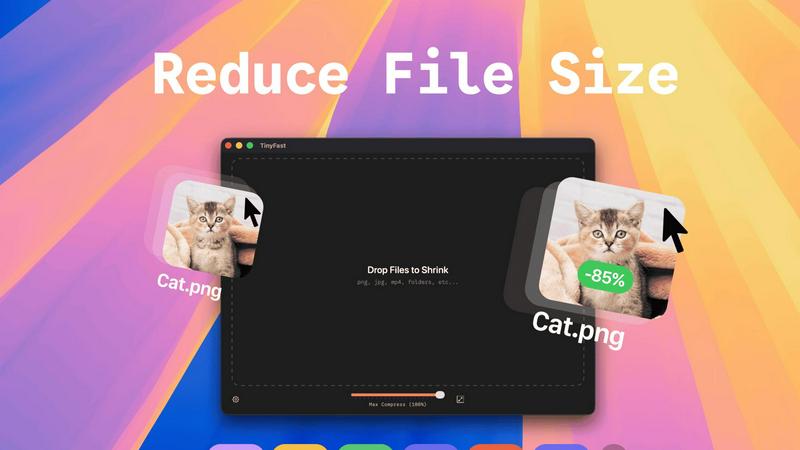
TinyFast is your team's local Mac tool for fast, private file compression without uploads.
Last updated: February 28, 2026
Visual Comparison
Clinic Comply
TinyFast
Feature Comparison
Clinic Comply
RACGP Accreditation Tracking
Clinic Comply offers robust tracking of every criterion in the RACGP 5th Edition Standards. It includes guided checklists that are specifically built around the actual assessment criteria, ensuring practices can easily monitor their compliance status. Users can upload evidence documents and link them directly to checklist items, facilitating a seamless accreditation process.
Privacy Act and NDB Compliance
The platform ensures that medical practices can effectively manage their obligations under the Privacy Act 1988 and the Notifiable Data Breaches (NDB) Scheme. With integrated compliance tools, users can stay updated on their privacy requirements, track their progress, and ensure they are prepared for any audits or assessments.
IT Vendor Portal
Clinic Comply simplifies interactions with IT vendors through its dedicated portal. Instead of lengthy email exchanges, users can send secure upload links to vendors, allowing them to upload necessary documents directly. This feature ensures that all vendor-related compliance documents are stored in one place and linked to the appropriate checklist criteria.
Live Compliance Score
The platform provides a live compliance score that updates in real-time as checklist items are completed. This feature gives practices immediate visibility into their compliance status, allowing teams to identify areas needing attention and ensuring that they are always accreditation-ready.
TinyFast
100% Local & Private Processing
Your team's confidentiality is paramount. TinyFast operates entirely on your local machine, ensuring that files—whether they're unreleased designs, legal documents, or proprietary code—never leave your Mac. This local-first approach, built on a foundation of mutual trust and security, means no uploads to unknown cloud servers, eliminating data breach risks and perfectly aligning with strict privacy policies or NDAs for seamless and secure collaboration.
Blazing-Fast Drag & Drop Compression
Experience a frictionless workflow designed for team efficiency. Simply drag and drop any file or even entire folders directly into the TinyFast window. The application uses optimized native engines to process and shrink your files in seconds, not minutes. This instant, local compression saves your team hours every week by removing the tedious wait times associated with uploading to and downloading from online services.
Universal File Type Support
TinyFast is your team's universal compression toolkit, fostering cooperation across different project types. It supports a wide array of common file formats, including images (PNG, JPG, WEBP, SVG), videos (MP4, MOV), documents (PDF, DOCX), code files (JS, CSS, JSON), and audio (MP3). This versatility means everyone, from marketing to development, can use the same trusted tool, streamlining your team's asset optimization process.
Batch Processing & Resolution Control
Empower your team to handle large volumes of work with ease. TinyFast allows for batch compression of entire folders, delivering optimized outputs in one go—a perfect synergy for project handoffs or preparing multiple assets for publication. Additionally, for images and videos, you can collaboratively decide and set automatic resolution resizing, ensuring files are perfectly tailored for their intended use, from web pages to client presentations.
Use Cases
Clinic Comply
Streamlining Accreditation Preparation
General practitioners can use Clinic Comply to streamline the preparation for accreditation visits. By accessing guided checklists and linked evidence documents, practices can ensure that all necessary requirements are met well before the assessor arrives.
Centralizing Compliance Documentation
Clinic managers can centralize all compliance documentation in one platform, eliminating the confusion of managing multiple spreadsheets and email threads. This ensures that all staff have access to the most current documents, making audits a smoother process.
Enhancing Team Collaboration
Healthcare administrators can enhance team collaboration by using Clinic Comply's features to assign tasks and deadlines related to compliance. This fosters a collaborative environment where all team members are aware of their responsibilities and progress is tracked transparently.
Improving Vendor Management
IT managers can significantly improve vendor management by utilizing the IT Vendor Portal. This allows for efficient communication regarding compliance-related documents, ensuring that all necessary paperwork is easily accessible and properly linked to compliance requirements.
TinyFast
Preparing Design Assets for Developer Handoff
Design teams can efficiently compress and batch-export high-fidelity mockups, icons, and images directly on their Macs. By using TinyFast, they ensure all assets are optimized for web performance before handing them off to the development team, maintaining visual quality while enabling faster site load times and a smoother, more cooperative workflow between departments.
Securely Sharing Confidential Client Documents
Legal, financial, or consulting professionals often need to share large PDF reports or presentations containing sensitive data. TinyFast allows them to compress these documents locally to a manageable email size without ever risking client confidentiality by uploading files to a third-party server, fostering a relationship built on trust and security.
Optimizing Media for Web and Social Content
Content creators and marketing teams can quickly prepare dozens of images and videos for blogs, social media, or website updates. The batch processing feature saves immense time, and the local operation means unpublished campaign materials stay secure until the moment they are ready for public release, supporting a cohesive and efficient content pipeline.
Managing Application and Project File Sizes
Developers and project managers can reduce the size of project repositories by compressing documentation, code bundles (like minified JS/CSS), and screenshot libraries directly on their machines. This keeps shared drives and version control systems lean, facilitates quicker backups and transfers, and promotes a more organized and efficient collaborative coding environment.
Overview
About Clinic Comply
Clinic Comply is an intuitive healthcare compliance platform specifically designed for Australian medical practices. This software addresses the complexities of healthcare compliance by providing a centralized hub for tracking essential requirements, such as RACGP accreditation, Privacy Act obligations, and IT vendor specifications. Clinic Comply eliminates the need for managing compliance through multiple spreadsheets, ensuring that all compliance documentation and progress are easily accessible in one location. It is tailored for general practitioners, clinic managers, and healthcare administrators, making it ideal for streamlining compliance processes. By utilizing Clinic Comply, medical practices can maintain accreditation readiness while saving valuable time and reducing the risk of errors in compliance management. This ultimately allows healthcare professionals to focus more on what matters most—delivering quality patient care.
About TinyFast
TinyFast is a powerful and intuitive macOS application built for teams and individuals who prioritize speed, security, and seamless collaboration in their digital workflows. It serves as your dedicated, local file compression partner, enabling you to shrink images, videos, and documents directly on your Mac. By eliminating the need to upload sensitive files to external servers, TinyFast ensures your confidential assets and collaborative projects remain private and secure. It's designed for creators, developers, designers, and professionals who need to optimize files for sharing, storage, or web use without compromising on quality or waiting for slow online tools. The core value proposition is a synergy of unmatched privacy, blazing-fast local processing, and an incredibly simple drag-and-drop interface that integrates effortlessly into any team's workflow, making file optimization a quick and secure step rather than a bottleneck.
Frequently Asked Questions
Clinic Comply FAQ
What makes Clinic Comply different from other compliance tools?
Clinic Comply is specifically designed for Australian healthcare practices, incorporating local standards and regulations such as RACGP and the Privacy Act. Unlike generic compliance tools, it provides tailored features to meet the unique needs of medical practices.
How does the live compliance score work?
The live compliance score updates automatically as checklist items are completed. This real-time feedback allows practices to monitor their compliance status continuously, helping them stay prepared for accreditation assessments.
Can I try Clinic Comply before committing?
Yes, Clinic Comply offers a 30-day free trial with no credit card required. This allows potential users to explore the platform and understand how it can benefit their practice before making a financial commitment.
Is my data secure with Clinic Comply?
Absolutely. Clinic Comply stores data securely in Sydney (ap-southeast-2), ensuring compliance with Australian data protection laws. The platform prioritizes user privacy and data security, making it a reliable choice for medical practices.
TinyFast FAQ
Is my data really kept private?
Absolutely. TinyFast is built on a principle of collaborative trust and security. All compression happens locally on your Mac using its own processing power. Your files are never uploaded to the internet, sent to our servers, or seen by anyone else. This local-only approach guarantees total privacy for your work and your team's confidential assets.
What file types does TinyFast support?
TinyFast supports a wide range of common file types to serve diverse team needs. This includes images (PNG, JPG, TIFF, HEIC, WEBP, GIF, BMP, SVG), videos (MP4, MOV, M4V), documents (PDF, DOCX), code files (JS, CSS, JSON), and audio (MP3). This universal support makes it a versatile tool for entire teams across different functions.
How does the free version work?
The free version of TinyFast allows you and your team to fully experience the application's core features, including local privacy and drag-and-drop simplicity. It permits compressing up to 5 files per day, which is ideal for testing its integration into your workflow or for occasional use. For unlimited daily compressions and full collaborative potential, a one-time or subscription plan is available.
Can I compress multiple files at once?
Yes, you can! TinyFast is designed for team efficiency and supports batch processing. You can drag and drop an entire folder containing multiple files into the app. It will compress all supported files within that folder in one go, saving your team significant time and streamlining the process of preparing large sets of assets for any project.
Alternatives
Clinic Comply Alternatives
Clinic Comply is an all-in-one compliance platform designed specifically for Australian healthcare providers. It streamlines the intricate processes of accreditation and vendor management, making it a valuable tool for general practitioners, clinic managers, and healthcare administrators. By centralizing compliance documentation, Clinic Comply helps users stay organized and focused on patient care. Users often seek alternatives to Clinic Comply for various reasons, including pricing considerations, feature sets, or specific platform needs that may better suit their operational requirements. When choosing an alternative, it's essential to evaluate the ease of use, scalability, and the breadth of features offered, ensuring the solution aligns with the unique demands of your healthcare practice.
TinyFast Alternatives
TinyFast is a powerful macOS application in the tech tools category, designed for local, private compression of images, videos, and PDFs. It stands out by keeping all your files securely on your device, eliminating the need for potentially risky cloud uploads. Users often explore other options for various reasons. Some may need a solution for a different operating system like Windows, while others might seek a different pricing model or require a specific feature that aligns with their unique workflow. It's a natural part of finding the perfect tool for your team's collaborative needs. When evaluating other tools, consider your group's core priorities. Key factors often include the platform compatibility, the balance of compression speed and quality, the overall cost for your team, and, crucially, the privacy policy regarding where your files are processed. Finding a tool that fosters synergy in your workflow is essential.