CCAPI vs Seedance 2 AI Video Generator
Side-by-side comparison to help you choose the right product.

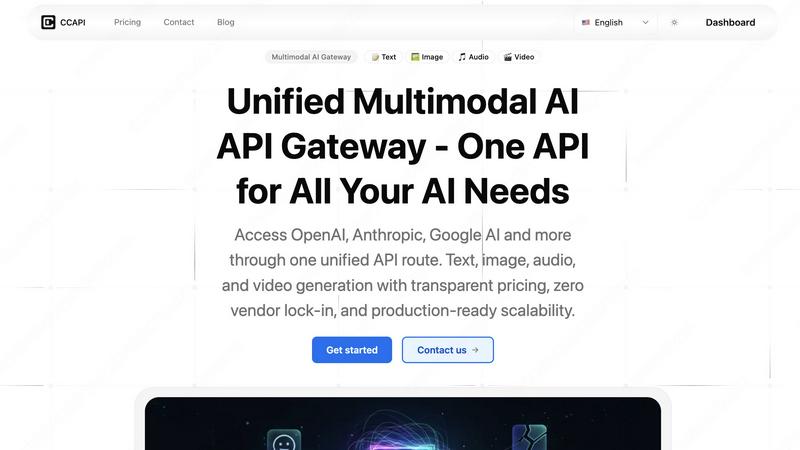
CCAPI
One unified API gateway that seamlessly connects your team to every major AI model.
Last updated: February 28, 2026

Seedance 2 AI Video Generator
Create stunning cinematic videos from text, images, and clips quickly with Seedance 2.0's intuitive AI tools.
Last updated: March 1, 2026
Visual Comparison
CCAPI
Seedance 2 AI Video Generator

Feature Comparison
CCAPI
Unified Multimodal API Gateway
CCAPI consolidates access to over seven major AI providers and four modalities—text, image, audio, and video—through a single, streamlined API endpoint. This means your team no longer needs to juggle different SDKs, authentication methods, or request formats for each service. Whether you're generating a chat response with Claude, creating an image with Stable Diffusion, or producing a video with Kling 3.0, you use the same consistent interface. This unification fosters seamless collaboration within development teams, as everyone works from the same integrated platform, drastically reducing integration complexity and accelerating feature development.
Intelligent Auto-Failover & Smart Routing
This feature ensures your application's resilience and high availability through intelligent routing logic. When CCAPI detects an issue like a timeout or failure from a primary provider (e.g., OpenAI), it automatically and swiftly reroutes the request to a backup provider (e.g., Anthropic or Google AI) in approximately 120 milliseconds. This smart failover happens under the hood, requiring zero intervention from your team. It guarantees a 99.9% success rate for API calls, allowing your team to build and maintain reliable, production-grade applications that your users can depend on, no matter the state of any single AI service.
OpenAI-Compatible Endpoint
Designed for effortless adoption, CCAPI offers a fully OpenAI-compatible endpoint. This allows developers to integrate with just one line of code change—simply swapping the base URL in their existing OpenAI SDK configuration. Your current code for chat completions, embeddings, and other tasks works instantly with CCAPI, providing immediate access to a broader model catalog. This dramatically lowers the barrier to entry and enables teams to collaborate on enhancing their AI capabilities without undergoing a costly and time-consuming migration or retraining process.
Transparent Usage Dashboard & Pay-As-You-Go
CCAPI promotes financial clarity and collaborative budget management with a real-time usage dashboard. Teams can monitor costs, latency metrics, and success rates across all providers and models in one place. The pricing model is straightforward pay-as-you-go; you add USD balance and are charged only for what you use, with no subscription fees or credit gimmicks. This transparency allows engineering, product, and finance teams to work together effectively, understanding exactly where resources are consumed and optimizing costs without any hidden surprises.
Seedance 2 AI Video Generator
Text to Video Conversion
Seedance 2.0 allows users to generate videos directly from text prompts, enabling creative expression through dynamic visual storytelling. This feature ensures that your ideas are captured visually, providing a seamless transition from concept to cinematic output.
Image to Video Generation
This feature lets users upload reference images to create videos that maintain stylistic consistency and visual fidelity. By anchoring the video content to a specific image, creators can achieve a cohesive look that aligns with their brand or project vision.
Video Restyling
With Seedance 2.0, users can take existing video footage and apply new styles or effects through its video-to-video capabilities. This feature is perfect for refreshing old content or adapting it to different themes without starting from scratch.
Rapid Iteration and Export
Seedance 2.0 is designed for speed, allowing users to generate multiple versions of a video in quick succession. This rapid iteration is particularly beneficial for marketers and content creators who need to test various concepts and finalize projects efficiently.
Use Cases
CCAPI
Building Resilient AI-Powered Applications
Development teams use CCAPI to ensure their customer-facing applications never experience downtime due to AI provider issues. For instance, a SaaS platform offering AI writing assistance can rely on CCAPI's smart routing to automatically switch from GPT-5 to Claude or Gemini if one service has an outage. This failover capability is handled seamlessly, ensuring end-users receive continuous, uninterrupted service, which is critical for maintaining trust and satisfaction in production environments where reliability is non-negotiable.
Rapid Prototyping with Multiple AI Models
Product and R&D teams leverage CCAPI to rapidly prototype and compare different AI models without changing their codebase. A team building a new feature can quickly test prompts against Claude 4.6 for quality, GPT-5.2 for popularity, and DeepSeek V4 for cost-efficiency—all through the same API call by simply changing the model parameter. This fosters an experimental and collaborative development culture, allowing teams to efficiently evaluate which model delivers the best performance for their specific use case before committing to a full-scale implementation.
Integrating Advanced Video Generation
Content creation and marketing platforms utilize CCAPI to offer cutting-edge video generation features via API. By accessing models like ByteDance's Seedance 2.0 and Kuaishou's Kling 3.0 through a unified endpoint, developers can easily build functionalities that allow users to create short, high-quality videos from text prompts. This eliminates the need to build separate, complex integrations for each video AI provider, enabling teams to collaborate on bringing sophisticated multimedia generation capabilities to market faster.
Centralizing AI Operations and Cost Management
Larger organizations and development studios use CCAPI as a central governance layer for all their AI operations. Instead of having different teams procure and manage keys for various providers, CCAPI serves as a single point of access. The unified dashboard provides visibility into usage and costs across all projects and departments, enabling better collaboration between tech and finance teams for budgeting, forecasting, and optimizing AI expenditure across the entire organization.
Seedance 2 AI Video Generator
Marketing Campaigns
Marketers can utilize Seedance 2.0 to quickly produce promotional videos that highlight product features, engage audiences, and convey messages effectively. The ability to generate multiple video versions accelerates campaign timelines and enhances creativity.
Social Media Content Creation
Social media managers can leverage the platform to create captivating video content tailored for different platforms. With options for various aspect ratios and styles, Seedance 2.0 ensures that content stands out in crowded feeds.
Educational Videos
Educators and trainers can benefit from Seedance 2.0 by creating engaging instructional videos that simplify complex topics. By converting text and images into videos, they can enhance learning experiences and retention.
Product Demos and Explainers
Businesses can produce high-quality product demonstration videos that showcase features and benefits in a visually appealing manner. Seedance 2.0 allows for quick revisions and updates, ensuring that product information remains current and relevant.
Overview
About CCAPI
CCAPI is a unified AI gateway designed to simplify and supercharge how development teams integrate artificial intelligence into their applications. It acts as a single, always-on API endpoint that aggregates access to a vast ecosystem of leading AI providers, including OpenAI, Anthropic, Google AI, DeepSeek, ByteDance, and many more. This collaborative platform is built for developers and engineering teams who need reliable, multimodal AI capabilities without the operational headache of managing multiple API keys, handling provider outages, or rewriting code for different services. Its core value proposition is synergy: by bringing together the strengths of numerous AI models under one roof, CCAPI ensures your application has uninterrupted access to the best tools for text, image, audio, and video generation. With smart routing that automatically fails over during provider downtime and a fully OpenAI-compatible interface, teams can integrate once and then seamlessly leverage the entire landscape of AI innovation, focusing on building great products rather than managing infrastructure.
About Seedance 2 AI Video Generator
Seedance 2 AI Video Generator is a powerful, all-in-one solution designed to transform text prompts, images, and existing video footage into stunning cinematic clips. Whether you are a content creator, marketer, or an agency looking to streamline video production, Seedance 2.0 offers a fast and efficient workflow that minimizes heavy editing overhead. With its advanced AI algorithms, users can generate high-quality videos with remarkable consistency and motion control. The platform supports various input types, making it incredibly versatile for different creative needs. The value proposition lies in its ability to produce professional-grade videos rapidly, allowing users to focus on creativity rather than technical hurdles. Seedance 2.0 is tailored for those who demand speed without compromising quality, making it an essential tool in the digital content landscape.
Frequently Asked Questions
CCAPI FAQ
How do I get started with CCAPI?
Getting started is designed for collaboration and ease. Simply sign up for an account—you can use "Sign in with Google" for instant access. Once logged in, you'll receive an API key. Then, in your existing code using an OpenAI SDK (like the official JavaScript or Python library), you only need to change the baseURL to https://api.ccapi.ai/v1 and use your CCAPI key. Your existing code will immediately work, now with access to all the models CCAPI supports, allowing your team to begin testing and integrating without delay.
What happens if an AI provider is down?
CCAPI's intelligent smart routing system is built specifically for this scenario. If our system detects a failure, timeout, or high error rate from a provider you're requesting, it will automatically and instantly reroute your request to a comparable alternative provider. This failover happens in about 120ms and is completely transparent to your application. Your request will be fulfilled, ensuring your users experience no interruption in service, which allows your development team to focus on features rather than firefighting provider outages.
Can I use my own API keys with CCAPI?
Yes, absolutely. CCAPI offers a "Custom Providers" feature that allows you to bring your own API keys and endpoints. This is particularly useful for teams that have existing contracts or credits with specific providers or need to use a private, company-hosted model. You can configure these within the CCAPI dashboard, and they will be integrated into the smart routing pool. This provides flexibility and control, enabling your team to collaborate on a unified strategy while leveraging existing investments.
Which AI models and modalities are supported?
CCAPI supports a wide and growing range of models across four key modalities: Text (e.g., GPT-5, Claude 4.6, Gemini 3, GLM-5), Image (from providers like Stability AI and Midjourney), Audio (e.g., ElevenLabs for speech synthesis), and Video (including Seedance 2.0 and Kling 3.0). New models like Kling 3.0, GLM-5, and MiniMax M2.5 are added regularly, often with instant API access and no waitlist. You can explore the full, updated catalog within the CCAPI dashboard or documentation.
Seedance 2 AI Video Generator FAQ
Can I use my own audio with Seedance 2.0?
Yes, Seedance 2.0 supports audio synthesis, allowing users to incorporate background music, sound effects, and voiceovers to enhance the video experience.
What is the maximum resolution for videos generated with Seedance 2.0?
The platform supports video outputs up to 1080p, ensuring high-definition quality suitable for professional use and various media platforms.
What types of input does Seedance 2.0 accept?
Seedance 2.0 allows for multiple input modes, including text, images, and existing video footage, providing flexibility for different creative projects.
How fast can I generate videos using Seedance 2.0?
The platform is designed for rapid video generation, enabling users to create videos within seconds while maintaining high quality and motion consistency, making it suitable for fast-paced production environments.
Alternatives
CCAPI Alternatives
CCAPI is a unified multimodal AI API gateway, a powerful tool in the development category that provides a single integration point for accessing multiple leading AI models. It streamlines the process for teams building applications that require text, image, audio, or video generation from various providers. Developers often explore alternatives for several reasons. A team's specific budget, the need for a particular niche feature not covered, or a requirement for a different deployment model like on-premises hosting can prompt a search for other solutions. The goal is always to find the best technical and strategic fit for the project's roadmap. When evaluating options, focus on how well a solution fosters team synergy. Key considerations include the breadth of model support, the simplicity of the unified interface, robust security practices, and transparent, scalable pricing. The ideal platform empowers your entire development team to collaborate more efficiently and innovate faster.
Seedance 2 AI Video Generator Alternatives
The Seedance 2 AI Video Generator is an innovative tool designed to transform text, images, and clips into cinematic videos swiftly and efficiently. As part of the video generation category, it offers a streamlined workflow that enables users to create polished video content with ease. Many users seek alternatives to Seedance 2 due to various reasons such as pricing, specific feature sets, or compatibility with different platforms. As the market for video generation tools expands, it's essential to consider factors like user interface, output quality, and support when searching for a suitable alternative. When selecting an alternative, you should prioritize tools that align with your creative needs and technical requirements. Look for features that enhance your workflow, such as prompt control options, reference capabilities, and the ability to handle various media types. Additionally, assess the overall cost and the potential return on investment, ensuring that any chosen product can effectively meet your video generation goals while fostering collaboration and synergy in your projects.