BRCKS vs Cosy
Side-by-side comparison to help you choose the right product.

BRCKS streamlines construction projects by connecting teams through WhatsApp for effortless updates, collaboration, and project management.
Last updated: April 4, 2026

Cosy automates Slack member onboarding and introductions, fostering engagement while saving you valuable time.
Last updated: February 28, 2026
Visual Comparison
BRCKS

Cosy
Feature Comparison
BRCKS
Unified Communication Platform
BRCKS consolidates all project communications into a single platform, allowing teams to manage conversations, updates, and tasks without the need to switch between various applications. This feature reduces the time spent on communication and minimizes the risk of important messages getting lost.
Free Subcontractor Access
With BRCKS, subcontractors can be invited to join projects at no extra cost. They receive full access to essential project materials, including checklists, calendars, files, and schedules, which fosters collaboration without burdening the primary team with additional costs.
Client Portal
The Client Portal feature allows homeowners and clients to stay informed about project progress without interfering with internal team communications. Clients can view updates, photos, and milestones in a read-only format, ensuring transparency while maintaining privacy and control over sensitive project details.
BRCKS Bot Integration
The BRCKS Bot seamlessly integrates with WhatsApp, allowing users to send simple text commands to update projects, check tasks, and receive instant answers. This eliminates the need for app switching and makes it easier for team members to stay engaged and informed.
Cosy
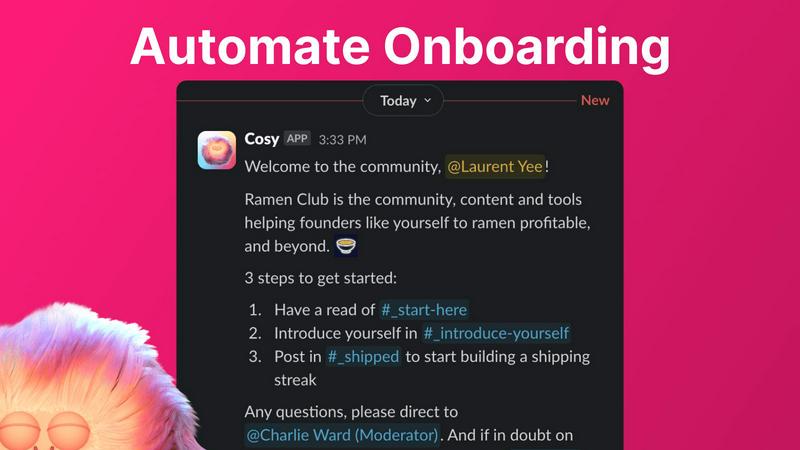
Automate Onboarding
Cosy allows you to create and automate up to 10 distinct onboarding welcome DM sequences for new members. This feature ensures that every new member is greeted with personalized messages, enhancing their initial experience and allowing you to focus on deeper community engagement.
Connect Your Members
With Cosy, you can automatically introduce community members to each other via DMs, fostering connections and engagement. This feature allows you to customize the frequency and content of introductions, making it easier for members to meet and interact with one another regularly.
Member Directory
Cosy provides a searchable member directory within Slack, enabling members to easily find and connect with one another. This feature allows you to customize the fields in profiles, ensuring that members can showcase their skills and interests, facilitating meaningful connections.
Content Highlights
Easily surface the top 10 most engaging posts in your community with Cosy's content highlights feature. This allows you to quickly identify popular discussions and ensure that valuable content is not missed, enhancing overall community engagement and interaction.
Use Cases
BRCKS
Daily Site Management
Construction teams can utilize BRCKS to manage day-to-day site activities efficiently. By organizing tasks, checklists, and schedules in one platform, team members can focus on their work rather than navigating through multiple communication channels.
Enhanced Client Communication
BRCKS enables builders to keep clients updated on project status through the Client Portal. Homeowners can view progress without being overwhelmed by internal communications, leading to improved client satisfaction and trust.
Streamlined Task Assignment
Project managers can create and assign tasks directly within BRCKS, ensuring that team members know exactly what needs to be done and by when. This feature helps prevent miscommunication and ensures accountability across the team.
Documentation and Record Keeping
BRCKS allows teams to maintain all project documentation, including meeting notes, project files, and checklists, in one place. This central repository not only improves accessibility but also simplifies compliance and auditing processes.
Cosy
Streamlined Onboarding
Community managers can use Cosy to automate the onboarding process for new members, ensuring that they feel welcomed and informed from the moment they join. This saves time and ensures consistency in communication, allowing managers to focus on community growth.
Enhanced Member Engagement
By facilitating regular introductions between members, Cosy creates opportunities for networking and deeper engagement. This feature is particularly useful in large communities where members may not easily connect without assistance.
Efficient Member Discovery
Utilizing the member directory, community members can quickly find others with similar interests or expertise, fostering collaboration and knowledge sharing. This feature enhances the sense of belonging and community within the Slack workspace.
Content Management and Promotion
With the content highlights feature, community managers can easily track the most engaging posts and discussions. This enables them to promote valuable content, ensuring that members remain informed and engaged with the community's activities.
Overview
About BRCKS
BRCKS is an innovative construction project management and communication software tailored specifically for residential builders, trades, and homeowners. Designed to centralize all project-related conversations, checklists, tasks, files, photos, and meeting notes, it alleviates the chaos often associated with managing projects across multiple platforms like WhatsApp and email. With BRCKS, teams can streamline daily site communication, effortlessly track actions, share updates with clients, and maintain a clear record of decisions throughout the project lifecycle. This user-friendly platform ensures that all team members, from directors to subcontractors, have access to essential information without overwhelming complexity. BRCKS empowers construction teams to save time, improve productivity, and enhance collaboration, making it an indispensable tool for modern construction management.
About Cosy
Cosy is a pioneering tool designed exclusively for Slack, tailored to meet the needs of community managers who aspire to create vibrant and engaging digital spaces. By automating time-consuming community management tasks, Cosy empowers you to focus on the core elements of community building: nurturing relationships, fostering inclusivity, and enhancing member engagement. Whether you are managing a small team or a large-scale community, Cosy offers essential features that streamline the onboarding process, facilitate member interactions, and highlight the most engaging content. Its user-friendly interface and seamless integration with Slack ensure that community leaders can manage their spaces efficiently while saving precious time and effort. Ideal for community managers, social leaders, and organizations dedicated to cultivating thriving communities, Cosy transforms Slack into a more welcoming and collaborative environment. Experience the ease of community management with Cosy, and watch your Slack workspace thrive as members connect and engage effortlessly.
Frequently Asked Questions
BRCKS FAQ
What types of teams can benefit from using BRCKS?
BRCKS is designed for residential builders, tradespeople, and homeowners. Its collaborative features make it suitable for any team involved in construction projects, regardless of size.
How does BRCKS improve communication within a project team?
BRCKS centralizes all communication within one platform, reducing the reliance on fragmented tools like WhatsApp and email. This leads to clearer communication, quicker decision-making, and fewer missed messages.
Is there a trial period available for new users?
Yes, BRCKS offers a free 14-day trial period for new users, allowing teams to explore the platform and its features without any commitment.
Do subcontractors incur additional costs when using BRCKS?
No, subcontractors can access BRCKS for free. The platform allows for unlimited invitations to trades without incurring extra charges, making it a cost-effective solution for project teams.
Cosy FAQ
How does Cosy automate onboarding?
Cosy automates the onboarding process by sending personalized welcome DMs to new members as soon as they join. You can customize these messages and set time delays for when they are sent, ensuring a tailored experience for each newcomer.
Can I customize the member introductions?
Yes, you can customize the frequency and content of member introductions through Cosy. This allows you to control how often members are introduced to one another, enhancing networking opportunities based on your community's needs.
Is there a limit to the number of members I can onboard?
Cosy allows you to onboard up to 250 members for free. For larger communities, there is a 30-day trial available that supports unlimited members, giving you ample opportunity to explore its capabilities.
How do members access the directory?
Members can access the directory by using the Cosy app within Slack or by typing the /member-directory command in any public channel. This makes it easy for them to find and connect with others without disrupting their workflow.
Alternatives
BRCKS Alternatives
BRCKS is a construction project management and communication software tailored for residential builders, trades, and homeowners. It serves to streamline project conversations, tasks, checklists, files, and meeting notes, ensuring that vital information isn't lost across various communication platforms like WhatsApp or email. As a productivity and management tool, BRCKS is designed to be simple and effective, enabling real construction teams to stay organized and connected throughout their projects. Users often seek alternatives to BRCKS for various reasons, such as pricing, specific feature sets, or compatibility with existing workflows. When exploring options, it’s essential to consider factors like ease of use, scalability, integration capabilities, and customer support. A well-chosen alternative can enhance collaboration and efficiency, making it easier for teams to achieve their project goals together.
Cosy Alternatives
Cosy is a powerful tool specifically designed to enhance Slack communities through automated onboarding and member introductions. It falls into the productivity and management category, offering features that enable community managers to create engaging and connected environments. Users often seek alternatives to Cosy for various reasons, such as budget constraints, specific feature requirements, or compatibility with other platforms. When selecting an alternative, it's crucial to evaluate the ease of use, integration capabilities, and overall value provided by the tool to ensure it aligns with your community's unique needs.