Before After Photo Maker vs ZeroEdit
Side-by-side comparison to help you choose the right product.

Before After Photo Maker
Our free online tool helps your team create professional before and after photo comparisons instantly.
Last updated: March 26, 2026

ZeroEdit is your collaborative AI image editor that transforms photos instantly using simple text prompts.
Last updated: February 28, 2026
Visual Comparison
Before After Photo Maker
ZeroEdit
Feature Comparison
Before After Photo Maker
Four Professional Comparison Layouts
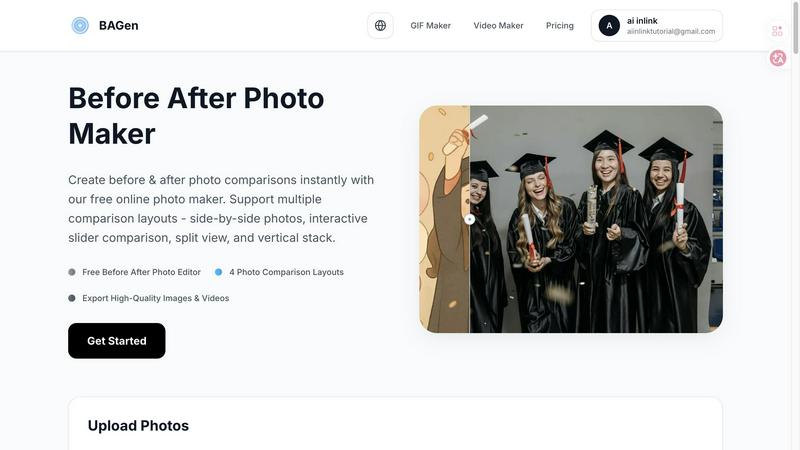
This feature provides a versatile toolkit of visual formats to match your narrative needs. Choose from the classic Side-by-Side for balanced viewing, the engaging Interactive Slider for dramatic reveals, the clear Split View for simultaneous contrast, or the mobile-optimized Vertical Stack. This flexibility ensures your transformation story is presented in the most effective and audience-appropriate format, fostering a collaborative decision on the best visual approach.
Customizable Labels and Branding
Enhance your comparisons with clear, customizable labels for "Before" and "After" images. Adjust the label size and corner radius to match your aesthetic, and integrate your team's identity by uploading a company logo to appear discreetly in the corner. This collaborative branding feature ensures your visual assets remain professional and aligned with your project or organization's visual language, creating a cohesive presentation.
Live Preview and Instant Editing
Experience true cooperative editing with a real-time live preview that updates as you make changes. This allows teams to experiment with different layouts, label styles, and branding options together, seeing the final result take shape instantly. This immediate feedback loop streamlines the creative process, enabling quick iterations and consensus-building on the perfect final composition before export.
High-Quality Multi-Format Export
Collaboration culminates in sharing, and this feature supports it fully. Export your finalized comparison not just as a high-resolution PNG or JPG image, but also as engaging video formats or GIFs. This versatility means the same project can fuel a social media post, a website case study, or a presentation slide, allowing your team's work to shine across all necessary channels without requiring multiple tools.
ZeroEdit
Natural Language Editing
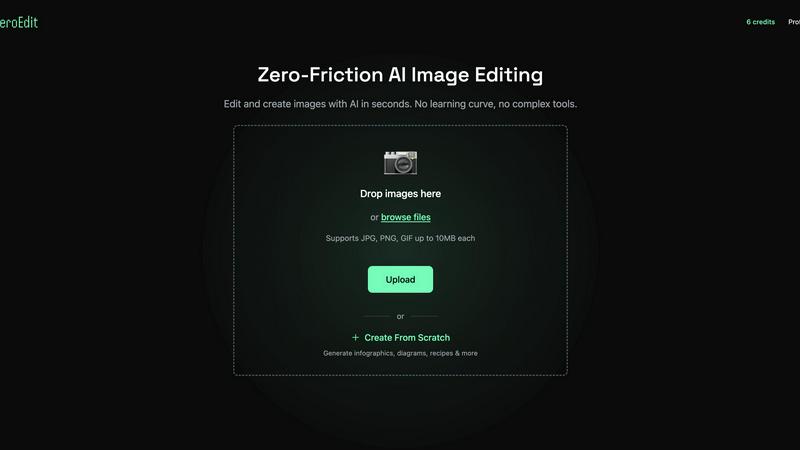
This foundational feature allows your entire team to collaborate using simple English prompts. Instead of navigating complex toolbars, team members can articulate the desired edit—like "add dramatic sunset lighting" or "remove the background and place on a beach"—and the AI executes it precisely. This creates a unified, intuitive language for creative collaboration, ensuring everyone from marketers to managers can contribute directly to the visual process without specialized training.
AI-Powered Complex Transforms
ZeroEdit moves beyond basic filters to understand and execute sophisticated creative requests collaboratively. Whether it's generating cinematic movie posters, applying specific artistic styles (like GTA aesthetics), creating product ad mockups, or performing sky replacement, the AI acts as a shared creative partner. This allows teams to rapidly prototype ideas, test different visual concepts, and achieve complex artistic visions together that would normally require multiple specialists or extensive manual labor.
Multi-Image Editing & Combination
Built for team projects and campaigns, this feature enables users to work with multiple images simultaneously. You can combine elements from different photos, create cohesive collages, or apply consistent edits across a batch of images based on a single descriptive prompt. This is essential for teams creating a series of social media posts, product galleries, or marketing materials that require a uniform look and feel, ensuring brand consistency through collaborative efficiency.
Rapid Object & Background Manipulation
The platform excels at precise, context-aware edits like removing unwanted objects, people, or backgrounds, and intelligently adding new elements. This capability streamlines collaborative revision rounds; for instance, a product team can quickly remove a distracting element from a shoot or a content team can seamlessly swap backgrounds to match a campaign theme, all through simple descriptive collaboration, drastically reducing feedback loops and production time.
Use Cases
Before After Photo Maker
Fitness and Wellness Progress Tracking
Trainers and clients can collaborate to visually document fitness journeys, weight loss, or strength transformations. By creating side-by-side or slider comparisons, they can tangibly showcase progress over weeks or months, boosting motivation and providing clear, shareable evidence of hard work and results for community inspiration or client testimonials.
Home Renovation and Interior Design Projects
Contractors, designers, and homeowners can work together to present stunning reveals of renovation projects. Showcasing a kitchen remodel, a room makeover, or landscaping work through before-and-after visuals is powerful for portfolios, client reviews, and social media marketing, clearly communicating the value and impact of the collaborative work completed.
Beauty, Skincare, and Makeup Tutorials
Content creators and beauty professionals can demonstrate the effectiveness of techniques, products, or routines. A split-view or interactive slider is perfect for highlighting makeup applications, haircut transformations, or long-term skincare results, creating engaging, trustworthy content that visually proves benefits and builds audience trust through clear evidence.
Product Demonstrations and Business Presentations
Marketing and sales teams can collaborate to create compelling comparisons for product upgrades, service improvements, or A/B testing results. These visuals are invaluable in presentations, whitepapers, and landing pages, helping to articulate value propositions, showcase development progress, and convince stakeholders by making differences undeniable and easy to understand.
ZeroEdit
E-commerce Team Product Staging
E-commerce teams can collaborate to produce professional product imagery at scale. A member can upload a simple photo and prompt the AI to "place this vase on a marble countertop with soft studio lighting." This allows the entire team—from product managers to social media coordinators—to quickly generate and approve consistent, high-quality visuals for websites and marketplaces without relying on lengthy photo shoots or external editors, speeding up time-to-market.
Content Creator & Social Media Team
Content creators and their collaborators can maintain a strong, consistent visual brand across platforms. A team can effortlessly generate engaging YouTube thumbnails, apply trending visual styles to Instagram posts, or transform casual photos into cinematic pieces for TikTok using descriptive prompts. This collaborative tool ensures all visual content aligns with the brand's identity, enabling the team to produce more engaging content faster and in unison.
Marketing & Advertising Campaigns
Marketing teams can rapidly ideate, create, and A/B test campaign visuals in a collaborative environment. By describing different concepts—"make a vibrant, energetic ad for the summer sale" versus "a sophisticated, minimalist version"—the team can generate multiple visual variants in minutes. This synergy allows for quick iteration based on collective feedback, enabling data-driven design decisions and significantly accelerating campaign launch cycles.
Photography Workflow Enhancement
Photographers collaborating with clients or assistants can streamline their post-production workflow. They can use ZeroEdit to quickly perform time-consuming edits like enhancing lighting ("add dramatic golden hour glow"), rescuing photos by removing photobombers, or applying artistic effects. This facilitates a more cooperative review process with clients, allowing for quick previews and adjustments based on descriptive feedback, ultimately delivering final products faster.
Overview
About Before After Photo Maker
Before After Photo Maker is a collaborative, browser-based tool designed to help teams and individuals create compelling visual narratives of change and progress. It transforms the simple act of comparing two images into a powerful storytelling experience, perfect for showcasing transformations across various fields. By working together seamlessly within the tool, users can generate professional-grade comparisons without the complexity of traditional photo editing software. Its core value lies in empowering users—from marketers and designers to fitness coaches and renovators—to visually communicate results, improvements, and milestones with clarity and impact. The synergy between its intuitive interface and powerful output options means that creating a stunning before-and-after visual is a quick, cooperative process that yields shareable, high-quality assets ready for any platform.
About ZeroEdit
ZeroEdit is a collaborative, AI-powered image editing platform that redefines visual creation by making professional-grade editing accessible to everyone through the power of natural language. It transforms individual effort into a seamless, synergistic process where ideas become stunning visuals in seconds. By simply describing edits in plain English, teams and creators can bypass the complex interfaces and steep learning curves of traditional software. This tool is built for a diverse, cooperative ecosystem, including e-commerce teams streamlining product imagery, content creators and marketing departments producing rapid campaign assets, and photographers enhancing their workflow. ZeroEdit's core value proposition lies in its ability to democratize high-quality visual editing, fostering a cooperative environment where technical skill is no longer a barrier to creative execution. It empowers groups to work together more efficiently, aligning on a vision and seeing it materialize instantly, thus accelerating project timelines and enhancing collective creative output.
Frequently Asked Questions
Before After Photo Maker FAQ
Is the Before After Photo Maker really free to use?
Yes, the core functionality of the Before After Photo Maker is completely free. You can upload your images, access all four comparison layouts, use the customization features, and export your high-quality comparisons without any cost or need for registration. This makes it an accessible tool for teams and individuals to start collaborating immediately.
What image formats and sizes does the tool support?
The tool supports common image formats including PNG, JPG, and GIF. You can upload images up to 10MB in size each. This range of support ensures that most photos from smartphones, cameras, or other design software can be used directly, facilitating a smooth and cooperative workflow without technical hurdles.
Can I remove the watermark from my exported comparisons?
The tool offers a transparent and collaborative approach to branding. You have the option to upload your own company or personal logo to place in the corner of your image. The platform's watermark visibility can be managed in the settings, allowing teams to choose how their final assets are branded for a professional finish.
Do I need to download software or create an account?
No, collaboration is made simple and immediate. The Before After Photo Maker is a fully online tool that runs directly in your web browser. There is no software to download or install, and no account creation is required to start creating and exporting your photo comparisons, enabling instant team productivity.
ZeroEdit FAQ
How does the natural language editing work?
ZeroEdit uses advanced AI and natural language processing models trained on vast datasets of images and descriptive text. When you type a prompt, the AI interprets your request, understands the context and objects in your image, and applies the corresponding visual transformations. It's designed to comprehend creative intent, making collaborative editing as simple as having a conversation about the desired outcome with your team.
Is there a free way to try ZeroEdit?
Yes, ZeroEdit offers a completely free tier to experience its collaborative power. You can sign up and perform your first edit without any credit card required. This allows entire teams to test the platform's core functionality, understand how natural language prompts can streamline their workflow, and see the quality of the results before committing to a paid plan.
What kind of image quality does ZeroEdit produce?
ZeroEdit delivers high-quality outputs suitable for professional use. Paid plans offer "Pro" quality at 2K resolution, ensuring images are crisp and detailed for web, social media, and even print materials. The standard quality (1K) available on lower tiers is still highly effective for digital platforms, allowing teams to choose the right balance of quality and volume for their collaborative projects.
Can I use ZeroEdit for commercial projects?
Absolutely. ZeroEdit is designed to support commercial use for individuals, freelancers, and teams. Whether you're creating product images for an online store, marketing assets for a client campaign, or visual content for a monetized social channel, you have full rights to use the images you create on the platform. It's built to be a reliable, collaborative partner in professional creative workflows.
Alternatives
Before After Photo Maker Alternatives
Before After Photo Maker is a free online tool in the photography and visual content category, designed to help users create professional before-and-after photo comparisons. It simplifies the process of showcasing transformations, making it accessible for a wide range of projects from home renovations to personal fitness journeys. Users often explore alternatives for various reasons, such as needing more advanced editing features, requiring offline software, or seeking integration with other creative platforms. Different projects and team workflows may also demand specific functionalities that go beyond the core offering of a single tool. When evaluating other options, it's wise to consider the collaboration features for team projects, the range of supported layouts and export options, and the overall ease of use. Finding a tool that aligns with your specific creative synergy and project requirements ensures a smoother, more productive workflow for everyone involved.
ZeroEdit Alternatives
ZeroEdit is a powerful AI image editor within the design and photography category, enabling users to transform photos using simple text prompts. It's designed for teams and individuals who value speed and simplicity in creating professional visuals. Users often explore alternatives for various reasons, such as aligning with specific budget constraints, requiring niche features beyond core AI editing, or needing compatibility with different operating systems and existing team workflows. The search for the right tool is a common step in optimizing a collaborative creative process. When evaluating other options, consider how well they integrate with your team's current software, the learning curve for new members, and the balance between automated AI capabilities and the level of manual control offered. The goal is to find a solution that enhances your team's synergy, allowing everyone to contribute effectively to visual projects.