
Hush Touch | Voice-to-Text for MacOS vs URL to Any
Side-by-side comparison to help you choose the right product.

Hush Touch | Voice-to-Text for MacOS
Hush Touch offers offline voice-to-text for Mac, learning your vocabulary and improving accuracy with every use.
Last updated: February 28, 2026

URL to Any
URL to Any converts web content into any format your team needs for seamless collaboration.
Last updated: March 2, 2026
Visual Comparison
Hush Touch | Voice-to-Text for MacOS

URL to Any
Feature Comparison
Hush Touch | Voice-to-Text for MacOS
Dual-Engine Recognition
Hush Touch utilizes a dual-engine system that combines DictationTranscriber for natural flow and punctuation with SFSpeechRecognizer to enhance custom vocabulary recognition. This powerful blend ensures that your voice is accurately transcribed, accommodating various speaking styles and terminologies.
Custom Vocabulary
With the ability to store up to 500 specialized terms, Hush Touch adapts to your unique language needs. It intelligently learns from corrections you make, ensuring that industry-specific jargon, brand names, and other specialized vocabulary are recognized accurately in future dictations.
Smart Text Processing
This feature streamlines your dictation experience by automatically removing filler words, correcting common errors in real-time, and formatting lists. Hush Touch processes your speech locally, providing a polished output that enhances clarity and professionalism in your written content.
Context Modes & Hands-Free Functionality
Hush Touch offers four distinct context modes—General, Email, Code, and Notes—allowing users to switch modes based on their specific needs. Additionally, the hands-free capability lets you dictate effortlessly by using Siri or a hotkey, with automatic text insertion after brief pauses.
URL to Any
Comprehensive Format Conversion
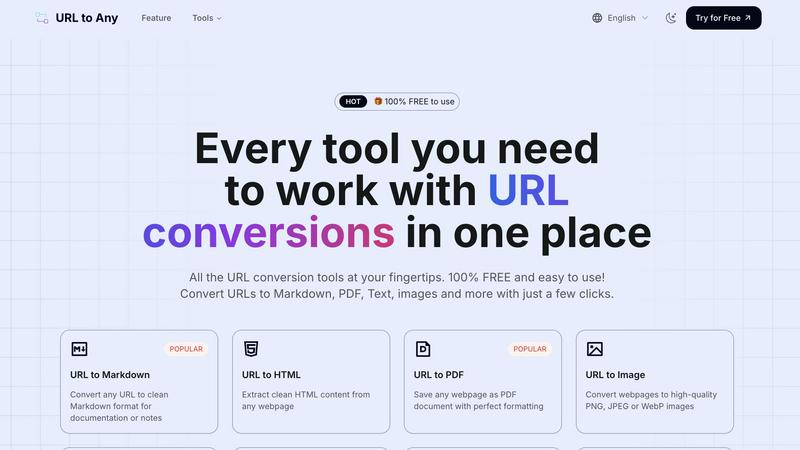
URL to Any offers a powerful suite of conversion tools that transform a single webpage into multiple useful formats with just a few clicks. This includes popular options like converting to clean Markdown for documentation, saving as a perfectly formatted PDF for archiving, extracting pure text content, generating high-quality images (PNG, JPEG, WebP), and even creating structured data outputs like JSON and XML. This diversity ensures every team member can access web content in the format that best suits their role and task, promoting seamless information sharing.
Advanced Extraction & Utility Tools
Beyond basic conversion, the platform includes advanced utilities that enhance team productivity and data handling. Features like the AI Summarizer condense lengthy articles into key points for quick team briefings. The URL Meta Tags and Heading Extractor allows marketing and SEO teams to collaboratively analyze webpage SEO elements. Tools for URL encoding/decoding across 8+ formats, extracting all links from a site, and opening multiple URLs simultaneously streamline development and research workflows, turning individual webpages into rich data sources.
Secure, Cloud-Based Processing
All conversion and processing happens instantly in the cloud, requiring no software installation or complex setup. This cloud-native approach guarantees global access from any device, enabling distributed teams to collaborate effortlessly. Importantly, the service is designed with privacy in mind; your data is processed securely and never stored on the servers, ensuring that sensitive information shared from URLs remains confidential and protected throughout the team's workflow.
Intuitive & Frictionless User Experience
The platform is built on a foundation of profound simplicity, featuring an easy-to-use interface that makes sophisticated conversions effortless. The process is consistently straightforward: paste a URL, choose your desired format, and get your result in seconds. With options to download the converted file or copy content directly to the clipboard, integrating results into team documents, presentations, or codebases is incredibly smooth, removing technical barriers and fostering wider team adoption.
Use Cases
Hush Touch | Voice-to-Text for MacOS
Professional Communication
Whether you are drafting emails or writing reports, Hush Touch enhances your professional communication by allowing you to dictate messages quickly and accurately. With its advanced vocabulary learning, you can ensure that industry terms are transcribed correctly, enhancing your credibility.
Academic Writing
Students and educators can benefit from Hush Touch by using it for lectures, notes, and research papers. The app's ability to handle complex terminology and references makes it a valuable tool for anyone in academia, facilitating a smoother writing process.
Creative Content Creation
Writers and content creators can leverage Hush Touch to produce articles, blog posts, and social media content hands-free. This tool allows for a natural flow of ideas, enabling creators to focus on their narratives without the distraction of typing.
Medical Documentation
Healthcare professionals can utilize Hush Touch to dictate patient notes, prescriptions, and reports efficiently. The app's ability to learn medical vocabulary ensures that dictations are accurate, saving time and improving record-keeping practices.
URL to Any
Collaborative Research & Documentation
Research teams can synergize their efforts by converting key articles and sources into clean Markdown or text files. This standardized output can be instantly compiled into shared team wikis, project documentation, or literature reviews, ensuring everyone works from a consistent, distraction-free base of information and accelerates the collaborative synthesis of insights.
Streamlined Content Creation & Marketing
Content and marketing teams can repurpose web-based research, competitor analyses, or inspiration into various assets. Converting a webpage to text aids in drafting blog posts, while generating an image snapshot is perfect for social media previews or presentations. Extracting meta tags collaboratively helps in SEO strategy sessions, making content planning a more integrated team activity.
Development & Data Integration Workflows
Development teams can use URL to Any to extract clean HTML, JSON, or XML from webpages to fuel applications or populate databases during prototyping. The URL encoding/decoding tools assist in debugging, while extracting all URLs from a site can aid in site mapping or audit tasks, facilitating better cooperation between developers, QA, and DevOps.
Archiving & Shared Reference
Project managers and legal or compliance teams can ensure critical web information is preserved for collective reference. Converting important announcements, terms of service, or project briefings into formatted PDFs creates a permanent, shareable record that can be distributed and archived by the entire team, ensuring alignment and a single source of truth.
Overview
About Hush Touch | Voice-to-Text for MacOS
Hush Touch is an innovative voice-to-text application designed specifically for macOS, revolutionizing the way users approach dictation. It combines advanced on-device processing with two powerful Apple transcription engines to deliver a dictation experience that feels fast, natural, and private. Ideal for professionals across various fields, Hush Touch allows users to draft emails, messages, documents, and notes hands-free, seamlessly integrating into their daily workflows. The app operates entirely offline, ensuring that sensitive information remains secure while providing accurate transcription. Hush Touch learns from user interactions, adapting to individual vocabulary and improving accuracy over time. With a simple setup and a lightweight design, Hush Touch empowers users to communicate effectively without relying on cloud services, offering a $20 lifetime license that breaks the mold of subscription-based dictation tools.
About URL to Any
In today's interconnected digital workspace, seamless collaboration is paramount. Teams constantly grapple with the challenge of sharing, repurposing, and archiving web content efficiently. URL to Any is the synergistic solution designed to bridge this gap, fostering a more cooperative and integrated team environment. It is a comprehensive, web-based toolkit that empowers individuals and teams to instantly transform any webpage link into a wide array of practical formats. The core value proposition is profound simplicity and accessibility: a completely free service requiring no registration, putting powerful conversion capabilities directly at your team's fingertips. Whether you are a content creator drafting a post from online research, a developer needing clean text or structured data for an application, or a project team archiving critical web data for shared reference, URL to Any facilitates a smoother, unified workflow. It eliminates the friction of manual copying, inconsistent formatting, and juggling multiple disparate tools, allowing teams to focus on cooperation and achieving their shared objectives faster. By providing a one-stop portal for conversions to Markdown, PDF, Text, Images, JSON, and more, URL to Any is the collaborative engine for handling online information.
Frequently Asked Questions
Hush Touch | Voice-to-Text for MacOS FAQ
How does Hush Touch ensure my privacy?
Hush Touch processes all voice data entirely on your Mac, eliminating any dependence on cloud services. There is no data collection, ensuring that your dictations remain confidential and secure.
Can I use Hush Touch offline?
Yes, Hush Touch is designed to work fully offline. All voice-to-text processing occurs on-device, allowing you to dictate anywhere without an internet connection.
What is the pricing model for Hush Touch?
Hush Touch offers a one-time payment of $20 for a lifetime license. This model eliminates recurring subscription fees, providing excellent value for users.
How does the vocabulary learning feature work?
Hush Touch adapts to your specific vocabulary by learning from corrections you make during dictation. It can recognize specialized terms and jargon over time, improving its accuracy and efficiency with each use.
URL to Any FAQ
Is URL to Any really free to use?
Yes, URL to Any is 100% free to use. Every tool in the suite, from URL to Markdown and PDF to the AI Summarizer and advanced extractors, is completely free. There is no registration required, no hidden fees, and no usage limits, making it an accessible tool for teams of all sizes to collaborate without budget constraints.
How does URL to Any ensure the privacy of my data?
Privacy and security are central to our service. When you convert a URL, the content is processed securely through our cloud engine. We do not store the webpage content, your input URL, or the converted output on our servers after the processing is complete. This means your data remains private and is not retained, shared, or used for any other purpose.
What formats can I convert a URL into?
URL to Any supports a wide range of output formats to suit various team needs. Key formats include Markdown, PDF, Text, and Images (PNG, JPEG, WebP). For more technical workflows, you can convert to structured data formats like JSON and XML. Additional utilities allow for QR Code generation, MP3 audio conversion, and various encoding/decoding formats.
Do I need to install any software or browser extension?
No installation is required to use the core web-based tools. You can access all conversion features directly from your browser. However, for even faster and more integrated access, an optional browser extension is available. This allows teams to convert the current webpage they are viewing without copying and pasting, further streamlining collaborative browsing and research.
Alternatives
Hush Touch | Voice-to-Text for MacOS Alternatives
Hush Touch | Voice-to-Text for MacOS is an innovative application designed for users who seek efficient, offline dictation capabilities on their Mac devices. As part of the AI Assistants category, it utilizes advanced Apple transcription engines to deliver accurate and fast voice-to-text conversion while maintaining user privacy through on-device processing. Many users explore alternatives to Hush Touch for various reasons, such as pricing, specific features, or compatibility with other platforms. When seeking an alternative, it’s essential to consider factors like ease of use, customization options, transcription accuracy, and the ability to function without an internet connection. Additionally, users should evaluate how well the alternative integrates into their existing workflows and whether it meets their unique dictation needs.
URL to Any Alternatives
URL to Any is a web-based AI assistant designed for collaborative teams, enabling the instant conversion of webpage content into various formats like Markdown, PDF, and text. It streamlines workflows by eliminating manual copying and formatting, fostering a more synergistic approach to handling online information. Users often explore alternatives for several reasons. Some teams may require advanced features like batch processing or API access, while others might need integrations with specific project management platforms. Budget considerations, different user interface preferences, or the need for on-premise deployment can also drive the search for other solutions. When evaluating other tools, focus on how they align with your team's cooperative rhythm. Key considerations include the range of output formats, ease of use without sign-up barriers, cost structure, and how well the tool integrates into your existing digital workspace to maintain a seamless and efficient team workflow.