ProcessBankStatement vs Tailride
Side-by-side comparison to help you choose the right product.

ProcessBankStatement
Work together to instantly convert your PDF bank statements into clean, ready-to-use CSV files.
Last updated: March 19, 2026

Tailride
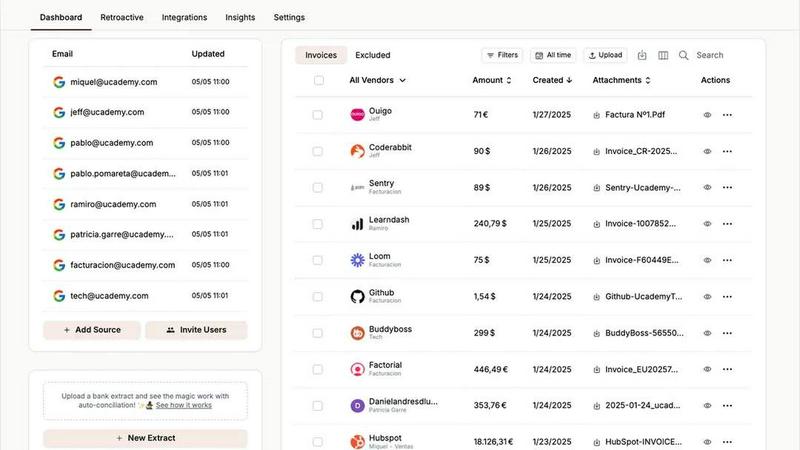
Tailride automates invoice and receipt management from emails and portals, saving accountants valuable time and effort.
Last updated: February 28, 2026
Visual Comparison
ProcessBankStatement

Tailride
Feature Comparison
ProcessBankStatement
Intelligent PDF Parsing Engine
Our core technology is a smart parsing engine built to handle the diverse formats of bank statements with ease. It accurately extracts transaction data from both digital text-based PDFs and scanned image files, overcoming poor scan quality or complex layouts. This intelligent processing ensures that dates, descriptions, amounts, and balances are correctly identified and organized, providing a reliable foundation for your team's financial work without the need for manual correction.
Batch Upload for High-Volume Work
Designed for collaborative efficiency, our batch upload feature allows you and your team to process multiple bank statement PDFs simultaneously. This is ideal for end-of-month closing, handling multiple client accounts, or reconciling several statements at once. By uploading in bulk, you transform a queue of individual tasks into a single, automated workflow, dramatically accelerating high-volume processing and enabling better project coordination.
Secure, Web-Based Platform
Security and accessibility are paramount for team-based tools. ProcessBankStatement operates on a secure, encrypted web platform, meaning there's no software to install or update. Your team can access the tool from anywhere, on any device, ensuring seamless collaboration. All file transfers are encrypted, and you maintain full control over your data, with the ability to delete files at any time, fostering a trusted environment for handling sensitive financial information.
Direct Integration Readiness
The output of our platform is designed for seamless handoff to the next stage of your workflow. Every processed statement is delivered as a clean, well-structured CSV file that is immediately ready for import into QuickBooks, Excel, Google Sheets, or any other accounting and analysis software your team uses. This eliminates formatting hurdles and ensures a smooth, cooperative transition from data extraction to reporting, reconciliation, or client delivery.
Tailride
Inbox Scanning
Tailride's inbox scanning feature revolutionizes how businesses manage invoices by allowing users to find any invoice in their inbox within seconds. This feature eliminates the chaos that often accompanies piled-up invoices, especially during peak periods. By connecting to various email clients like Gmail and Outlook, Tailride monitors incoming invoices, regardless of whether they are in PDF format, images, or embedded within emails.
Online Portals
The online portals feature enables users to extract invoices from any website, saving time and reducing the manual effort required for invoice management. With Tailride, business owners can easily gather invoices from platforms like Amazon, Meta Ads, and others, streamlining their accounting processes. This feature is essential for those managing multiple online transactions and wishing to maintain organized records.
AI Processing
Tailride employs advanced AI processing to intelligently recognize and categorize invoices and receipts. This feature allows users to set customizable AI rules tailored to their specific business needs, ensuring that all incoming documents are accurately categorized without manual intervention. By automating this process, businesses can significantly reduce errors and save valuable time.
Reconciliation
The reconciliation feature offers an efficient way to match transactions with invoices, enabling businesses to identify any missing documents quickly. This capability not only enhances financial accuracy but also simplifies the tax filing process, allowing accountants to maintain accurate records with less manual oversight. The automatic matching of transactions to invoices ensures that businesses can operate smoothly without the stress of missing financial documentation.
Use Cases
ProcessBankStatement
Streamlining Client Bookkeeping
For accounting firms and bookkeepers, receiving client statements in various PDF formats is a daily challenge. ProcessBankStatement allows your team to quickly convert these disparate documents into uniform CSV files. This standardization speeds up the data import into accounting software like QuickBooks, enabling your team to focus on value-added services like financial analysis and advisory, rather than manual data entry, thereby enhancing client service through efficiency.
Accelerating Month-End Close
The month-end close process is a team-wide effort often bottlenecked by manual transaction logging. Our tool empowers finance teams to upload and convert all necessary bank statements in batches. This rapid conversion provides the clean data needed for reconciliation in minutes instead of hours, allowing the entire team to collaborate more effectively on analysis and reporting, and significantly shortening the financial close cycle.
Supporting Loan Application Processing
Loan officers and underwriters must meticulously review bank statements for applicant verification. Manually combing through PDFs is time-consuming. With ProcessBankStatement, officers can instantly transform statements into searchable, sortable spreadsheets. This makes it easier for the underwriting team to collaboratively identify deposits, cash flow patterns, and red flags, leading to faster, more informed lending decisions.
Empowering Small Business Financial Management
Small business owners and their advisors often wear many hats. Manually entering transactions from bank PDFs into a spreadsheet is a solitary, error-prone task. Using this tool, the business owner or their part-time bookkeeper can get an instant, accurate CSV. This clean data becomes a shared resource for budgeting, tax preparation, and cash flow analysis, fostering better financial collaboration and decision-making.
Tailride
Streamlining Invoice Management for Accountants
Accountants managing multiple clients can leverage Tailride to automate the extraction and organization of invoices. By connecting their clients' email inboxes, accountants can access all necessary documents in one place, significantly reducing time spent on manual data entry and improving accuracy.
Enhancing Financial Oversight for Businesses
Businesses can utilize Tailride to monitor their financial documentation effectively. With automatic inbox scanning and online portal extraction, companies can ensure that all invoices are captured and organized, providing management with a clearer overview of their financial standing without the usual chaos.
Simplifying Expense Tracking for Employees
Tailride makes it easy for employees to track their expenses by allowing them to send physical receipts directly to the platform through messaging apps like Telegram or WhatsApp. This streamlined process ensures that all receipts are processed and added to the dashboard, making expense reporting straightforward and efficient.
Automating Tax Filing Preparation
For businesses that face the daunting task of tax preparation, Tailride provides a solution by automating invoice organization and reconciliation. With all invoices captured and categorized, accountants can easily prepare for tax filings, ensuring compliance and accuracy while freeing up time to focus on strategic planning.
Overview
About ProcessBankStatement
ProcessBankStatement is a collaborative, web-based platform designed to transform the solitary and tedious task of bank statement processing into a streamlined, team-friendly workflow. It serves as your intelligent partner, converting messy PDF bank statements—whether text-based or scanned images—into clean, structured CSV files in mere seconds. Built with a synergy-focused approach, it empowers finance professionals, accountants, bookkeepers, and small business owners to work smarter, not harder. By automating the manual data entry that traditionally consumes hours, our tool allows teams to reallocate precious time towards analysis, strategy, and client service. The core value proposition is a shared victory: achieving remarkable accuracy (99%+), broad compatibility with all major U.S. and international banks, and robust security, all while putting you in full control of your data. It's more than a converter; it's a foundational tool that enhances cooperation across financial operations, ensuring everyone is working from the same accurate, instantly available dataset.
About Tailride
Tailride is an innovative AI-powered accounting automation platform designed to streamline the invoice management process for businesses and accountants alike. By seamlessly integrating with your email inbox, Tailride automatically detects and extracts invoices and receipts from emails and attachments using advanced intelligent document recognition technology. This platform is especially useful for accountants managing multiple clients, as it alleviates the burden of manual data entry and invoice tracking. With features like a Chrome extension for one-click invoice extraction from over 20 popular platforms, customizable AI rules for automatic categorization, and integrations with leading accounting software such as QuickBooks and Xero, Tailride enhances operational efficiency. The platform not only simplifies invoice management but also offers bank reconciliation to ensure that transactions align with invoices, helping businesses maintain financial accuracy and clarity.
Frequently Asked Questions
ProcessBankStatement FAQ
What types of bank statement files are supported?
We support PDF bank statements exclusively, but our engine is versatile. It handles both text-based PDFs (downloaded from online banking portals) and scanned PDFs (created from paper statements or images). This ensures broad compatibility regardless of how you or your clients receive the original documents.
Is there a free way to try ProcessBankStatement?
Absolutely, we encourage teams to test our platform collaboratively. Guest users can process up to 3 pages per day for free. By registering for an account, you and your team members can unlock 5 free pages per day, providing ample opportunity to evaluate the tool's accuracy and fit for your shared workflow before any commitment.
How does the tool handle data security and privacy?
We treat your data with the utmost seriousness, as trust is the foundation of good teamwork. All file uploads and downloads are protected with encryption in transit. We do not claim ownership of your data; you retain full control and can permanently delete your files and data from our servers at any time through your dashboard.
Can I use this for my international or non-U.S. bank statements?
Yes, our intelligent parsing engine is designed with global compatibility in mind. While we proudly support all major U.S. banks, we also successfully process statements from a wide array of international financial institutions, making it a reliable tool for teams and businesses with global operations or clients.
Tailride FAQ
How does Tailride connect to my email inbox?
Tailride connects natively to your email inbox without the need to forward invoices. This ensures that your emails remain secure and organized, while all incoming invoices are automatically detected and managed.
Can I use Tailride with multiple email accounts?
Yes, Tailride supports connections with multiple email accounts, allowing you to monitor and manage invoices from various inboxes, whether they belong to you or your colleagues.
What types of documents can Tailride process?
Tailride can process a variety of document types, including invoices in PDF format, images, and even text embedded in the body of emails. This versatility ensures that no invoice goes unnoticed.
Is there a mobile app for Tailride?
Currently, Tailride processes physical receipts through messaging apps like Telegram and WhatsApp, enabling users to send images of their receipts for processing. However, a dedicated mobile app is not mentioned in the current features.
Alternatives
ProcessBankStatement Alternatives
ProcessBankStatement is a specialized tool in the business and finance category, designed to automate the conversion of PDF bank statements into structured CSV files. This process saves significant time for professionals who would otherwise perform manual data entry. Users often explore alternatives for various reasons, such as finding a solution that better fits their budget, offers specific integrations with their existing software stack, or provides a different deployment model like a desktop application versus a web-based service. It's a natural part of finding the right tool for a team's unique workflow and requirements. When evaluating different options, it's wise to consider core factors like parsing accuracy for your bank's statements, data security protocols, ease of use for your entire team, and the overall value in terms of time saved versus cost. The goal is to find a solution that creates synergy, allowing your team to focus on analysis and insight rather than data preparation.
Tailride Alternatives
Tailride is an innovative AI-powered accounting automation platform that streamlines the process of managing invoices and receipts by connecting directly to users' email inboxes and web portals. By utilizing advanced document recognition technology, it efficiently detects and extracts financial documents, thereby reducing manual entry and increasing productivity. Tailride is classified under the Business & Finance category, catering to organizations seeking to enhance their financial workflows. Users often seek alternatives to Tailride for various reasons, including pricing considerations, a desire for specific features, or compatibility with particular platforms. When exploring other options, it’s essential to prioritize features that align with your business needs, such as automation capabilities, ease of integration with existing systems, and overall user experience. Additionally, assessing customer support and scalability can significantly impact your choice of accounting automation solutions.