QuoteCraft AI vs SupaSidebar
Side-by-side comparison to help you choose the right product.

QuoteCraft AI
QuoteCraft AI crafts winning proposals for freelancers in seconds, ensuring clarity and competitive pricing.
Last updated: March 4, 2026

SupaSidebar
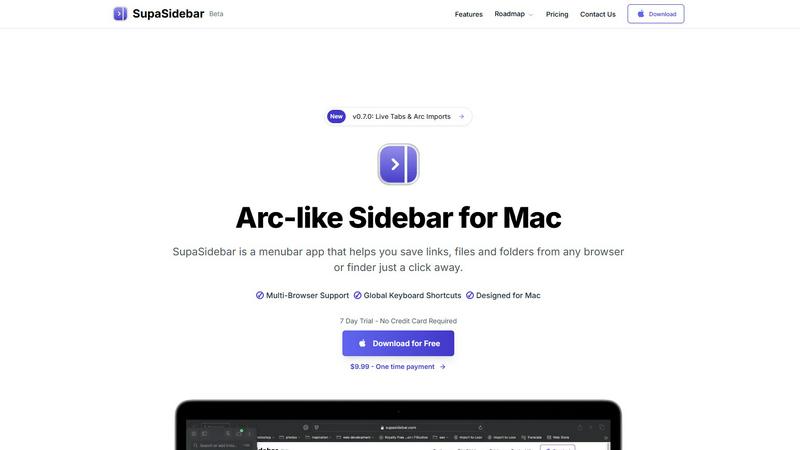
SupaSidebar is your team's universal Mac sidebar for instantly saving and opening any link, file, or folder.
Last updated: February 28, 2026
Visual Comparison
QuoteCraft AI

SupaSidebar
Feature Comparison
QuoteCraft AI
Voice-to-Proposal Generation
Describe your project conversationally out loud, and watch as QuoteCraft AI instantly transcribes your thoughts into a structured proposal draft. This feature is perfect for capturing ideas on the go, allowing you to walk out of a client meeting, record a quick summary, and have a professional proposal framework ready before you've even left. It turns spontaneous discussion into actionable project outlines, ensuring no detail is lost and dramatically speeding up your initial workflow.
Context Engine & Import Learning
The platform becomes a true collaborative partner by learning from you. You can import your past winning proposals, and the AI analyzes your unique pricing models, writing style, and standard deliverables. The Context Engine uses this knowledge to ensure every new proposal it generates already sounds like it was crafted by you, maintaining your brand voice and business logic for a consistent, professional client experience.
Interactive & Customizable Client Proposals
Foster a cooperative proposal process with your clients by sending interactive documents. Clients can toggle specific line items or services on or off directly within the proposal, and the total cost updates in real-time. This collaborative flexibility reduces back-and-forth emails, minimizes rejections due to pricing, and involves the client in co-creating a scope that works for both parties, leading to higher acceptance rates.
Integrated E-Signatures & Smart Tracking
Close deals seamlessly with legally binding digital signatures recorded with IP addresses and timestamps for security. Work in tandem with the platform's tracking tools: receive notifications the moment a client views your proposal and use Smart Follow-Ups to automate gentle reminders. This suite of features manages the post-send process for you, ensuring nothing falls through the cracks and you can focus on the work itself.
SupaSidebar
Universal Save & Copy Shortcuts
Working in harmony with your actions, SupaSidebar provides global keyboard shortcuts that work across any browser. With a simple press of CMD+CTRL+S, you can instantly save the current website link directly to your sidebar. Similarly, CMD+CTRL+C copies the URL, allowing for seamless integration into your workflow without ever needing to reach for your mouse or break your train of thought.
Intelligent Recents Tracking
SupaSidebar acts as a cooperative memory aid for your digital activity. It automatically tracks every website you visit across all major browsers—including Safari, Chrome, Firefox, and Arc—for the last 48 hours. This feature ensures you can instantly rediscover that crucial article or reference page you viewed earlier, eliminating the frustration of lost tabs and creating a smooth, continuous workflow.
Fast, Unified Search
Summon the full power of your organized workspace with the CMD+CTRL+K shortcut. This command brings up a lightning-fast search bar that scours through all your saved items, recent history, pinned favorites, files, folders, and applications. It’s designed for synergy, delivering exactly what you’re looking for in an instant, so you can maintain your momentum and stay deeply focused on your task.
Pinned Favorites & Spaces
Build a personalized command center tailored to your collaborative projects. SupaSidebar allows you to pin your most important links, files, and apps to the top of your sidebar for one-click access. With the Pro plan, you gain access to unlimited Spaces, enabling you to organize resources into distinct categories or projects, fostering a clean and efficient partnership between you and your digital tools.
Use Cases
QuoteCraft AI
For Web Designers & Developers
Quickly translate client discovery calls into detailed technical proposals. After discussing a website's needed features, use Voice-to-Proposal to outline the scope. The AI generates a comprehensive document including development phases, technology stack, timelines, and a clear breakdown of costs for design, development, and testing, presenting a professional image that builds client trust.
For Marketing Agencies & Creative Studios
Streamline proposal creation for campaign-based projects like social media management or branding overhauls. Import past successful campaign proposals to teach the AI your agency's service packages and pricing tiers. Then, generate new proposals that accurately reflect your team's approach, complete with interactive line items for clients to select specific ad spend or content volumes.
For Independent Consultants & Freelancers
Overcome the pricing uncertainty that many solo professionals face. Describe your consulting engagement, and let the AI suggest a structured pricing model based on project value or hourly rates, incorporating lessons from your past accepted deals. This provides a confident starting point, allowing you to present well-justified fees that reflect your expertise.
For Teams Managing Multiple Client Pipelines
Maintain consistency and oversight when several team members are creating proposals. Use the shared dashboard to track all sent proposals, see which clients have viewed them, and manage e-signatures. The Context Engine ensures every team member's proposals align with the company's standard language and pricing, presenting a unified front to all clients.
SupaSidebar
The Multitasking Researcher
For academics and researchers juggling dozens of browser tabs with papers, articles, and data sources, SupaSidebar is a game-changer. It allows for the quick saving of references with a single shortcut and uses the Recents feature to effortlessly backtrack through a day's browsing. This synergy between collection and retrieval streamlines the research process, keeping all critical materials a quick search away.
The Creative Professional
Designers, writers, and developers can use SupaSidebar to create a fluid workspace. They can pin inspiration mood boards, project briefs, and asset folders for instant access. The universal search function lets them jump between design tools, documentation, and communication apps without losing focus, fostering a creative flow state by minimizing disruptive app switching.
The Project Manager
Managing multiple projects requires quick access to shared documents, trackers, and communication hubs. SupaSidebar’s Spaces feature (available in Pro) lets a project manager organize links by client or initiative. The global shortcuts enable rapid saving of meeting notes or task updates, creating a synergistic hub that keeps the entire project ecosystem organized and immediately accessible.
The Student
Students benefit from SupaSidebar’s ability to corral lecture notes, research links, and assignment briefs in one place. Using the save shortcut during online study sessions builds a personalized knowledge base. The fast search then acts as a study partner, helping them quickly find materials for essay writing or exam revision, making their study sessions more efficient and organized.
Pricing Comparison
QuoteCraft AI
During the ongoing beta phase, full access to QuoteCraft AI is completely free, with no credit card required to join. This includes 10 proposals per month, all core AI generation features, the Context Engine, professional email sending, secure client links, e-signatures, voice input, and interactive proposals. This allows you and our early community to collaborate on building the tool. Future pricing plans, which will be introduced after beta, are projected to include a Solo plan at $9/month, a Growth plan at $19/month, and an Agency plan at $39/month, with increasing proposal limits and additional premium features. By joining the beta now, you can lock in your free access.
SupaSidebar
SupaSidebar offers honest and flexible pricing to partner with users at every stage. A Free Forever plan is available, supporting all major browsers and including 3 Spaces, perfect for daily use. The Pro plan is priced at $13.99 per year (or $19.99 monthly) and unlocks unlimited Spaces for advanced organization, early access to new features, and priority support. For those seeking a permanent partnership, a Lifetime license is available for a one-time payment of $34.99. During the beta period, you can use the code BETA30 to receive a 30% discount on Pro and Lifetime plans. All plans are backed by a 14-day money-back guarantee, and a 50% student discount is available.
Overview
About QuoteCraft AI
QuoteCraft AI is a collaborative platform built to empower freelancers and creative teams by transforming how they create and manage proposals. It acts as your intelligent proposal partner, designed to eliminate the friction and guesswork that often costs valuable deals. By leveraging advanced AI, the tool works alongside you to generate comprehensive, professional proposals in seconds, not hours. It’s specifically crafted for web designers, marketing agencies, creative studios, and consulting firms who face the common challenges of defining clear project scopes and setting confident, competitive prices. The core value proposition is a powerful synergy between user input and AI intelligence: you bring your project vision and expertise, and QuoteCraft AI handles the structuring, writing, and formatting, learning from your feedback to become a more effective teammate over time. This partnership allows you to present clients with polished, detailed proposals faster, turning administrative work into a strategic advantage for winning more business. Best of all, this collaborative tool is currently free during its beta phase, inviting early adopters to join in shaping its future.
About SupaSidebar
SupaSidebar is your collaborative partner for macOS productivity, designed to create a synergistic relationship between you and your digital workspace. It's a beautifully crafted, Arc-inspired sidebar application that acts as a universal command center, seamlessly integrating with your workflow to keep your essential digital assets—links, files, folders, and apps—instantly accessible. Built for professionals, researchers, creators, and anyone who multitasks across browsers and applications, SupaSidebar solves the common pain points of digital disorganization and constant context-switching. Its core mission is to keep you in a state of flow. By placing a powerful, searchable hub just a keyboard shortcut away, it ensures that everything you need, from a recently viewed article to a critical project folder, is available without breaking your concentration. Your data remains private and secure on your Mac, fostering a trustworthy partnership. It works quietly in the background until you call upon it, then delivers exactly what you need to move forward efficiently, transforming how you interact with your Mac by reducing clutter and amplifying focus.
Frequently Asked Questions
QuoteCraft AI FAQ
How does the AI generate proposals?
The AI analyzes your project description, selected services, and chosen client profile. It cross-references this information with its training on effective business proposals and, if available, your own imported proposal history. It then structures a complete document with logical sections like project scope, detailed line items, deliverables, a clear timeline, and professional pricing, all tailored to the specific project context.
Will my proposals look generic?
No, they won't. This is where our collaborative Context Engine shines. By importing your past proposals, the AI learns your specific writing style, common phrases, pricing structures, and typical deliverables. It applies this learned "voice" to every new proposal it generates, ensuring the output feels personal and authentically yours, not a generic template.
Can I edit proposals after generation?
Absolutely. The AI-generated proposal is a collaborative starting point designed to save you time. You have full control to edit, customize, and refine every section before sending it to your client. Think of the AI as your first draft partner, handling the heavy lifting so you can focus on perfecting the details and adding your personal touch.
Is my data and client information secure?
Yes, security is a top priority. We use industry-standard encryption to protect your data both in transit and at rest. Client proposals are sent via secure, unique links. Furthermore, the integrated e-signature feature includes legal protections like IP address and timestamp recording to validate the signing process for both parties.
SupaSidebar FAQ
Is SupaSidebar a browser extension?
No, SupaSidebar is not a browser extension. It is a standalone macOS menubar application designed to work in synergy with your entire system. It integrates with all major browsers (like Safari, Chrome, Firefox, and Arc) through system-level accessibility, allowing it to capture and save your current tab's URL from any browser using its global keyboard shortcuts.
Which browsers does SupaSidebar work with?
SupaSidebar is built for seamless cooperation with all major browsers on macOS. This includes Safari, Google Chrome, Mozilla Firefox, Arc, and others. Its universal shortcuts and Recents tracking are designed to work across your entire browsing environment, ensuring a consistent and integrated experience no matter which browser you are using at the moment.
What macOS version do I need?
To ensure a smooth and synergistic experience, SupaSidebar requires macOS 13 (Ventura) or a later version. This requirement allows the app to utilize the latest macOS technologies and security features, providing the stable and powerful performance needed to act as your reliable productivity partner.
Where is my data stored?
Your privacy and trust are paramount in our partnership. All data saved in SupaSidebar—including your links, pins, and spaces—is stored locally on your Mac. Nothing is sent to external servers. This approach guarantees your information remains private, secure, and instantly accessible, true to the app's philosophy of being a personal command center.
Alternatives
QuoteCraft AI Alternatives
QuoteCraft AI is a specialized productivity tool that helps freelancers and small teams generate professional project proposals with speed and precision. It falls into the business and productivity software category, focusing on streamlining a critical part of the client acquisition workflow. By automating scope definition and pricing, it allows creative professionals to focus more on their core work and less on administrative tasks. Users often explore other options for various reasons. As needs evolve, some may seek different feature sets, specific integrations with other platforms, or pricing models that align with a growing business. Others might look for tools that cater to a different company size or offer more extensive customization beyond the proposal stage. When evaluating other solutions, it's wise to consider your team's collaborative workflow. Look for tools that enhance synergy, clearly define project parameters to avoid scope creep, and support your pricing strategy. The goal is to find a platform that acts as a true partner in your business development, ensuring every proposal you send is both competitive and comprehensively clear.
SupaSidebar Alternatives
SupaSidebar is a universal Mac sidebar application in the productivity and management category, designed to be a collaborative partner in your workflow. Users often explore alternatives for various reasons, such as budget considerations, a need for different feature sets, or compatibility with other operating systems beyond macOS. It's a natural part of finding the right tool for your unique team dynamic and project requirements. When evaluating an alternative, consider how it fosters synergy with your existing habits. Look for a solution that minimizes disruptive context-switching and keeps your resources—links, files, and apps—readily accessible. The ideal tool should feel like a seamless extension of your process, promoting flow rather than adding friction, and should align with your specific collaboration and organizational needs.