HeyVid vs SupaSidebar
Side-by-side comparison to help you choose the right product.

HeyVid is your all-in-one AI solution for effortlessly creating stunning videos and images, streamlining your creative workflow.
Last updated: April 4, 2026

SupaSidebar
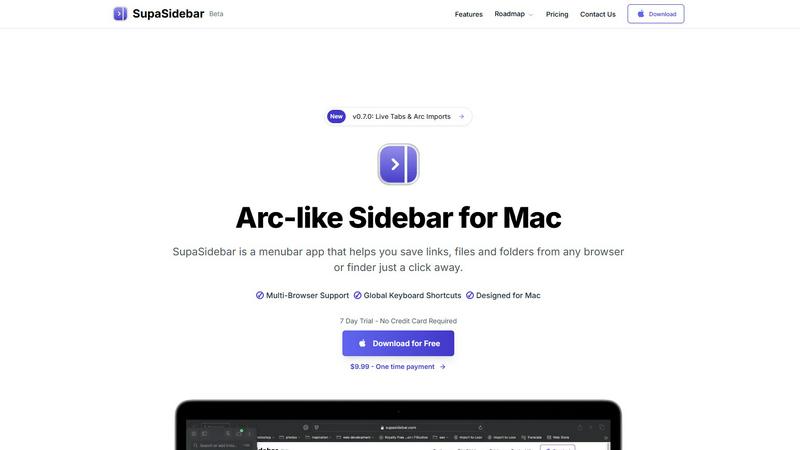
SupaSidebar is your team's universal Mac sidebar for instantly saving and opening any link, file, or folder.
Last updated: February 28, 2026
Visual Comparison
HeyVid

SupaSidebar
Feature Comparison
HeyVid
Text to Video
This feature allows users to convert written content into engaging videos seamlessly. Simply input your text, and HeyVid utilizes advanced AI models to create a visually appealing narrative, complete with animations and graphics that enhance the message.
Image to Video
Transform static images into dynamic videos with ease. This feature enables users to take their existing visuals and animate them, creating captivating video content that can be used for presentations, social media, and more.
AI Image to Image Refiner & Stylizer
Enhance your images with this powerful tool that refines and stylizes visuals based on user preferences. Whether you want to adjust the color palette or apply artistic effects, this feature ensures your images stand out.
One-Click AI Video Maker
Creating videos has never been easier. With just one click, users can generate a complete video based on predefined templates and AI suggestions. This feature streamlines the content creation process, making it accessible for everyone.
SupaSidebar
Universal Save & Copy Shortcuts
Working in harmony with your actions, SupaSidebar provides global keyboard shortcuts that work across any browser. With a simple press of CMD+CTRL+S, you can instantly save the current website link directly to your sidebar. Similarly, CMD+CTRL+C copies the URL, allowing for seamless integration into your workflow without ever needing to reach for your mouse or break your train of thought.
Intelligent Recents Tracking
SupaSidebar acts as a cooperative memory aid for your digital activity. It automatically tracks every website you visit across all major browsers—including Safari, Chrome, Firefox, and Arc—for the last 48 hours. This feature ensures you can instantly rediscover that crucial article or reference page you viewed earlier, eliminating the frustration of lost tabs and creating a smooth, continuous workflow.
Fast, Unified Search
Summon the full power of your organized workspace with the CMD+CTRL+K shortcut. This command brings up a lightning-fast search bar that scours through all your saved items, recent history, pinned favorites, files, folders, and applications. It’s designed for synergy, delivering exactly what you’re looking for in an instant, so you can maintain your momentum and stay deeply focused on your task.
Pinned Favorites & Spaces
Build a personalized command center tailored to your collaborative projects. SupaSidebar allows you to pin your most important links, files, and apps to the top of your sidebar for one-click access. With the Pro plan, you gain access to unlimited Spaces, enabling you to organize resources into distinct categories or projects, fostering a clean and efficient partnership between you and your digital tools.
Use Cases
HeyVid
Marketing Campaigns
HeyVid is ideal for marketers looking to produce eye-catching promotional videos and images. With its advanced tools, marketers can create engaging ad content that captures attention and drives conversions across multiple platforms.
Educational Content
Educators can leverage HeyVid to create informative and visually appealing course materials. From instructional videos to engaging presentations, the platform allows for the seamless integration of text and visuals, enhancing the learning experience.
Social Media Content
HeyVid is perfect for social media managers and influencers aiming to elevate their online presence. The ability to generate short-form videos and stunning thumbnails quickly helps users maintain a consistent and professional look across their social profiles.
Corporate Communications
Businesses can use HeyVid to create corporate videos that effectively communicate updates, presentations, and training materials. This ensures that internal communications are engaging and professional, fostering a better understanding among team members.
SupaSidebar
The Multitasking Researcher
For academics and researchers juggling dozens of browser tabs with papers, articles, and data sources, SupaSidebar is a game-changer. It allows for the quick saving of references with a single shortcut and uses the Recents feature to effortlessly backtrack through a day's browsing. This synergy between collection and retrieval streamlines the research process, keeping all critical materials a quick search away.
The Creative Professional
Designers, writers, and developers can use SupaSidebar to create a fluid workspace. They can pin inspiration mood boards, project briefs, and asset folders for instant access. The universal search function lets them jump between design tools, documentation, and communication apps without losing focus, fostering a creative flow state by minimizing disruptive app switching.
The Project Manager
Managing multiple projects requires quick access to shared documents, trackers, and communication hubs. SupaSidebar’s Spaces feature (available in Pro) lets a project manager organize links by client or initiative. The global shortcuts enable rapid saving of meeting notes or task updates, creating a synergistic hub that keeps the entire project ecosystem organized and immediately accessible.
The Student
Students benefit from SupaSidebar’s ability to corral lecture notes, research links, and assignment briefs in one place. Using the save shortcut during online study sessions builds a personalized knowledge base. The fast search then acts as a study partner, helping them quickly find materials for essay writing or exam revision, making their study sessions more efficient and organized.
Overview
About HeyVid
HeyVid is an innovative AI-powered platform designed to simplify the video and image creation process for users of all skill levels. Whether you are a content creator, marketer, educator, or entrepreneur, HeyVid offers an all-in-one solution to generate high-quality videos and images quickly and effortlessly. Its user-friendly interface allows anyone to transform their ideas into stunning visual content without the need for extensive editing skills. With features such as text-to-video and image-to-image generation, HeyVid empowers users to create professional-grade content that captivates audiences. The platform leverages top AI models like Veo 3.1 and Sora 2, ensuring that users can produce visually striking content for various applications, from marketing campaigns to educational materials. HeyVid is your go-to creative studio for turning concepts into compelling visuals that resonate with viewers, helping you elevate your storytelling and brand identity.
About SupaSidebar
SupaSidebar is your collaborative partner for macOS productivity, designed to create a synergistic relationship between you and your digital workspace. It's a beautifully crafted, Arc-inspired sidebar application that acts as a universal command center, seamlessly integrating with your workflow to keep your essential digital assets—links, files, folders, and apps—instantly accessible. Built for professionals, researchers, creators, and anyone who multitasks across browsers and applications, SupaSidebar solves the common pain points of digital disorganization and constant context-switching. Its core mission is to keep you in a state of flow. By placing a powerful, searchable hub just a keyboard shortcut away, it ensures that everything you need, from a recently viewed article to a critical project folder, is available without breaking your concentration. Your data remains private and secure on your Mac, fostering a trustworthy partnership. It works quietly in the background until you call upon it, then delivers exactly what you need to move forward efficiently, transforming how you interact with your Mac by reducing clutter and amplifying focus.
Frequently Asked Questions
HeyVid FAQ
How does HeyVid generate videos and images?
HeyVid utilizes advanced AI algorithms and models to create videos and images based on user input. Users can choose from various AI models and simply provide text or images to generate their desired content.
Is HeyVid suitable for beginners?
Absolutely! HeyVid is designed to be user-friendly, making it accessible for individuals with no prior editing experience. The intuitive controls and templates allow anyone to create professional-quality content effortlessly.
What types of content can I create with HeyVid?
HeyVid enables users to create a wide range of content, including marketing videos, educational materials, social media posts, corporate presentations, and more. The diverse features cater to various creative needs.
Are there any limitations on the content I can generate?
Users can create a multitude of content types, but specific limitations may apply based on the chosen AI model and resource credits. However, the platform provides ample flexibility to meet diverse creative requirements.
SupaSidebar FAQ
Is SupaSidebar a browser extension?
No, SupaSidebar is not a browser extension. It is a standalone macOS menubar application designed to work in synergy with your entire system. It integrates with all major browsers (like Safari, Chrome, Firefox, and Arc) through system-level accessibility, allowing it to capture and save your current tab's URL from any browser using its global keyboard shortcuts.
Which browsers does SupaSidebar work with?
SupaSidebar is built for seamless cooperation with all major browsers on macOS. This includes Safari, Google Chrome, Mozilla Firefox, Arc, and others. Its universal shortcuts and Recents tracking are designed to work across your entire browsing environment, ensuring a consistent and integrated experience no matter which browser you are using at the moment.
What macOS version do I need?
To ensure a smooth and synergistic experience, SupaSidebar requires macOS 13 (Ventura) or a later version. This requirement allows the app to utilize the latest macOS technologies and security features, providing the stable and powerful performance needed to act as your reliable productivity partner.
Where is my data stored?
Your privacy and trust are paramount in our partnership. All data saved in SupaSidebar—including your links, pins, and spaces—is stored locally on your Mac. Nothing is sent to external servers. This approach guarantees your information remains private, secure, and instantly accessible, true to the app's philosophy of being a personal command center.
Alternatives
HeyVid Alternatives
HeyVid is an all-in-one AI video and image generator that empowers users to create high-quality visual content quickly and easily. As a tool in the productivity and management category, it caters to a diverse range of professionals seeking to enhance their creative capabilities without the need for extensive technical skills. However, users often look for alternatives to HeyVid for various reasons, including pricing concerns, feature sets that may not fully align with their specific needs, or compatibility with different platforms. When seeking an alternative, it is essential to consider elements such as ease of use, the quality of output, integration capabilities with existing tools, and the overall value offered. This collaborative approach will help ensure you find a solution that meets your team's requirements effectively.
SupaSidebar Alternatives
SupaSidebar is a universal Mac sidebar application in the productivity and management category, designed to be a collaborative partner in your workflow. Users often explore alternatives for various reasons, such as budget considerations, a need for different feature sets, or compatibility with other operating systems beyond macOS. It's a natural part of finding the right tool for your unique team dynamic and project requirements. When evaluating an alternative, consider how it fosters synergy with your existing habits. Look for a solution that minimizes disruptive context-switching and keeps your resources—links, files, and apps—readily accessible. The ideal tool should feel like a seamless extension of your process, promoting flow rather than adding friction, and should align with your specific collaboration and organizational needs.