
Afterly Plan vs SupaSidebar
Side-by-side comparison to help you choose the right product.

Afterly Plan
Navigate probate together with clear, step-by-step guidance for executors and families.
Last updated: February 28, 2026

SupaSidebar
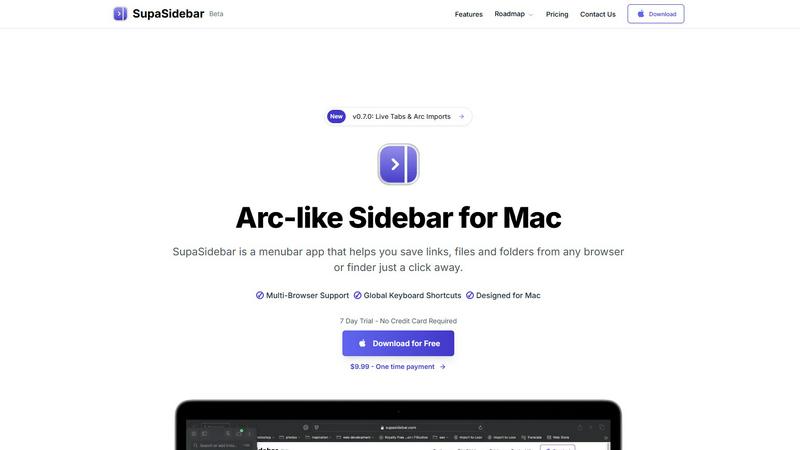
SupaSidebar is your team's universal Mac sidebar for instantly saving and opening any link, file, or folder.
Last updated: February 28, 2026
Visual Comparison
Afterly Plan

SupaSidebar
Feature Comparison
Afterly Plan
Phase-Based Step-by-Step Guidance
Afterly Plan structures the entire post-loss process into clear, sequential phases, transforming an overwhelming journey into a manageable series of tasks. This collaborative roadmap helps users understand what to do now and what comes next, providing a sense of direction and accomplishment. It covers everything from immediate funeral arrangements to the final steps of estate settlement, ensuring no critical action is missed.
Interactive Checklists & Document Finders
The platform offers dynamic, interactive checklists tailored to your specific situation, allowing you to track progress collaboratively with family members. Paired with intuitive document finders, it helps you locate essential paperwork like wills, deeds, and vital records. This feature ensures all necessary items are accounted for and organized in one secure place, simplifying the executor's duties.
Expert-Designed Timelines & Resources
Afterly Plan provides realistic timelines for legal and financial processes, such as probate, set by estate professionals. This helps manage expectations and plan effectively. The platform also includes a library of expert-vetted resources, templates, and explanations, empowering users with the knowledge they need to navigate complex procedures in partnership with their advisors.
Compassionate Task Management for Daily Affairs
Beyond legalities, this feature helps families manage the everyday logistics that cause significant stress. It offers structured guidance for handling bills, account closures, subscriptions, and digital passwords. This compassionate approach ensures the practical details are managed smoothly, allowing the family to focus on emotional healing and memorial planning.
SupaSidebar
Universal Save & Copy Shortcuts
Working in harmony with your actions, SupaSidebar provides global keyboard shortcuts that work across any browser. With a simple press of CMD+CTRL+S, you can instantly save the current website link directly to your sidebar. Similarly, CMD+CTRL+C copies the URL, allowing for seamless integration into your workflow without ever needing to reach for your mouse or break your train of thought.
Intelligent Recents Tracking
SupaSidebar acts as a cooperative memory aid for your digital activity. It automatically tracks every website you visit across all major browsers—including Safari, Chrome, Firefox, and Arc—for the last 48 hours. This feature ensures you can instantly rediscover that crucial article or reference page you viewed earlier, eliminating the frustration of lost tabs and creating a smooth, continuous workflow.
Fast, Unified Search
Summon the full power of your organized workspace with the CMD+CTRL+K shortcut. This command brings up a lightning-fast search bar that scours through all your saved items, recent history, pinned favorites, files, folders, and applications. It’s designed for synergy, delivering exactly what you’re looking for in an instant, so you can maintain your momentum and stay deeply focused on your task.
Pinned Favorites & Spaces
Build a personalized command center tailored to your collaborative projects. SupaSidebar allows you to pin your most important links, files, and apps to the top of your sidebar for one-click access. With the Pro plan, you gain access to unlimited Spaces, enabling you to organize resources into distinct categories or projects, fostering a clean and efficient partnership between you and your digital tools.
Use Cases
Afterly Plan
The Overwhelmed Executor
An individual named as an executor with no prior experience feels daunted by the legal and administrative responsibilities. Using Afterly Plan, they gain a clear, phase-by-phase partner in their duties. The checklists, probate guides, and document organizers help them fulfill their role effectively, ensuring deadlines are met and reducing the fear of making a costly mistake.
The Grieving Immediate Family
A spouse or child is dealing with profound grief while facing immediate tasks like funeral planning and notifying institutions. Afterly Plan provides a gentle, structured starting point with prioritized checklists. It helps them honor their loved one's wishes for services and manage initial notifications without feeling alone in the process.
The Long-Distance Caregiver or Family Member
A family member living far away needs to support the estate settlement process remotely. Afterly Plan acts as a central, collaborative hub. They can use the platform to understand the steps involved, track progress made by local family, and contribute to tasks like contacting financial institutions or organizing documents, fostering teamwork despite distance.
The Proactive Planner
An individual creating their own estate plan uses Afterly Plan to complement their legal documents. They can organize their vital information, document locations, and personal wishes for their family in the platform. This act of collaboration provides their future loved ones with a clear, compassionate guide, turning a legal plan into a practical, supportive action plan.
SupaSidebar
The Multitasking Researcher
For academics and researchers juggling dozens of browser tabs with papers, articles, and data sources, SupaSidebar is a game-changer. It allows for the quick saving of references with a single shortcut and uses the Recents feature to effortlessly backtrack through a day's browsing. This synergy between collection and retrieval streamlines the research process, keeping all critical materials a quick search away.
The Creative Professional
Designers, writers, and developers can use SupaSidebar to create a fluid workspace. They can pin inspiration mood boards, project briefs, and asset folders for instant access. The universal search function lets them jump between design tools, documentation, and communication apps without losing focus, fostering a creative flow state by minimizing disruptive app switching.
The Project Manager
Managing multiple projects requires quick access to shared documents, trackers, and communication hubs. SupaSidebar’s Spaces feature (available in Pro) lets a project manager organize links by client or initiative. The global shortcuts enable rapid saving of meeting notes or task updates, creating a synergistic hub that keeps the entire project ecosystem organized and immediately accessible.
The Student
Students benefit from SupaSidebar’s ability to corral lecture notes, research links, and assignment briefs in one place. Using the save shortcut during online study sessions builds a personalized knowledge base. The fast search then acts as a study partner, helping them quickly find materials for essay writing or exam revision, making their study sessions more efficient and organized.
Overview
About Afterly Plan
Afterly Plan is a compassionate, collaborative platform designed to guide families and executors through the complex and emotionally challenging tasks that follow the loss of a loved one. It serves as a digital partner, providing step-by-step guidance through the overwhelming responsibilities of probate, estate settlement, and executor duties. Built with input from estate professionals, the platform breaks down daunting logistical, legal, and financial tasks into clear, manageable phases. It is specifically tailored for individuals and families who feel lost or overwhelmed during grief, offering them a structured roadmap. Afterly Plan's core value proposition is to provide incredible clarity and organization during life's most difficult moments, allowing families to focus on healing and honoring their loved one's memory by handling the necessary logistics with confidence and support. It complements traditional estate plans by addressing the immediate, everyday practicalities that legal documents often overlook.
About SupaSidebar
SupaSidebar is your collaborative partner for macOS productivity, designed to create a synergistic relationship between you and your digital workspace. It's a beautifully crafted, Arc-inspired sidebar application that acts as a universal command center, seamlessly integrating with your workflow to keep your essential digital assets—links, files, folders, and apps—instantly accessible. Built for professionals, researchers, creators, and anyone who multitasks across browsers and applications, SupaSidebar solves the common pain points of digital disorganization and constant context-switching. Its core mission is to keep you in a state of flow. By placing a powerful, searchable hub just a keyboard shortcut away, it ensures that everything you need, from a recently viewed article to a critical project folder, is available without breaking your concentration. Your data remains private and secure on your Mac, fostering a trustworthy partnership. It works quietly in the background until you call upon it, then delivers exactly what you need to move forward efficiently, transforming how you interact with your Mac by reducing clutter and amplifying focus.
Frequently Asked Questions
Afterly Plan FAQ
How is Afterly Plan different from an estate plan?
An estate plan is a set of legal documents (like a will or trust) that instructs the court on asset distribution. Afterly Plan is a practical, logistical guide for your family to use after a death. It provides the step-by-step actions, checklists, and support for handling daily affairs, accounts, and procedures that legal documents do not cover, ensuring your family has a collaborative partner for the journey.
Do I need to be tech-savvy to use Afterly Plan?
Not at all. Afterly Plan is designed with simplicity and compassion at its core. The interface is intuitive and guides you through one step at a time with clear language. The platform is built to reduce stress, not add to it, making it accessible for users of all technical backgrounds who are navigating a difficult period.
Is my personal and family information secure?
Yes. Afterly Plan employs bank-level encryption to keep your data safe both at rest and in transit. We adhere to a strict privacy-first policy, meaning we never sell or share your personal information. Your data is protected with the same seriousness we apply to providing compassionate guidance.
Can I use Afterly Plan for free?
Yes, you can start with a free plan immediately, with no credit card required. The free plan offers instant access to essential guidance, including funeral planning checklists, probate basics, and executor duty overviews. This allows you and your family to begin finding organization and clarity from the very first steps.
SupaSidebar FAQ
Is SupaSidebar a browser extension?
No, SupaSidebar is not a browser extension. It is a standalone macOS menubar application designed to work in synergy with your entire system. It integrates with all major browsers (like Safari, Chrome, Firefox, and Arc) through system-level accessibility, allowing it to capture and save your current tab's URL from any browser using its global keyboard shortcuts.
Which browsers does SupaSidebar work with?
SupaSidebar is built for seamless cooperation with all major browsers on macOS. This includes Safari, Google Chrome, Mozilla Firefox, Arc, and others. Its universal shortcuts and Recents tracking are designed to work across your entire browsing environment, ensuring a consistent and integrated experience no matter which browser you are using at the moment.
What macOS version do I need?
To ensure a smooth and synergistic experience, SupaSidebar requires macOS 13 (Ventura) or a later version. This requirement allows the app to utilize the latest macOS technologies and security features, providing the stable and powerful performance needed to act as your reliable productivity partner.
Where is my data stored?
Your privacy and trust are paramount in our partnership. All data saved in SupaSidebar—including your links, pins, and spaces—is stored locally on your Mac. Nothing is sent to external servers. This approach guarantees your information remains private, secure, and instantly accessible, true to the app's philosophy of being a personal command center.
Alternatives
Afterly Plan Alternatives
Afterly Plan is a compassionate productivity and management platform designed to guide families through the complex duties following a loss. It provides structured, step-by-step support for tasks ranging from funeral arrangements to estate settlement, helping to organize an overwhelming time. Users often explore alternatives to find a solution that best fits their specific situation. Common considerations include budget, as some may seek more affordable or different pricing models, and the need for particular features or integrations that align with their unique family or legal circumstances. When evaluating other options, it's wise to consider the depth of guidance offered, the credibility of the expertise behind the platform, and the overall approach to user support. A collaborative tool should simplify the process while allowing family members to work together seamlessly during a challenging transition.
SupaSidebar Alternatives
SupaSidebar is a universal Mac sidebar application in the productivity and management category, designed to be a collaborative partner in your workflow. Users often explore alternatives for various reasons, such as budget considerations, a need for different feature sets, or compatibility with other operating systems beyond macOS. It's a natural part of finding the right tool for your unique team dynamic and project requirements. When evaluating an alternative, consider how it fosters synergy with your existing habits. Look for a solution that minimizes disruptive context-switching and keeps your resources—links, files, and apps—readily accessible. The ideal tool should feel like a seamless extension of your process, promoting flow rather than adding friction, and should align with your specific collaboration and organizational needs.