AI Photo Generator vs Sketch To
Side-by-side comparison to help you choose the right product.

AI Photo Generator
Unlock your team's creative synergy with the fastest AI photo generator for stunning, realistic images from text or your own photos.
Last updated: March 11, 2026
Sketch To
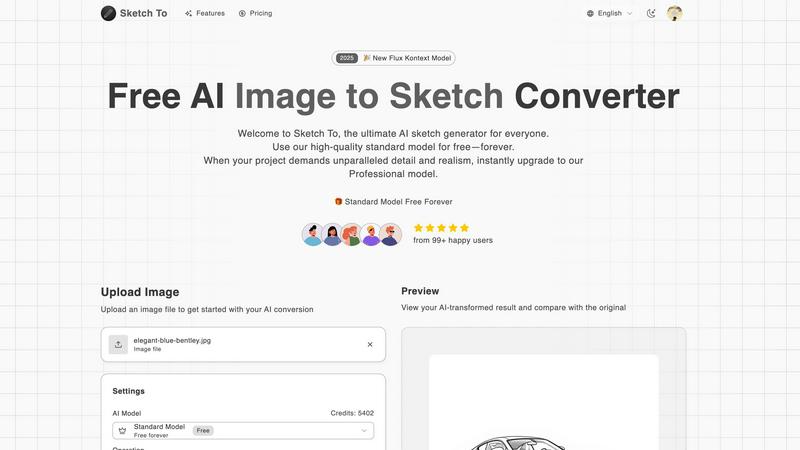
Sketch To is your collaborative AI partner that instantly transforms images into sketches and sketches into images.
Last updated: March 2, 2026
Visual Comparison
AI Photo Generator

Sketch To
Feature Comparison
AI Photo Generator
Ultra-Fast, Multi-Model Generation
Our platform provides a curated selection of the latest AI models, including Flux, Ideogram, and Qwen, all optimized for speed. This allows your team to generate multiple variants and concepts in the time it would take to brief a single design. You can choose the perfect model for your task, balancing speed with detail for photorealistic product shots, artistic renders, or quick edits, ensuring your creative momentum is never lost waiting for renders.
Text-to-Image and Image-to-Image Workflows
Collaborate through two distinct, streamlined production paths. The text-to-image flow lets your team describe any concept in natural language to generate original visuals from scratch. The image-to-image workflow allows you to upload a reference photo to maintain style, composition, or identity consistency while making directed edits, perfect for refining existing assets or maintaining brand continuity across a campaign.
Infinite Style Library & Professional Templates
Unlock a massive library of artistic styles and pre-built templates to suit any project need. From ultra-realistic photography and vibrant anime to classic oil paintings and futuristic 3D renders, your team can quickly experiment with different aesthetics. This feature fosters creative synergy, allowing non-designers to easily apply professional-grade visual treatments and ensuring all assets align with the desired creative direction.
Commercial-Grade Output & Editing Tools
Every generated image is geared for professional use, with high-resolution exports and clear commercial usage rights. Integrated editing tools like the Image Expander help teams adapt visuals for different aspect ratios and platforms without losing coherence. This end-to-end capability means your team can take a concept from initial prompt to a polished, channel-ready asset entirely within one collaborative platform.
Sketch To
Dual-Direction AI Conversion
Sketch To's foundational feature is its powerful bidirectional conversion engine. Teams can collaboratively take a photograph and instantly render it into various sketch styles, such as pencil, charcoal, or ink, to establish an artistic direction. Conversely, they can upload concept sketches and use the AI to generate realistic image previews, allowing for seamless feedback and iteration cycles that enhance project synergy and alignment.
Tiered Model System for Team Needs
The platform is built on a cooperative tiered system, featuring a free Standard Model and a premium Professional Model. This structure allows teams to work together efficiently; members can use trial credits on the Standard Model for brainstorming and initial drafts, while the project lead can upgrade to the Professional Model for final assets requiring world-class detail, realism, and commercial-grade quality, ensuring every project phase is supported.
Extensive Artistic Style Library
Sketch To promotes creative collaboration through a diverse library of pre-configured artistic styles. Teams can experiment with outputs ranging from classic Pencil and Charcoal Sketches to more specialized forms like Comic Sketches, Concept Art, and Watercolor effects. This variety enables different team members to explore multiple visual interpretations of a single idea, fostering a richer, more cohesive creative process.
Instant, High-Resolution Processing
Built for efficient teamwork, Sketch To delivers instant processing powered by a robust cloud-based AI infrastructure. This speed ensures that creative workflows are never stalled, allowing for rapid prototyping and review. Every generated image is provided in high resolution, making the outputs immediately suitable for team presentations, client reviews, and professional applications like print or digital publishing.
Use Cases
AI Photo Generator
Marketing & Advertising Campaigns
Marketing teams can work in synergy to rapidly prototype and produce a vast array of visuals for ads, social media posts, and website banners. The ability to generate multiple variants for A/B testing and edit concepts on-the-fly streamlines the entire campaign development cycle, enabling data-driven creative decisions and consistent brand storytelling across all touchpoints.
Content Creation & Social Media Management
Content creators and social media managers can collaborate to produce a constant stream of unique, engaging, and copyright-free visuals. Generate eye-catching thumbnails, blog post illustrations, and platform-specific assets in minutes. The style library allows for quick adaptation to different content themes, maintaining a fresh and professional aesthetic without requiring a dedicated graphic designer.
E-commerce & Product Visualization
E-commerce teams can efficiently generate realistic product photography and lifestyle scenes, even for products that are in the prototype stage or difficult to photograph. This allows for faster website updates, more compelling product pages, and cohesive visual catalogs. The image-to-image feature is perfect for placing products into different settings or creating consistent model shots.
Personal Branding & Professional Portraits
Individuals and teams can enhance their professional presence by generating high-quality headshots and character-consistent portraits. Transform a simple selfie into a polished LinkedIn profile picture or create a suite of on-brand character visuals for a team page. This use case democratizes access to professional photography, ensuring everyone can present their best visual self.
Sketch To
Collaborative Concept Design & Storyboarding
Creative teams in animation, gaming, and film can use Sketch To to rapidly visualize concepts. Artists can sketch character poses or environments, convert them to realistic images for context, and then transform reference photos back into styled sketches. This iterative loop enhances team alignment and accelerates the storyboarding and pre-visualization process with clear, evolving visuals.
Architectural Visualization and Client Presentations
Architecture and interior design firms can leverage Sketch To to improve client collaboration. Hand-drawn floor plan sketches or mood images can be converted into photorealistic renders to help clients visualize the final space. Similarly, photos of a site can be turned into elegant architectural sketches for presentations, facilitating a more intuitive and synergistic design review process.
Educational Projects and Team Learning
Student groups and educational teams can utilize the free Standard Model for academic projects. Whether for art history presentations, science fair visuals, or literature adaptations, teams can collaboratively convert relevant images into sketches for reports or transform their own drawings into polished images, making complex subjects more accessible and engaging through shared creative exploration.
Marketing Content and Social Media Creation
Marketing teams can work together to produce unique, eye-catching content. They can convert product photos into stylish sketch-based advertisements or transform illustrative concepts for a campaign into realistic mock-ups. This allows for a cohesive visual strategy across assets, with team members efficiently generating a variety of content formats from a single source image.
Overview
About AI Photo Generator
AI Photo Generator is a collaborative creative platform designed to transform collective ideas into stunning visual reality. It empowers teams by removing technical barriers, allowing everyone to contribute to the visual design process regardless of their skill level. By harnessing a suite of advanced neural networks, the platform turns simple text descriptions and existing photos into professional-grade digital art in seconds. This synergy between human creativity and AI precision is built for fast-paced teams who need to ideate, iterate, and produce high-quality visuals efficiently. Whether you're a marketing team brainstorming campaign assets, a content creator needing unique thumbnails, or a product team mocking up scenes, this tool streamlines your workflow. The core value proposition lies in its accessibility and speed, offering a free-to-start model that encourages experimentation before scaling up to commercial-grade, copyright-free outputs for any project.
About Sketch To
Sketch To is a collaborative AI-powered platform designed to bridge the gap between imagination and reality for creative teams and individuals. It serves as a versatile digital studio where photos can be transformed into exquisite sketches and preliminary drawings can be evolved into photorealistic images. This dual functionality makes it an indispensable tool for a wide spectrum of users, from hobbyists exploring artistic expression to professional designers, artists, and architects who need to visualize concepts and iterate on ideas rapidly. The core value proposition of Sketch To lies in its commitment to accessible, high-quality AI conversion. By offering both a robust free Standard Model with trial credits and an advanced Professional Model, it ensures that every member of a creative community, regardless of skill level or budget, can participate and contribute. Trusted by over 500,000 creators, Sketch To fosters a synergistic environment where ideas can be effortlessly shaped and shared, empowering teams to achieve their collective creative vision with ease and precision.
Frequently Asked Questions
AI Photo Generator FAQ
What is the best way to write a prompt for good results?
For the best collaborative results, use clear, descriptive language that details the main subject, setting, style, lighting, and mood. Think of it as providing a creative brief to a teammate. Being specific about elements like "cinematic lighting," "minimalist background," or "vibrant anime style" helps the AI align with your team's vision. You can iterate and refine prompts together based on the initial outputs.
Can I use the generated images for commercial purposes?
Yes, images generated on the platform are provided with commercial usage rights, allowing your team to use them in client work, advertising, products, and other commercial projects. This makes it a powerful and reliable tool for professional teams needing legally secure assets. Always review the specific terms for your plan to ensure compliance.
How does the image-to-image feature work?
The image-to-image feature acts as a collaborative editing tool. You upload a reference photo, which the AI uses as a structural and stylistic baseline. Then, you provide text instructions on what to change, such as "change the background to a beach" or "make the colors more vibrant." This allows teams to refine existing assets, maintain consistency, and explore new creative directions without starting from zero.
Is there a free plan to try the platform?
Yes, the platform offers a free plan to start. This allows teams to experiment with core features, test different prompts and models, and integrate the tool into their workflow without an initial investment. It's designed to foster collaborative experimentation, so your team can validate concepts and refine their process before scaling up to a paid plan for higher-volume, commercial-grade production.
Sketch To FAQ
How does the free trial work for new users?
New users signing up for Sketch To receive complimentary trial credits to immediately experience the Standard Model. These credits allow you to perform several image conversions at no cost, providing a full opportunity to explore the platform's core features and understand how it can benefit your personal or team projects before any commitment.
What is the difference between the Standard and Professional models?
The Standard Model is a powerful, accessible tool perfect for personal projects, learning, and initial concept work, delivering clean, artistic conversions. The Professional Model is an advanced tier designed for commercial and professional use, unlocking superior levels of detail, texture accuracy, and photorealism that meet the highest quality standards for final deliverables.
What file formats and sizes does Sketch To support?
Sketch To supports common image file formats for upload. The current upload limit for the conversion tool is a maximum of 5MB per file. For output, you can download your AI-transformed creations in high resolution, ensuring the files are suitable for both digital use and professional printing applications.
Can I use Sketch To for commercial projects?
Yes, Sketch To is designed to support commercial work. For professional and commercial applications, it is recommended to use the outputs generated by the Professional Model. This ensures you have the appropriate license and the highest quality assets with the detail and realism required for client work, publications, and commercial branding.
Alternatives
AI Photo Generator Alternatives
AI Photo Generator is a leading platform in the AI image generation category, designed to transform text prompts and existing photos into professional digital art. It empowers users to create stunning visuals without requiring advanced technical skills, making high-end design accessible to a broad audience. Users often explore alternatives for various reasons. This can include seeking different pricing models, specific features not available in one tool, or a platform that better integrates with their existing workflow. The needs of a solo content creator can differ greatly from those of a large marketing team, driving the search for the perfect fit. When evaluating other options, consider the core aspects that matter most to your collaborative projects. Look at the quality and consistency of image outputs, the flexibility of styles and editing tools, and how well the platform supports team sharing and asset management. The goal is to find a tool that enhances your group's creative synergy and efficiency.
Sketch To Alternatives
Sketch To is a popular AI-powered tool in the image and photo category, designed to transform photos into sketches and sketches into photorealistic images. Its dual functionality makes it a versatile choice for hobbyists, artists, and designers looking to add a creative or conceptual layer to their work. Users often explore alternatives for various reasons, such as seeking different pricing structures, needing specific features not available in their current tool, or requiring compatibility with other platforms in their workflow. It's a natural part of finding the right collaborative fit for a team's unique creative process and budget. When evaluating other options, consider the core needs of your project. Look for the right balance of output quality, processing speed, ease of use, and cost. The goal is to find a tool that integrates seamlessly into your team's workflow, enhancing synergy without creating new hurdles.